
This article will guide you through how to set up, customize, and embed Review Widgets. These widgets let you showcase real reviews from customers directly on your site—boosting trust, improving conversions, and enhancing your brand image.
TABLE OF CONTENTS
- What are Review Widgets?
- Key Benefits of Review Widgets
- How to Access and Use the Review Widget Builder
- Customizing Review Widgets
- Saving, Naming, and Managing Your Widgets
- Templates
- Frequently Asked Questions
- Related Articles
What are Review Widgets?
The Review Widget lets you display real customer feedback directly on your website, helping you build instant trust and social proof. It supports reviews from platforms like Google and Facebook, allowing you to combine them into one seamless, branded display.
You can easily customize the widget’s layout, style, and content to match your website’s design. Once added, it updates automatically with new reviews, giving your visitors fresh, credible testimonials without any manual work.
Key Benefits of Review Widgets
Adding a review widget to your site is more than just a design choice—it’s a strategic move. Displaying reviews builds social credibility and helps potential customers make buying decisions with confidence.
- Social Proof: Showcasing real customer reviews builds trust and increases conversion rates
- Review Aggregation & Filtering: Seamlessly combine reviews from platforms like Google and Facebook. Apply filters by platform or rating to showcase only your best reviews
- Brand Consistency: Tailor the widget’s layout, fonts, and color scheme to align perfectly with your website’s branding
- Automated Updates: New reviews are automatically pulled into the widget, keeping your content fresh without ongoing maintenance
- Templates: Use ready-made, no-code templates for fast setup and professional, consistent design.
- Simple Integration: Easily embed widgets into any website page, no need for coding knowledge
AI Summary: Instantly highlight overall review sentiment with auto-generated summaries that build trust at a glance
How to Access and Use the Review Widget Builder
Follow these steps to create and customize a review widget:
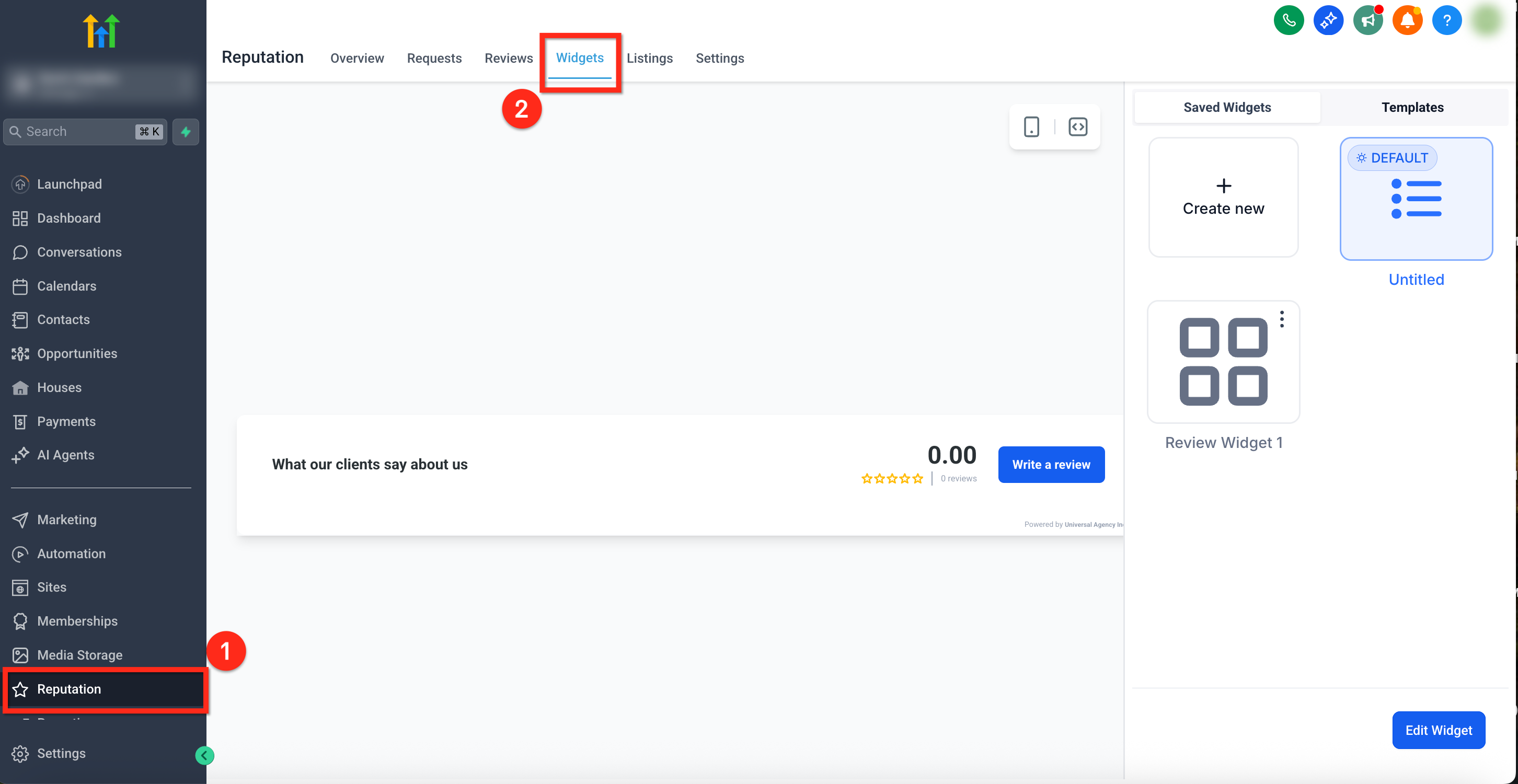
Step 1: Navigate to the Widgets tab
From the sub-account dashboard, go to Reputation in the left-hand menu.
Click the Widgets tab in the top navigation.
Step 2: Select or Create a New Widget
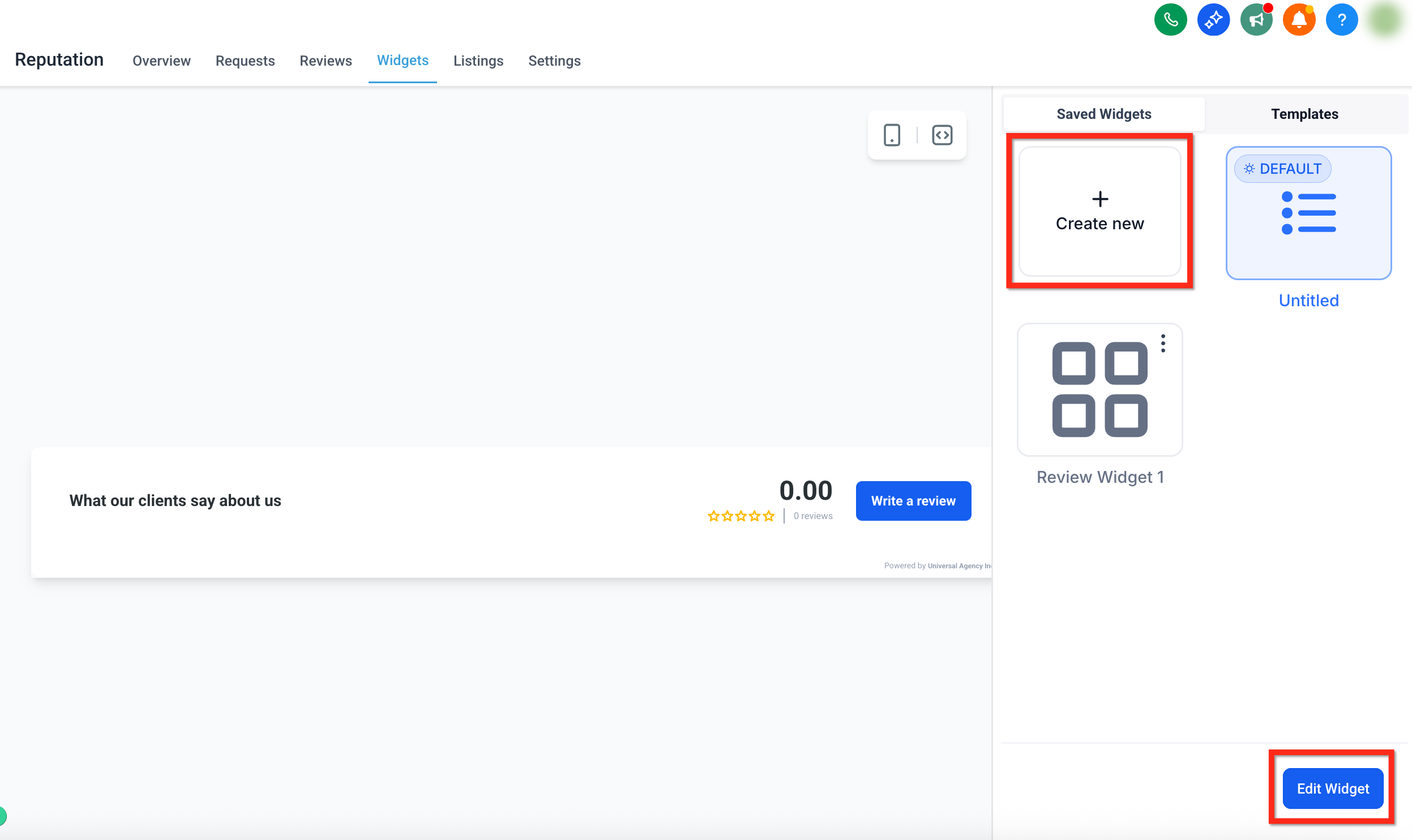
To create a new widget, click + Create Widget button
To edit an existing widget, click the desired widget then click on the blue button in the bottom right corner labeled Edit Widget
If you're starting from scratch, you can also select a pre-built template to instantly apply a professional layout and style. Click here for more info on using Templates.
Step 3: Configure Your Widget Settings
The widget builder includes several tabs that let you fully customize the structure, content, and appearance of your review widget. You'll be able to control everything from the layout to the sources and theme.
Each tab focuses on a different part of the widget experience:
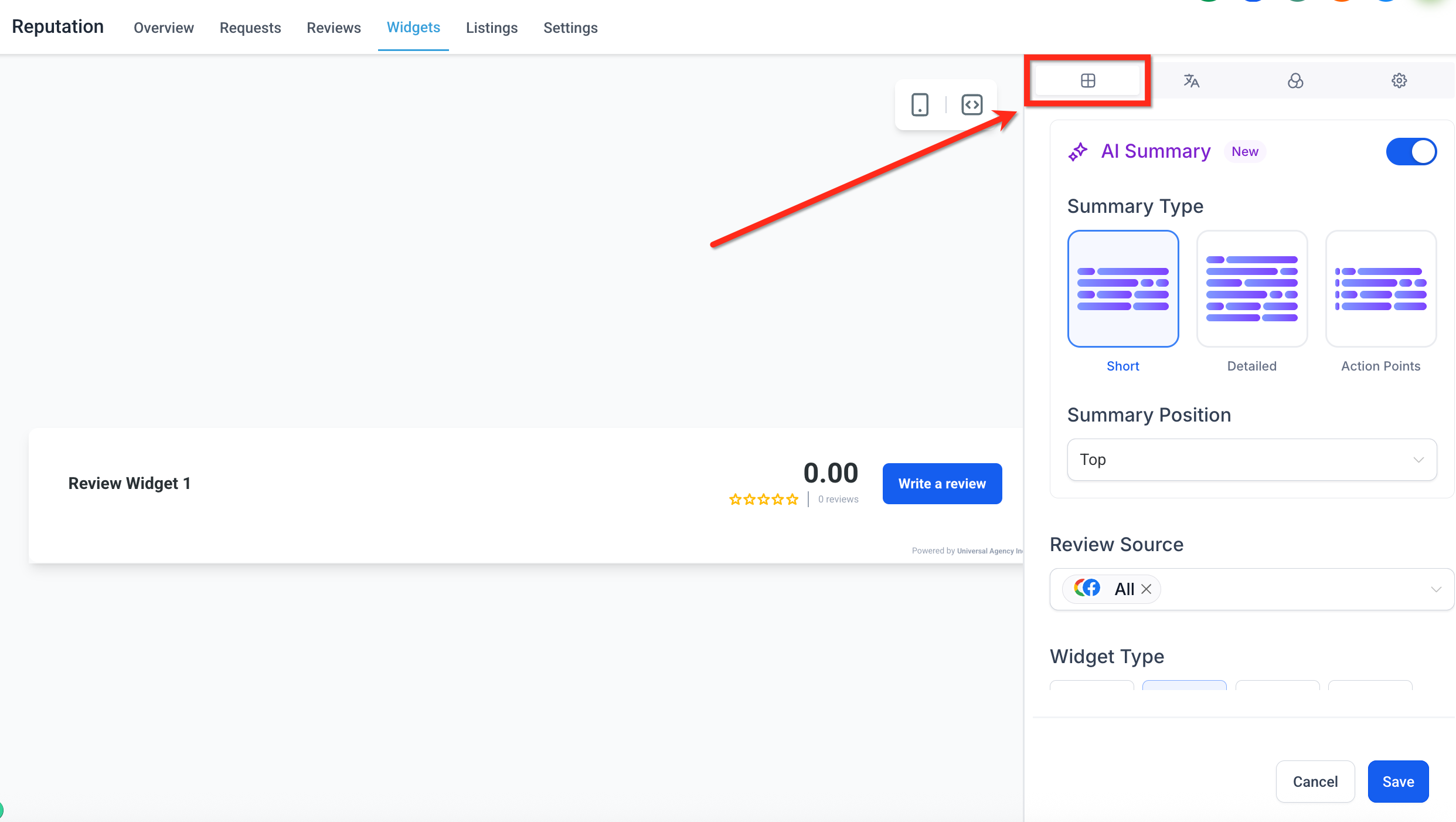
- Layout Tab: Set the widget type, review sources, summary options, rating filters, and “Powered by" visibility. Click here for more info on customizing the Layout.
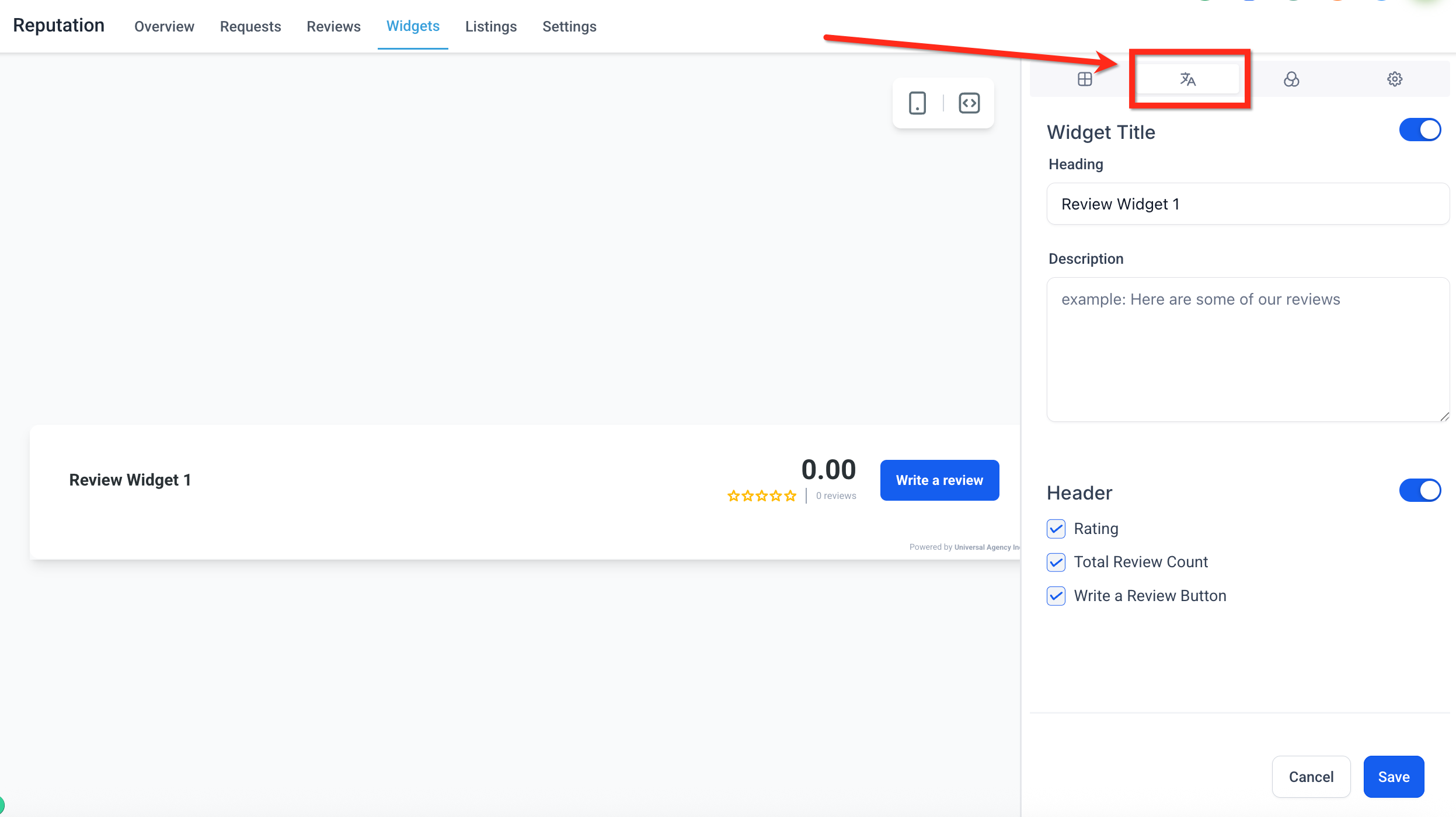
Content Tab: Manage the widget heading, description, position and header elements. Click here for more info on customizing the Content.
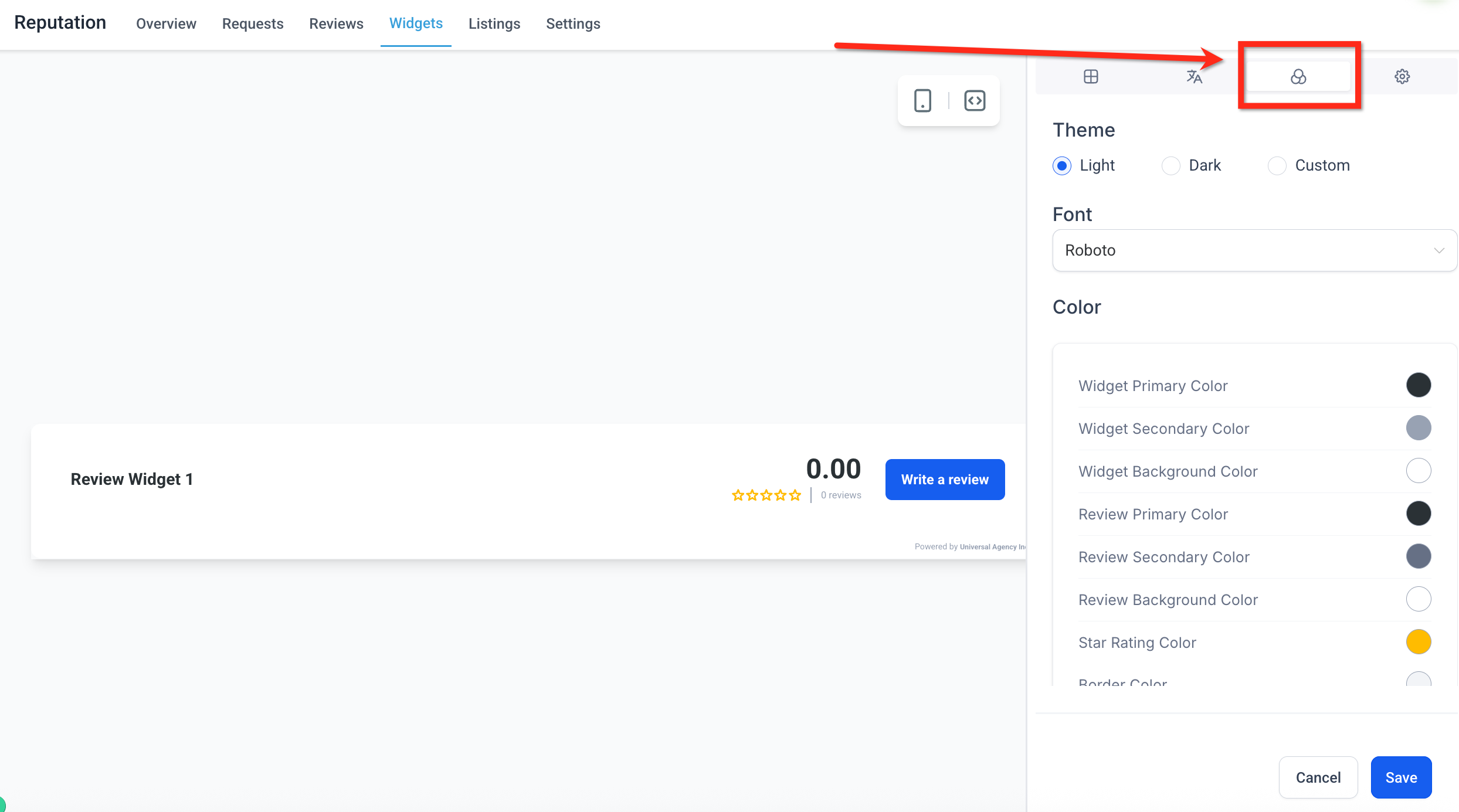
Appearance Tab: Choose a theme, apply brand fonts, and configure individual colors if using the Custom option. Click here for more info on customizing the Appearance.
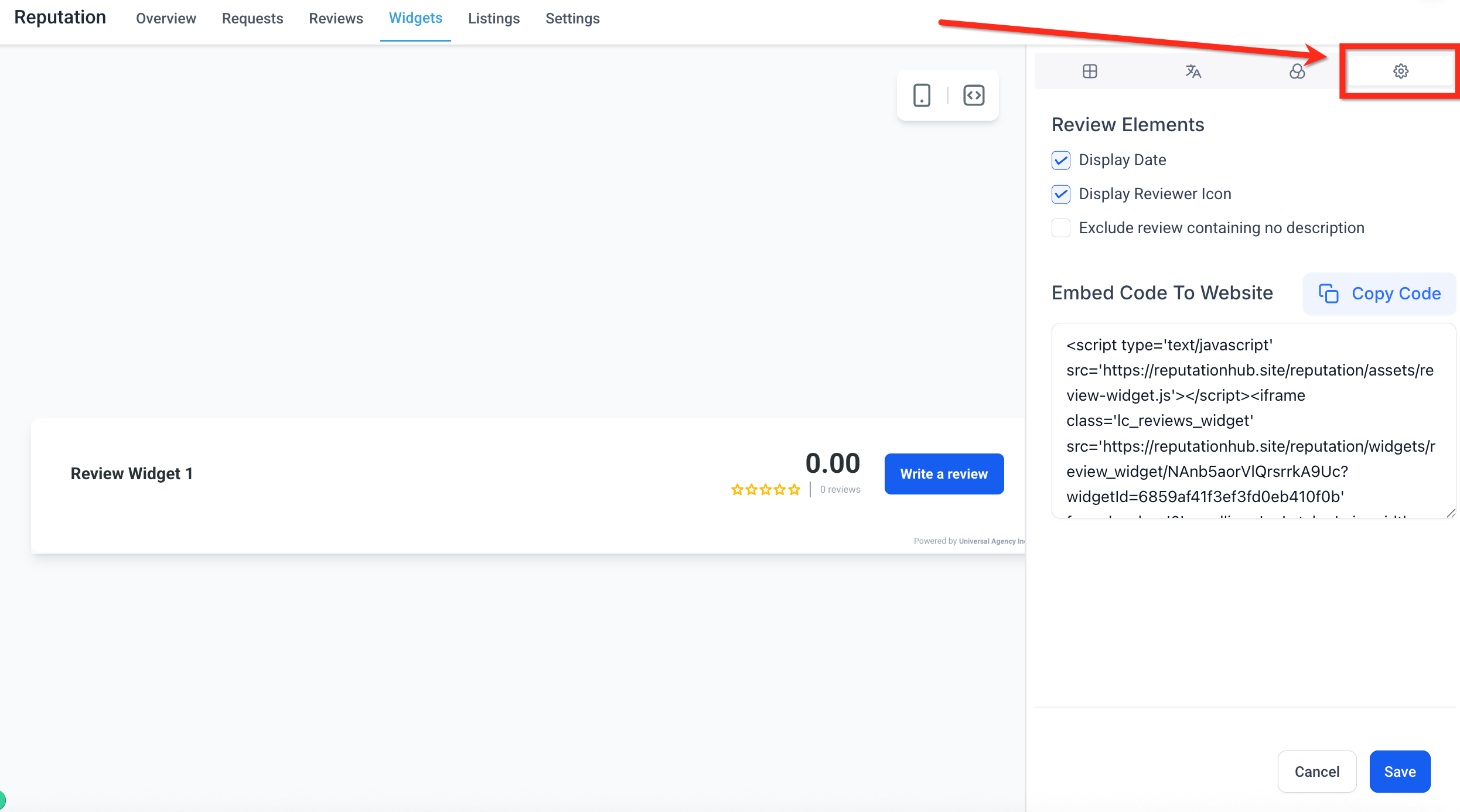
Settings Tab: Enable or disable review display elements and generate the embed code for your site. Click here for more info on customizing the Settings.
Note: For detailed configuration options, scroll down to the full breakdown of each tabStep 4: Save and Embed the Widget
- Once you have made all required changes, click the blue Save button in the lower right corner,
- Add your widget to a SourCherry site or funnel, drag and drop the Reviews element onto the site page.
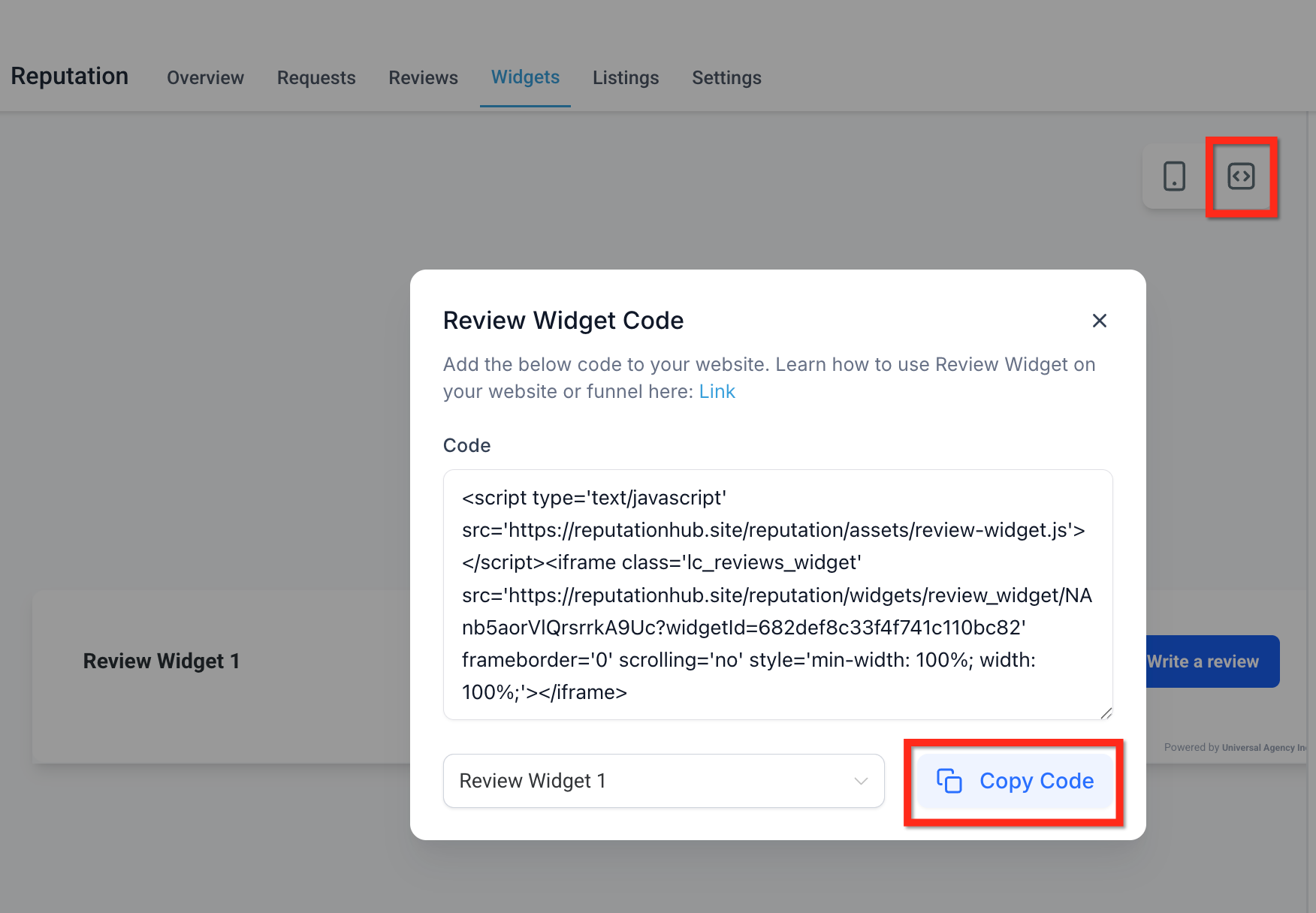
- To embed the review widget using code, click the Code icon then click Copy Code. Paste this code into a custom HTML block on your website or funnel.
Customizing Review Widgets
Each tab in the widget builder gives you control over a different aspect of your review widget—from structure and layout to content, design, and behavior.
Note: Available customizations vary based upon selected Widget Type.Layout Tab: Configuring Widget Structure
Define the foundational structure and sources of your review display:
Summary Type: AI generated sentiment overview based on your reviews. You can choose the summary type (Short, Detailed, or Action-Oriented) and toggle it on or off as needed.
Summary Position: Choose where the AI summary appears either at the top of the widget or inline with the reviews. The placement follows selected widget layout by default. If you want the summary to always appear at the top, set Summary Position to Top.
Review Source: Select which platforms to pull reviews from.
Widget Type: Pick the display format for your reviews. Options include List, Grid, Masonry, Carousel, Slider, Flash and Legacy.
Max Number of Reviews: Set the total number of reviews to display within the widget.
Minimum Ratings: Choose to show only reviews that meet a specific star rating threshold.
Powered by: Show or hide the “Powered by” message at the bottom of the widget.
Content Tab: Editing Widget Header and Description
Customize how your widget introduces and frames your reviews:
Title (Toggle): Toggle on or off to display a custom title at the top of the widget.
Heading: Define the text that appears as the widget heading. This can reflect your brand tone or content focus (e.g., “What Our Customers Say”).
Description: Add brief supporting text below the heading to provide context or encouragement.
- Header (Toggle): Controls the visibility of the header summary section, which includes rating data, review count, and a write a review button.
Rating: This shows the average star rating of all reviews.
Total Review Count: Displays how many total reviews have been left.
Write a Review Button: Adds a clickable button that directs users to submit a review.
Widget Position: Where on the screen is the widget displayed.
Slider Interval: Set how many seconds each review stays visible before rotating. Available when using a carousel or slider layout
Appearance Tab: Choosing Themes and Colors
Control the overall visual style of your widget to align with your website’s branding:
Theme: Choose between Light, Dark, or a fully customizable option. Each theme provides a different default visual experience.
Font: Adjust the font family used in the widget to match your brand’s typography.
Color: If using the Custom theme, you can individually edit a wide range of color elements, such as background, borders, star rating, review text, buttons, and more.
Settings Tab: Fine-Tuning Widget Behavior
Further refine your widget's behavior and what information is displayed for each review:
Display Date: Toggle on to show the date each review was posted.
Display Reviewer Icon: Enable to display a reviewer avatar or initials next to each review.
Exclude Reviews Containing No Description: Filter out reviews that only include a rating but no written feedback.
Embed Code to Website: Click Copy Code to grab the auto-generated embed script. Paste this code into any HTML block on your website or funnel to display the widget
Saving, Naming, and Managing Your Widgets
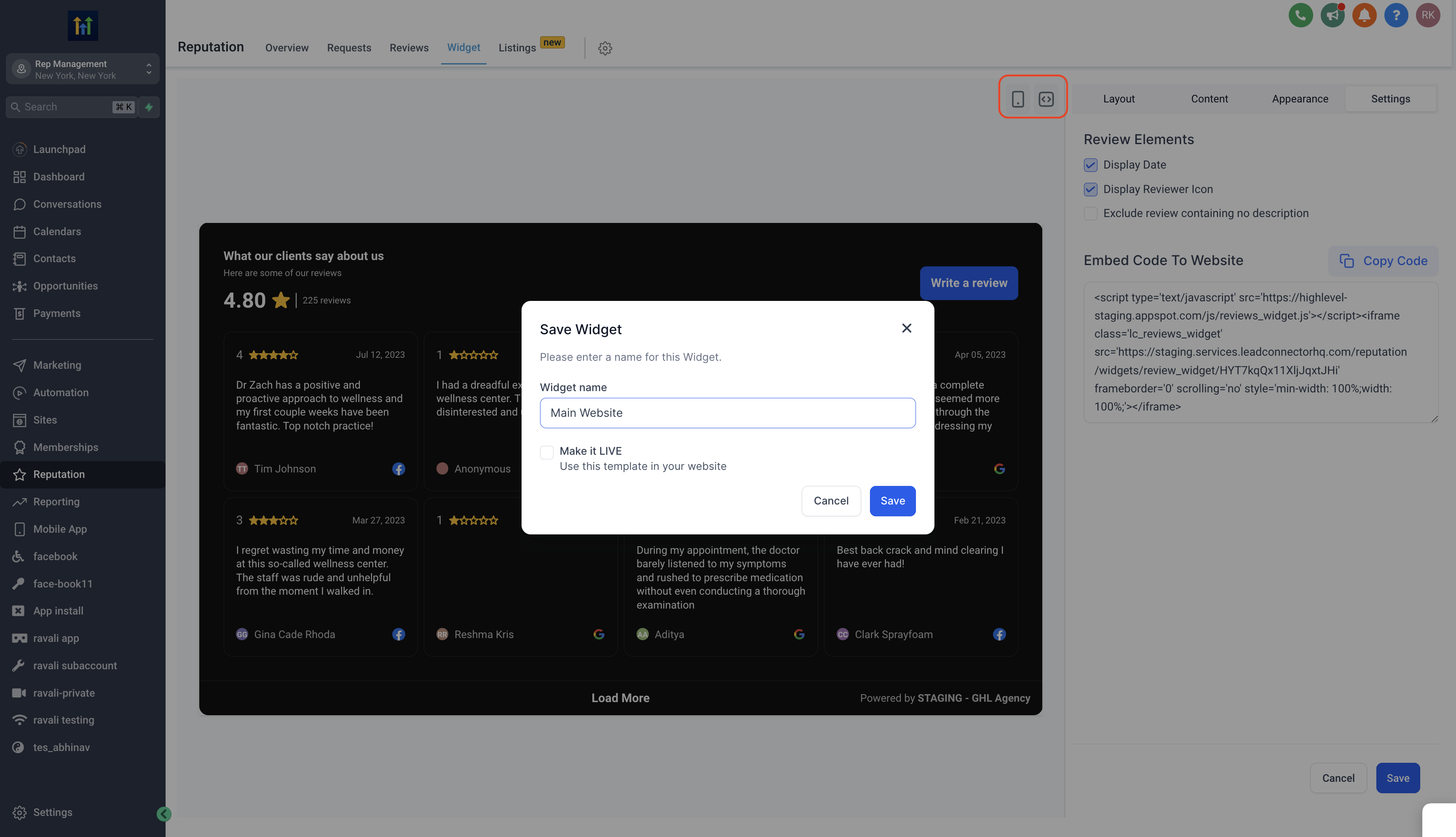
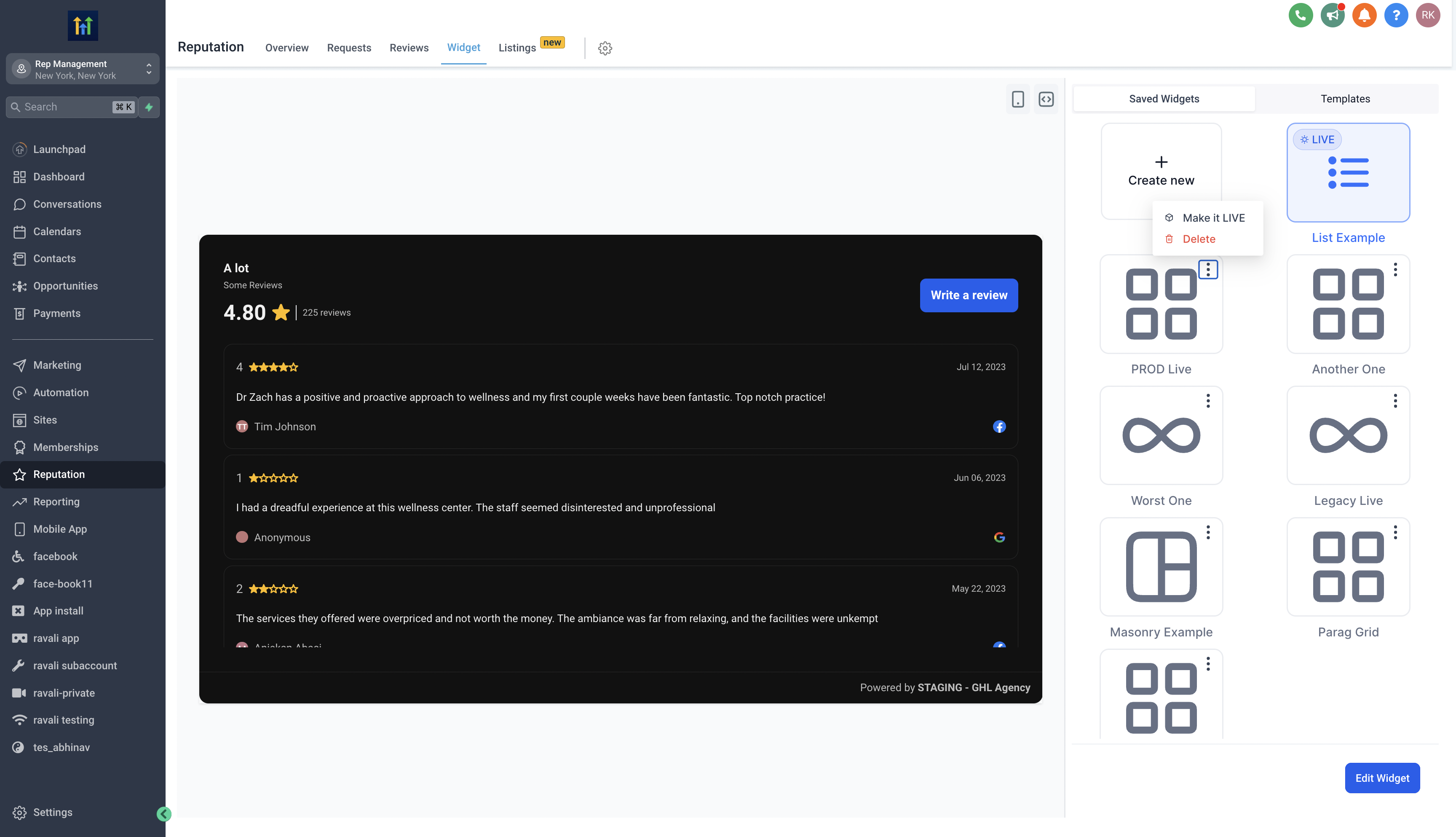
Give your widget a meaningful name for easy reference. You can view all your saved widgets in the saved widgets tab. Choose to save your widget for later use or make it live immediately.
You can also delete widgets you no longer require by clicking on the triple-dot menu at the widget's upper corner then clicking Delete.
Templates
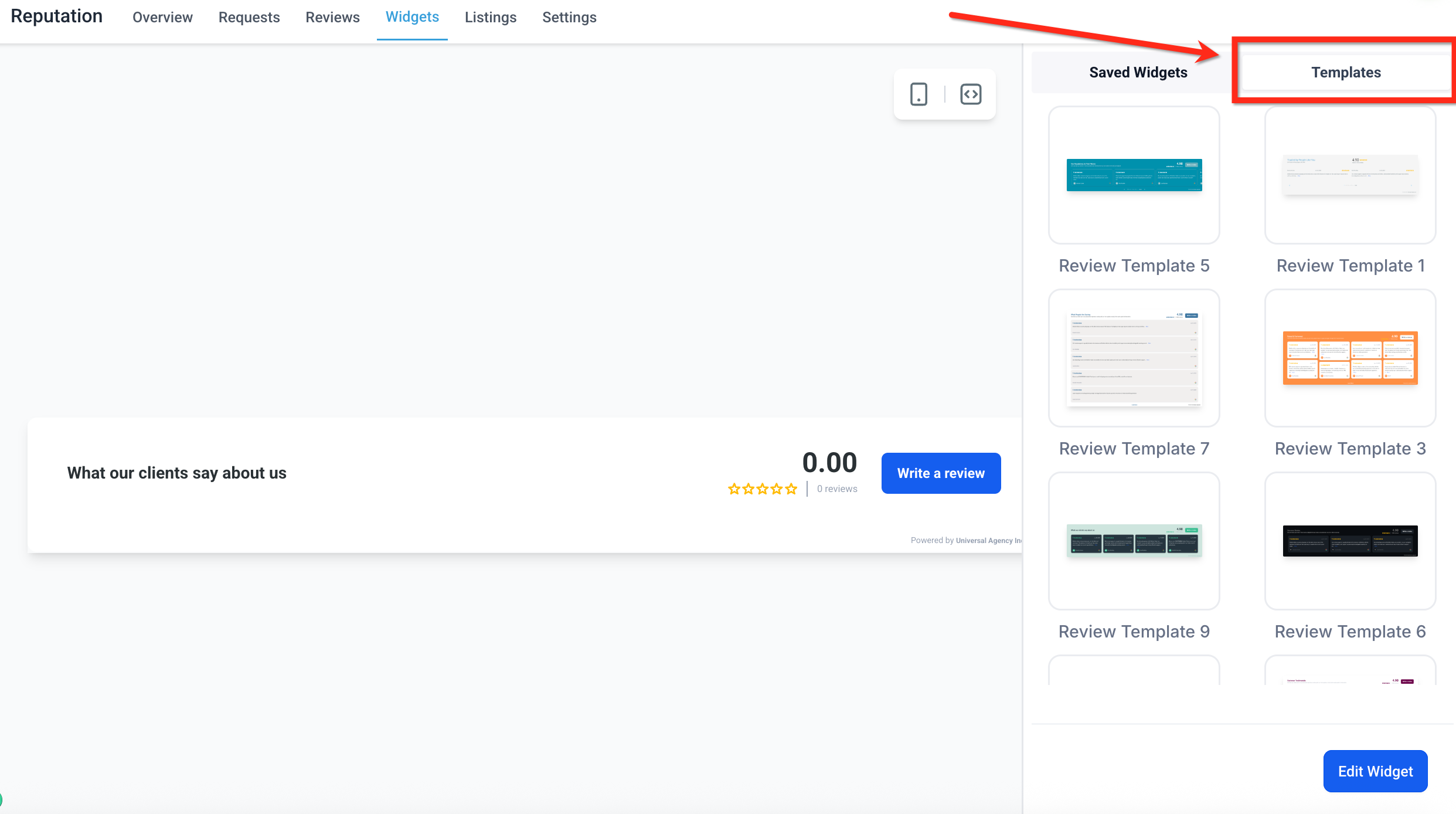
Templates allow you to launch a beautifully styled review widget in seconds. These pre-built designs are especially helpful if you want a professional layout without manually customizing every element. Applying a template is quick and easy!
- Click the Templates tab at the top-right of the widget panel.
Browse the list of available designs and click on any template to instantly apply that design to your review widget.
Once applied, you can continue customizing the widget just like any other—adjust layout, colors, fonts, or content to make it your own. Just click the blue Edit Widget button.
Frequently Asked Questions
Q: Can I embed multiple different review widgets on one website?
Yes, but not using the "Review" block in the builder, which always displays your default widget. To embed multiple widgets in the same site, use the “Embed Code” option to copy the code for the desired widget. Then add the widget's code to your website using a "Code" block. Make sure you are using the dropdown to select the correct widget when copying the code. Repeat this for each widget you would like to add to the site.
Q: Will my widget update automatically when I receive new reviews?
Yes. The widget syncs with connected platforms such as Google and Facebook. New reviews will automatically appear in the widget based on the filters and display settings you've configured.
Q: Do review widgets work on non-SourCherry websites?
Yes. Review widgets can be embedded on almost any website platform. Simply copy the Embed Code from the widget and paste it into a custom code block on your external site.
Q: Can I continue editing a widget after I add it to a site?
Yes. You can edit the widget at any time—even after it's embedded. Changes you make in the widget builder (like layout, content, or styling) will automatically update on your site once you save the widget.
Q: Are the review widgets mobile responsive?
Absolutely. All review widget templates and layouts are fully responsive and automatically optimized for mobile, tablet, and desktop viewing.