
SourCherry now allows you to assign different owners to contacts and their related opportunities. This gives teams more flexibility in managing tasks and responsibilities—especially useful when different team members handle lead nurturing vs. sales conversion.
With this new feature, you can have separate owners for contacts and opportunities in your CRM. This flexibility allows for more nuanced management and delegation of responsibilities within your organization.
How to Enable This Feature
- Navigate to Settings in your sub-account.
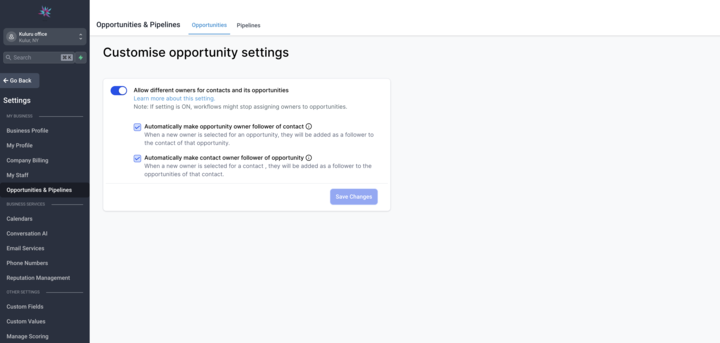
- Scroll to “Allow different owners for contacts and its opportunities.”
- Toggle the setting to On.
Once this is enabled, both contacts and opportunities can be owned and managed by different users.
How Contact and Opportunity Ownership Works
Both contacts and opportunities can have different owners once the toggle has been turned on.
- Default Opportunity Owner: When creating a new opportunity, the default owner will be the same as the contact owner. However, this can be updated as needed to reflect the appropriate ownership.
- Workflow Action (Coming Soon): Stay tuned for an upcoming workflow action that will enable further customization and automation with this feature.
Additional Ownership Settings
There are two optional sub-settings to further automate ownership-based updates:
- Sync Contact Follower with Opportunity Owner: When this is enabled, changing the owner of an opportunity will also update the follower on the related contact. This helps the new owner stay updated with all contact-level activity.
- Sync Opportunity Follower with Contact Owner: When enabled, changing the contact owner automatically updates the opportunity follower to match. This ensures that contact managers are also looped in on deal progress.
How it helps
- Improved Customization: Tailor ownership settings to match your team’s workflow. Assign contacts to one team and opportunities to another.
- Efficient Collaboration: Automatically sync followers based on owner changes to keep communication seamless across departments.
- Greater Control: Gain flexibility in your CRM structure to better reflect how your teams operate.