
Workflow Actions in SourCherry are pivotal components that facilitate the automation and management of various tasks within the Workflow Builder. Actions are executed sequentially following a triggering event, allowing for precise control over the order of operations.
TABLE OF CONTENTS
Additional Docs for Getting Started!
Getting Started with Workflows
Understanding Triggers and Actions
Triggers are events that kickstart workflows, leading to various actions being performed. They follow a chronological order as specified in your workflow.
- Workflow Trigger: Initiates a workflow based on specific events.
- Workflow Action: Follows the trigger and performs tasks as instructed.
Action Categories
Workflow Actions are organized into categories to make them easier to find and use. The categories are:
- Contact Actions
- Communication Actions
- Send Data
- Internal Tools Actions
- Workflow AI Action
- Eliza Actions
- Appointments Actions
- Opportunities Actions
- Payments Actions
- Marketing Actions
- Affiliate Actions
- Courses Actions
- IVR (Interactive Voice Response) Actions
- Communities Actions
You can access Workflow Actions within the workflow build and then select the add action button.
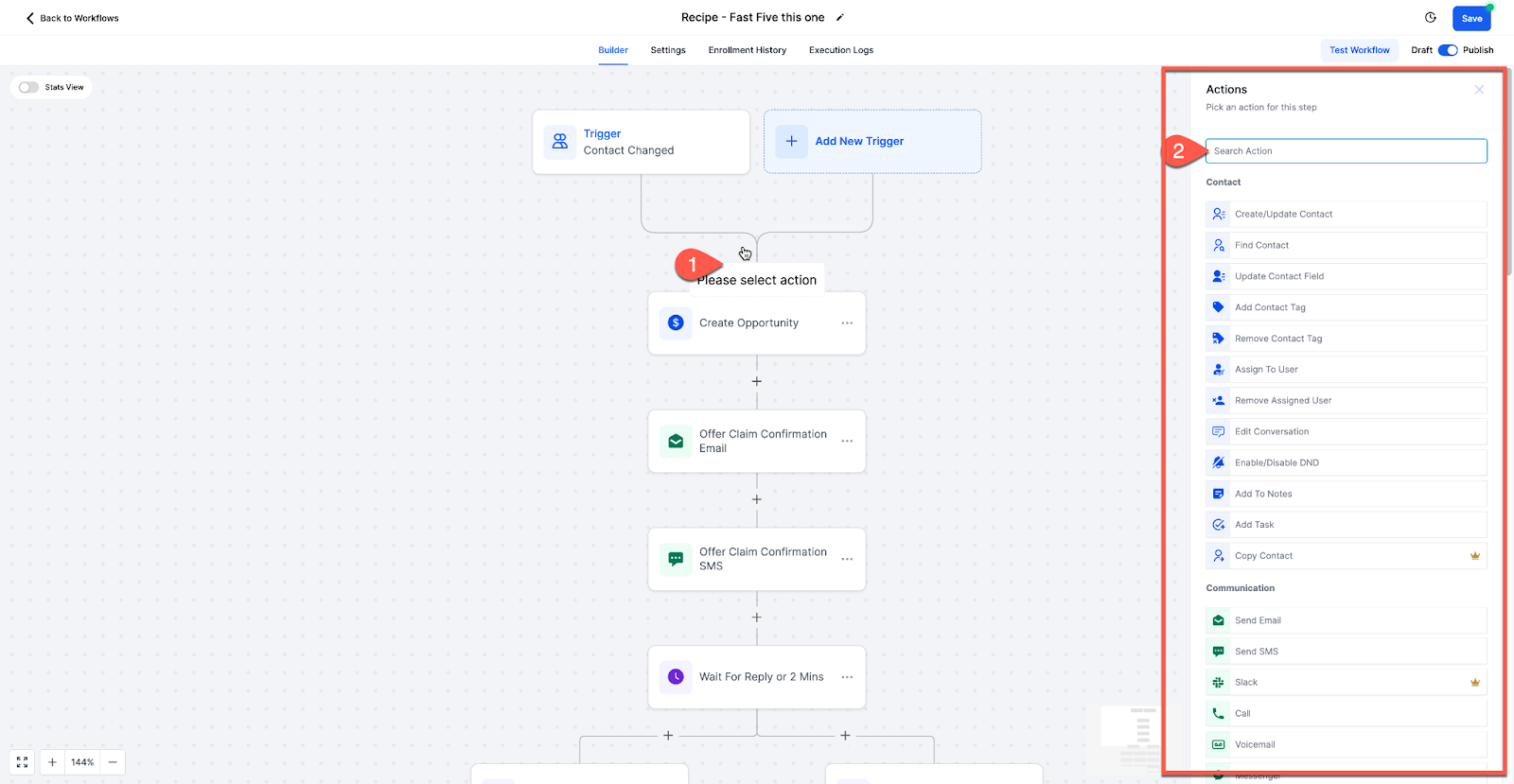
Below we will break down of each action - notating what it does and what it's "useful for" to get you started!
Contact Actions
Create Contact:
- Adds a new contact to the system, useful for managing new leads.
- Useful for: Automates lead capture and organization.
Find Contact:
- Locates a contact in the system based on provided data.
- Useful for: Helpful for finding existing contacts for updates or referencing.
Update Contact Field:
- Modifies a specific field on a contact.
- Useful for: Allows for dynamic updating of contact information.
Add Contact Tag:
- Adds a tag to a contact for organization and segmentation.
- Useful for: Facilitates better contact management and targeting.
Remove Contact Tag:
- Removes a tag from a contact.
- Useful for: Helps maintain contact list organization and segmentation.
Assign to User:
- Assigns a contact to a user in the system.
- Useful for: Enables personalized communication and task allocation.
Remove Assigned User:
- Removes the assigned user from a contact.
- Useful for: Helps in reassigning or managing contacts.
Edit Conversation:
- Edits a conversation by marking it, archiving, or unarchiving.
- Useful for: Facilitates conversation management within SourCherry.
Disable/Enable DND:
- Disables or enables "Do Not Disturb" for a contact.
- Useful for: Controls outbound communication to manage contact preferences.
Add Note:
- Adds a custom note to a contact.
- Useful for: Allows for manual tracking of contact interactions.
Add Task:
- Creates a task related to a contact. Attaches to the contact if one exists; creates a contact-less task if the workflow is running without a contact. Pair with Inbound Webhook to create internal tasks even when no contact exists.
- Useful for: Helps in managing follow-ups and actions.
Copy Contact:
- Duplicates a contact into another sub-account.
- Useful for: Facilitates data sharing and management across accounts.
Delete Contact:
- Removes a contact from the system.
- Useful for: Helps in contact list maintenance.
Modify Contact Engagement Score:
- Adjusts a contact's engagement score.
- Useful for: Assists in evaluating contact interaction and responsiveness.
Add/Remove Contact Followers:
- Adds or removes followers to/from a contact.
- Useful for: Facilitates shared contact visibility within teams or departments.
Communication Actions
Send Email
- Sends an email to the contact.
- Useful for: Allows personalized communication via email, facilitating follow-ups, updates, and notifications.
Send SMS
- Sends an SMS to the contact.
- Useful for: Enables direct and immediate communication via text, suitable for alerts, reminders, and quick interactions.
Send Slack Message
- Sends a message via Slack if integrated.
- Useful for: Facilitates team communication and internal notifications within Slack, streamlining collaboration and task management.
Call
- Makes a phone call to the contact, if they pick up, it will attempt to ring a user.
- Useful for: Automates lead outreach and management, useful for auto-dialing, and efficiently connecting leads with assigned users.
Messenger
- Sends a Facebook message to the contact.
- Useful for: Manages inbound messages via Facebook Messenger, enabling personalized communication and customer engagement.
Instagram DM
- Sends an Instagram Direct Message.
- Useful for: Engages with customers via Instagram Direct Messages, enhancing social media interaction and customer support.
Manual Action
- Prompts a manual action to be performed by a user for a contact.
- Useful for: Provides flexibility for manual interventions, useful for lead management and personalized interactions.
GMB Messaging
- Respond to Google My Business messages.
- Useful for: Facilitates customer communication through GMB, enhancing local business engagement and customer service.
Send Internal Notification
- Sends notifications to assigned users or contacts.
- Useful for: Notifies team members about updates or triggers in the system, aiding in team collaboration and task management.
Send Review Request
- Sends a review request.
- Useful for: Automates review requests, enhancing reputation management and customer feedback collection.
Conversation AI
- Manages inbound conversations with customers.
- Useful for: Utilizes AI to handle customer inquiries across multiple channels, improving response time and customer satisfaction.
Facebook Interactive Messenger
- Responds to Facebook comments on posts.
- Useful for: Engages with customers on Facebook, enhancing social media presence and interaction.
Instagram Interactive Messenger
- Responds to Instagram comments on posts.
- Useful for: Boosts engagement on Instagram, fostering community interaction and brand awareness.
Reply in Comments
- Replies to comments on Facebook or Instagram posts.
- Useful for: Facilitates engagement by responding to comments, building relationships with followers.
WhatsApp
- Sends WhatsApp messages.
- Useful for: Enables communication via WhatsApp, adhering to WhatsApp's guidelines for customer support and engagement.
Send Live Chat Message
- Responds to live chat messages.
- Useful for: Enhances real-time customer support by responding to inquiries via live chat, improving customer satisfaction.
Send Data
Webhook/Custom Webhook:
- Sends data from SourCherry to external applications or services.
- Useful for: Facilitates integration with other tools and services.
Google Sheets:
- Manages data in Google Sheets, enabling updates or lookups.
- Useful for: Automates data management and reporting.
Internal Tools Actions
If Else
- Creates branches based on conditions.
- Useful for: Allows personalized customer experiences by directing contacts down specific paths based on conditions, useful for segmentation and customization.
Wait Step
- Delays the workflow for a specific time.
- Useful for: Useful for scheduling actions or communications at a later time, enhancing workflow efficiency and timing.
Goal Event
- Directs contacts to a specific event goal.
- Useful for: Helps contacts skip unnecessary steps in a workflow, useful for optimizing customer journeys and automation.
Split
- Conducts a split test within a workflow.
- Useful for: Allows comparison of different paths or actions, useful for optimizing marketing messages and strategies.
Update Custom Value
- Updates custom values.
- Useful for: Enables dynamic updating of custom fields based on events or triggers, enhancing data management and personalization.
Go To
- Directs contacts to another workflow.
- Useful for: Facilitates moving contacts between workflows, useful for managing complex customer journeys without duplication.
Remove from Workflow
- Removes contacts from a workflow.
- Useful for: Helps manage communication and actions by removing contacts from specific workflows, ensuring targeted interactions.
Arrays
- Handles multiple values as a single unit.
- Useful for: Simplifies data management and manipulation, allowing sorting, searching, and iteration of data collections.
- Find, filter, transform, or calculate values from list-based data.
Drip Mode
- Drips contacts through the workflow in batch sizes.
- Useful for: Prevents overloading communication channels by controlling the rate at which contacts move through the workflow, maintaining reputation and delivery rates.
Text Formatter
- Formats text.
- Useful for: Facilitates transformation of text data into a desired format, improving data handling and management.
Custom Code
- Executes custom code.
- Useful for: Provides advanced capabilities for running custom scripts or programs, allowing complex data processing and automation.
Workflow AI Action
AI Prompt (GPT-3 Powered):
- Generates AI responses based on given prompts.
- Useful for: Automates AI-driven responses for better engagement.
Eliza Actions
Eliza AI Appointment Booking:
- Utilizes the Eliza platform in the Marketplace services to automate appointment bookings using AI.
- Useful for: Automating appointment scheduling conversations with AI.
Send to Eliza Agent Platform:
- Sends the contact to the Eliza Agent Platform.
- Useful for: Utilizing the Eliza Agent Platform service when enabled.
Appointments Actions
Update Appointment Status:
- Updates appointment status (e.g., rescheduled, no show, completed).
- Useful for: Managing appointment statuses and bookings on your calendars.
Generate One Time Booking Link:
- Generates a one-time booking link to send to clients.
- Useful for: Sending a booking link via SMS or email to protect your calendar from multiple bookings.
Opportunities Actions
Create/Update Opportunity:
- Creates or updates an opportunity in the pipeline.
- Useful for: Managing opportunity pipelines and moving opportunities along the pipeline.
Remove Opportunity:
- Removes the opportunity from specific or multiple pipelines.
- Useful for: Managing opportunities by removing them from pipelines.
Payments Actions
Stripe One-Time Charge:
- Charges a one-time fee via Stripe using the Stripe Customer ID ("cus_id").
- Useful for: Sending one-time charges to customers via integrated Stripe.
Send Invoice:
- Sends an invoice created in SourCherry to the customer.
- Useful for: Automating invoice management and sending invoices to customers.
Send Documents and Contracts:
- Sends a document or contract from a template to the customer.
- Useful for: Automating the process of sending contracts or documents to customers.
Marketing Actions
Add to Google Analytics:
- Adds contact data to Google Analytics.
- Useful for: Managing contact data for ads or analytics purposes.
Add to Google AdWords:
- Adds contact to Google AdWords.
- Useful for: Managing Google AdWords data and running ads.
Add to Custom Audience (Facebook):
- Adds contact to a custom audience in Facebook.
- Useful for: Managing Facebook ad targeting and audience segmentation.
Remove from Custom Audience (Facebook):
- Removes contact from a custom audience in Facebook.
- Useful for: Managing Facebook ad targeting and audience segmentation.
Facebook Conversion API:
- Sends conversion data to Facebook for better ad tracking.
- Useful for: Tracking conversions for Facebook ads.
Affiliate Actions
Add to Affiliate Manager:
- Adds a new affiliate to the affiliate manager.
- Useful for: Automating affiliate management and adding new affiliates.
Update Affiliate:
- Updates existing affiliate details.
- Useful for: Managing and updating affiliate information.
Add/Remove from Affiliate Campaign:
- Adds or removes affiliate from a specific campaign.
- Useful for: Managing affiliate campaigns and promotions.
Courses Actions
Course Grant Offer:
- Grants a course offer to a contact.
- Useful for: Fulfilling purchases of course offers.
Course Revoke Offer:
- Revokes a course offer.
- Useful for: Managing course offerings.
IVR (Interactive Voice Response) Actions
Gather Input on Call:
- Gathers input from callers to determine their path in the IVR.
- Useful for: Creating IVR branches based on caller input.
Play Message:
- Plays a message within the IVR journey.
- Useful for: Providing information or instructions during the IVR experience.
Connect to Call:
- Connects the call to a specific user or number.
- Useful for: Forwarding calls to the appropriate user or number.
End Call:
- Ends the call.
- Useful for: Ending the call after a specific action or message.
Record Voicemail:
- Records a voicemail from the caller.
- Useful for: Allowing callers to leave voicemail messages.
Communities Actions
Grant Group Access:
- Grants access to a specific community group.
- Useful for: Managing access to community groups.
Revoke Group Access:
- Removes access from a specific community group.
- Useful for: Managing access to community groups.
Workflow actions in SourCherry are a powerful way to manage contacts and automate business processes, streamlining tasks such as appointment scheduling, opportunity management, payments, marketing, affiliate management, course offerings, IVR interactions, and community access.