
TABLE OF CONTENTS
Overview
The Task Completed workflow trigger allows you to automate follow-up actions based on the completion of tasks. By setting this trigger, you can initiate workflows when a task assigned to a user is marked as completed, creating an efficient way to handle task-related workflows and subsequent actions.
Trigger Name
Task Completed
Trigger Description
This trigger fires when a task assigned to a user is completed. It is useful for automatically moving a workflow forward based on task completion, whether to notify the team, follow up with a contact, or update a system status. You can filter this trigger to only fire for specific users or custom fields associated with tasks.
Trigger Details
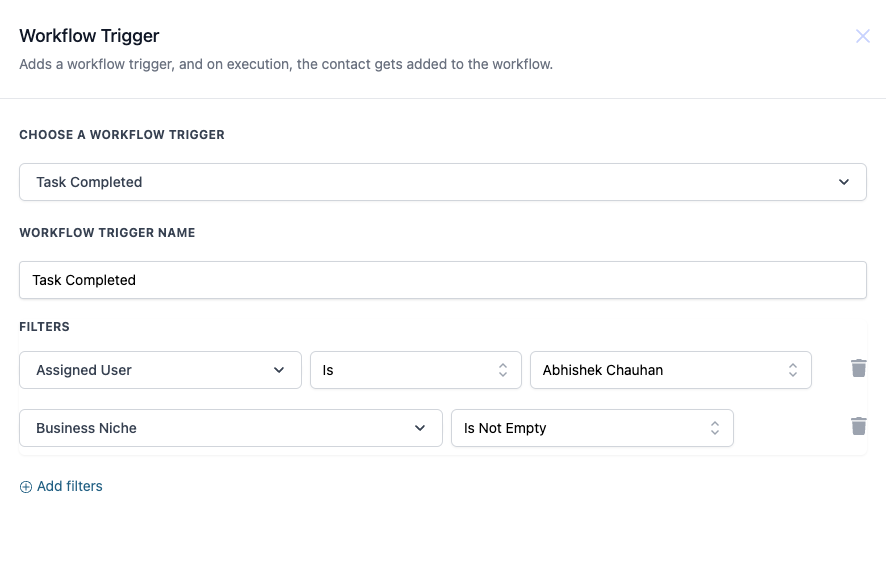
How to Configure
Choose a Workflow Trigger:
- From the list of available triggers, select "Task Completed."
Set the Workflow Trigger Name:
- Enter a descriptive name, such as "Task Completed Follow-up."
Apply Filters (Optional):
- You can add filters to limit when the trigger fires. For example, you can specify that only tasks completed by a specific user should activate the trigger or tasks that contain specific values in custom fields.
Save the Trigger:
- After configuring the trigger and filters, save your settings.
Example
Let’s say you want to set up a workflow where a follow-up email is automatically sent to a contact after a sales task is marked as complete by a specific user.
- Trigger Name: Sales Task Completed
- Assigned User: John Doe
- Filter: Business Niche = Real Estate
Once John Doe completes a task assigned to a contact in the Real Estate niche, this trigger will fire and automatically move the workflow to the next step, such as sending an email to the contact or updating the CRM status.