
This help article explains the difference between tax-inclusive and tax-exclusive pricing in SourCherry and guides you through setting up the appropriate pricing model for your business.
TABLE OF CONTENTS
What's New?
Businesses can now specify if the products are tax inclusive or tax exclusive to ensure that the right tax convention is followed based on their requirements.
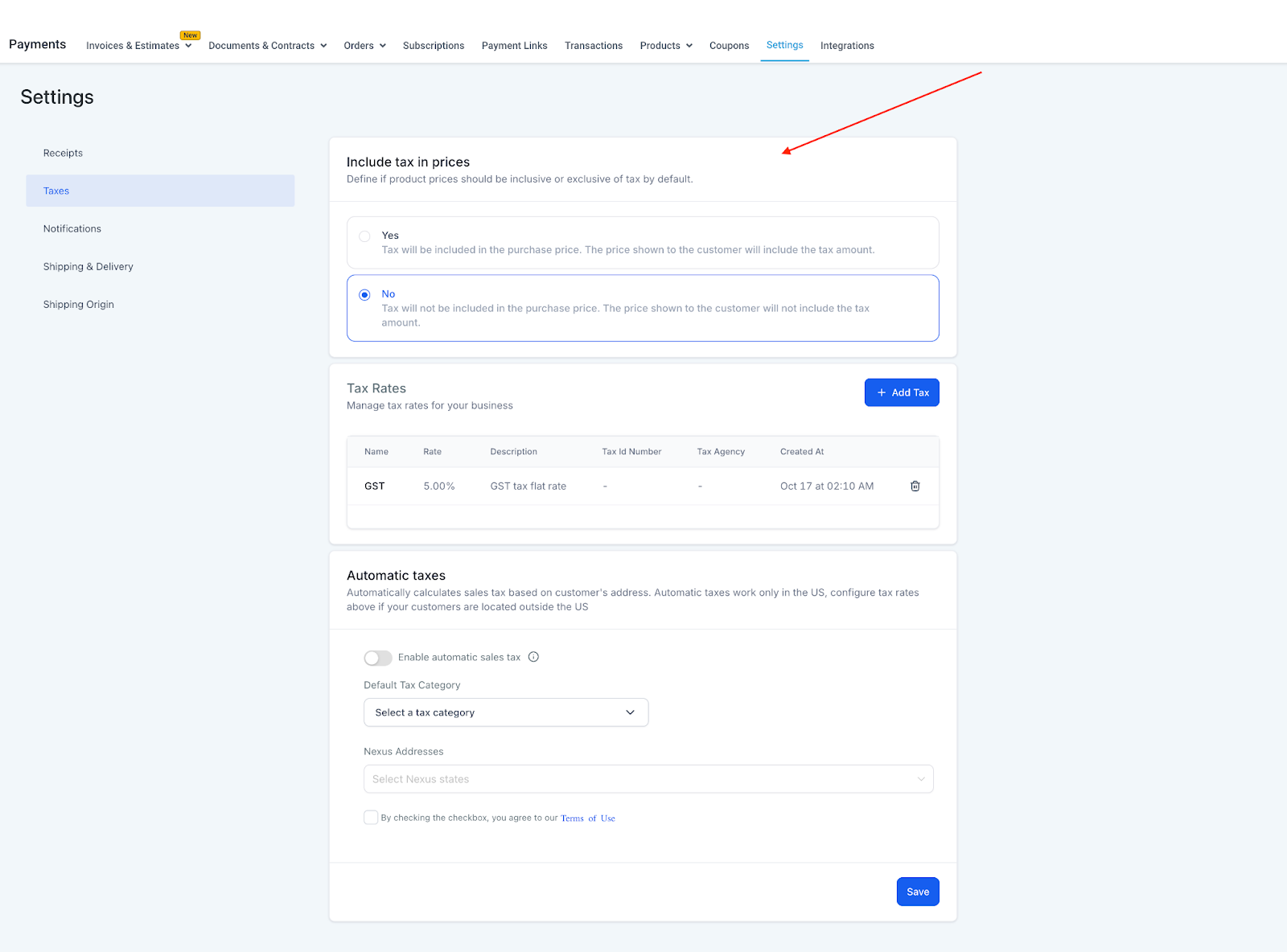
This can be enabled for all the products to be created by changing on the Global settings i.e. Payments > Settings > Taxes OR on a product level while creating or editing the product.
On a Global level, 2 settings preferences exist - Tax Inclusive OR Tax Exclusive which is answered as a Yes or No to the question "Include tax in prices".
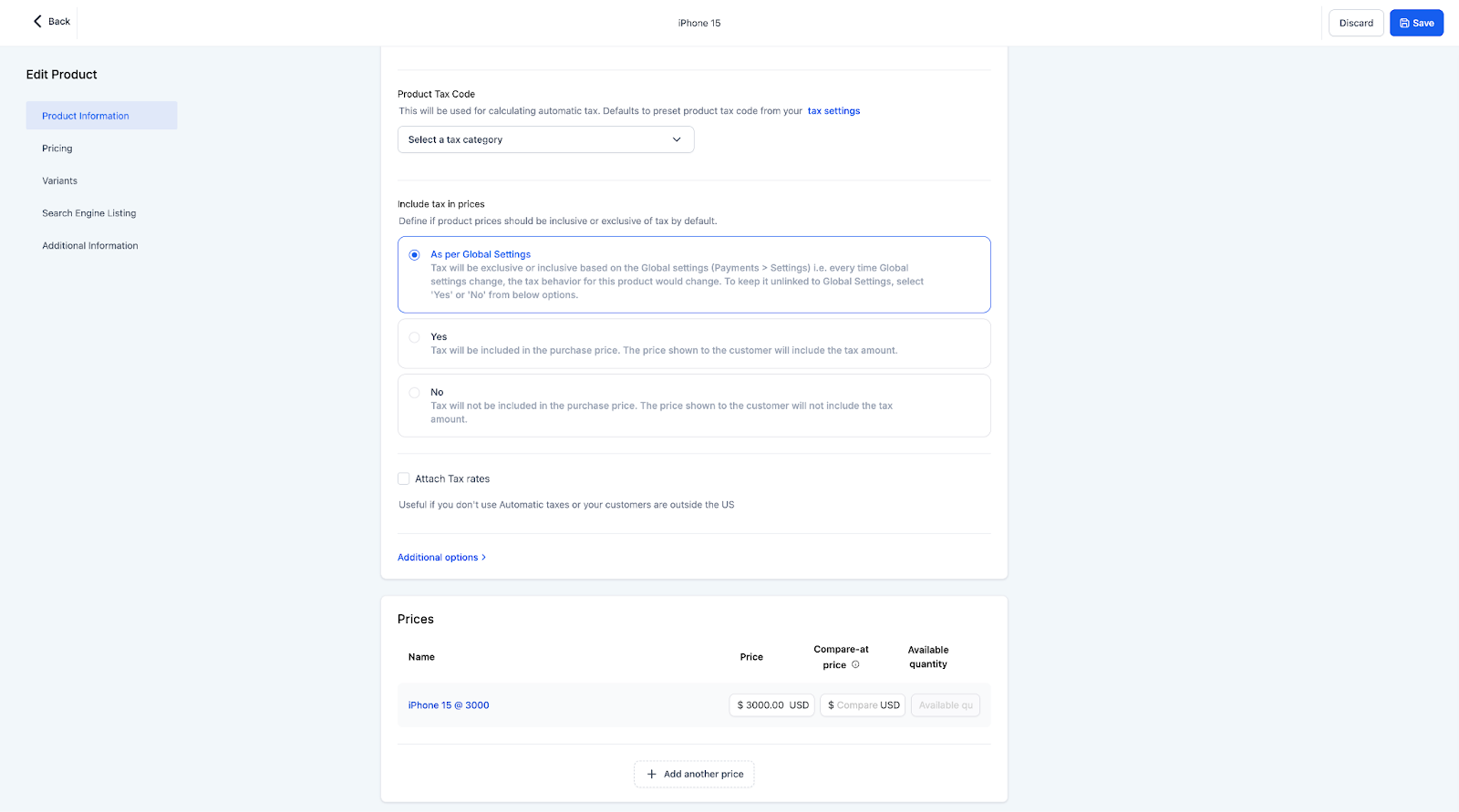
On a product level, 3 settings preferences exist - Follow Global settings OR Tax Inclusive OR Tax Exclusive as answers to the question "Include tax in prices".
If no selection is done at a global level, the default selection would be Tax Exclusive.
All products created in the past would have default tax settings to "As per Global settings" which would ensure that as the global settings change, the preference for these products would also change. Users can go ahead and change these as well to inclusive or exclusive which would unlink them to the global settings i.e. even if global settings are changed, the products would have their preferred tax setting enabled.
Whenever a new product is created the default selection would be "As per Global settings" which can be changed to Tax Inclusive or Tax Exclusive.
While creating the product or editing it later on, the tax preference can be changed to Tax Inclusive or vice versa depending on the need.
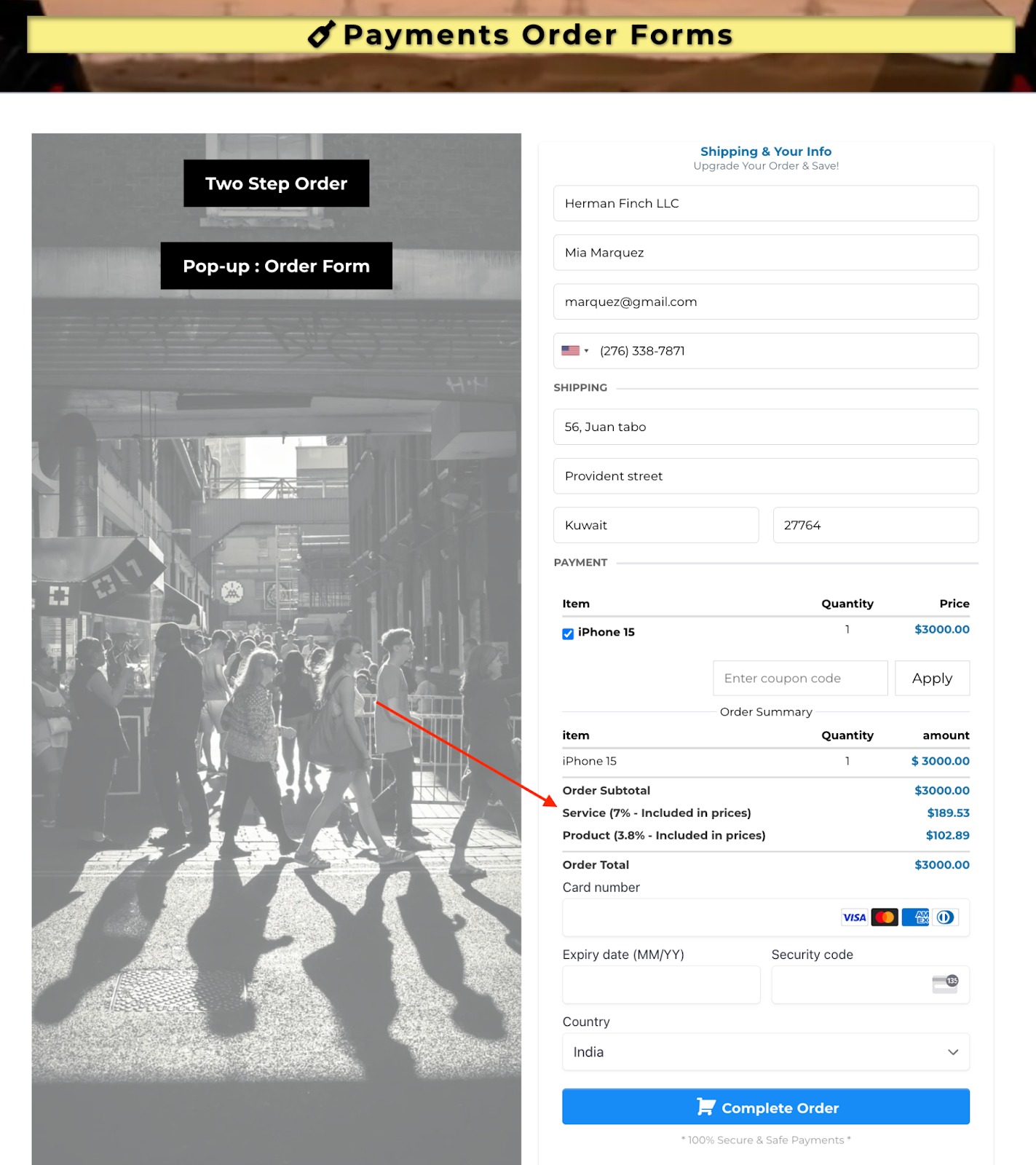
How the tax displays in an order form
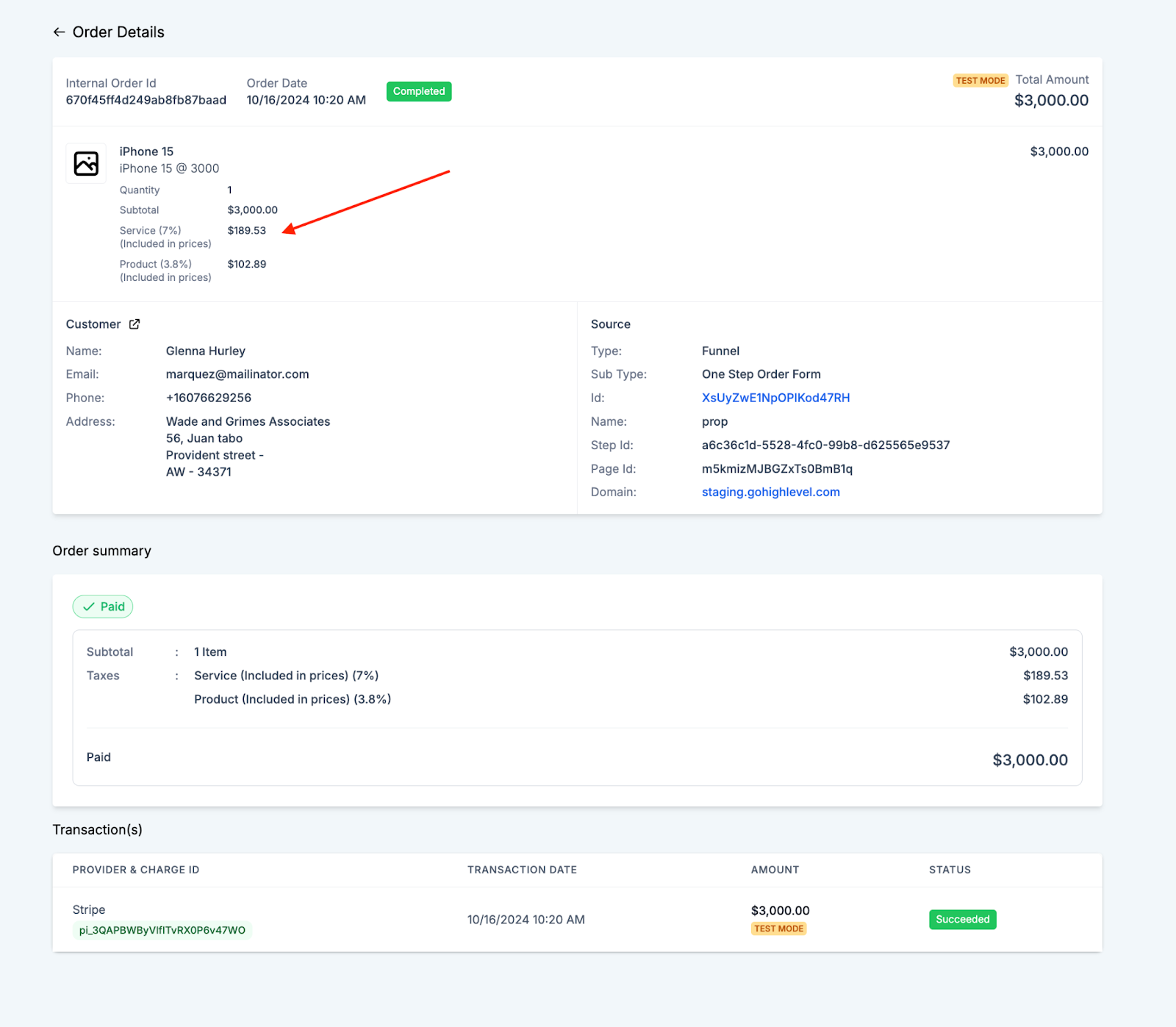
How the tax displays in an order details and summary
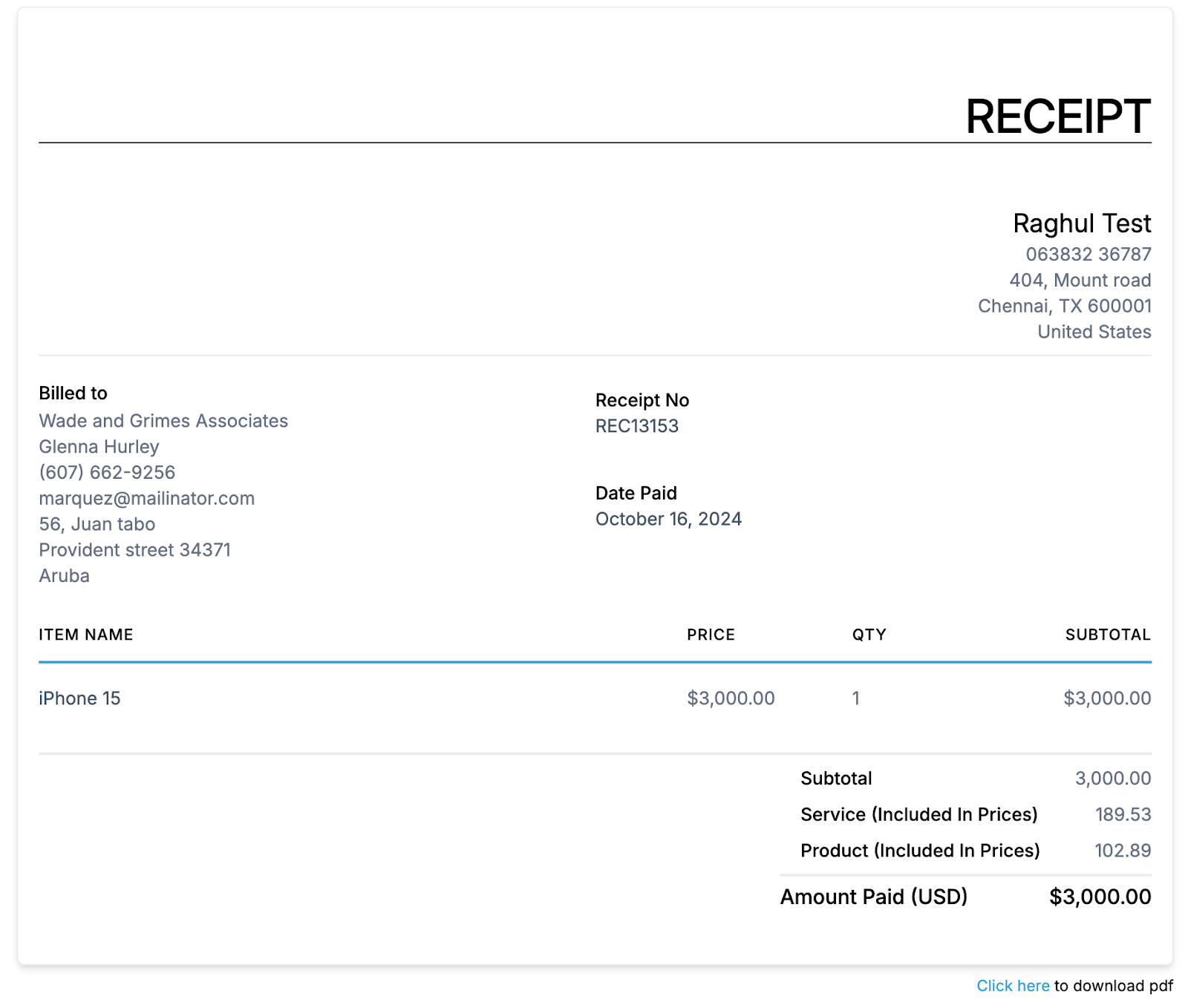
How the tax displays in a receipt
How to enable/disable the tax inclusion
Payments > Settings > Taxes OR on a product level while creating or editing the product.
Frequently Asked Questions
1. Can I switch between tax-inclusive and tax-exclusive pricing after setting up my pricing?
- Yes, you can switch between tax-inclusive and tax-exclusive pricing in SourCherry. However, be aware that changing the pricing model may affect existing invoices or quotes, so it's recommended to review any outstanding transactions before making adjustments.
2. How does changing my pricing model affect existing subscriptions or recurring payments?
- If you change your pricing model (from tax-inclusive to tax-exclusive, or vice versa), it could impact existing subscriptions or recurring invoices. You may need to manually adjust existing subscriptions to reflect the new pricing structure and ensure the correct tax amounts are applied.
3. What happens if a customer is in a region with different tax rates but I’ve set tax-inclusive pricing?
- If your customer is in a region with different tax rates, SourCherry will calculate the tax based on the region's rate, but the total price shown to the customer will remain the same (as taxes are included in the price). You may need to adjust your pricing strategy if you operate in multiple tax jurisdictions.
4. Can I apply tax-inclusive pricing to certain products and tax-exclusive pricing to others within the same account?
- SourCherry allows you to set a global pricing model for your account, but if you need to apply different pricing models to individual products or services, you may need to manage them separately by using different products or subscription plans with their own pricing configurations.
5. How are discounts applied when using tax-inclusive pricing?
- When using tax-inclusive pricing, any discounts will typically be applied to the total price, including taxes. This means the discount will reduce the overall price, and the final tax will be recalculated based on the new total price. If you're using tax-exclusive pricing, discounts will apply only to the base price before taxes.
6. Can I manually adjust the tax amount on individual invoices?
- Yes, you can manually adjust the tax amount on individual invoices in SourCherry, but keep in mind that this might not reflect the automated tax rules based on your pricing model or location settings.
7. How does SourCherry handle tax calculation for international customers?
- SourCherry uses region-specific tax rates for international customers if you have set up different tax zones. Ensure that your tax settings are properly configured to reflect different international tax rates based on customer location.