
Need help with A2P 10DLC Campaign Registration? This guide walks SourCherry users through the updated 2023 registration process to ensure SMS compliance and deliverability.
TABLE OF CONTENTS
- Overview of Campaigns
- Campaign Details
- Messaging Use Case
- User Consent
- Requirements and Best Practices
- Frequently Asked Questions
- Related Articles
Overview of Campaigns
Once your Brand registration is successfully approved as part of the A2P 10DLC (Application-to-Person 10-Digit Long Code) setup, the next essential step is to register a Campaign associated with that Brand. This step is mandatory to begin sending A2P messages through 10DLC phone numbers.
Once your Brand registration is approved as part of the A2P 10DLC setup, SourCherry automatically submits the associated Campaign for review. You do not need to manually submit the Campaign.
This applies to both Standard and Sole Proprietor A2P registration flows.
Pricing & Fees: A2P 10DLC registration/vetting, monthly campaign fees, and carrier per-message charges are passthrough via LC Phone with no SourCherry markup. For current fee tables, see Understanding A2P 10DLC Messaging Fees: Registration, Monthly, and Carrier Costs,What You Should Do
After receiving confirmation that your Brand is approved:
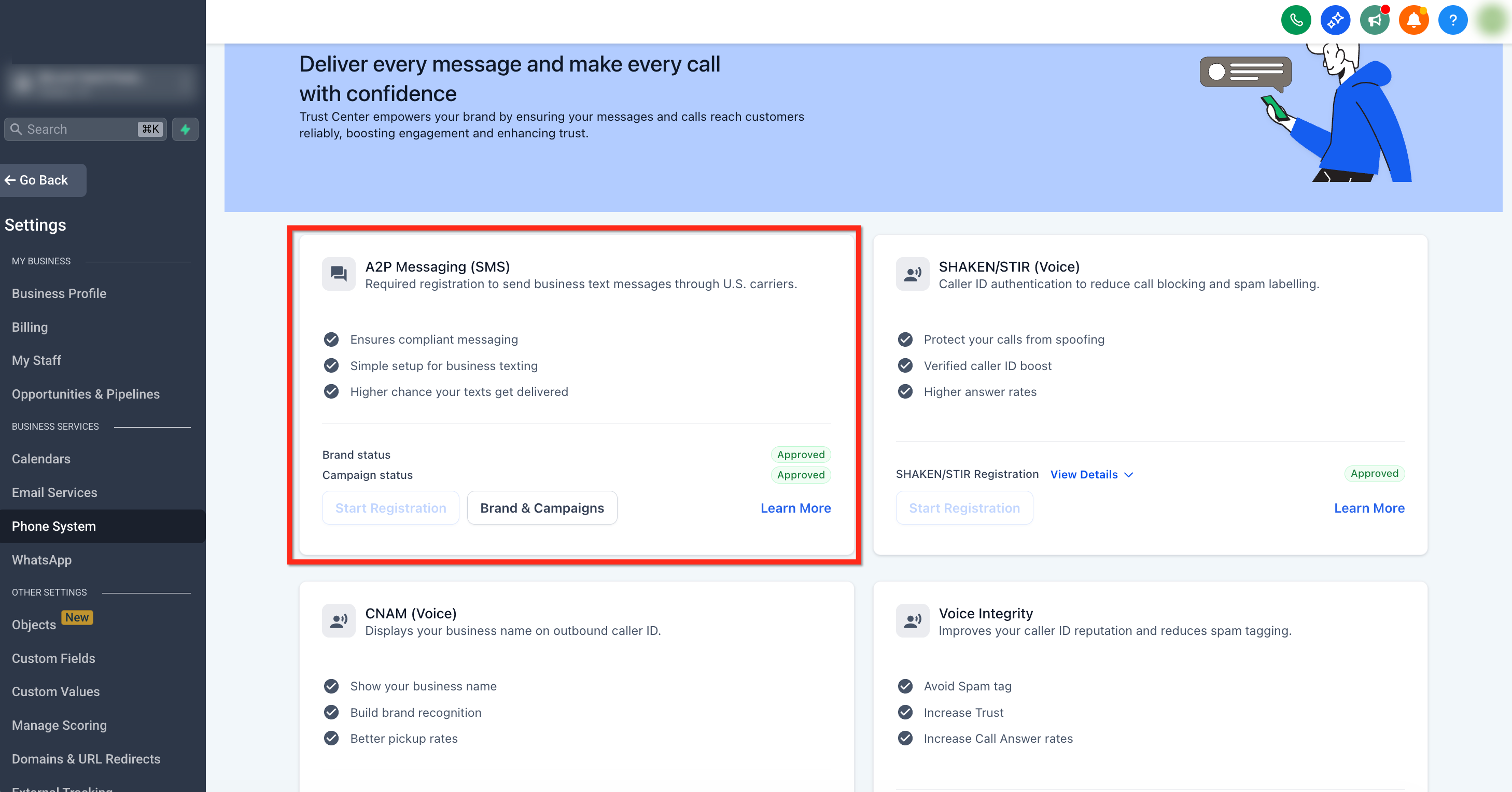
- Go to Settings > Phone System > Trust Center.
- Click on Brands & Campaigns then go to the Campaigns tab.
- Click Create Campaign.
- Fill out the Campaign Details.
- Await Campaign approval before using your number for A2P messaging.
Campaign Details
Once you complete the steps to submit the Brand Details, you will be taken to Campaign Details page.
Campaign Details page has two sub-sections:
- Messaging Use Case
- User Consent
Messaging Use Case
Clearly describe the purpose of your SMS campaign. Specify who will receive the messages, the nature of the content, and the context in which messages will be sent. For example, "Sending appointment reminders to clients who have opted in via our website."
For detailed Messaging Use Cases refer to List of campaign use case types for A2P 10DLC registration.
You will see the following campaign fields on this page:
1. Campaign Use Case
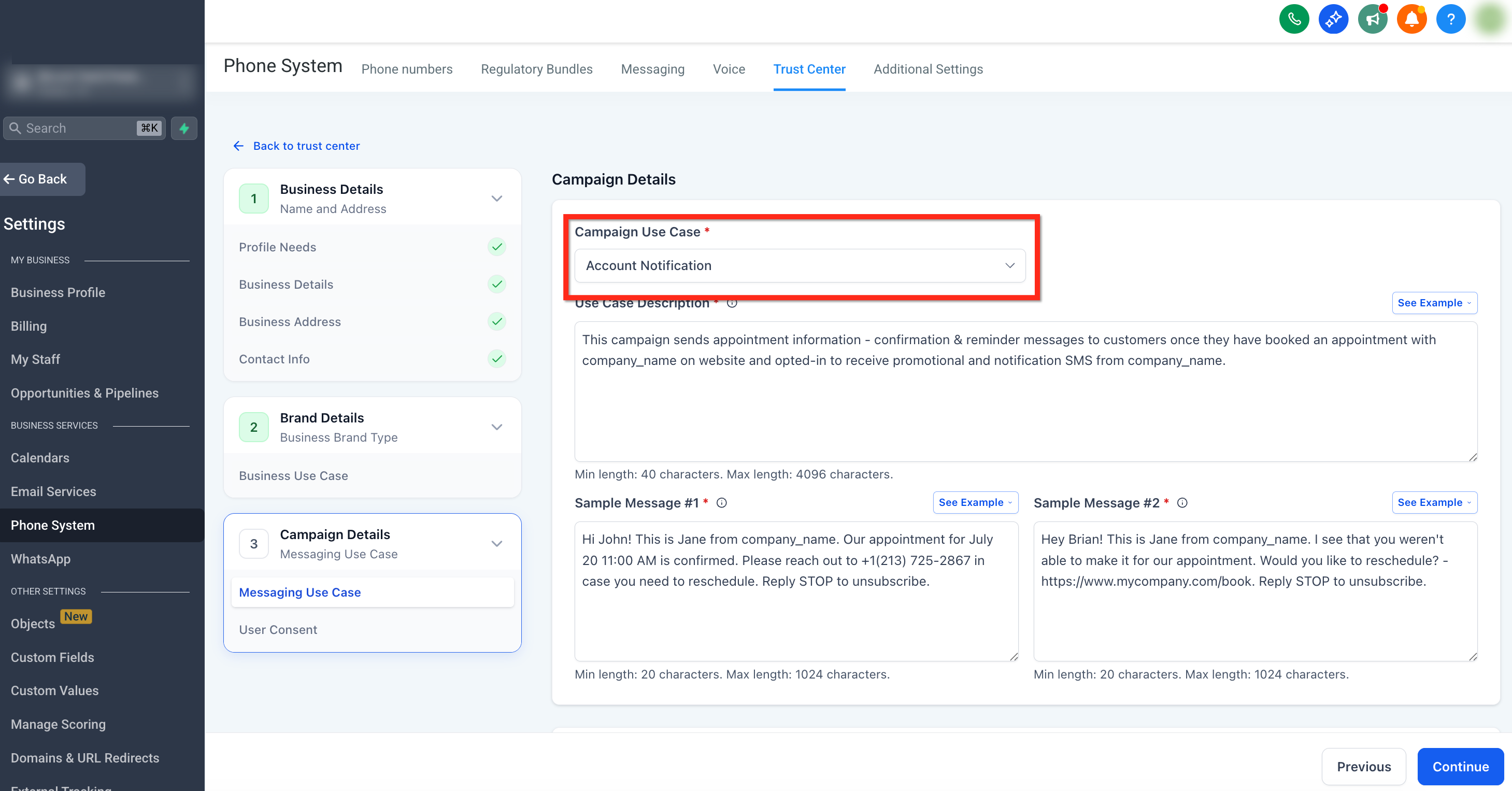
In the Pre-Built Chat Widget registration flow, transactional / non-marketing campaigns are automatically assigned **Customer Care. That guided flow does not require manual use-case selection for transactional campaigns.
2. Use Case Description
The use case description field under Messaging Use Case outlines the specific purpose and intended usage of your SMS campaign. It’s a critical requirement for approval because it informs carriers about how and why you are sending messages, ensuring compliance with regulations and transparency.
The description must explain what type of SMS the client will be sending (e.g., marketing messages, appointments, notifications, etc.). This description must match both the Campaign Use Case and the sample messages.
Click on See Example in the top right to check out examples for your use case. It's best to keep it simple. If you outline all the use cases, you will need to provide the opt-in link for each one.
Important: If you have an EIN for your company but you want to use a different brand name for your messages, you can add this sentence "We are doing DBA as [Business_Name]" in the Campaign Use Case.

Make sure the rest of the submission, including the website,  Privacy policy, Terms & Conditions, and the business name shown in opt-in form checkboxes, matches the declared [Legal Business Name] DBA [DBA Name]. You can register the same EIN for up to 10 brands.
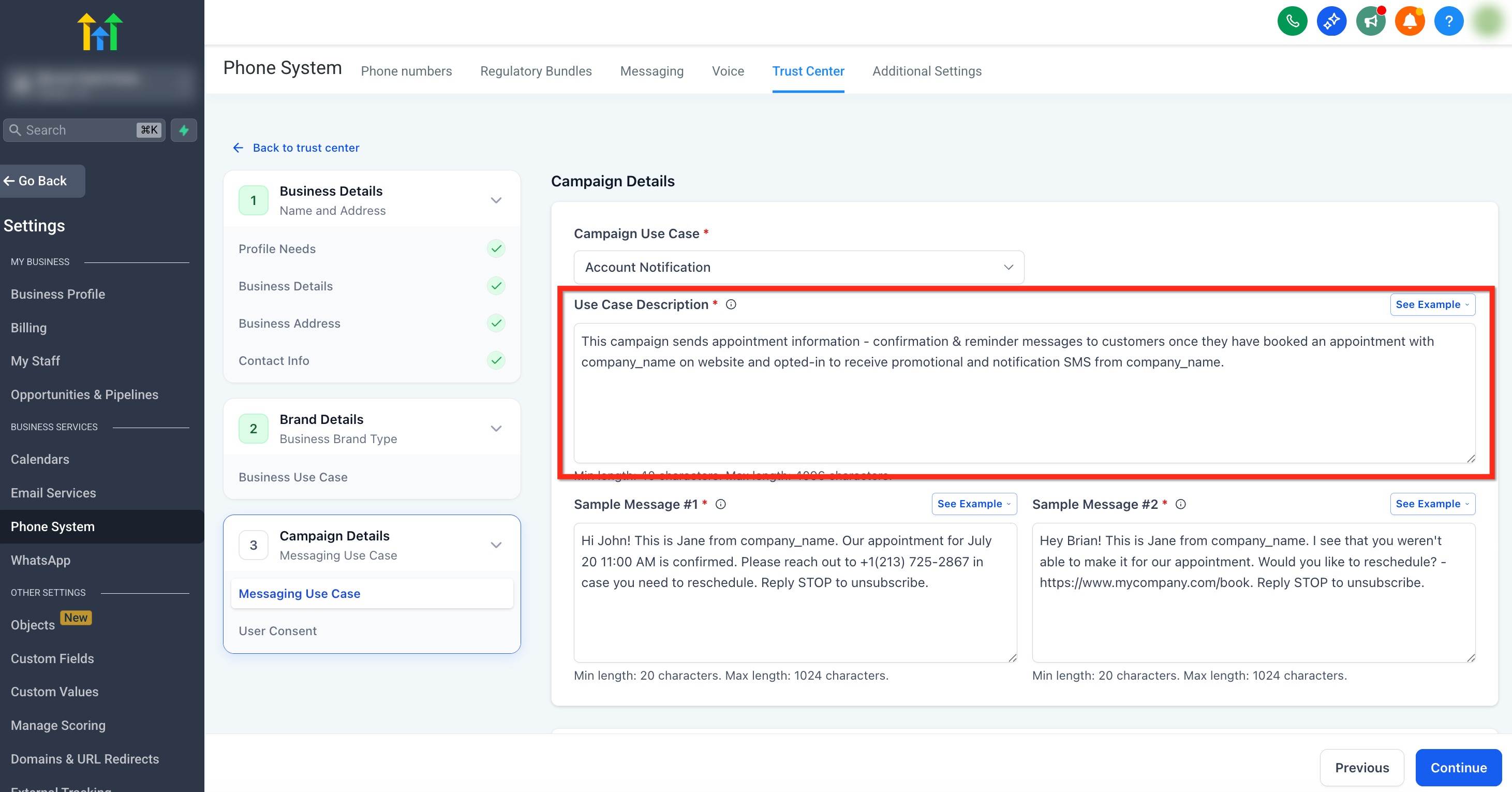
Use Case Description Examples
- "This campaign sends appointment confirmations, message notifications, and offers for chiropractic adjustments to existing patients or new patients who have opted in to receive SMS notifications. The communications are sent via the website form."
- "This campaign targets customers who have opted in to receive marketing updates via our subscription form. Messages will include promotional discounts, new product announcements, and exclusive offers. Users can opt out anytime by replying STOP."
3. Sample Message #1 and #2
Sample Message #1 and #2 are examples of the SMS content you plan to send under this campaign. Carriers use these samples to validate your declared use case and messaging mix.
Sample Message #1 (Promotional/Marketing)
Use this field for marketing content such as promotions, discounts, special offers, and announcements.
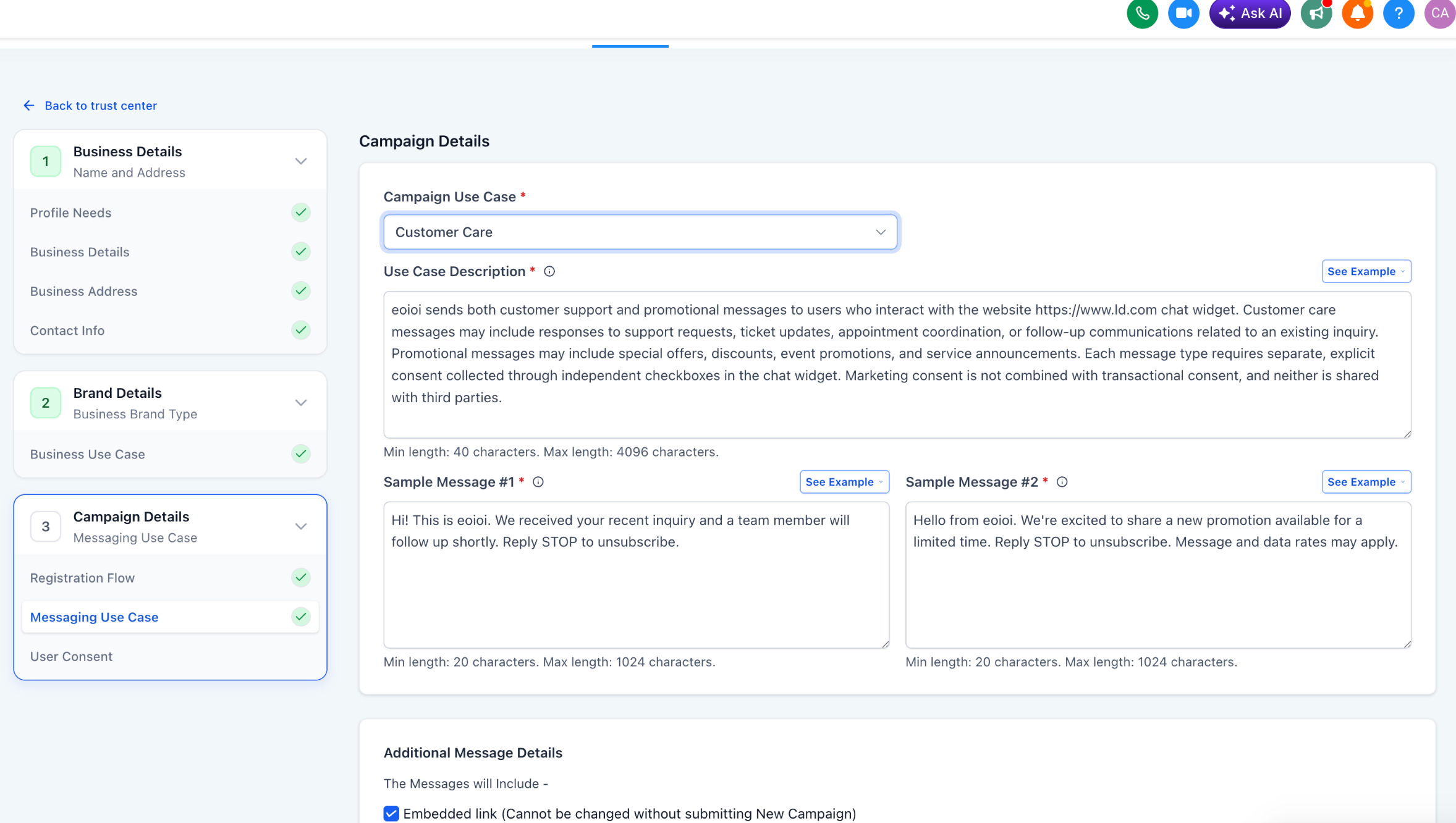
Sample Message #2 (Transactional/Informational)
Use this field for informational content such as appointment reminders, confirmations, status updates, and support follow-ups.
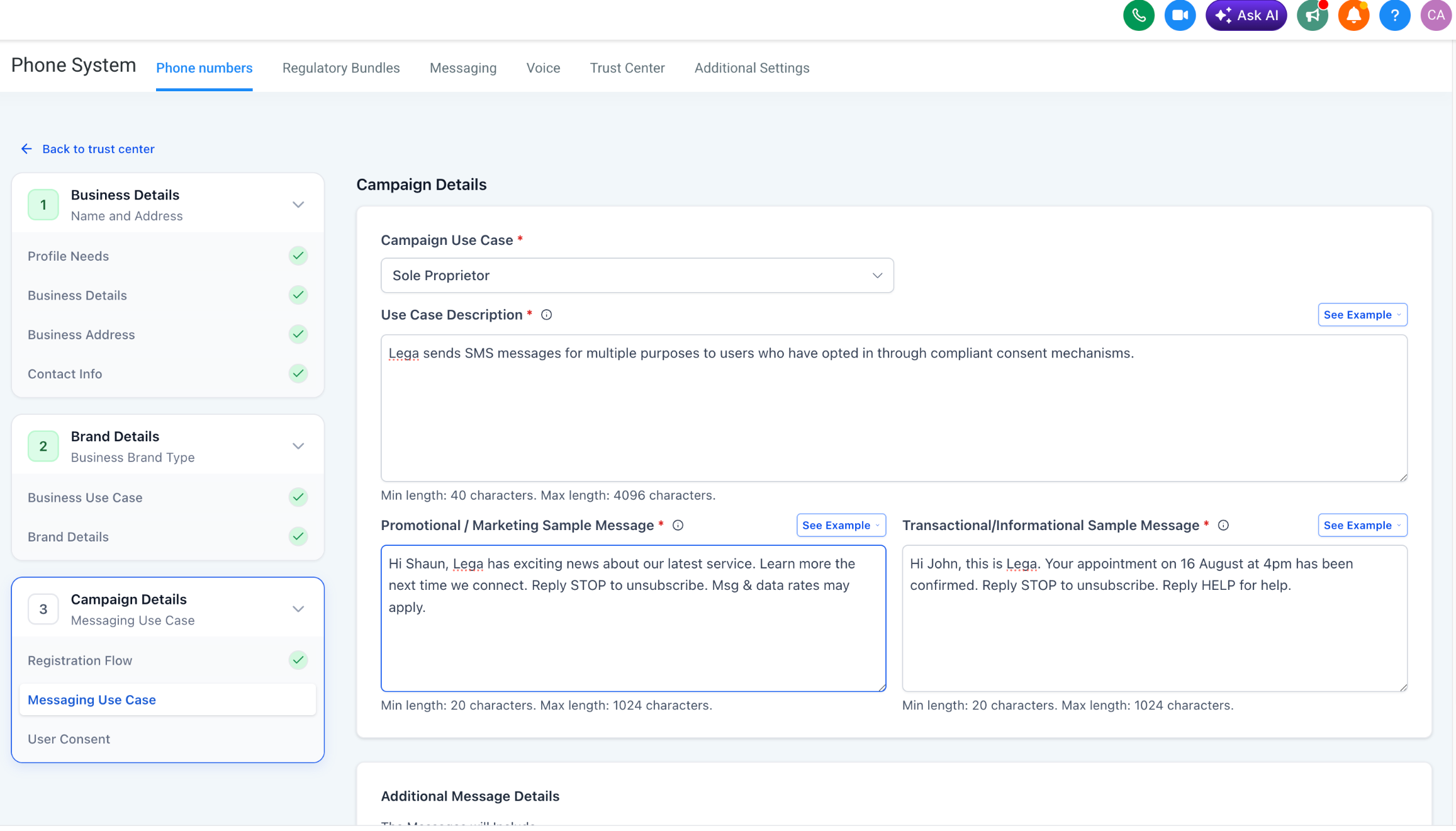
Both sample messages must:
- Include the lead’s name, your name (or staff name), your business name, and opt-out language (for example, “Reply STOP to unsubscribe”).
- Match the campaign use case and your use case description.
- Reflect real messages you will send.
Tips
- For mixed messaging, submit at least one promotional sample and one transactional sample (use each field as intended).
- Use the “See Example” option to view examples filtered to the required content type for each field.
- Do not include custom field tokens or values in sample messages.
Important: Do NOT including custom fields or values in the sample messages.
User Consent
Users must clearly and willingly agree to receive messages, and the consent should specify the type of messages being sent, such as marketing, transactional, or informational.
Ensure users are fully informed during the opt-in process. Clearly communicate:
- The type of messages they will receive.
- The expected frequency of the messages.
- Any associated costs, such as standard message and data rates.
Important: Brands cannot submit Campaigns using [company name] and will need to update their flows to have their own BRAND NAME rather than "the company" or "the business".

Brands cannot use SourCherry's demo numbers in their opt-in flows and campaigns or submit using SourCherry's sample number provided in guidance.
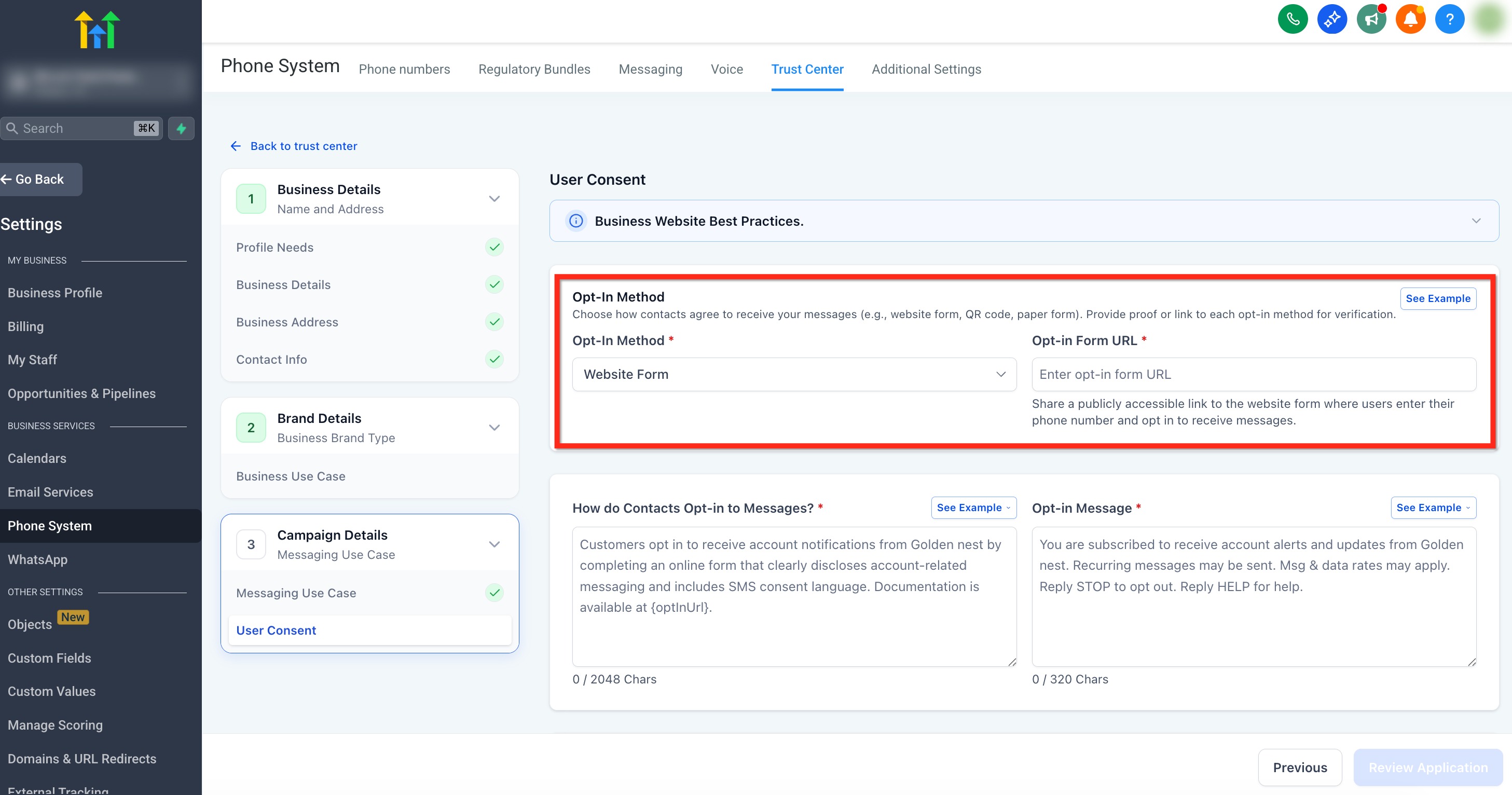
1. Opt In Method and Opt In Form URL
If consent is being obtained on the website, please provide the URL. If it’s verbally, provide the script with the above requirements. If it’s a keyword opt-in, please provide the image of how the keyword is being advertised to the end users with all the required disclaimers. If it’s over a paper form, please provide a picture of the form where we can see all the disclaimers and where the end user is providing their phone number.
Tip: If the checkbox is showing at the end of the survey, or behind an appointment form. Please include a hosted link to an image of the opt-in
For detailed list of all Opt-In methods refer to A2P 10DLC Campaign Approval Best Practices.
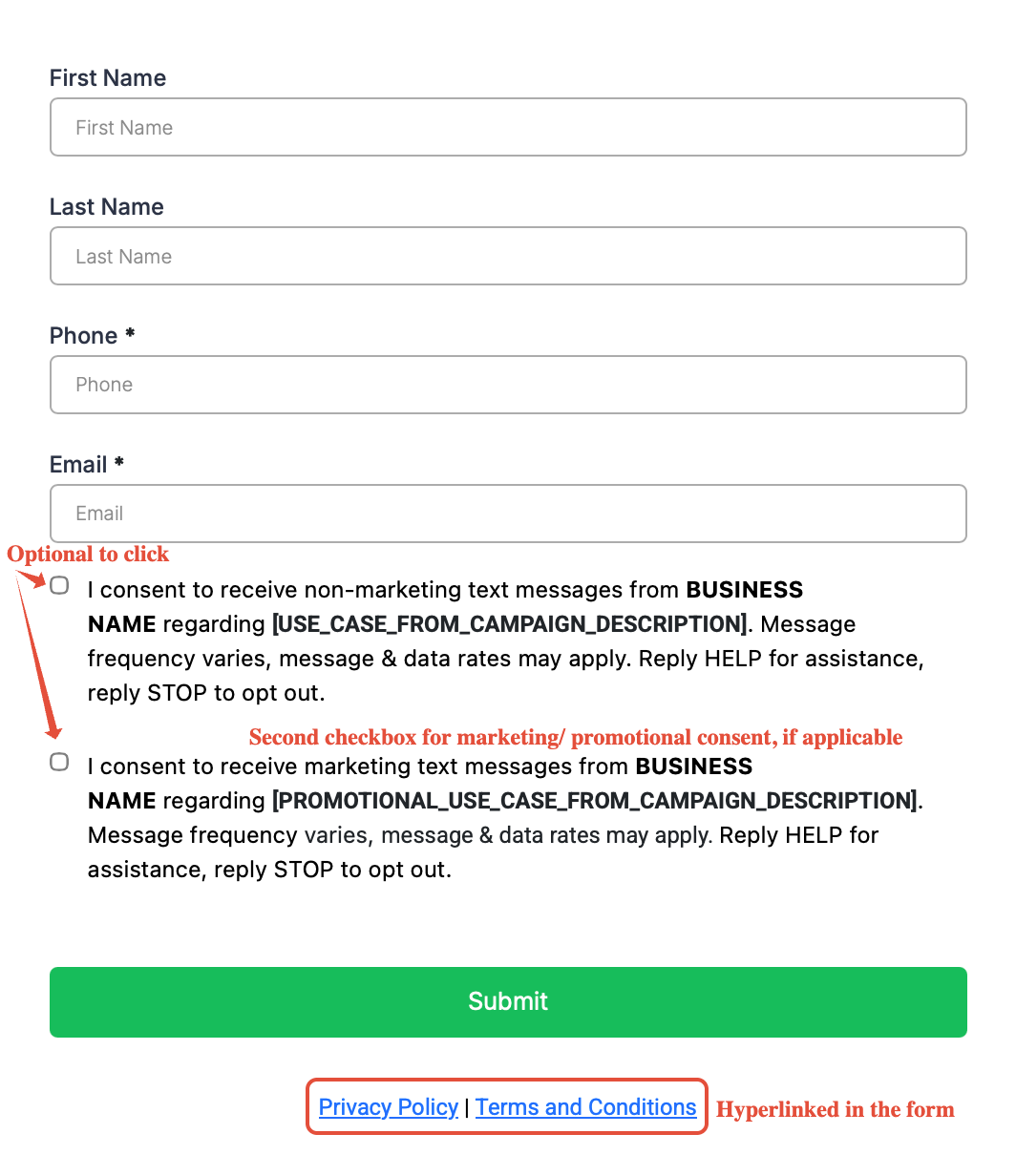
Example of Web Form Opt-In Flow
- Consent check boxes should be separated for both Marketing and Non-Marketing Messages.
- Consent check boxes cannot be pre-selected and should be optional when Phone Number is required.
- SMS notifications cannot be forced in the form. Meaning you cannot require BOTH consent and the phone number to proceed.
- Privacy Policy and TnC at footer.
For more details on best practices and examples for Web Form Opt-In requirements, see How to get your phone number A2P approved in 2026
 |
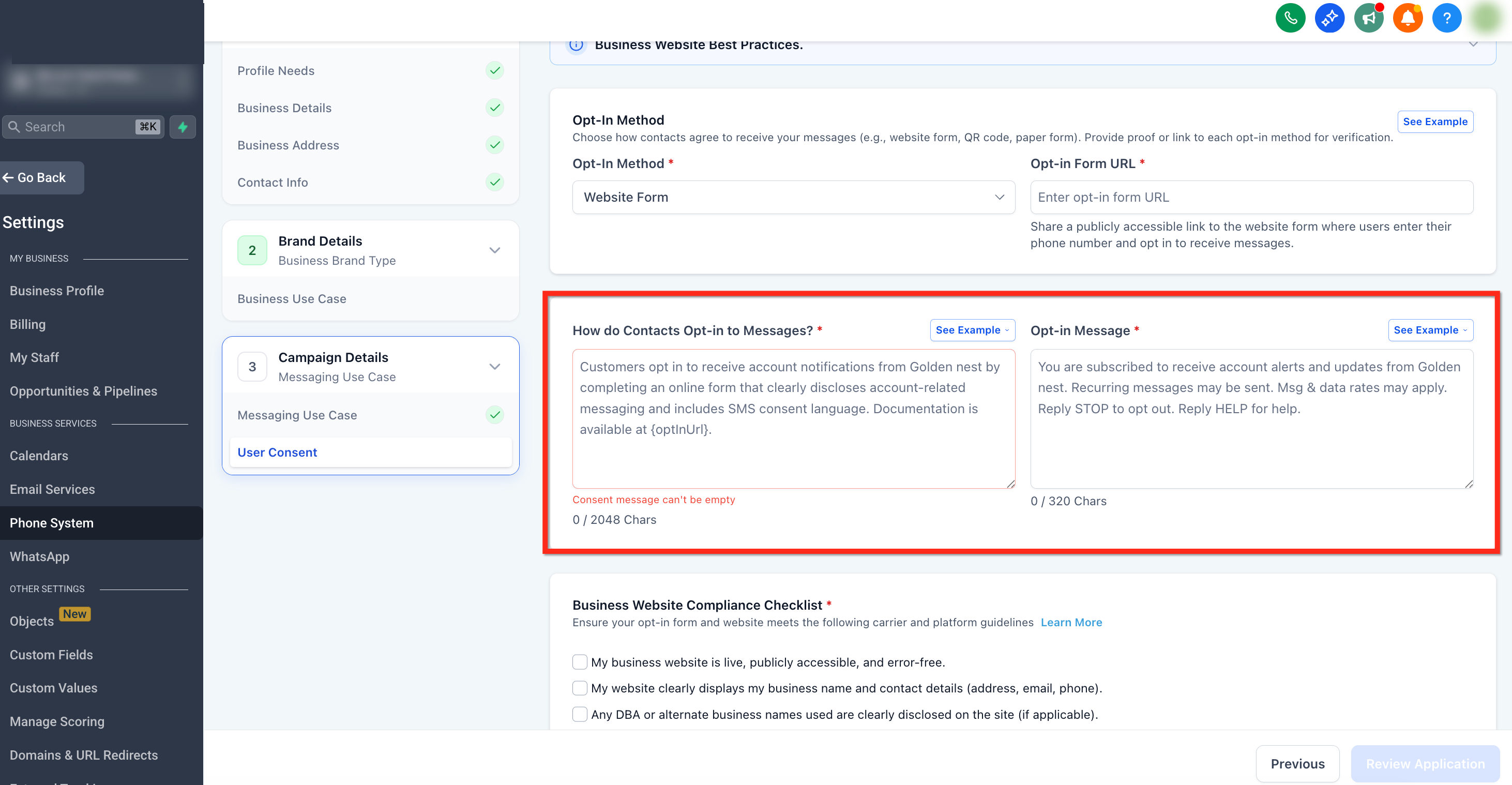
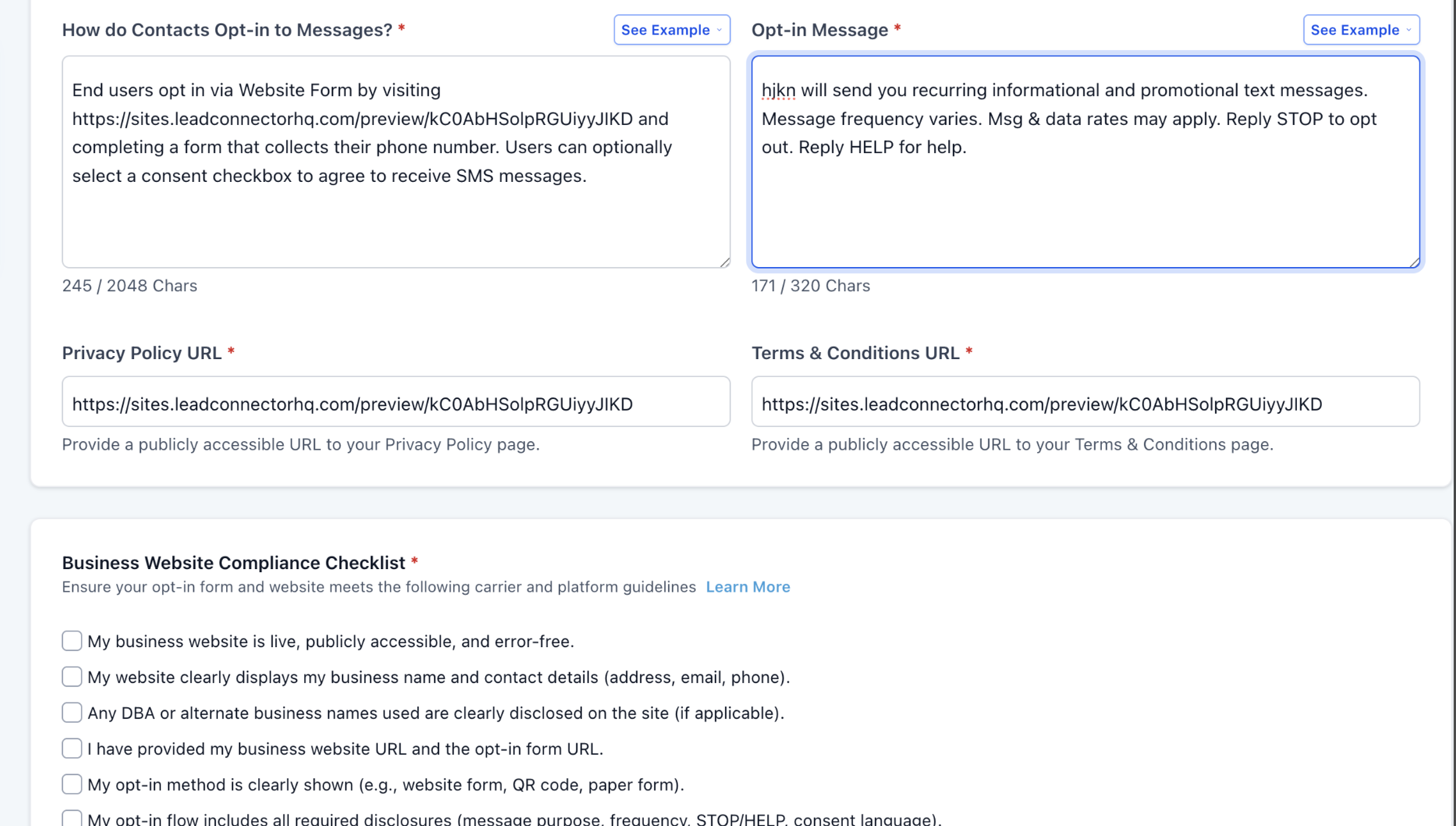
2. How do Contacts Opt-in to Messages?
How do Contacts Opt-in to Messages?
Explain how the customers are opting into receiving messages. Explain the flow that these users will go though. This must match your use case and your opt in message.
Example of How Contacts Opt-In to Messages
- "Customers opt in to receive account-related SMS notifications from Golden nest after being informed of the nature of the notifications and providing explicit consent during account setup or enrollment. Opt-out instructions are included in each message."
Click on See Example in the top right to check out examples for your use case.
Opt-In Message
It should not exceed 160 characters and must have the following:
- Program/company name
- Message frequency (must align with the frequency on the CTA and SMS Terms)
- Disclosure: Message and data rates may apply
- Customer care contact details: Reply HELP for help.
- Opt-out instructions: Reply STOP to opt-out.
Examples of Opt-In Messages
- "[Company name]: Thank you for signing up for updates! Msg freq varies. Msg&Data rates may apply. Reply HELP for help, STOP to cancel."
- "You have successfully opted in for messages from ABC Company. Reply STOP to unsubscribe"
Click on See Example in the top right to check out examples for your use case.
Privacy Policy URL and Terms & Conditions URL
These fields are now required for self-serve campaign registration.
- In the "Privacy Policy URL" field, enter the publicly accessible link to your business's Privacy Policy page.
- In the "Terms & Conditions URL" field, enter the publicly accessible link to your Terms & Conditions (or Terms of Service) page.
- Both fields appear directly below the "How do contacts Opt-in" and "Opt-in Message" fields in the self-serve campaign registration flow.
- If you do not have these URLs, consider registering through the prebuilt chat widget flow, which includes compliant Privacy Policy and Terms & Conditions automatically.
Tip: Your Privacy Policy must include the following paragraph to comply with carrier requirements:
"No mobile information will be shared with third parties/affiliates for marketing/promotional purposes. Information sharing to subcontractors in support services, such as customer service is permitted. All other use case categories exclude text messaging originator opt-in data and consent; this information will not be shared with any third parties."
Widget-First Campaign Use-Case Guidance
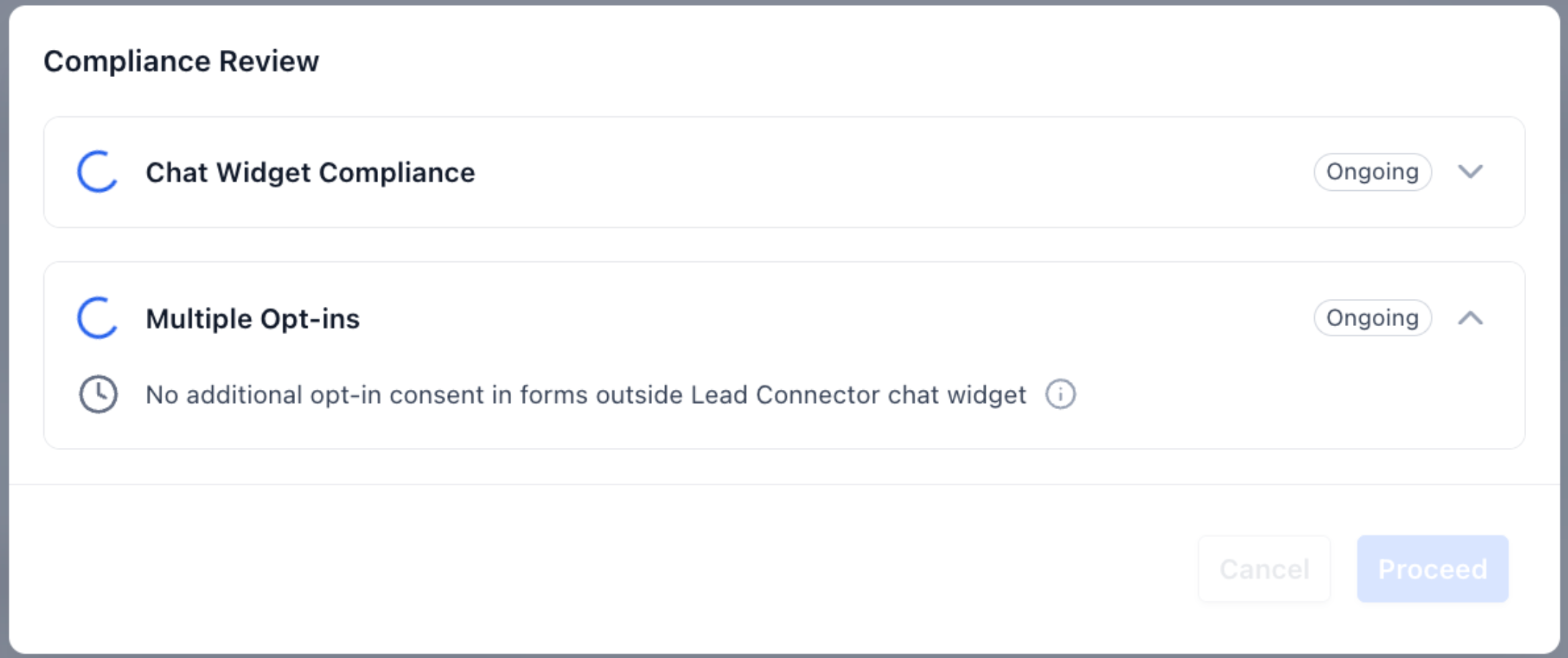
The pre-built Chat Widget-first registration flow uses guided use-case ordering to help reduce incorrect selections during campaign setup.
In this flow:
- Customer Care appears first
- Account Notification appears second
This guided order is intended to improve submission quality for chat-widget-based campaigns. For widget-first setup and compliance requirements, refer to the dedicated widget-first registration article.
Requirements and Best Practices
Consent Checkboxes
Both the consent checkboxes must be option, must not be pre-checked and must allow form submission even if the check boxes are not selected. You must execute the communication channels based on their selections
Make sure you have two checkboxes with the following exact messages:
- I consent to receive marketing text messages, about special offers, discounts, and service updates, from [BUSINESS NAME] at the phone number provided. Message frequency may vary. Message & data rates may apply. Text HELP for assistance, reply STOP to opt out.
- I consent to receive non-marketing text messages from [BUSINESS NAME] about [USE_CASE_FROM_CAMPAIGN_DESCRIPTION] Message frequency may vary, message & data rates may apply. Text HELP for assistance, reply STOP to opt out.
For more information on consent checkbox requirements and to see examples, click here.
Privacy Policy
Here are guidelines on the Privacy Policy:
- Find Keywords: Look for words like share, disclose, sell, affiliate, and third-party.
- Check Context: See if the sentence allows sharing or selling leads' information with others.
- Remove or Fix: Delete or reword any text that says leads' information is shared or sold.
- Confirm: Make sure the policy clearly states that you don’t share or sell leads' information.
- Must add this paragraph:
"No mobile information will be shared with third parties/affiliates for marketing/promotional purposes. Information sharing to subcontractors in support services, such as customer service is permitted. All other use case categories exclude text messaging originator opt-in data and consent; this information will not be shared with any third parties."
For more information on privacy policy requirements and to see examples, click here.
Terms of Service
Here are guidelines on the Terms of Service:
- Make sure the company name & logo is branded in the webpage header to ensure consistency.
- Provide publicly accessible terms of service URL.
- Must add these 6 bullet points:
- Program Name
- {Insert program description here; a brief description of the types of messages users can expect upon opting in.}
- You can cancel the SMS service at any time. Simply text "STOP" to the shortcode. Upon sending "STOP," we will confirm your unsubscribe status via SMS. Following this confirmation, you will no longer receive SMS messages from us. To rejoin, sign up as you did initially, and we will resume sending SMS messages to you.
- Carriers are not liable for delayed or undelivered messages.
- As always, message and data rates may apply for messages sent to you from us and to us from you. Message frequency varies. For questions about your text plan or data plan, contact your wireless provider.
- For privacy-related inquiries, please refer to our privacy policy: {link to privacy policy}.
- Program Name
For more information on privacy policy requirements and to see examples, click here.
Frequently Asked Questions
Q: What is changing?
Starting January 26, 2023, all new US A2P 10DLC Campaign registrations (Standard, Low volume standard, and Sole Proprietor 2.0) will be subject to a manual vetting process and be charged a one-time $15.75 campaign verification fee at the time of registration.
Q: Why is this change happening, and is this a SourCherry-specific requirement?
This is an industry-wide change to improve the Campaign Vetting process to reduce spam, fraud, and unwanted messaging and protect SMS as a trusted communications channel in the U.S. Every messaging provider who services A2P Campaigns must conduct this vetting.
Note: We are collecting the campaign verification fee and will pass that along without markup to our telecommunications partners. The cost is not levied by us directly.
Q: How do the new fees fit in with existing registration fees?
The below table details the existing registration fees and new registration fees:
Sole Prop | Low Volume Standard | Standard | |
Existing Fee | |||
Brand registration fee (one time) | $4.2 | $4.2 | $4.2 |
Monthly campaign fee (monthly recurring) | $2.1 | $1.5-$12 (depending on the use case type) | $1.5-$12 (depending on the use case type) |
New fee | |||
Campaign verification fee (one time) | $15.75 | $15.75 | $15.75 |
Q: How will this affect Campaign Vetting?
With this new vetting process, a newly submitted Campaign will be put in a “Pending” state until it has been vetted and approved in the manual vetting process. Customers can only send compliant messages on the A2P route once the Campaign is fully approved.
Q: What will determine whether a Campaign passes or fails this vetting?
To help ensure your Campaigns are approved in this vetting process, please follow these best practices in A2P Campaign Approval Best Practices.
Q: Will I get my $15.75 back if my Campaign fails to vet?
No, the $15.75 Campaign vetting fee is non-refundable. Telephony System is working on an expedited pre-screening process to catch issues before the Campaign is sent for external vetting. We will share more news on this once we have an update.
Q: Are existing Campaigns affected by this change?
At this time, only new Campaigns are affected by this change. If this changes for existing Campaigns, we will communicate any new vetting requirements.
Q: Are monthly recurring fees affected by this change?
No, recurring fees remain the same and are based on the campaign use case.
Q: Do this new vetting process and $15.75 fee also extend to “post-approval” Campaigns like Agents/Franchise and Proxy? If yes, does it occur before the carrier approval, after the carrier approval, or instead of the carrier approval?
Yes, it applies to post-approval Campaigns. It happens after carrier approval.
Q: What can I do if my campaigns are rejected?
Contact the support team here so our LC phone specialist team will help you fix your Campaign registration / re-submit a new Campaign. There are no charges for a resubmission of a rejected campaign.
Q: Are there exceptions to these changes?
Toll-Free messaging remains an attractive alternative to A2P 10DLC. Toll-Free messaging does require a verification process but does not rely on Brand and Campaign registration.
Q: Does SourCherry add a markup (like 1.05×) to A2P fees?
No. All A2P fees (TCR registration/vetting, monthly campaign charges, and carrier per-message rates) are passed through via LC Phone with no SourCherry markup. Refer to Understanding A2P 10DLC Messaging Fees for the current breakdown.