
TABLE OF CONTENTS
- Key Benefits of Top Browsers and Client IP Analytics
- Top Browsers Breakdown
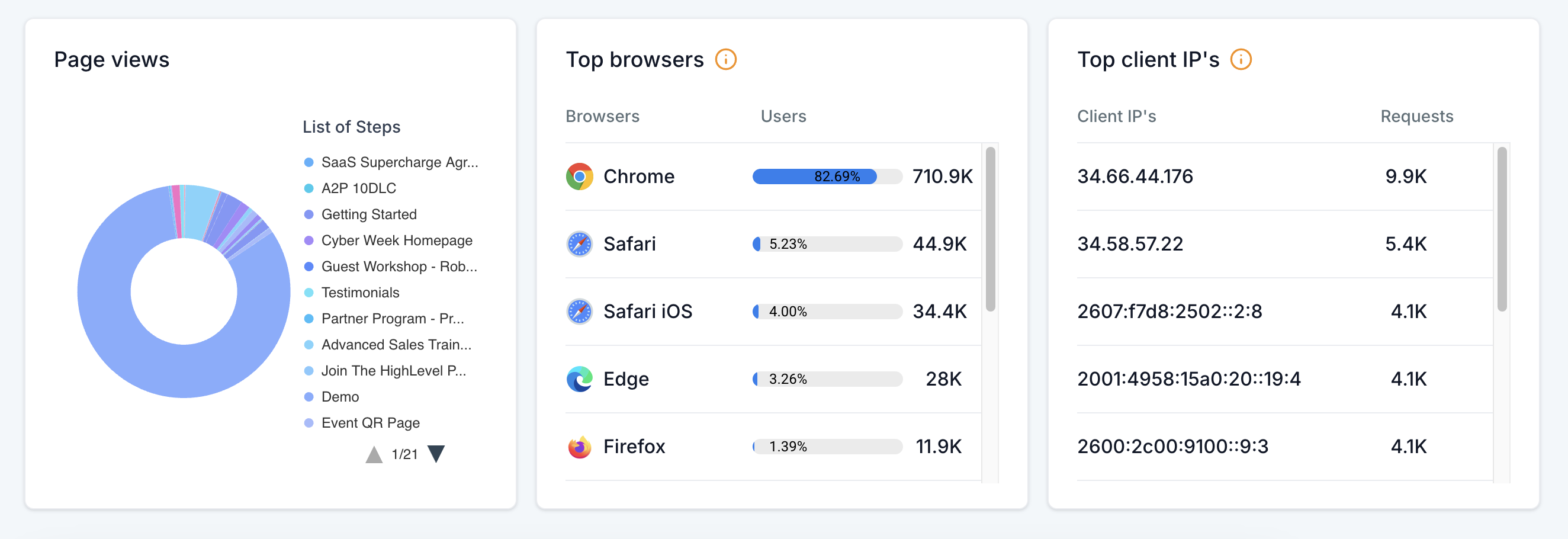
- View the top 10 browsers your visitors use (e.g., Chrome, Firefox, Safari, Edge).
- Client IP Tracking
- Identify the top 10 IP addresses accessing your site.
- How to Use Top Browsers and Client IPs Analytics
- Why This Feature is Important
- What’s Next?
- Frequently Asked Questions
Understanding your website traffic is key to optimizing performance and security. With the latest update to the Funnels & Websites Analytics Dashboard, you can now see the Top Browsers and Top Client IPs accessing your site. This feature, available in the Page Views section, provides valuable insights into how visitors engage with your Funnels and Websites, helping you tailor your site for better performance and detect unusual traffic patterns.
Key Benefits of Top Browsers and Client IP Analytics
Gain deeper insights into visitor behavior with these new metrics in Funnel and Website Analytics:
Top Browsers Breakdown
View the top 10 browsers your visitors use (e.g., Chrome, Firefox, Safari, Edge).
Analyze browser usage trends with percentage breakdowns.
Optimize your site for the most popular browsers and prevent compatibility issues.
Client IP Tracking
Identify the top 10 IP addresses accessing your site.
Detect unusual traffic activity—identify potential bots or frequent visitors.
Improve security by monitoring high-activity IPs.
How to Use Top Browsers and Client IPs Analytics
Follow these steps to access and analyze browser and IP data in your Funnel and Website Analytics:
Log into your account and navigate to the Sites section.
Click on the Analytics tab.
Use the dropdown menu to select either Funnels, Websites, or both.
Choose a date range (e.g., last week, last month, custom range).
Scroll down to view insights on Top Browsers and Top Client IPs.
Analyze the data to make informed decisions about site optimization and security.
Why This Feature is Important
Enhanced Optimization – Ensure your site runs smoothly on the most-used browsers.
Security Monitoring – Spot suspicious IP activity, such as repeated visits from a single address.
Data-Driven Decisions – Adjust your content and technical settings based on real visitor behavior.
What’s Next?
Stay tuned for future enhancements to the Analytics Dashboard:
Geolocation Heatmaps – View the geographic distribution of your visitors.
Device Analytics – Understand the ratio of mobile vs. desktop users to improve SEO and UX.
By leveraging these insights, you can optimize your Funnels and Websites for a better user experience while keeping an eye on security threats.
Frequently Asked Questions
Q: Where can I find the new Top Browsers and Client IPs data?
A: Navigate to the Sites > Analytics section and look under the Page Views section.
Q: How can I use this data to improve my site?
A: Use browser insights to ensure compatibility with the most-used browsers. Monitor client IPs for unusual activity that may indicate bots or spam traffic.
Q: Can I track historical browser and IP data?
A: Yes! Simply select a custom date range to analyze trends over time.
Q: What should I do if I notice suspicious activity from a specific IP?
A: If you detect an IP making excessive requests, consider blocking it or setting up bot protection measures.