
TABLE OF CONTENTS
- Introduction
- Table of Contents
- Integration Flow Diagram
- 1. Requirements
- 2. Initial Setup
- 3. Live Shipping Rates Implementation
- 4. Order Syncing and Fulfillment
- 5. Disconnection and Uninstallation
- Conclusion
Introduction
This guide provides a comprehensive walkthrough for developing a shipping carrier integration with SourCherry's marketplace. A custom shipping carrier integration allows businesses using SourCherry to connect their preferred shipping providers, offer real-time shipping rates during checkout, automate order fulfillment workflows, and provide accurate tracking information directly to customers. This enhances the native e-commerce capabilities within SourCherry.
Key benefits of implementing a custom shipping carrier integration include:
- Flexibility: Connect with any shipping carrier that provides an API, beyond built-in options.
- Accurate Rates: Display real-time, accurate shipping costs from your specific carrier accounts during checkout.
- Automated Fulfillment: Reduce manual effort by automatically creating shipping labels and triggering shipments with your carrier.
- Seamless Tracking: Keep customers informed by syncing tracking information from the carrier back into SourCherry orders.
- Integrated Experience: Manage shipping aspects directly within the SourCherry ecosystem.
Building this integration involves backend development to handle API calls and webhooks, frontend development for user configuration (often via a Custom Page), and secure management of credentials and data flow between SourCherry, your service, and the carrier's API. By following this guide, you can build a robust integration that streamlines shipping operations for SourCherry users.
Integration Flow Diagram
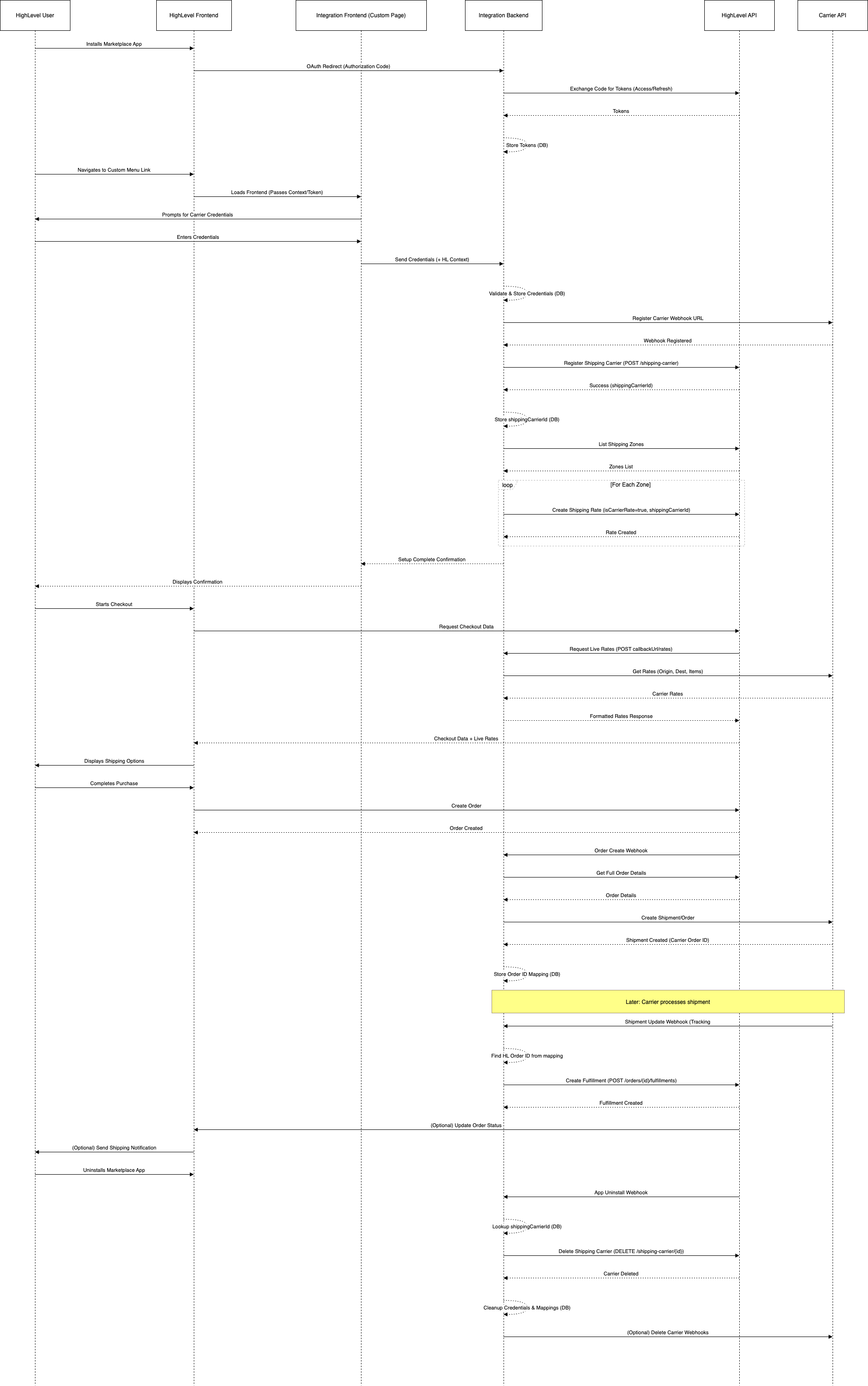
1. Requirements
Technical Knowledge
- Basic backend development knowledge (e.g., Node.js, Python, etc.).
- Understanding of REST APIs, webhooks, and OAuth 2.0 authorization flow.
Backend Service
- A backend service capable of:
- Handling OAuth redirection from SourCherry.
- Receiving and processing webhooks from both SourCherry (e.g., order events) and the custom shipping carrier (e.g., shipping updates).
- Making API calls to both SourCherry and the custom carrier's API.
- Serving the frontend UI (if not hosted separately).
Database
- A database to securely store:
- SourCherry OAuth tokens (access and refresh tokens) associated with location IDs.
- Custom shipping carrier credentials (e.g., API keys, secrets) provided by the user, linked to the SourCherry location.
- Mapping information between SourCherry entities (like orders) and carrier entities.
Frontend
- A simple frontend application (can be implemented as a SourCherry Custom Page) that allows users to:
- Initiate the connection process.
- Input and save their shipping carrier API credentials.
- Manage connection settings (e.g., enable/disable features).
APIs
- Your backend service will need to implement several API endpoints:
- OAuth Redirect URI: Handles the callback from SourCherry after app authorization.
- SourCherry Webhook Listener: Receives webhooks from SourCherry (e.g.,
OrderCreate,OrderStatusUpdate). - Carrier Credential Management: APIs to save/update/delete carrier credentials entered via the frontend.
- Carrier Webhook Listener: Receives webhooks from the custom shipping carrier.
- Live Rates Callback: An endpoint SourCherry calls to fetch live shipping rates during checkout.
2. Initial Setup
Create Marketplace App
- Follow the SourCherry documentation to create a new Marketplace application: SourCherry Authorization Documentation
Configure App Settings
- App Type: Set the application type to Sub-Account. This allows installation on specific location accounts.
- Redirect URI: Set this to the URL of your backend service endpoint designated to handle the OAuth callback (e.g.,
https://your-backend.com/oauth/callback). - Webhook URL: Set this to the URL of your backend service endpoint designated to receive webhooks from SourCherry (e.g.,
https://your-backend.com/webhooks/SourCherry). EnsureOrderCreateandOrderStatusUpdatewebhooks are enabled in the app settings.
Required Scopes
- Your application will need the following scopes to manage shipping and orders. Refer to the scopes documentation for the exact scope names: SourCherry Scopes Documentation
orders.readonlyorders.writeshipping.readonlyshipping.write
Frontend UI (Custom Page)
- Develop a frontend interface where users can enter their specific shipping carrier credentials (API Key, Secret, Account ID, etc.).
- This UI should be embedded within SourCherry using a Custom Menu Link pointing to your hosted frontend page or an endpoint serving the UI.
Handling User Context
- Your frontend and backend need to identify the SourCherry location the user is currently interacting with. Use the context provided by SourCherry when loading your custom page/menu link.
- Refer to the documentation on User Context: User Context in Marketplace Apps
- Typically, this involves parsing a token (like a JWT or an encrypted payload) passed as a query parameter when SourCherry redirects to your frontend/backend. Decrypt/validate this token using a shared secret provided during app setup to get the
locationId.
Backend Example (Node.js/Express):
// Example using crypto-js for AES decryption
const CryptoJS = require('crypto-js')

function decryptGhlUserData(encryptedData, sharedSecret) {
  try {
    const bytes = CryptoJS.AES.decrypt(encryptedData, sharedSecret)
    const decryptedData = bytes.toString(CryptoJS.enc.Utf8)
    return JSON.parse(decryptedData)
  } catch (error) {
    console.error('Decryption failed:', error)
    throw new Error('Failed to decrypt or parse user data')
  }
}

// Example Express middleware/route handler
app.post('/your-context-endpoint', (req, res) => {
  try {
    // Assuming encrypted data is passed in the request body
    const { encryptedContextData } = req.body
    const sharedSecret = process.env.GHL_APP_SHARED_SECRET // Load your shared secret securely

    if (!encryptedContextData || !sharedSecret) {
      return res.status(400).json({ error: 'Missing data or configuration' })
    }

    const userData = decryptGhlUserData(encryptedContextData, sharedSecret)
    console.log('Decrypted User Context:', userData)
    // Now you have access to userData.locationId, userData.userId, etc.
    // Proceed with your logic...
    res.json({ success: true, locationId: userData.locationId })
  } catch (error) {
    res.status(500).json({ error: error.message || 'Internal Server Error' })
  }
})
Frontend Example (Custom Page JavaScript):
// Function to request and potentially decrypt user context data
async function getUserContext() {
  return new Promise((resolve, reject) => {
    const timeout = setTimeout(() => {
      reject(new Error('Timeout waiting for user context response'))
      window.removeEventListener('message', messageHandler)
    }, 5000) // 5-second timeout

    const messageHandler = (event) => {
      // Optional: Add origin check for security
      // if (event.origin !== 'expected_SourCherry_origin') return;

      if (event.data && event.data.message === 'REQUEST_USER_DATA_RESPONSE') {
        clearTimeout(timeout)
        window.removeEventListener('message', messageHandler)
        console.log('Received encrypted context from SourCherry:', event.data.payload)
        // Send event.data.payload to your backend for decryption
        // fetch('/your-context-endpoint', { method: 'POST', ... body: { encryptedContextData: event.data.payload }})
        //   .then(response => response.json())
        //   .then(decryptedData => resolve(decryptedData))
        //   .catch(error => reject(error));

        // For demonstration, assuming payload is the decrypted context (or you handle decryption client-side IF safe)
        resolve(event.data.payload)
      }
    }

    window.addEventListener('message', messageHandler)
    // Request the data from the parent SourCherry window
    window.parent.postMessage({ message: 'REQUEST_USER_DATA' }, '*') // Use a specific target origin in production
  })
}

// Example usage:
getUserContext()
  .then((context) => {
    console.log('User Context:', context)
    // Use context.locationId, context.userId etc.
  })
  .catch((error) => {
    console.error('Failed to get user context:', error)
  })
Carrier Credential Handling
Receive Credentials: Get the carrier API key, secret, etc., from the user via your frontend UI.
Associate with Location: Store these credentials securely in your database, linking them to the
locationIdobtained from the user context.Validate Credentials: Make a test API call to the carrier's API using the provided credentials to ensure they are valid. Provide feedback to the user.
Frontend Example (Saving Credentials):
async function saveCarrierCredentials(locationId, apiKey, apiSecret) {
  try {
    const response = await fetch('/your-backend-api/carrier/credentials', {
      // Your backend endpoint
      method: 'POST',
      headers: {
        'Content-Type': 'application/json'
        // Include authentication if needed (e.g., JWT)
      },
      body: JSON.stringify({
        locationId: locationId, // Send context if needed by backend
        apiKey: apiKey,
        apiSecret: apiSecret
      })
    })

    if (!response.ok) {
      const errorData = await response.json()
      throw new Error(errorData.message || `HTTP error! status: ${response.status}`)
    }

    const result = await response.json()
    console.log('Credentials saved successfully:', result)
    // Update UI (e.g., show success message)
    return result
  } catch (error) {
    console.error('Failed to save carrier credentials:', error)
    // Update UI (e.g., show error message)
    throw error
  }
}

// Example form submission handler
document.getElementById('credential-form').addEventListener('submit', async (event) => {
  event.preventDefault()
  const apiKey = document.getElementById('api-key').value
  const apiSecret = document.getElementById('api-secret').value
  const locationId = 'USER_LOCATION_ID' // Get this from user context

  try {
    await saveCarrierCredentials(locationId, apiKey, apiSecret)
    alert('Credentials Saved!')
  } catch (error) {
    alert(`Error saving credentials: ${error.message}`)
  }
})
Setup Carrier Webhooks: Use the validated carrier credentials to make API calls to the carrier's system to register your backend's carrier webhook listener URL (e.g.,
https://your-backend.com/webhooks/carrier). This allows the carrier to notify your service about shipping updates (like tracking number generation).
3. Live Shipping Rates Implementation
To allow SourCherry checkout to display real-time shipping rates from your custom carrier, you need to register your service as a shipping carrier within SourCherry.
Register Shipping Carrier in SourCherry
- Your backend service needs to make a POST request to the SourCherry API endpoint responsible for creating shipping carriers. This endpoint is typically associated with the Store/Payments microservice. The endpoint is
POST /shipping-carrier. - The request body should include the location context (
altId,altType) and details about your carrier integration.
Example Request:
POST /shipping-carrier HTTP/1.1
Host: <SourCherry-api-domain>
Authorization: Bearer <location_access_token>
Content-Type: application/json

{
  "altId": "LOCATION_ID_HERE", // The location ID obtained from user context
  "altType": "location",
  "name": "Your Custom Carrier Name", // e.g., "My Awesome Shipping"
  "callbackUrl": "https://your-backend.com/rates" // Your backend endpoint for live rates
}name: The name displayed to the user in SourCherry shipping settings.callbackUrl: The base URL where SourCherry will send POST requests to fetch live rates during checkout. SourCherry will append/ratesto this URL. So, if you providehttps://your-backend.com/shipping, SourCherry will callhttps://your-backend.com/shipping/rates. In the example above, the final URL called will behttps://your-backend.com/rates/rates, so adjust yourcallbackUrlaccordingly (e.g., justhttps://your-backend.comif your endpoint is/rates). Correction based on user prompt: The prompt implies the full URL including/ratesshould be provided incallbackUrl. Let's assume the prompt is correct: SetcallbackUrltohttps://your-backend.com/rates.- Response: A successful response will contain the details of the created carrier, including a unique
_id(let's call itshippingCarrierId). Store thisshippingCarrierIdin your database, associated with the location and carrier credentials.
{
  "data": {
    "_id": "SHIPPING_CARRIER_ID_HERE", // Store this ID
    "altId": "LOCATION_ID_HERE",
    "altType": "location",
    "name": "Your Custom Carrier Name",
    "callbackUrl": "https://your-backend.com/rates",
    "marketplaceAppId": "YOUR_MARKETPLACE_APP_ID",
    "createdAt": "...",
    "updatedAt": "..."
  },
  "status": true
}
Implement Live Rates Callback
- Your backend must implement the endpoint specified in the
callbackUrl(e.g.,POST /rates). - SourCherry will send a
POSTrequest to this endpoint during checkout with details of the cart contents and destination address.
Example Request Body Received by Your Backend (POST /rates):
{
  "rate": {
    "altId": "LOCATION_ID_HERE",
    "altType": "location",
    "origin": {
      "name": "Store Owner Name",
      "companyName": "Store Name",
      "address1": "123 Origin St",
      "address2": "Suite 100",
      "city": "Origin City",
      "state": "CA",
      "zip": "90210",
      "country": "US",
      "phone": "5551112222",
      "email": "store@example.com"
    },
    "destination": {
      "name": "Customer Name",
      "companyName": null,
      "address1": "456 Destination Ave",
      "address2": null,
      "city": "Destination City",
      "state": "NY",
      "zip": "10001",
      "country": "US",
      "phone": "5553334444",
      "email": "customer@example.com"
    },
    "items": [
      {
        "name": "Product A",
        "sku": "SKU123",
        "quantity": 2,
        "grams": 500, // Weight per item
        "unitPrice": 25.0,
        "totalPrice": 50.0, // quantity * unitPrice
        "productId": "HL_PRODUCT_ID_1",
        "priceId": "HL_PRICE_ID_1"
      },
      {
        "name": "Product B",
        "sku": "SKU456",
        "quantity": 1,
        "grams": 1200,
        "unitPrice": 100.0,
        "totalPrice": 100.0,
        "productId": "HL_PRODUCT_ID_2",
        "priceId": "HL_PRICE_ID_2"
      }
    ],
    "currency": "USD"
  }
}- Your Backend Logic:
- Parse the request body.
- Retrieve the carrier credentials associated with the
altId(locationId) from your database. - Transform the SourCherry rate request payload into the format required by your custom carrier's API.
- Call the carrier's API to get live shipping rates.
- Transform the carrier's response into the format expected by SourCherry.
- Example Response Sent by Your Backend:
{
  "rates": [
    {
      "serviceName": "Standard Ground", // Name of the shipping service
      "amount": 15.5, // Cost of the service
      "currency": "USD", // Currency code
      "estimatedDays": 5 // Estimated delivery days (optional)
    },
    {
      "serviceName": "Express Overnight",
      "amount": 45.0,
      "currency": "USD",
      "estimatedDays": 1
    }
  ]
}
Configure Shipping Rates in SourCherry Zones
After successfully registering the shipping carrier, your integration (or the user manually) needs to add shipping rates based on this carrier to the relevant Shipping Zones within SourCherry Store settings.
Backend Automation:
Use the SourCherry API to list existing Shipping Zones for the location. The endpoint is
GET /shipping-zone.Example Request (
GET /shipping-zone):GET /shipping-zone?altId=LOCATION_ID_HERE&altType=location HTTP/1.1 Host: <SourCherry-api-domain> Authorization: Bearer <location_access_token>
For each relevant zone returned by the above call, use the SourCherry API to create a new Shipping Rate (
POST /shipping-zones/{zoneId}/rates- endpoint inferred).- In the request body for creating the rate:
- Set
isCarrierRatetotrue. - Provide the
shippingCarrierIdobtained during carrier registration. - Set a placeholder
amount(e.g., 0) as the actual rate will be fetched live via the callback. - Set
name(e.g., "My Awesome Shipping - Live Rates"). - Specify
altId,altType.
- Set
- In the request body for creating the rate:
Example Request Body (POST /shipping-zones/{zoneId}/rates):
{
  "altId": "LOCATION_ID_HERE",
  "altType": "location",
  "name": "My Awesome Shipping - Live Rates", // Name shown to user
  "currency": "USD", // Or the location's currency
  "amount": 0, // Placeholder, actual rate fetched live
  "conditionType": "NONE", // Or based on weight/price if needed, though usually NONE for carrier rates
  "isCarrierRate": true,
  "shippingCarrierId": "SHIPPING_CARRIER_ID_HERE" // The ID received when registering the carrier
}
4. Order Syncing and Fulfillment
This section describes how to sync orders to your carrier and automate fulfillment updates back into SourCherry.
Enable Order Webhooks
- Ensure the
OrderCreateandOrderStatusUpdatewebhooks are enabled in your SourCherry Marketplace App configuration settings. Point them to your backend's SourCherry webhook listener endpoint.
Handling Order Creation Webhook
Receive Webhook: Your backend receives a POST request from SourCherry when an order is created or its status changes (specifically looking for newly completed orders relevant for shipping).
Validate: Verify the webhook signature/authenticity if applicable.
Process:
- Check if the order status is appropriate for shipping (e.g.,
Completed,Paid). - Check if the order requires shipping (contains physical products).
- Retrieve the full order details using the SourCherry API (
GET /orders/{orderId}). - Retrieve the associated carrier credentials from your database using the
locationId.
- Check if the order status is appropriate for shipping (e.g.,
Backend Example (Node.js/Express):
// Example Express endpoint for SourCherry webhooks
app.post('/webhooks/SourCherry', async (req, res) => {
  try {
    // 1. TODO: Validate webhook signature (important for security)
    // const signature = req.headers['webhook-signature']; // Example header
    // const isValid = validateSignature(req.rawBody, signature, GHL_WEBHOOK_SECRET);
    // if (!isValid) return res.status(401).send('Invalid signature');

    const { type, locationId, orderId, status } = req.body // Adjust based on actual webhook payload structure

    console.log(`Received webhook: Type=${type}, LocationId=${locationId}, OrderId=${orderId}, Status=${status}`)

    // 2. Process only relevant events (e.g., completed orders)
    if ((type === 'OrderCreate' || type === 'OrderStatusUpdate') && orderId && status === 'completed') {
      console.log(`Processing order ${orderId} for location ${locationId}`)
      await processOrderForShipping(locationId, orderId)
    } else {
      console.log(`Skipping webhook type: ${type} or status: ${status}`)
    }

    res.status(200).send('Webhook received successfully')
  } catch (error) {
    console.error('Error processing SourCherry webhook:', error)
    // Respond with 5xx error but don't reveal internal details
    res.status(500).send('Internal Server Error')
  }
})

async function processOrderForShipping(locationId, orderId) {
  try {
    // 3. Retrieve full order details from SourCherry API
    // const orderDetails = await SourCherryApiClient.getOrder(locationId, orderId);
    // Example: const orderDetails = { requiresShipping: true, items: [...] }; // Mock

    // Check if order actually needs shipping
    // if (!orderDetails || !orderDetails.requiresShipping) {
    //   console.log(`Order ${orderId} does not require shipping.`);
    //   return;
    // }

    // 4. Retrieve carrier credentials for the location from your DB
    // const credentials = await database.getCarrierCredentials(locationId);
    // if (!credentials) throw new Error(`Credentials not found for location ${locationId}`);

    // 5. Transform SourCherry order data to carrier's API format
    // const carrierPayload = transformOrderForCarrier(orderDetails);

    // 6. Call carrier API to create shipment/order
    // const carrierResponse = await carrierApiClient.createShipment(credentials, carrierPayload);
    // const carrierOrderId = carrierResponse.id;

    // 7. Store mapping in your DB
    // await database.storeOrderMapping(locationId, orderId, carrierOrderId);

    console.log(`Successfully created shipment with carrier for order ${orderId}. Carrier ID: ${carrierOrderId}`)
  } catch (error) {
    console.error(`Failed to process order ${orderId} for shipping:`, error)
    // TODO: Implement retry logic or error notification system
  }
}
Create Order with Carrier:
- Transform the SourCherry order data into the format required by your carrier's "create order" or "create shipment" API endpoint.
- Call the carrier's API to create the order/shipment.
- Store the mapping between the SourCherry
orderIdand the carrier's order/shipment ID in your database.
Handling Carrier Shipping Updates
Receive Webhook: Your backend's carrier webhook listener receives a notification from the shipping carrier when a shipment status changes (e.g., label printed, tracking number generated, shipped, delivered).
Validate: Verify the webhook's authenticity based on the carrier's mechanism (e.g., signature).
Process:
- Parse the webhook data to extract the carrier's order/shipment ID and the new shipping information (tracking number, tracking URL, status).
- Use the carrier ID to look up the corresponding SourCherry
orderIdandlocationIdfrom your database mapping.
Backend Example (Node.js/Express):
// Example Express endpoint for Carrier webhooks
app.post('/webhooks/carrier', async (req, res) => {
  try {
    // 1. TODO: Validate webhook authenticity (specific to the carrier)
    // const isValid = validateCarrierSignature(req);
    // if (!isValid) return res.status(401).send('Invalid signature');

    const carrierWebhookData = req.body
    console.log('Received carrier webhook:', JSON.stringify(carrierWebhookData))

    // 2. Parse carrier data (adjust keys based on actual payload)
    const carrierOrderId = carrierWebhookData.orderReference // Or shipmentId, etc.
    const trackingNumber = carrierWebhookData.tracking?.number
    const trackingUrl = carrierWebhookData.tracking?.url
    const shippingStatus = carrierWebhookData.status // e.g., 'SHIPPED', 'LABEL_CREATED'

    // 3. Check if we have necessary data (especially tracking number for fulfillment)
    if (!carrierOrderId || !trackingNumber) {
      console.log('Carrier webhook missing order reference or tracking number. Skipping.')
      return res.status(200).send('Webhook received, but no action needed yet.')
    }

    // 4. Find corresponding SourCherry order info from DB mapping
    // const mapping = await database.findMappingByCarrierId(carrierOrderId);
    // if (!mapping) {
    //   console.warn(`Received carrier update for unknown order reference: ${carrierOrderId}`);
    //   return res.status(404).send('Mapping not found'); // Or 200 to prevent carrier retries
    // }
    // const { SourCherryOrderId, locationId } = mapping;
    // Mock:
    const SourCherryOrderId = 'HL_ORDER_ID_123'
    const locationId = 'LOCATION_ID_XYZ'

    // 5. Create fulfillment in SourCherry if applicable (e.g., status is SHIPPED)
    if (shippingStatus === 'SHIPPED' || shippingStatus === 'LABEL_CREATED') {
      // Adjust condition as needed
      console.log(`Triggering fulfillment for SourCherry Order ${SourCherryOrderId}`)
      await createSourCherryFulfillment(locationId, SourCherryOrderId, trackingNumber, trackingUrl)
    } else {
      console.log(`Carrier status ${shippingStatus} doesn't require fulfillment action yet.`)
    }

    res.status(200).send('Carrier webhook processed successfully')
  } catch (error) {
    console.error('Error processing carrier webhook:', error)
    res.status(500).send('Internal Server Error')
  }
})

async function createSourCherryFulfillment(locationId, orderId, trackingNumber, trackingUrl) {
  try {
    // Fetch order details to get line items and price IDs if needed
    // const orderDetails = await SourCherryApiClient.getOrder(locationId, orderId);
    // const itemsToFulfill = orderDetails.items.map(item => ({ priceId: item.price._id, qty: item.quantity })); // Adjust as needed

    const fulfillmentPayload = {
      altId: locationId,
      altType: 'location',
      items: [
        /* Populate with items being fulfilled, e.g., itemsToFulfill */
      ],
      trackings: [
        {
          trackingNumber: trackingNumber,
          shippingCarrier: 'Your Custom Carrier Name', // Use the name registered earlier
          trackingUrl: trackingUrl || undefined // Include URL if available
        }
      ],
      notifyCustomer: true // Or based on user preference/setting
    }

    console.log('Creating SourCherry fulfillment with payload:', JSON.stringify(fulfillmentPayload))
    // await SourCherryApiClient.createFulfillment(locationId, orderId, fulfillmentPayload);
    console.log(`Successfully created fulfillment for order ${orderId}`)
  } catch (error) {
    console.error(`Failed to create fulfillment for order ${orderId}:`, error)
    // TODO: Implement retry logic or error notification
  }
}
Create Fulfillment in SourCherry: If a tracking number is now available, trigger the fulfillment process in SourCherry.
- Use the SourCherry API to create an order fulfillment record. Refer to the official documentation: Create Order Fulfillment API
- This typically involves making a
POSTrequest to an endpoint like/orders/{orderId}/fulfillments, as demonstrated in thecreateSourCherryFulfillmentfunction example above.
5. Disconnection and Uninstallation
When a user disconnects or uninstalls your Marketplace App from their location, you need to clean up the integration settings within SourCherry.
Deleting the Shipping Carrier
- Your backend should listen for the App Uninstalled webhook from SourCherry (configure this in your Marketplace App settings).
- When this webhook is received for a specific
locationId:- Look up the
shippingCarrierIdassociated with thatlocationIdin your database. - If found, make a
DELETErequest to the SourCherry API to remove the shipping carrier registration. The endpoint isDELETE /shipping-carrier/{shippingCarrierId}.
- Look up the
Example Request:
DELETE /shipping-carrier/SHIPPING_CARRIER_ID_HERE?altId=LOCATION_ID_HERE&altType=location HTTP/1.1
Host: <SourCherry-api-domain>
Authorization: Bearer <location_access_token> // Need a valid token, potentially stored or obtained via app credentials
- This removes the carrier from the location's shipping settings, preventing errors if the callback URL becomes invalid.
- Also, perform cleanup on your side: delete stored credentials, webhook registrations with the carrier, etc.
Conclusion
Successfully creating a custom shipping carrier integration for SourCherry can significantly enhance the platform's e-commerce capabilities for users, offering greater flexibility and automation in their shipping processes. This guide has outlined the essential steps, from setting up the Marketplace App and handling authentication to implementing live rates, order syncing, and fulfillment.
The core components involve:
- Secure Authentication: Managing OAuth tokens for SourCherry and API credentials for the carrier.
- API Integration: Interacting with both SourCherry and carrier APIs for registration, rates, orders, and fulfillment.
- Webhook Handling: Reliably processing asynchronous events from both platforms.
- Data Management: Storing credentials and mapping IDs between systems.
- User Interface: Providing a clear way for users to configure the integration.
When building your integration, remember to prioritize robust error handling, security best practices (especially around credentials), and clear logging for easier debugging. Consider the scalability of your backend service and database as usage grows. Keep abreast of API changes from both SourCherry and your target shipping carrier to ensure long-term compatibility.
By following these principles and adapting the examples provided, you can build a valuable and reliable shipping carrier integration for the SourCherry marketplace.