
Welcome to the Skool Importer! This feature is designed to make your transition from Skool to the SourCherry Community platform effortless. Whether you're moving members, posts, or both—this tool has you covered with just a few simple steps.
? What is the Skool Importer?
The Skool Importer allows community admins to transfer:
✅ Group members
✅ Community posts
...from an existing Skool group into a SourCherry Community group.
With real-time progress tracking, smart data validation, and an intuitive interface, you can migrate your entire community in minutes.
? Step-by-Step Guide to Using the Importer
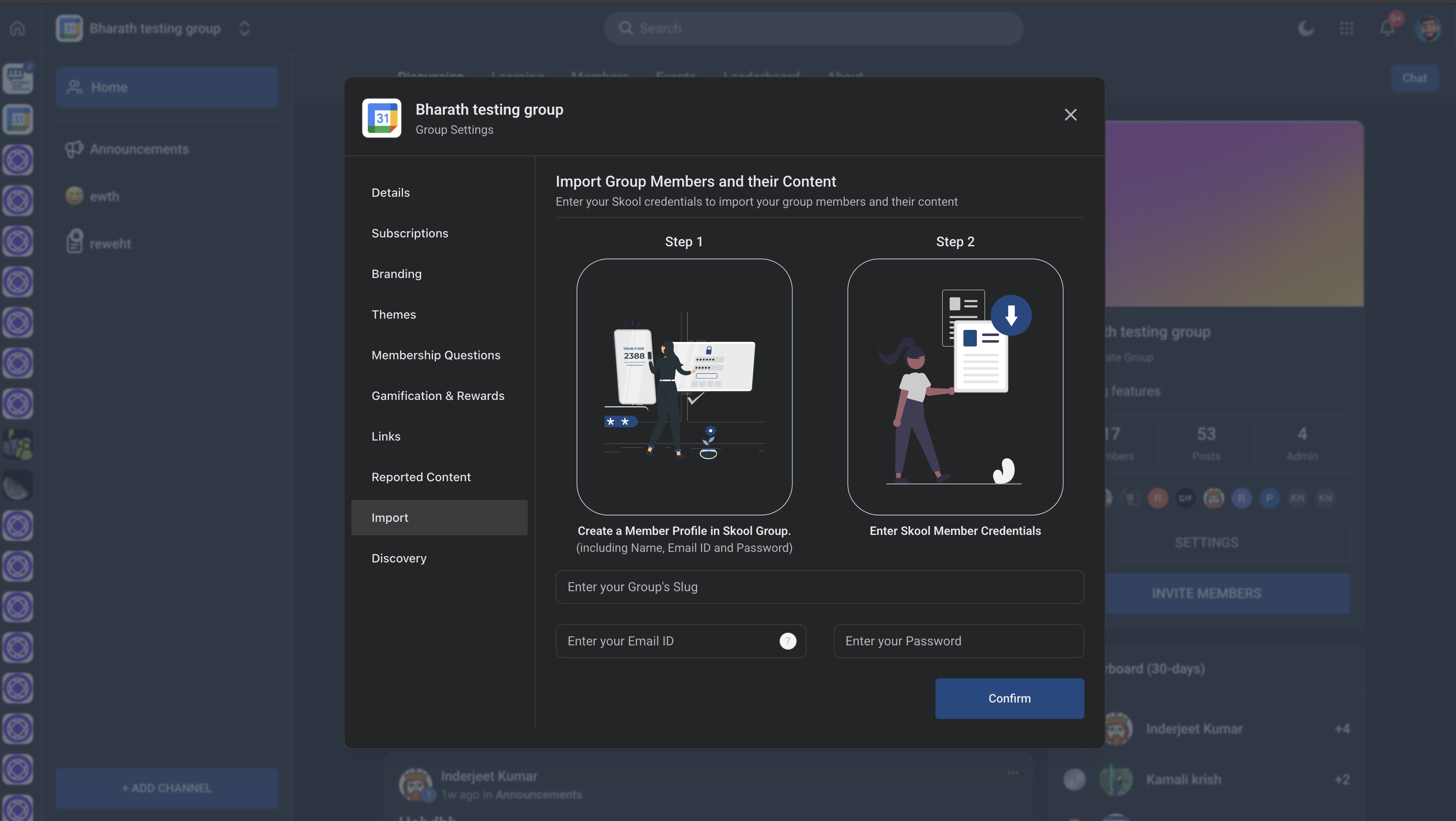
Step 1: Enter Your Skool Group Details
Navigate to your SourCherry Group Settings.
Select the Import tab from the left-hand menu.
Provide the following:
Group Slug (Skool group's URL slug)
Admin Email ID (used in Skool)
Password (Skool account credentials)
Click Confirm to initiate the import.
Step 2: Fetch and Prepare Member Data
The system will generate a .CSV file that includes:
profileSlugfirstNamelastNameemail(may be missing for some members)
Download the CSV and fill in any missing email addresses.
? Use "Refresh user list" if new members were added in the meantime.
⚠️ Do not change the profile slug in the file.
Step 3: Upload Completed CSV
Click Select File and upload your updated CSV.
The system will:
Automatically import valid members
Display a count of successful and failed imports
? Success example:
“7 members added successfully!”
⚠️ Error example:
“2 members could not be added due to missing email addresses.”
Click Try Again after fixing issues in the CSV.
Step 4: Migrate Posts
Once member import is successful:
The system will prompt you to import community posts.
Track the post import progress in real time.
Posts are tied to their respective members, so accurate member data ensures smooth migration.
Example:
“10 posts imported - 3% complete…”
? Key Benefits
✅ Two-step process keeps things simple and trackable
✅ Editable CSV lets you fix missing info without redoing the whole process
✅ Progress indicators and feedback messages show what’s working (and what’s not)
✅ Posts and members stay linked during migration
? Pro Tips
Always re-sync before downloading if your Skool group is active.
Double-check emails—missing or incorrect ones are the most common import issue.
Posts can only be migrated after members are successfully imported.
❓FAQs
Q: Can I retry importing failed members?
Yes! Just fix the CSV and click Try Again.
Q: What happens if I change the profile slug?
Don't do it—the system uses that to identify members. Changing it can break the import.
Q: Are posts imported for members not successfully added?
No. Posts are tied to member IDs, so only those successfully imported will have their posts brought over.