
Now you can manage your Stripe payment methods entirely within SourCherry, no need to switch back and forth between dashboards! Simplify your payment setup across invoices, funnels, stores, and more while ensuring greater control and flexibility for your business.
TABLE OF CONTENTS
- What is Stripe Payment Method Management?
- Advanced Payment Method Setup & Troubleshooting
- Buy Now, Pay Later Payment Methods
- Switching Between Test Mode and Live Mode
- Stripe Payment Method Settings for Different Product Areas
- Frequently Asked Questions
- Related Articles
What is Stripe Payment Method Management?
Stripe Payment Method Management allows you to configure which payment options (like credit cards, wallets, bank debits) are available across various SourCherry product areas, directly inside your SourCherry account. This eliminates the need to manage payment methods separately on Stripe’s dashboard, streamlining operations and improving payment setup control.
Key Benefits of Stripe Payment Method Management
Understanding how managing Stripe payment methods directly in SourCherry benefits your business helps you make the most out of this feature.
Centralized Control: Manage all your Stripe payment options without leaving SourCherry.
Separate Live and Test Modes: Customize payment methods individually for live and test environments.
Checkout-Specific Visibility: Only available payment methods will show in each checkout’s options.
Subscription-Specific Settings: Manage unique payment configurations specifically for subscriptions.
Reduced Dependency on Stripe Dashboard: No longer necessary to edit payment methods in Stripe.
Seamless User Experience: Streamlined configuration leads to faster setup across invoices, funnels, forms, and stores.
How To Manage Stripe Payment Methods
Effectively setting up your Stripe payment options ensures smooth transactions across all your product areas. Follow these easy steps to start managing them directly within SourCherry:
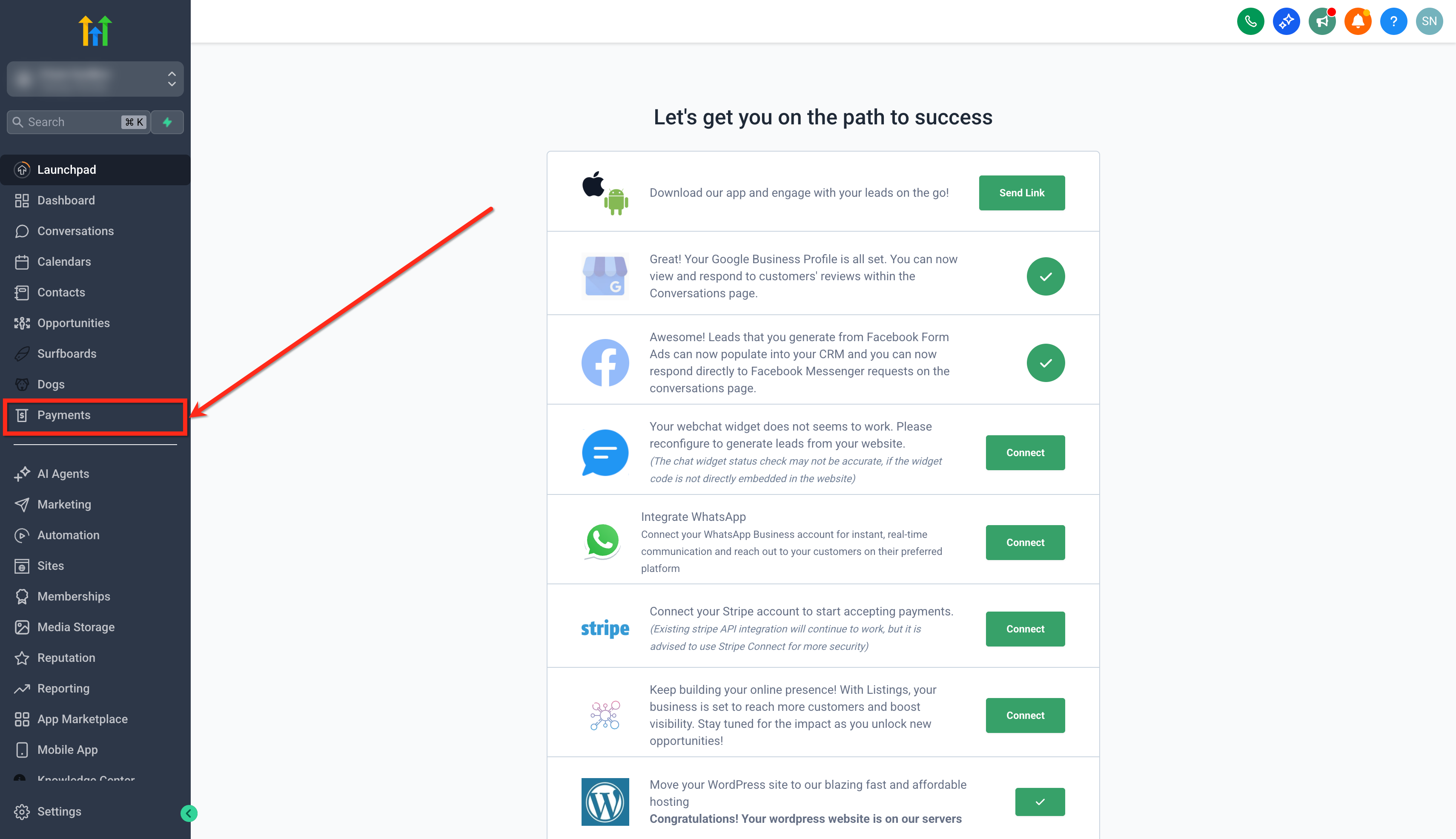
Step 1: Navigate to Payments Settings
- Click on the Payments tab from your sub-account.
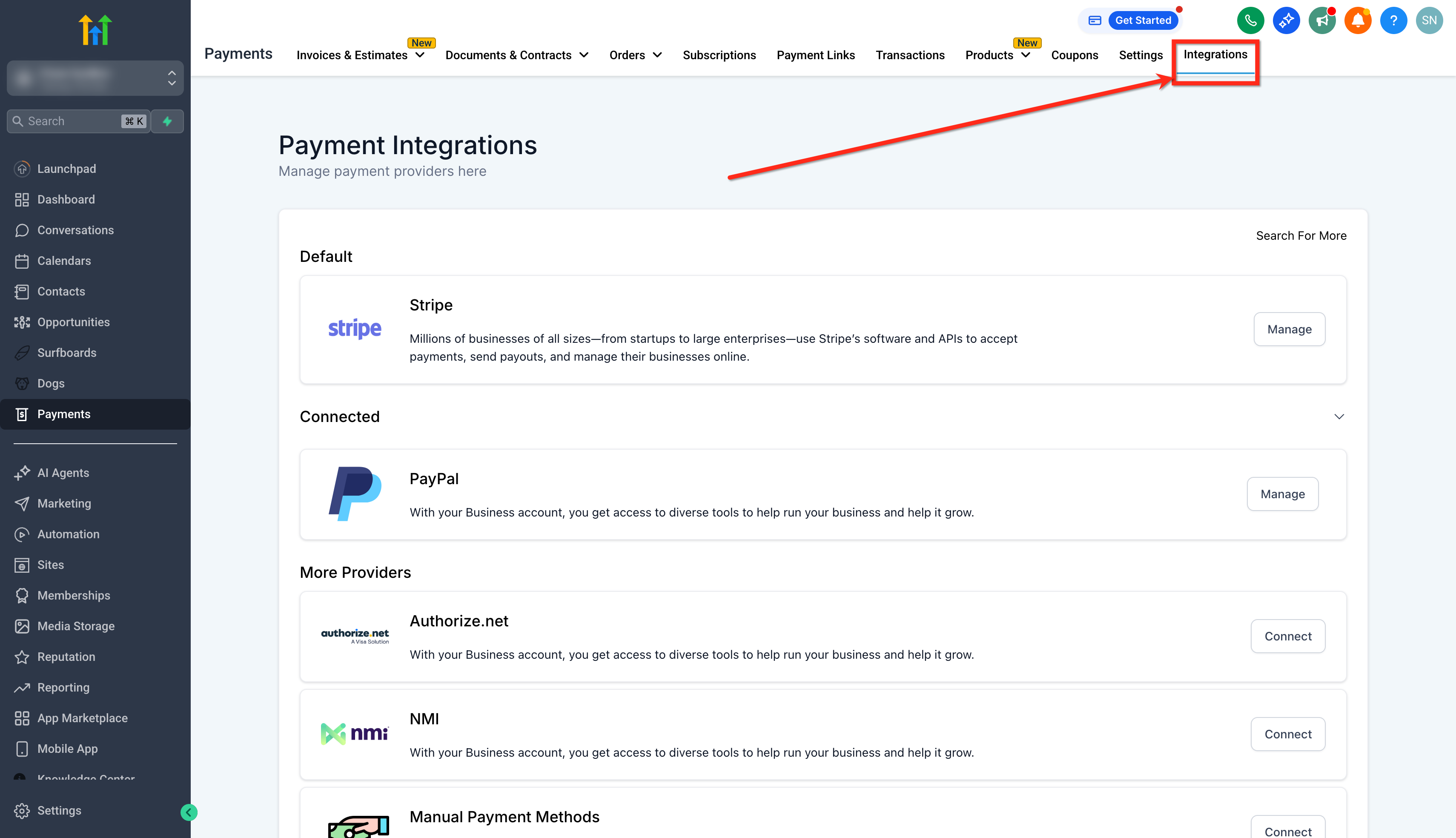
- Click on Integrations.
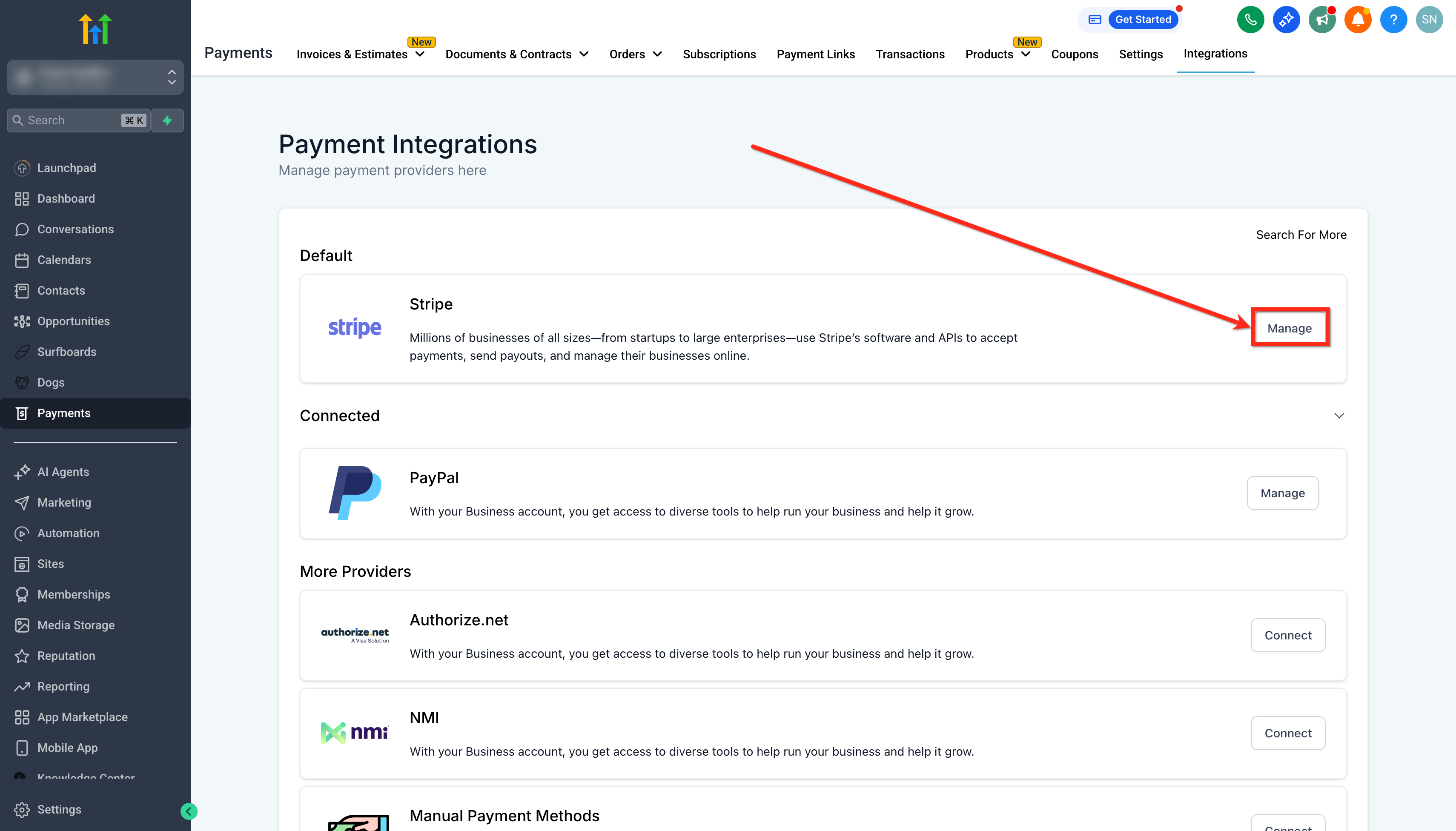
- Click the Manage button next to your connected Stripe account.
Step 2: Enable/Disable Payment Methods
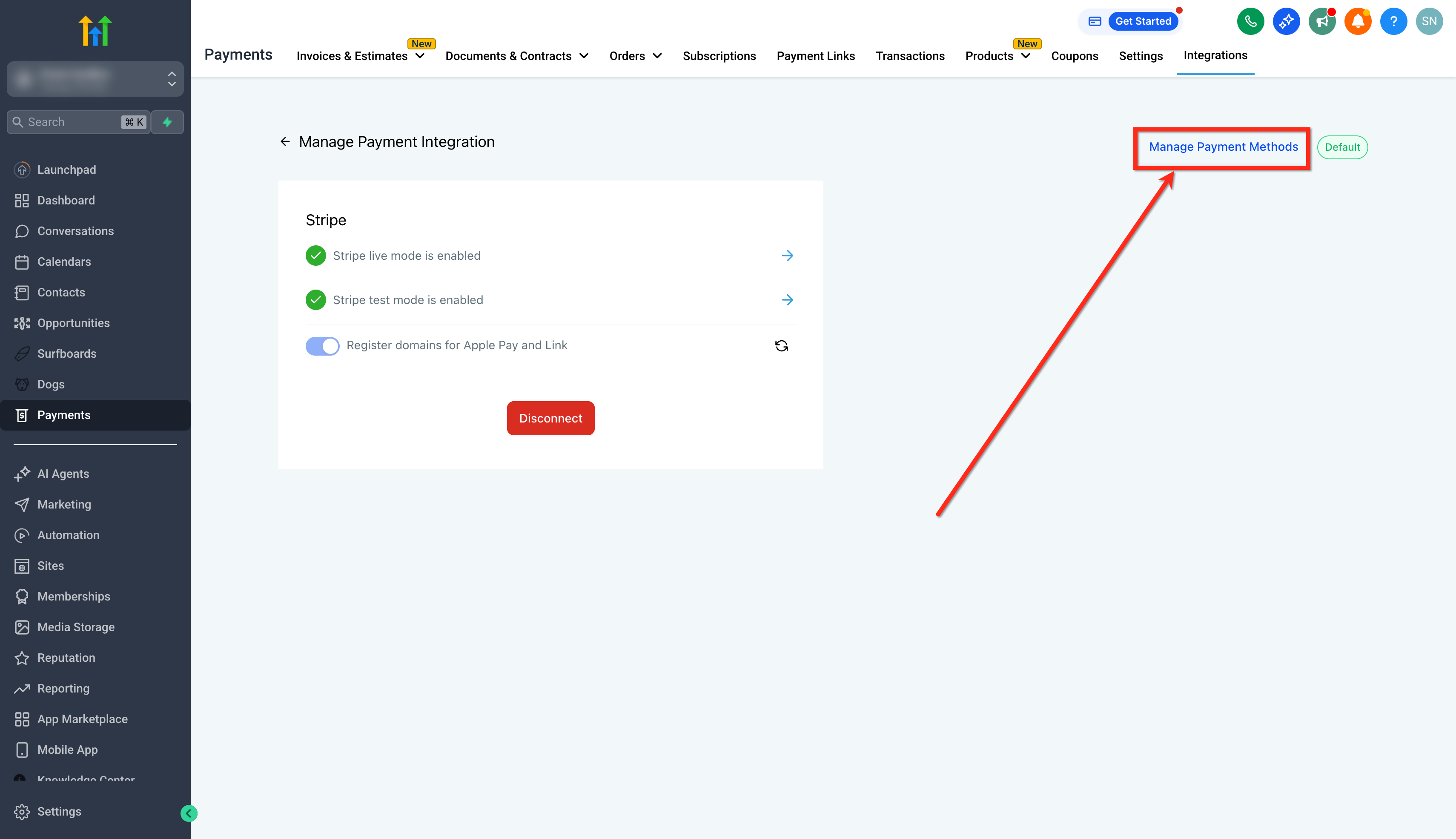
- Click on the Manage Payment Methods option.
- You’ll see a list of payment methods available for different product areas.
- Toggle on or off based on which payment methods you want available for a particular product area.
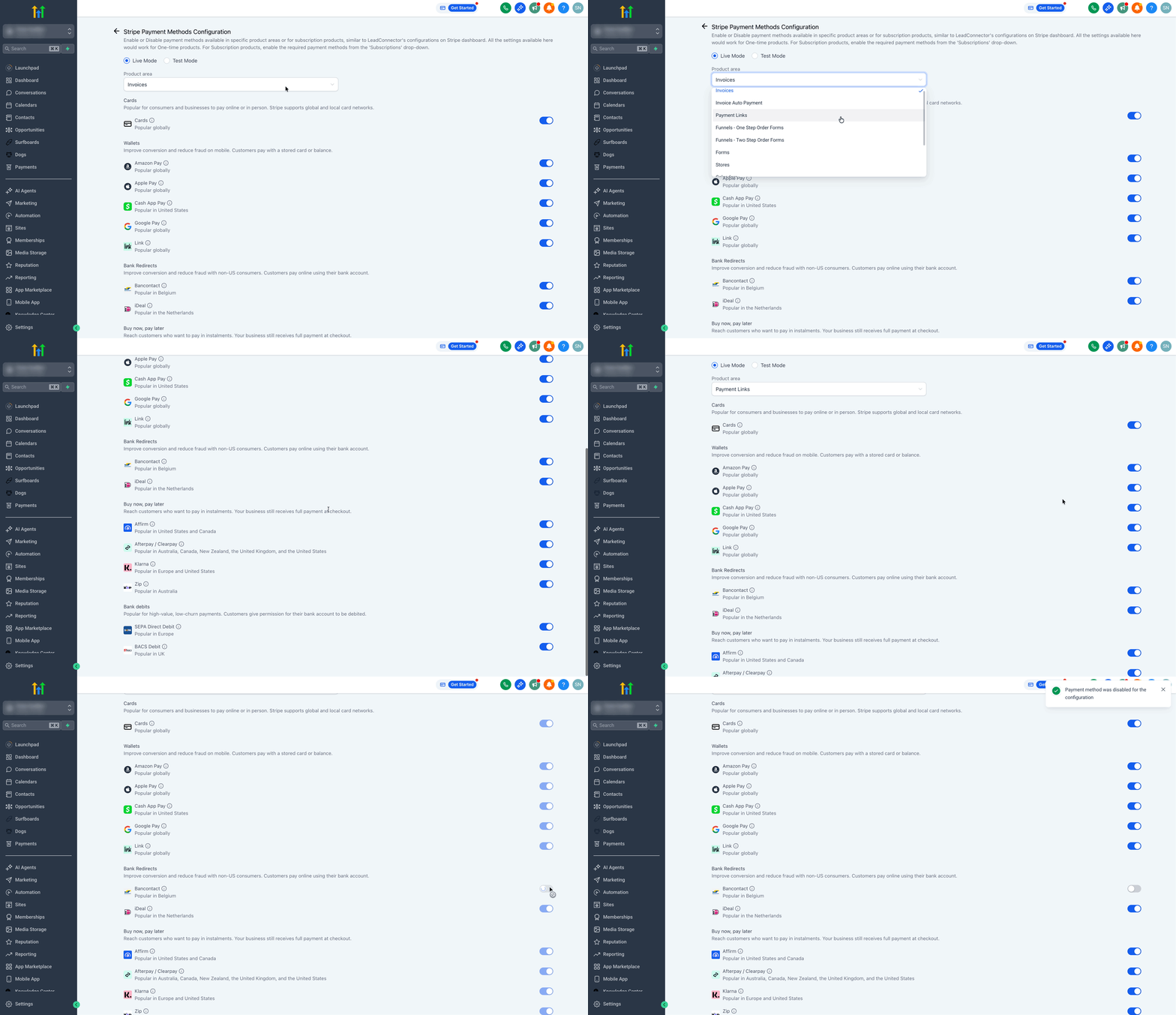
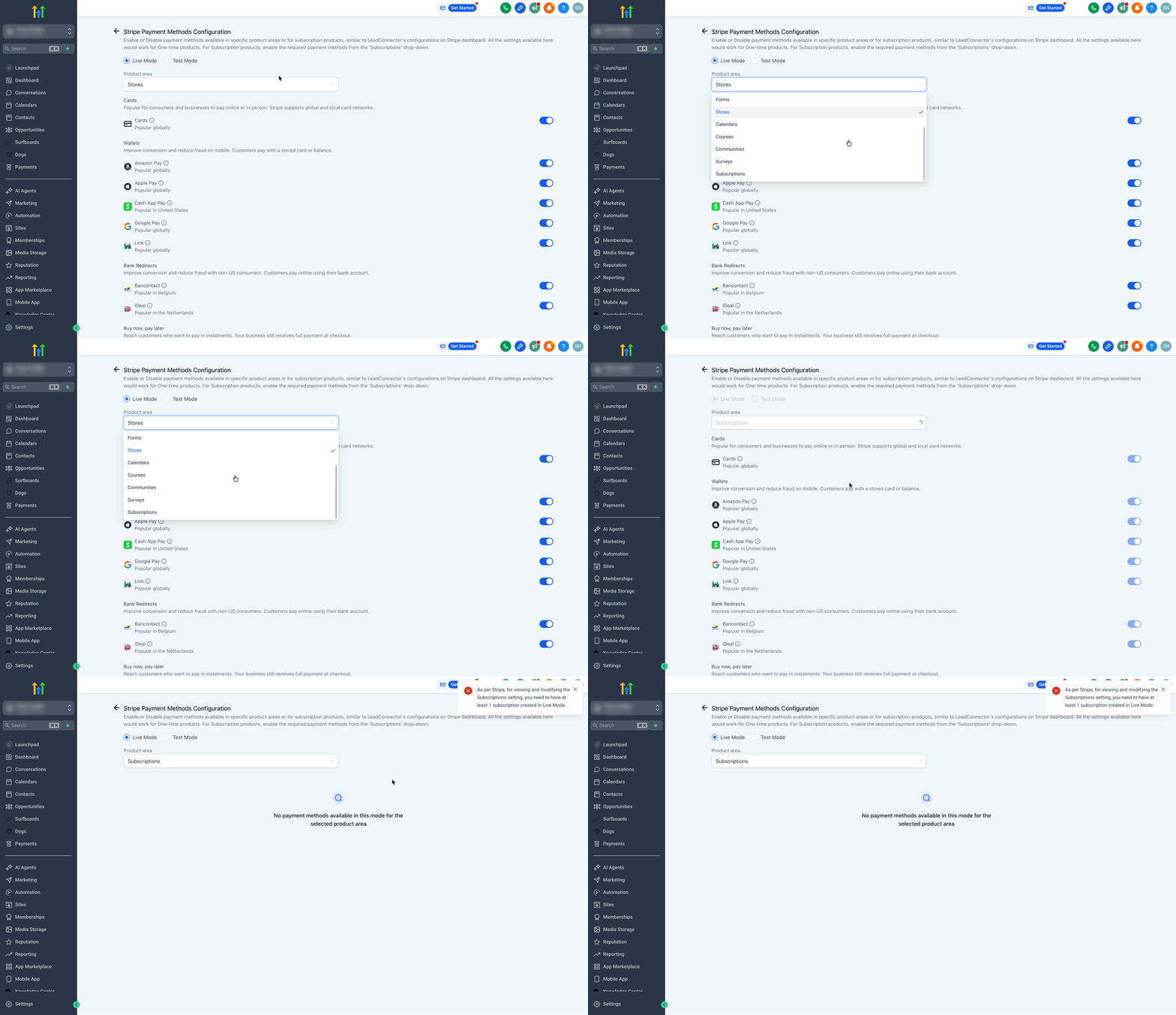
- If you’re offering subscription products, you’ll see a special drop-down called Subscriptions. Configure payment methods specifically for subscription checkouts here.
Advanced Payment Method Setup & Troubleshooting
Some payment methods require additional configuration before they become available at checkout. Availability depends on factors such as account verification status, country support, payment method eligibility, and whether you are using Test or Live Mode.
Enabling Digital Wallets
Digital wallet payment methods can provide a faster checkout experience for customers using supported devices and browsers.
Apple Pay
Before Apple Pay can appear during checkout:
- Your payment account must be fully activated.
- Domain verification must be completed.
- Apple Pay must be enabled within your payment provider settings.
To enable Apple Pay:
- Go to Payments → Integrations.
- Open your connected payment account.
- Select Manage Payment Methods.
- Enable Apple Pay where available.
- Save your changes.
Google Pay
Google Pay availability depends on supported devices, browsers, and payment account eligibility.
To enable Google Pay:
- Open Payments → Integrations.
- Select Manage Payment Methods.
- Enable Google Pay.
- Save your settings.
Activating Bank-Based Payment Methods
Bank payment methods may require additional account verification before becoming available.
ACH Payments
ACH payments may only be available in supported regions and for eligible payment accounts.
To enable ACH:
- Open Payments → Integrations.
- Select Manage Payment Methods.
- Enable ACH if available.
- Save changes.
iDEAL and SEPA
Regional payment methods such as iDEAL and SEPA may only appear when supported by your payment account and customer location.
To enable these methods:
- Open Payments → Integrations.
- Select Manage Payment Methods.
- Enable the desired payment method.
- Save your settings.
Buy Now, Pay Later Payment Methods
Supported financing and installment payment options may require approval from the payment provider before activation.
Examples may include:
- Affirm
- Klarna
- Afterpay
- Clearpay
To enable available installment options:
- Open Payments → Integrations.
- Select Manage Payment Methods.
- Enable supported installment payment methods.
- Save changes.
Switching Between Test Mode and Live Mode
Payment methods can be configured independently for Test and Live environments.
When troubleshooting payment visibility:
- Verify which mode is currently selected.
- Confirm the payment method is enabled in the correct environment.
- Save any changes before testing checkout again.
Stripe Payment Method Settings for Different Product Areas
Managing Stripe payment methods across product areas ensures that your customer-facing interfaces only show relevant payment options. Here’s where your configurations apply:
Invoices
Invoices with AutoPayments
Payment Links
Funnels - One-Step Order Form
Funnels - Two-Step Order Form
Forms
E-commerce Stores
Calendars
Courses
Communities
Subscriptions
SaaS Configurator-generated checkout links for SaaS subscriptions support card payments only.

Other payment methods may be available in Stripe or other SourCherry product areas, but they are excluded for SaaS subscription onboarding.
Each checkout will respect the settings you’ve configured — no more surprises for your customers at checkout!
Frequently Asked Questions
Q: What are the transaction fees for Stripe?
Stripe transaction fees vary depending on your country and the type of payment method used. Generally, Stripe charges a percentage of each transaction plus a fixed fee. Because pricing differs by region, you should always refer to Stripe’s official pricing page for the most accurate and up-to-date details.
Q: Why don’t I see the Subscriptions list in SourCherry?
The Subscriptions list only becomes available after you’ve added at least one subscription product in Live Mode within the respective sub-account. This requirement comes directly from Stripe.
Q: What happens if I already have payment methods configured in Stripe?
Your existing settings are preserved. Default payment methods for product areas or checkouts will match your original Stripe setup unless you update them inside SourCherry.
Q: Will Live and Test modes have separate settings?
Yes! You can configure payment methods independently for Live and Test environments, allowing full flexibility during development and production.
Q: Why don’t I see the Subscriptions dropdown?
The Subscriptions settings become available only after adding at least one subscription product in Live Mode in that sub-account, according to Stripe’s rules.
Q: Are these changes applied to all sub-accounts?
Each sub-account connected to Stripe needs to configure its payment methods individually under its Payments settings.
Payment methods may be hidden due to account restrictions, unsupported checkout types, regional limitations, missing verification requirements, or because they are enabled only in Test Mode instead of Live Mode.