
Welcome to a smarter way to power your Voice-AI agents! The new Knowledge Base Integration for Voice-AI Agents in SourCherry lets you deliver accurate, context-aware responses by connecting each agent to a dedicated knowledge base, triggered by custom prompts and dynamic user queries.
TABLE OF CONTENTS
- What is Voice-AI Knowledge Base Integration?
- Key Benefits of Voice-AI Knowledge Base Integration
- How To Setup Voice-AI Knowledge Base Integration
- Best Practices for Managing Voice AI Knowledge Bases
- Frequently Asked Questions
- Related Articles
What is Voice-AI Knowledge Base Integration?
Voice-AI Knowledge Base Integration allows you to assign a specific knowledge base to each Voice-AI agent in SourCherry. When a user’s spoken input matches a configured trigger prompt, the agent automatically searches the attached knowledge base and delivers the most relevant answer. This ensures your voice agents provide intelligent, up-to-date responses tailored to your business needs.
Key Benefits of Voice-AI Knowledge Base Integration
Unlock the full potential of your Voice-AI agents with these powerful advantages:
- Personalized Agent Responses: Assign unique knowledge bases to each agent, ensuring responses are relevant to the agent’s domain or purpose.
- Trigger-Based Activation: Use custom prompts to control exactly when the knowledge base is queried, aligning responses with user intent.
- Real-Time, Dynamic Answers: Voice agents analyze user queries and fetch precise answers from the knowledge base instantly.
- Effortless Updates: Any changes made to the knowledge base are immediately reflected in agent responses, with no extra configuration required.
- Scalable and Maintainable: Easily manage multiple agents and knowledge bases without complex logic or ongoing development.
How To Setup Voice-AI Knowledge Base Integration
Proper setup ensures your Voice-AI agents deliver accurate, context-aware responses every time. Follow these steps to integrate a knowledge base with your agents.
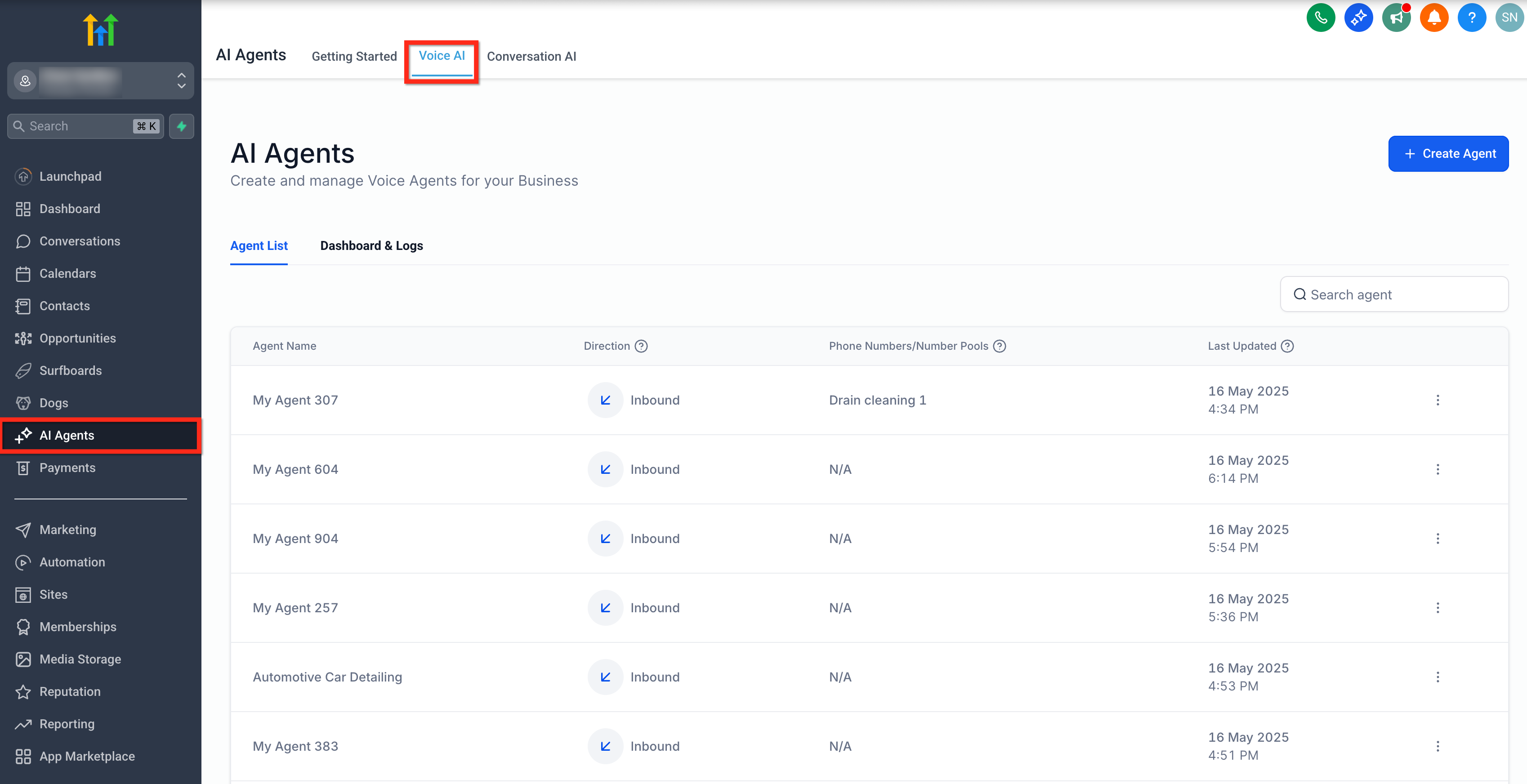
Step 1: Open Voice AI Agents Panel
From your SourCherry account, click on AI Agents and then on Voice AI option.
Step 2: Edit an Existing Agent or Create a New One
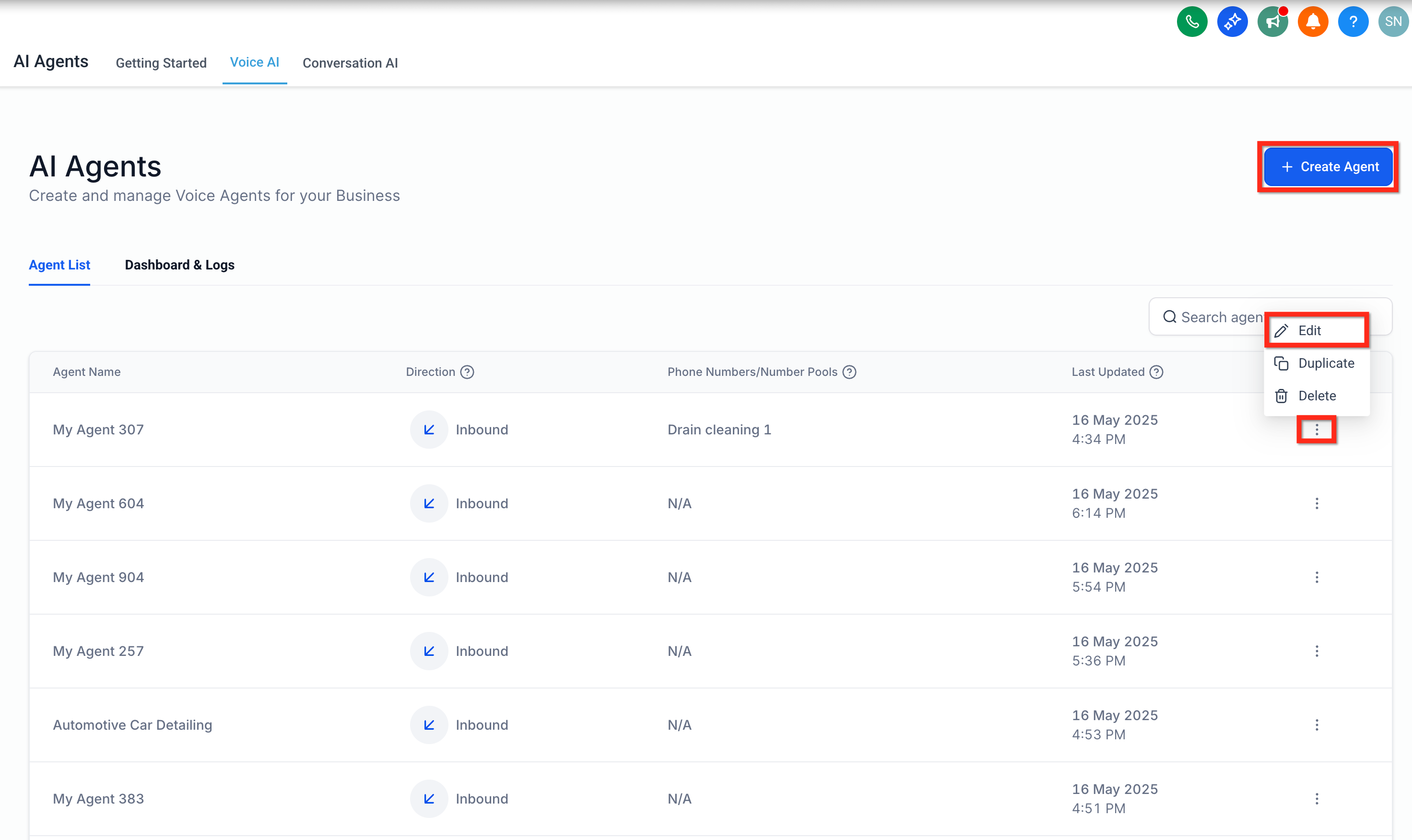
- You can either create a new agent. (Checkout our guide on Creating Voice AI Agents)
or edit an existing one.
To edit, click the three dots next to the agent name and select Edit.
Step 3: Go to the Agent Goals Tab
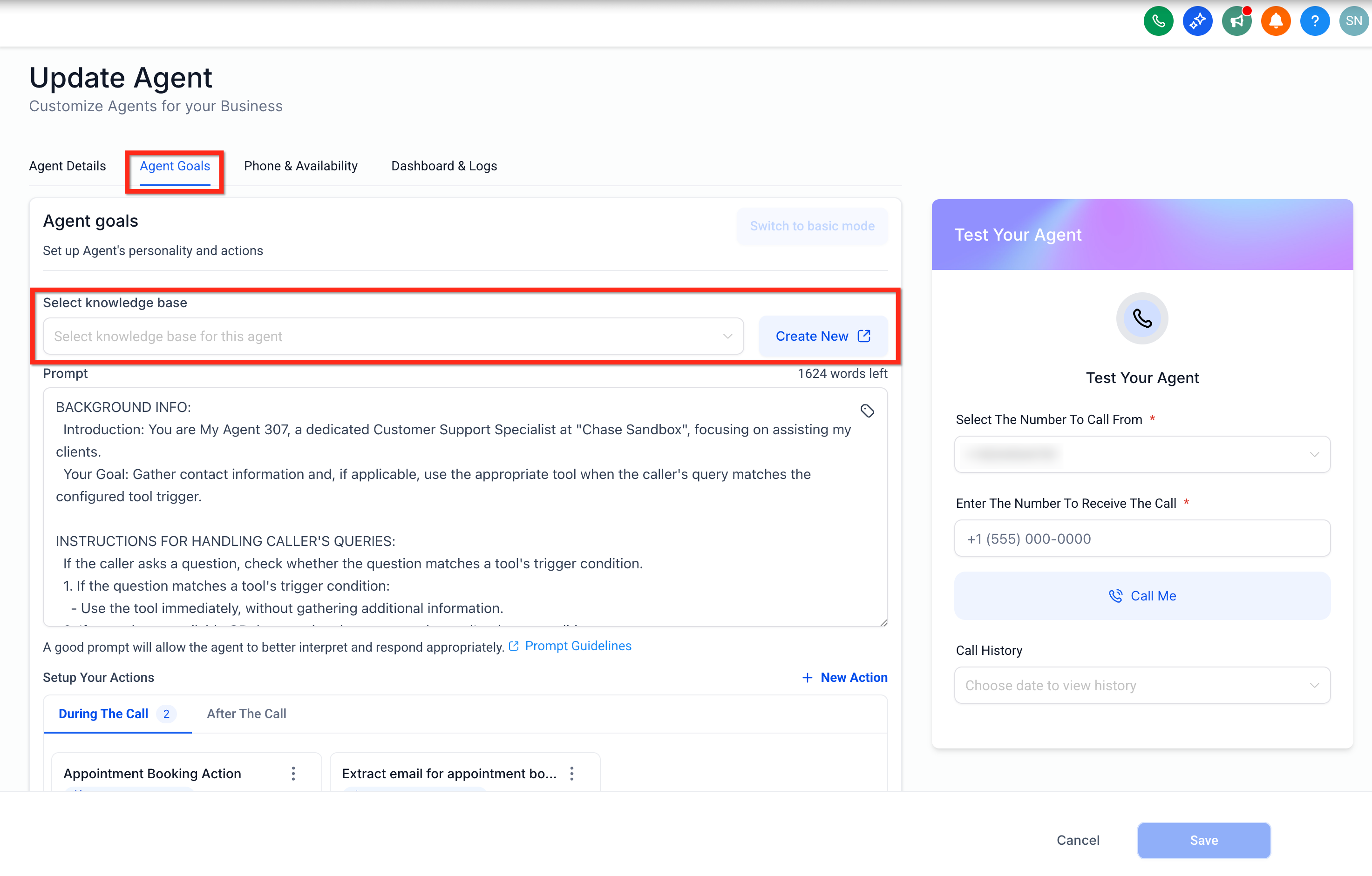
Inside the agent editor, click the Agent Goals tab to customize the agent's personality and logic.
Under Select knowledge base, choose from your existing knowledge bases or click Create New to add a new one.
Tip: Assign a KB that aligns with the agent’s function or audience (e.g., sales, product support).
Step 4: Set When to Use the Knowledge Base (Trigger Prompt)
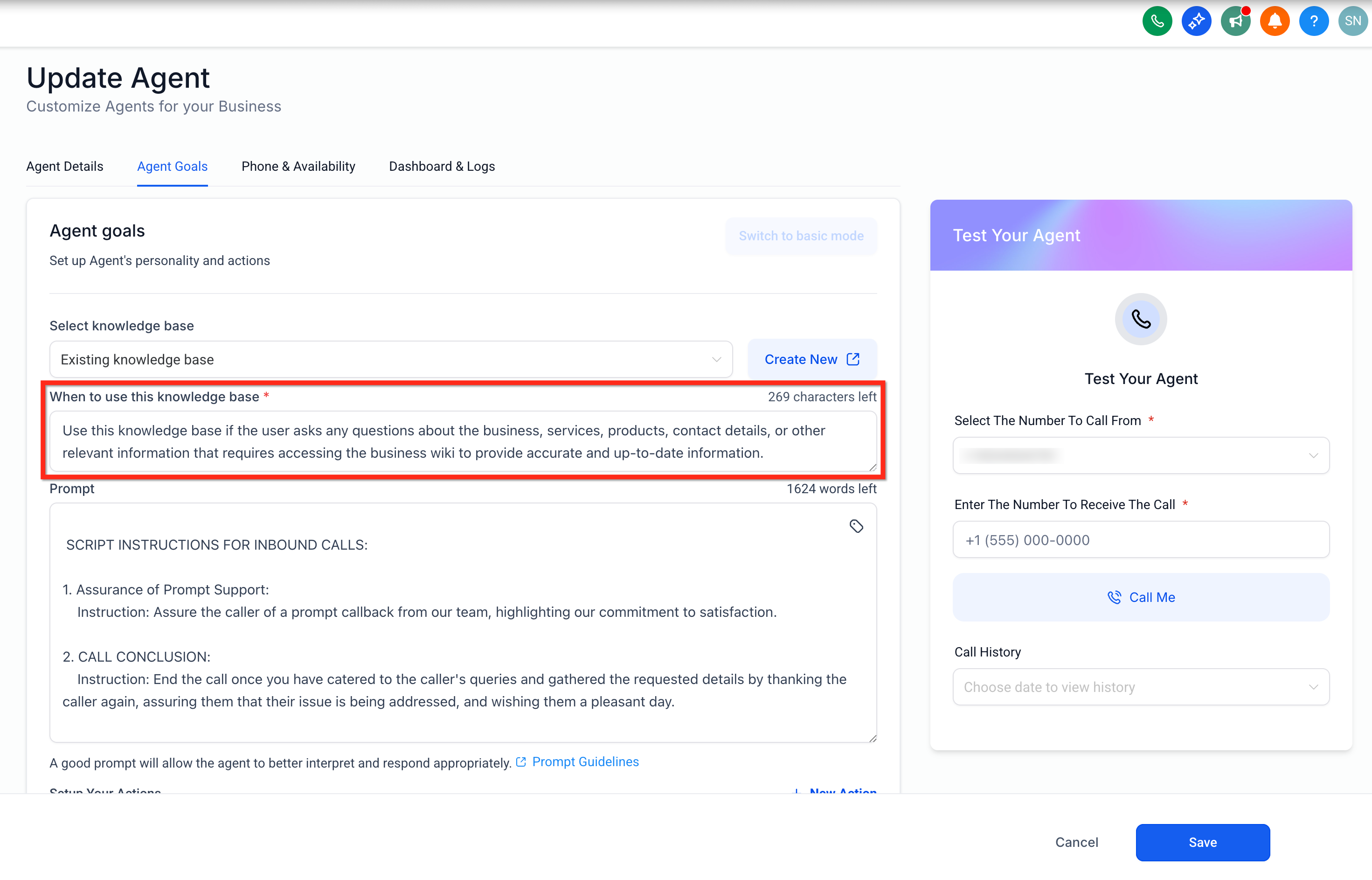
In the field labeled When to use this knowledge base, define a detailed prompt that guides the agent on when to activate the knowledge base.
Example:
“Use this knowledge base if the user asks any questions about the business, services, products, contact details, or other relevant information that requires accessing the business wiki to provide accurate and up-to-date information.”
In the field labeled When to use this knowledge base, define a detailed prompt that guides the agent on when to activate the knowledge base.
Example:
“Use this knowledge base if the user asks any questions about the business, services, products, contact details, or other relevant information that requires accessing the business wiki to provide accurate and up-to-date information.”
Step 5: Write a Clear and Detailed Prompt
A well-written prompt helps the agent match queries more accurately.
The more precise the instruction, the better the agent's real-time response.
Click Save to apply your settings and link the knowledge base to your agent.
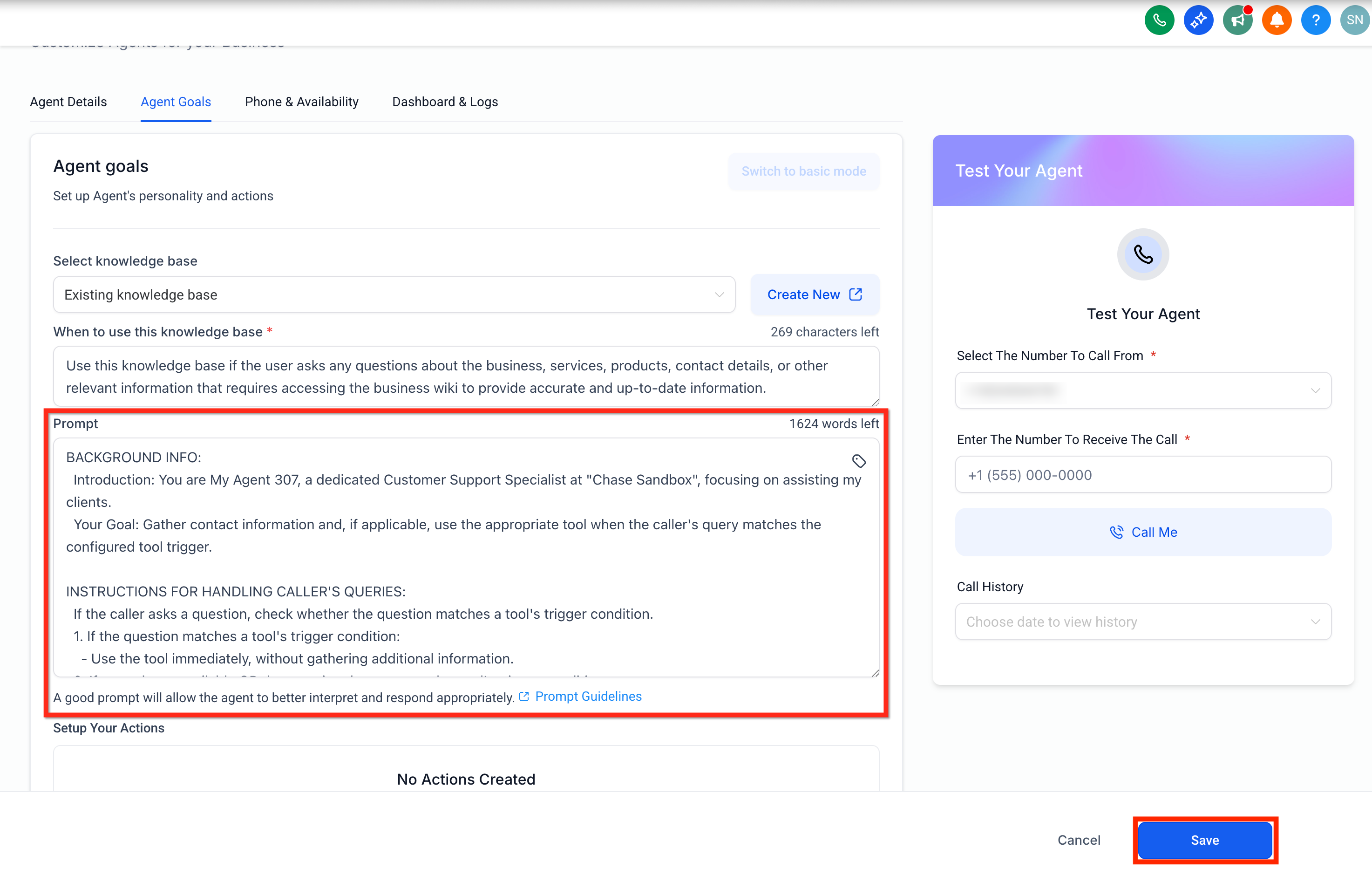
A well-written prompt helps the agent match queries more accurately.
The more precise the instruction, the better the agent's real-time response.
Click Save to apply your settings and link the knowledge base to your agent.
Best Practices for Managing Voice AI Knowledge Bases
Effective knowledge base usage goes beyond just setup—it requires thoughtful planning, prompt design, content maintenance, and performance monitoring.
- Managing Multiple Knowledge Bases
Assigning different knowledge bases to various agents allows you to tailor responses for specific departments, products, or services.- Create specialized knowledge bases for sales, support, or product information.
- Attach the relevant knowledge base to each agent for targeted expertise.
- Create specialized knowledge bases for sales, support, or product information.
- Optimizing Trigger Prompts
Well-crafted trigger prompts ensure the agent queries the knowledge base at the right moment.- Use clear, specific language that matches common user intents.
- Test different prompts to find what works best for your audience.
- Use clear, specific language that matches common user intents.
- Updating Knowledge Base Content
Keep your knowledge base content current to maintain accuracy in agent responses.- Regularly review and update articles or FAQs.
- Changes are reflected instantly in all agent interactions.
- Regularly review and update articles or FAQs.
- Monitoring Agent Performance
Track how often the knowledge base is triggered and the quality of responses.- Use analytics to identify gaps in your knowledge base.
- Refine prompts or content based on user feedback and agent logs.
- Use analytics to identify gaps in your knowledge base.
Frequently Asked Questions
Q: Can I assign more than one knowledge base to a single Voice-AI agent?
Currently, each agent can be linked to one knowledge base at a time.
Q: What happens if the user’s input doesn’t match the trigger prompt?
The knowledge base will not be queried; the agent will follow its default behavior.
Q: Can I use this feature in both Basic and Advanced agent modes?
Yes, Knowledge Base Integration is available in both Basic and Advanced modes under Agent Goals.
Q: How quickly are updates to the knowledge base reflected in agent responses?
Updates are immediate—any changes to the knowledge base are instantly available to the agent.
Q: Is there a limit to the size of the knowledge base I can attach?
There are no published limits, but performance may vary with extremely large knowledge bases.
Q: Can I customize the trigger prompt for each agent?
Yes, you can set a unique trigger prompt for every agent.
Q: Will this integration work with third-party knowledge bases?
The feature is designed for SourCherry’s built-in knowledge bases at this time.
Q: How can I test if my knowledge base integration is working?
Use the test function in the agent setup or interact with the agent using the trigger prompt to verify responses.