
Gain a competitive edge with SourCherry’s new Competitor Analysis feature in Reputation Management. Effortlessly benchmark your clients’ online reputation against up to three competitors, using real-time review data from Google and other major platforms.
TABLE OF CONTENTS
- What is Competitor Analysis in Reputation Management?
- Key Benefits of Competitor Analysis
- How To Setup Competitor Analysis
- Additional Competitor Analysis Subtopics
- Frequently Asked Questions
- Related Articles
What is Competitor Analysis in Reputation Management?
Competitor Analysis is a powerful tool within SourCherry’s Reputation Management suite that allows agencies and businesses to compare their online reputation metrics with up to three competitors. By automatically gathering and analyzing review data across multiple platforms, this feature provides a comprehensive view of how your business stacks up in the market, helping you identify strengths, weaknesses, and opportunities for improvement.
Key Benefits of Competitor Analysis
Understanding the advantages of Competitor Analysis helps you leverage this feature for maximum impact:
- Real-Time Benchmarking: Instantly compare Google star ratings and review volumes with up to three competitors.
- Multi-Platform Insights: Access reputation data from Google and other major review platforms for a holistic view.
- Actionable Visuals: Intuitive charts highlight performance gaps and opportunities at a glance.
- Effortless Setup: Quickly search and select competitors; all data is auto-fetched and updated regularly.
- Enhanced Client Reporting: Export and share insights to strengthen your client presentations.
- Time Savings: Eliminate manual research—get all the insights you need in one place.
- Strategic Decision-Making: Use data-backed insights to refine your reputation management strategies.
How To Setup Competitor Analysis
Setting up Competitor Analysis is straightforward and ensures you get accurate, up-to-date insights with minimal effort.
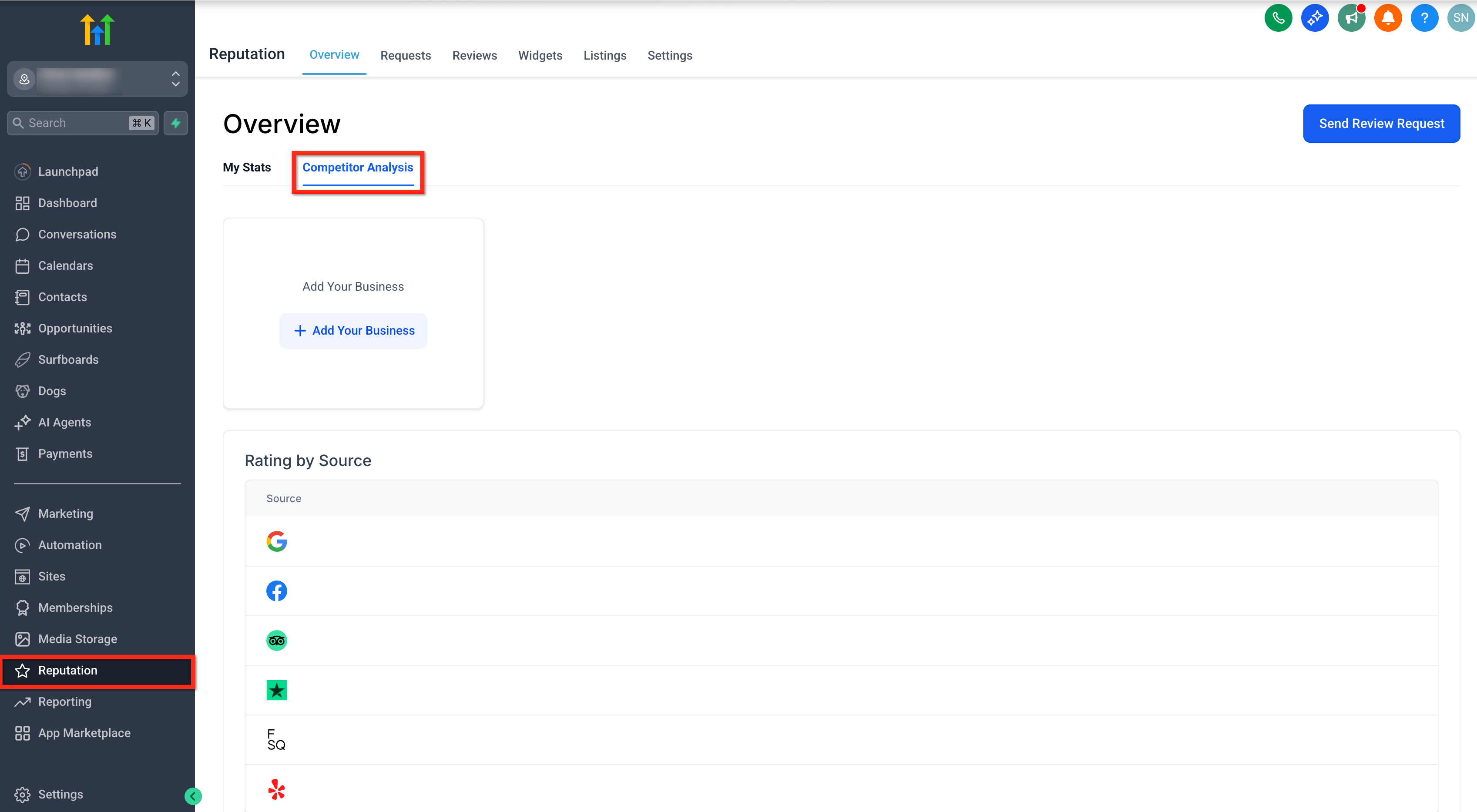
Step 1: Navigate to Competitor Analysis
- Click on the Reputation option in your account dashboard.
- Click on the Competitor Analysis tab to begin the setup process.
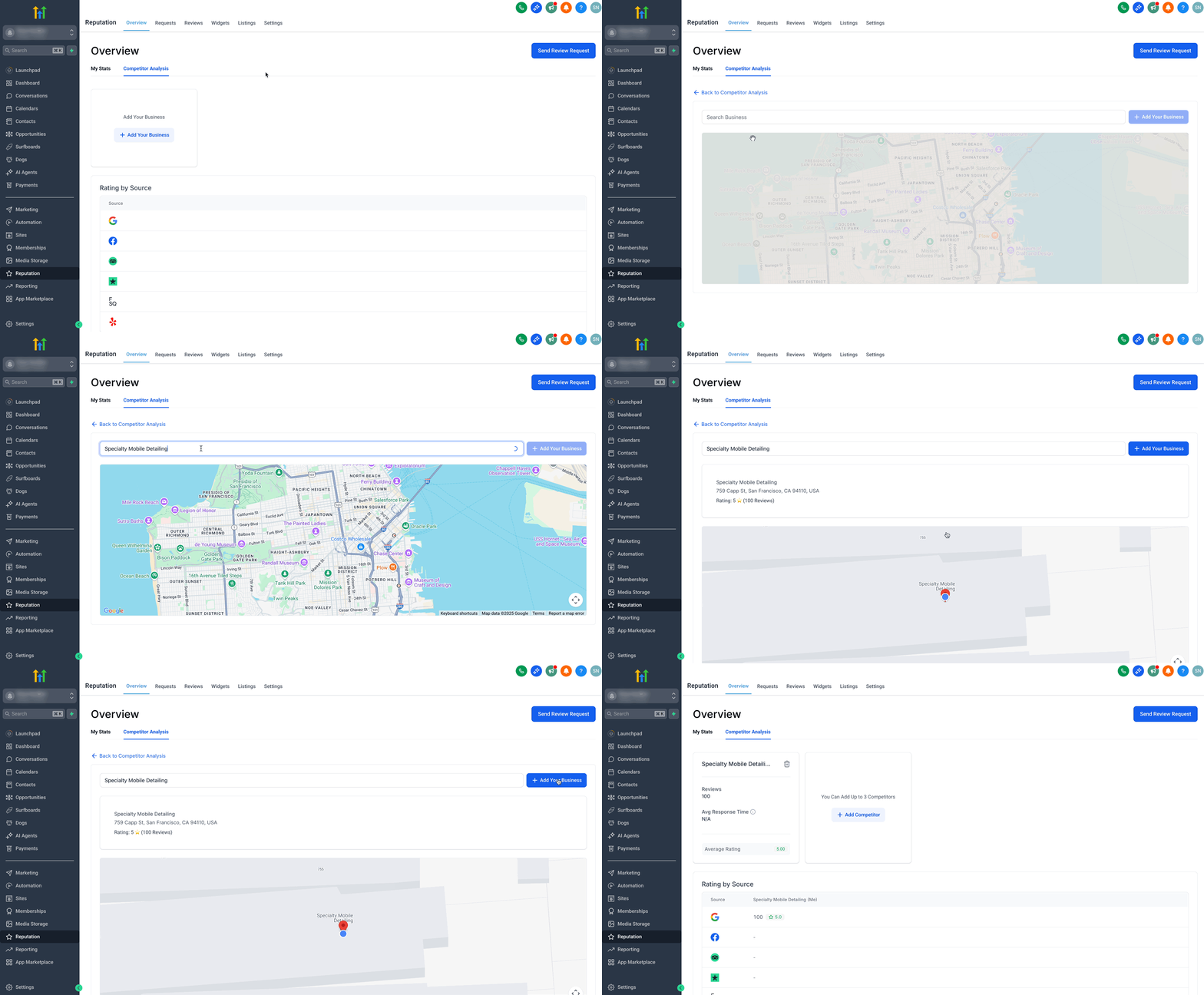
Step 2: Add Your Business
- Click on the + Add Your Business button under competitor analysis tab.
- Allow Location Permission.
- Search for your business and select the correct one.
- Click on the + Add Your Business button beside the search bar.
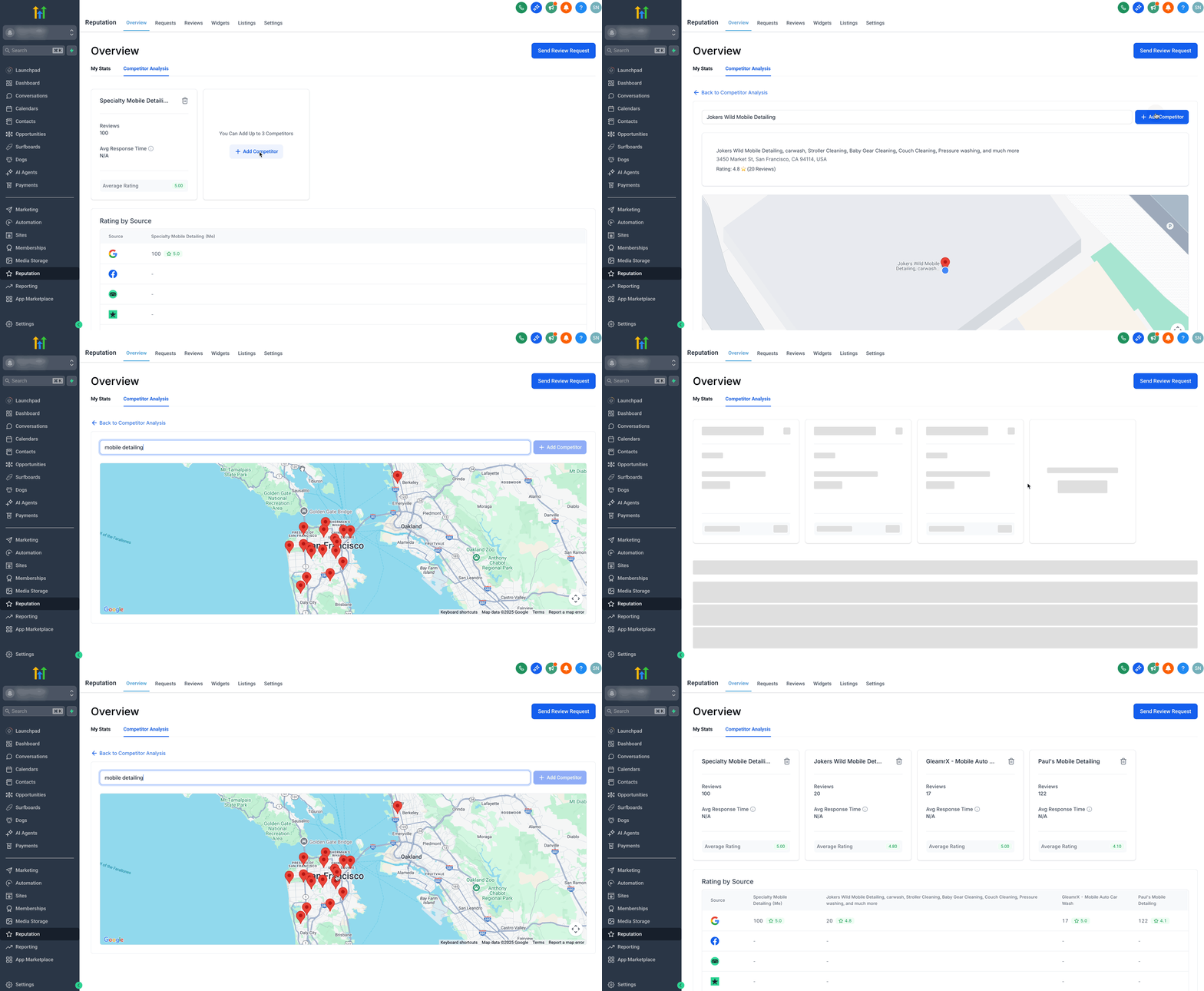
Step 3: Add Competitors
- Click on the + Add Competitor button. (You can add maximum 3 Competitors)
- Search for competitor businesses and select the correct ones.
- Click on the + Add Competitor button beside the search bar.
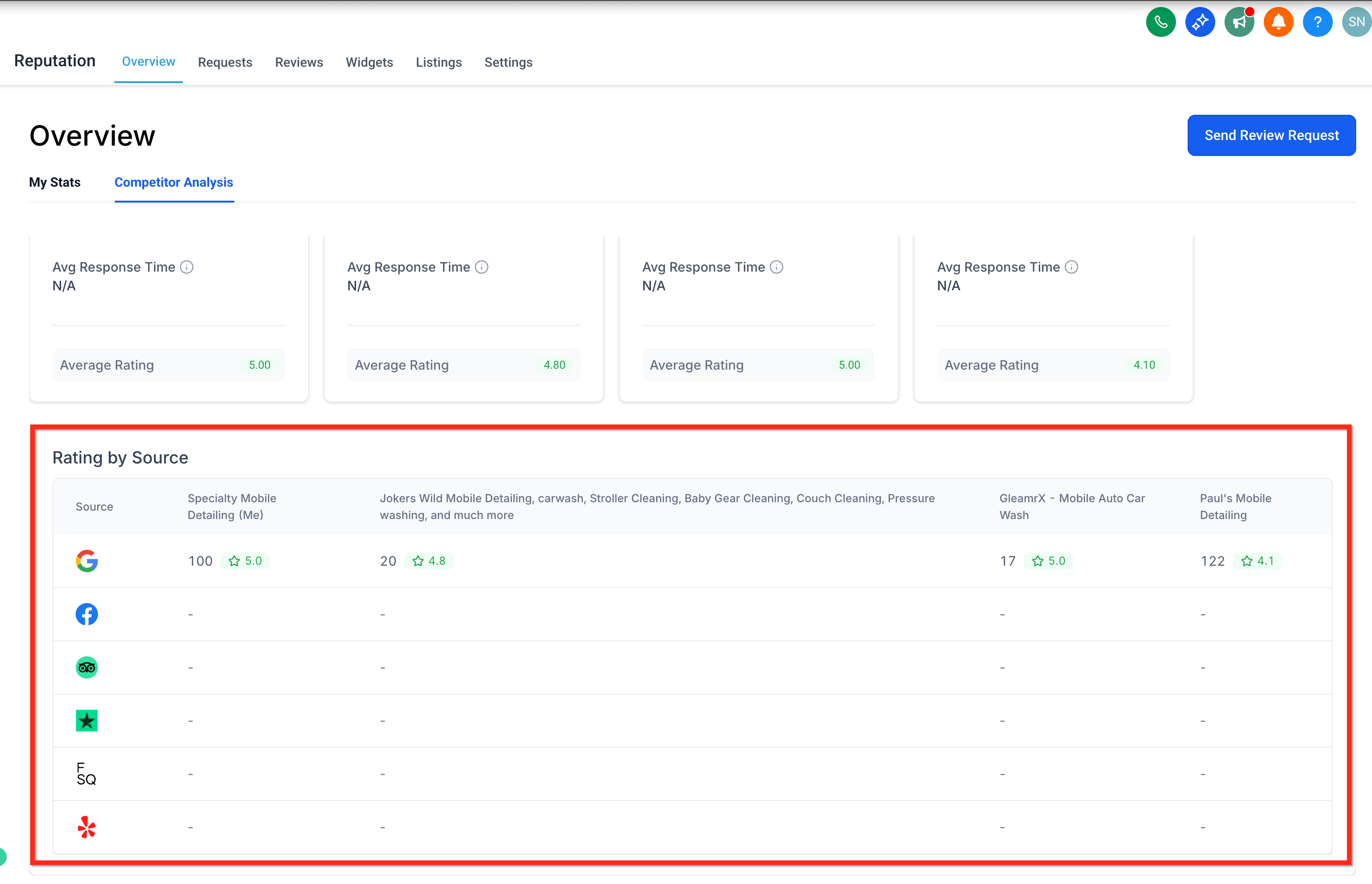
Step 4: Check Ratings by Source
- Scroll down to see “Rating by Source” across Google, Facebook, TripAdvisor, etc.
- The system will automatically fetch and display real-time data, including star ratings, review volumes, and response times.
Additional Competitor Analysis Subtopics
Explore more ways to utilize Competitor Analysis for deeper insights and strategic actions:
Real-Time Benchmarking
Real-time benchmarking allows you to see how your business’s reputation metrics compare to competitors at any moment, enabling quick responses to changes in the market.- Compare Google star ratings side-by-side.
- Analyze total review volume trends.
- Monitor average response times to customer reviews.
- Compare Google star ratings side-by-side.
Multi-Platform Insights
Multi-platform insights expand your competitive analysis beyond Google, giving you a broader perspective on your reputation landscape.- Access data from additional major review platforms (e.g., Facebook, Yelp, etc.).
- Identify platforms where competitors may be outperforming you.
- Access data from additional major review platforms (e.g., Facebook, Yelp, etc.).
Easy Setup and Automation
The automated setup process ensures you spend less time gathering data and more time acting on insights.- Competitor data is auto-fetched and refreshed regularly.
- No manual data entry required—set it and forget it.
- Competitor data is auto-fetched and refreshed regularly.
Frequently Asked Questions
Q: How many competitors can I compare at once?
You can benchmark your business against up to three competitors at a time.
Q: Which review platforms are supported?
Google is fully supported, with additional major review platforms included for broader insights.
Q: How often is the competitor data updated?
Data is auto-fetched and refreshed regularly to ensure you always have the latest insights.
Q: Is there any manual data entry required?
No, all competitor data is automatically gathered and updated by SourCherry.
Q: Can I change the selected competitors after setup?
Yes, you can update your competitor selections at any time.
Related Articles
- Reputation - Breaking Down the Reputation Overview Dashboard
- Reputation Management - Market Comparison & why you should choose SourCherry to boost your online reputation
- Guided Review Setup Wizard (Reputation Management)
- Reputation - Breaking Down the Reviews Tab
- Customizing Review Widgets in Reputation Management