
This article will show you how to use the new Auto Save feature in the Blog Post Editor! With Auto Save, your changes are automatically saved while you work, reducing the risk of losing content and eliminating constant manual saves.
TABLE OF CONTENTS
- What is Auto Save in the Blog Post Editor?
- Key Benefits of Auto Save
- How To Use Auto Save in the Blog Post Editor
- Important Notes
- Frequently Asked Questions
- Next Steps
What is Auto Save in the Blog Post Editor?
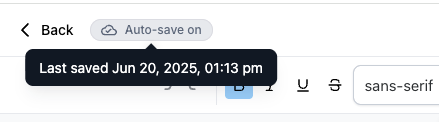
Auto Save is a new feature that automatically saves your blog post edits in real-time with a slight delay. It helps ensure that your content is consistently protected from unexpected issues, such as browser crashes or accidental page closures, giving you peace of mind while creating content.
Key Benefits of Auto Save
Auto Save improves your content creation workflow by providing seamless, automated protection. Here’s why it matters:
Minimizes risk of losing content during editing.
Reduces the need for manual saves, letting you focus on writing.
Offers real-time feedback with visual save status indicators.
Flexible — you can easily turn it on or off as needed.
How To Use Auto Save in the Blog Post Editor
Auto Save is designed to be intuitive and easy to manage. Follow these steps to enable or disable it:
Open the Blog Post Editor in your dashboard.
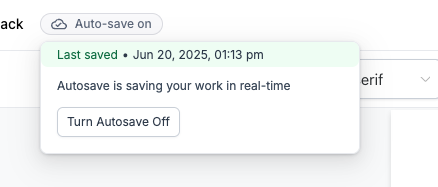
In the top action bar, locate the Autosave Toggle.
By default, Auto Save is enabled, shown as the tag “Autosave on.”
To disable Auto Save:
Hover over the “Autosave on” tag.
A popover will appear with a Disable Autosave button.
When Auto Save is disabled, the tag changes to “Last saved” with a timestamp of your most recent save (e.g., “Last saved May 22, 6:30 PM”).
Hover over the “Last saved” tag to see a popover with an Enable Autosave button if you want to turn it back on.
Your Auto Save preference is stored in your browser’s local storage and will persist across future sessions on the same browser.
Important Notes
The Auto Save preference is browser-specific and saved in local storage under the key: blog-editor-autosave-enabled.
Your preference does not sync across devices or different browsers.
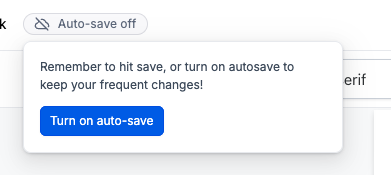
If Auto Save is off and no last saved data is available, you’ll see “Autosave off” displayed.
Frequently Asked Questions
Q: What happens if my browser crashes while Auto Save is on?
Your changes will be saved automatically, helping you avoid losing any recent edits.
Q: Can I have Auto Save enabled on multiple devices?
No, Auto Save preferences are specific to each browser and device.
Q: What if I prefer manual saves?
Simply disable Auto Save using the toggle, and you can manually save whenever you choose.
Q: Does Auto Save slow down my editor?
No, Auto Save is designed with a slight delay to keep performance smooth while capturing your updates.
Next Steps
Try enabling Auto Save to experience worry-free editing.
Adjust your toggle preference based on your writing style and comfort.
Save your browser’s local storage preference to keep using your favorite setup across sessions.
Explore other blog features to further enhance your publishing workflow.