
Documents & Contracts: Public APIs empower you to automate document workflows directly within SourCherry. With these APIs, you can seamlessly list, send, and manage documents and templates, eliminating manual processes and streamlining integrations with external systems.
TABLE OF CONTENTS
- What is Documents & Contracts: Public APIs?
- Key Benefits of Documents & Contracts: Public APIs
- List Documents
- Send Document
- List Templates
- Send Template
- How To Set Up Documents & Contracts: Public APIs
- Frequently Asked Questions
What is Documents & Contracts: Public APIs?
Documents & Contracts: Public APIs provide developers with programmatic access to core document and contract features in SourCherry. They allow you to fetch documents, send them to contacts, access templates, and even generate and send documents in one step. By integrating these APIs, you can automate workflows, ensure consistency, and scale document management across your business applications.
Key Benefits of Documents & Contracts: Public APIs
Harnessing these APIs delivers efficiency and automation that improve how you manage document workflows.
Document listings: Retrieve a complete list of documents for accurate tracking.
Automated sending: Send documents directly to contacts without manual intervention.
Template access: Quickly fetch available templates to generate documents faster.
One-step creation & sending: Create and send documents from templates with a single API call.
Seamless integration: Connect document workflows with other apps and systems to reduce friction.
List Documents
The List Documents endpoint lets you retrieve all documents within a specific SourCherry location. This is useful for syncing document records across your CRM, dashboards, or custom apps. For more, refer to List Documents.
Pull a full list of documents tied to your account.
Keep document records updated in real time.
Enable integrations that rely on document metadata.
Send Document
With the Send Document endpoint, you can automatically dispatch an existing document to one or multiple contacts. This reduces time spent manually sending documents and ensures a consistent process. For more, refer to Send Document.
Select an existing document for sending.
Choose one or more contact recipients.
Automate document delivery to improve response times.
List Templates
The List Templates endpoint provides access to all available templates in your SourCherry location. This enables developers to fetch templates dynamically when building automated workflows or integrations. For more, refer to List Templates.
Fetch a central list of templates.
Identify the right template for any use case.
Power integrations with up-to-date template availability.
Send Template
The Send Template endpoint combines template-based document creation and sending into a single API call. This reduces the workflow to one action, making it easier to build automation at scale. For more, refer to Send Template.
Generate a new document from a template.
Immediately send it to designated contacts.
Simplify your process with fewer steps.
How To Set Up Documents & Contracts: Public APIs
Correctly setting up API access ensures your integrations run smoothly, securely, and at scale. Follow the steps below to configure your SourCherry account for API usage:
Step 1: Obtain API Credentials
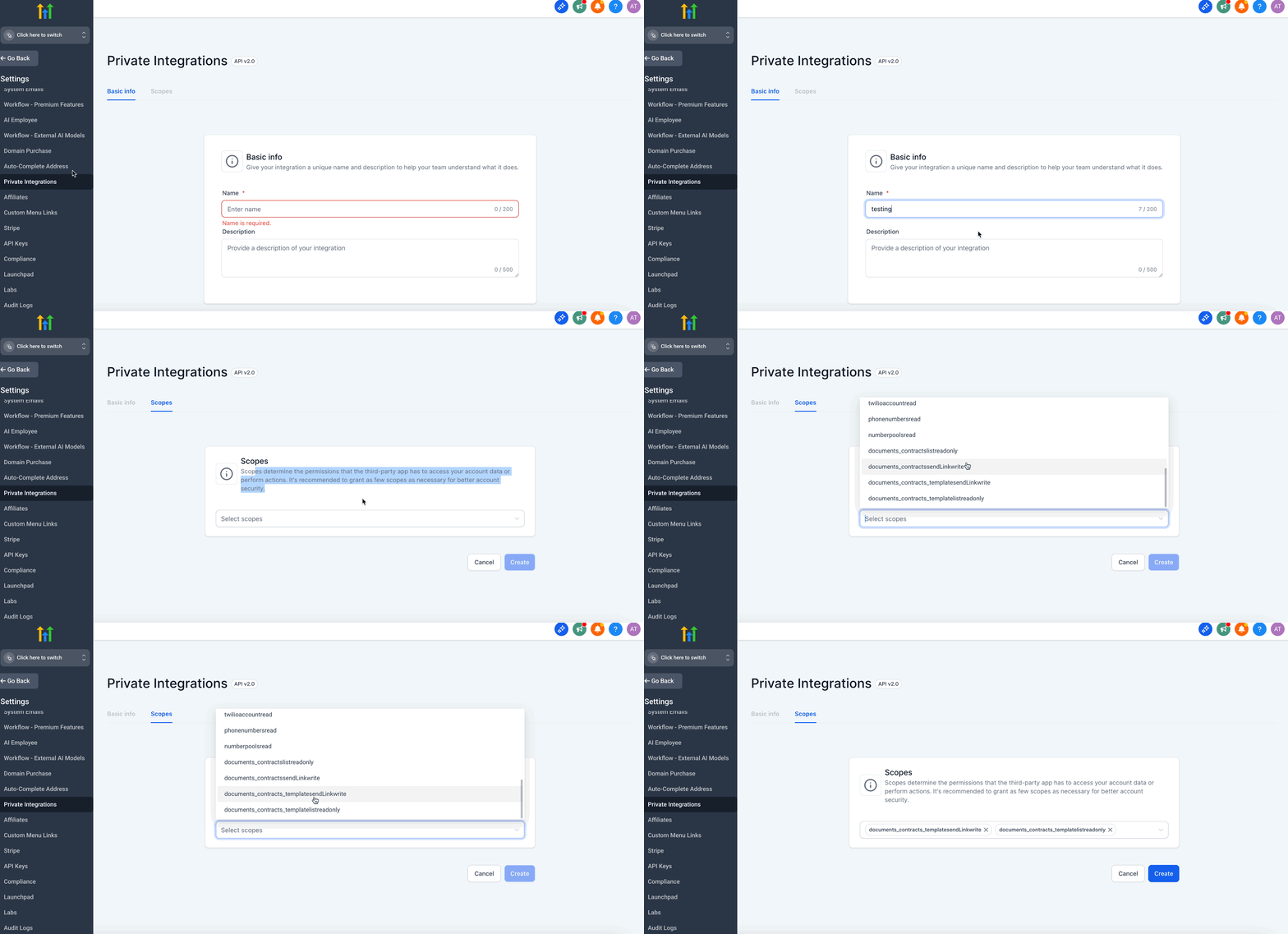
Go to Agency Settings > Private Integrations in your SourCherry account and create a Private Integration token (recommended over API keys for enhanced security and access control).
IMPORTANT: Scopes determine the permissions that the third-party app has to access your account data or perform actions. It's recommended to grant as few scopes as necessary for better account security.
Step 2: Review API Documentation
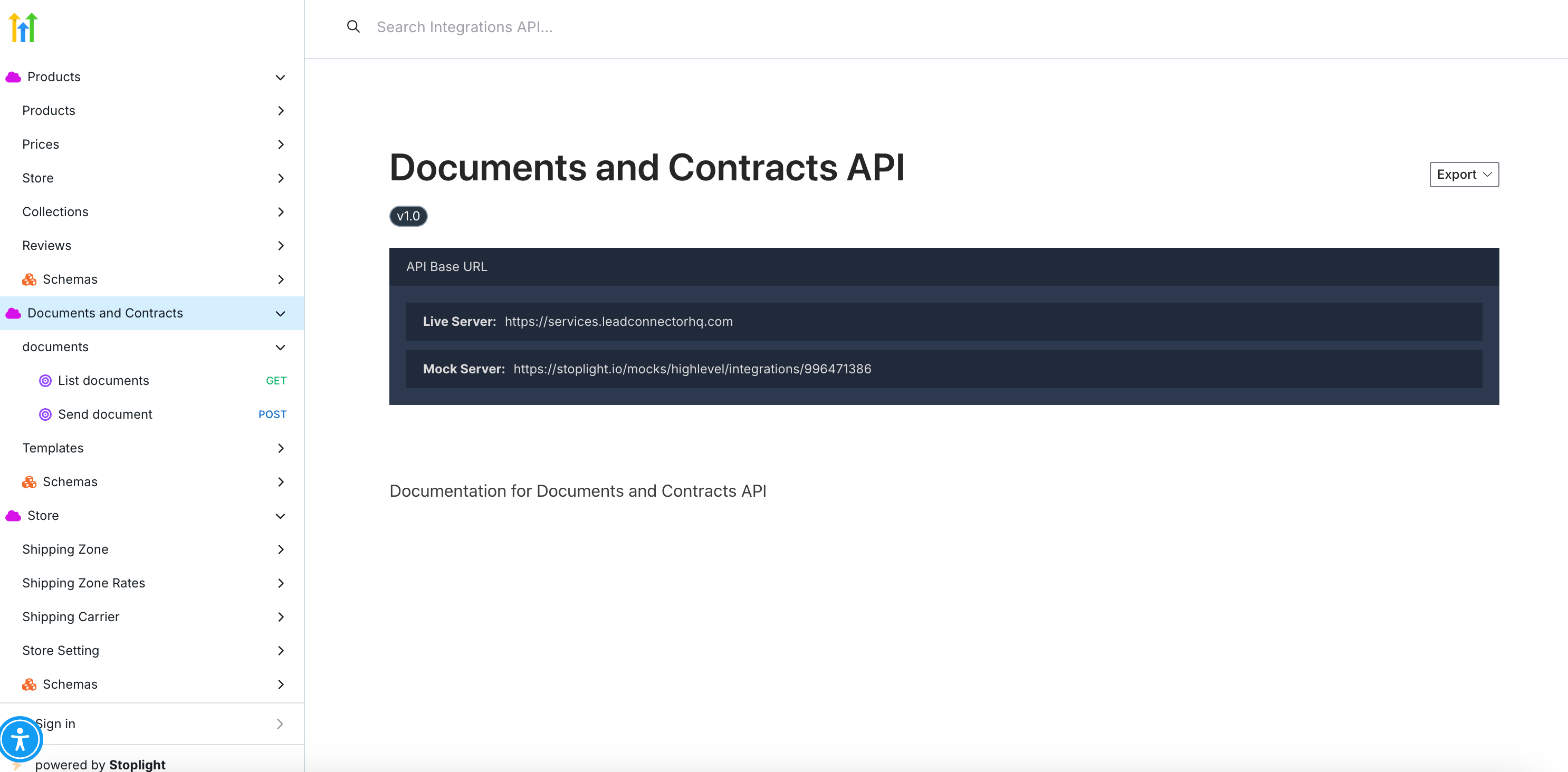
Visit the Public API documentation portal. Identify which endpoints your workflow requires (List Documents, Send Document, List Templates, Send Template).
Step 3: Test API Calls
Use a tool like Postman to make sample requests. Set your authentication header as Authorization: Bearer <your-token>. Enter required parameters (document ID, template ID, contact IDs).
Step 4: Validate Responses
Review the JSON output from each call. Confirm that documents or templates are returned and sent successfully.
Step 5: Integrate with Your Workflow
Embed API calls into your CRM, automation scripts, or backend processes. Optionally connect with SourCherry workflows that trigger based on document actions (e.g., “Document Sent” or “Document Signed”).
Step 6: Deploy Securely
Store your API tokens securely, rotate them periodically, and monitor API usage to avoid hitting rate limits.
Frequently Asked Questions
Q: What endpoints are included in Documents & Contracts: Public APIs?
You can use endpoints for listing documents, sending documents, listing templates, and sending templates.
Q: Where do I find the official API documentation?
Full documentation is available at the SourCherry Public API portal.
Q: Do I need specific permissions to access these APIs?
Yes, valid API credentials (preferably Private Integration tokens) are required for access.
Q: How can I test the APIs safely?
Use Postman or a similar API client with sample data before moving to production.
Q: Is there a difference between using a document and using a template?
Yes. A document refers to an existing file in your account, while a template is a predefined structure that can be used to generate and send new documents.