
SourCherry now supports 3D Secure (3DS) with Square, adding an extra layer of cardholder authentication to online checkouts. This enhancement automatically triggers the verification step whenever a buyer’s card or regional regulations require Strong Customer Authentication (SCA), helping you capture more payments while keeping fraud at bay. (squareup.com)
TABLE OF CONTENTS
- What is 3D Secure (3DS) for Square?
- Key Benefits of 3D Secure (3DS) for Square
- 3DS High-Level Checkout Flow
- Prerequisites & Supported Flows
- 3DS Error Handling & Troubleshooting
- How does it work?
- Frequently Asked Questions
What is 3D Secure (3DS) for Square?
3D Secure (3DS) is an industry-standard protocol that prompts the buyer to verify their identity (e.g., a one-time SMS code, Face ID, or redirect to the issuing bank) before the transaction can be authorized. Enabling 3DS greatly reduces fraud-related chargebacks because liability shifts to the card issuer once authentication succeeds. Square provides 3DS as part of its built-in Risk Manager, and SourCherry now passes the required data so Square can invoke the extra verification step whenever needed.
Key Benefits of 3D Secure (3DS) for Square
The new Square 3DS integration delivers immediate advantages:
- Fewer payment failures on cards that mandate 3DS, boosting conversion rates.
- Added fraud protection and chargeback liability shift once authentication succeeds.
- Automatic SCA compliance in regions such as the UK and EU—no extra coding required.
- A friction-light, in-checkout pop-up keeps customers inside your SourCherry funnel for a smoother experience.
3DS High-Level Checkout Flow
3DS is entirely automatic once your Square account is connected in SourCherry.
- The Buyer enters the required billing address and contact fields on an Order Form, Payment Element, Invoice, or Store checkout.
- SourCherry sends the transaction request to Square; Square risk rules decide whether 3DS is required based on the card, amount, location, and other factors.
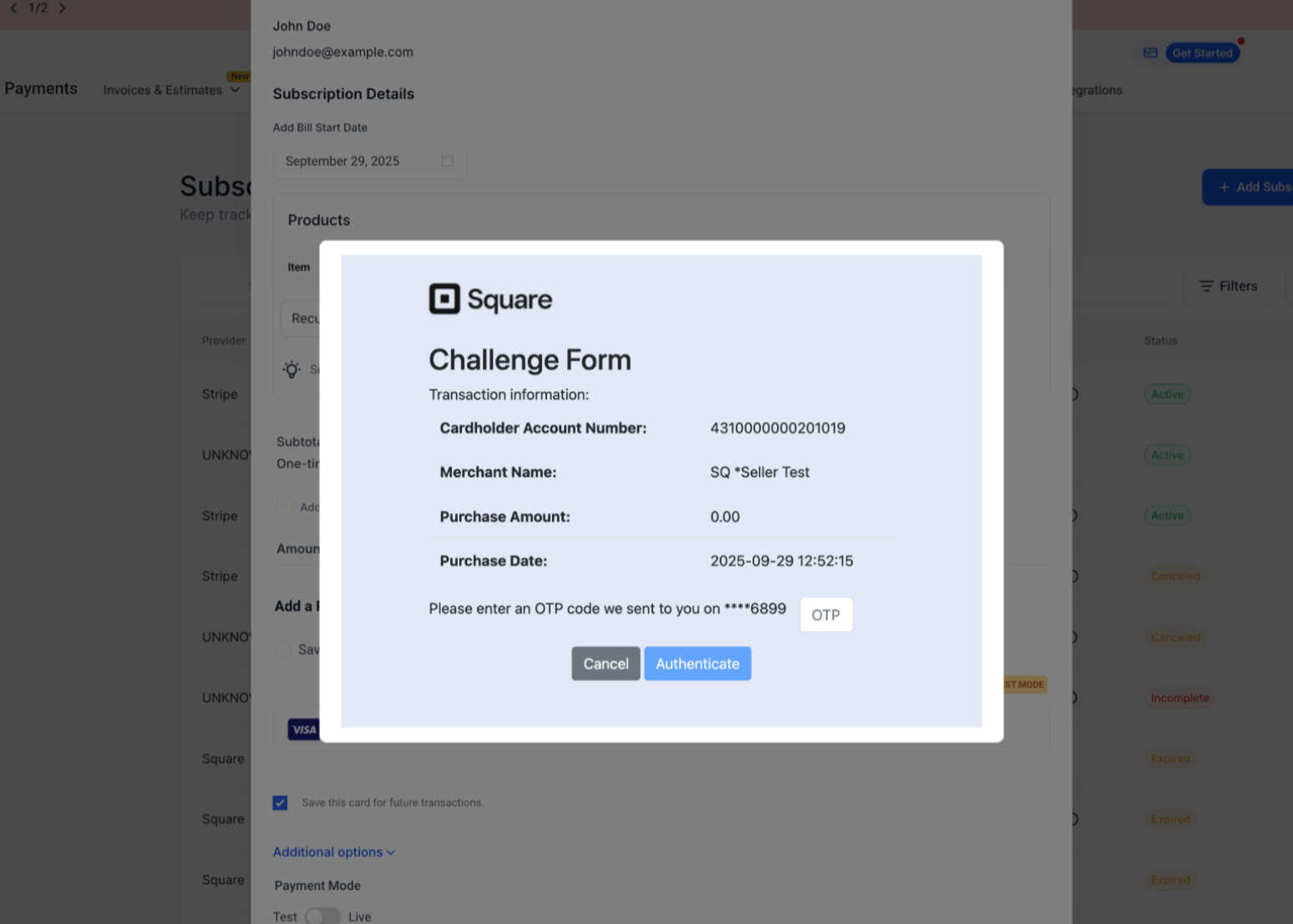
- If 3DS is triggered, a secure pop-up/modal appears for the buyer to complete authentication.
- On successful verification, the payment is captured, and the SourCherry order/invoice status updates to “Paid.”
- If verification fails or times out, the payment is declined, and SourCherry surfaces the error so the buyer can try another card.
Prerequisites & Supported Flows
3DS for Square is available anywhere you can already accept Square card payments in SourCherry: Order Forms, Payment Links, Ecommerce Store, Invoices, and more.
Prerequisites:
- A connected Square account at Sub-Account → Payments → Integrations.
- Square location set to Live mode.
- Billing Address + Email/Phone fields visible (and preferably required) on the checkout form so Square can validate the buyer.
- The buyer uses a card and an issuing bank that supports 3DS.
3DS Error Handling & Troubleshooting
Understanding common scenarios helps you support customers:
- “Authentication failed” — Buyer entered an incorrect SMS code or declined Face ID. Ask them to retry or use another card.
- “Issuer declined” — The card-issuing bank blocked the transaction before or after 3DS. Suggest contacting their bank.
- “3DS not completed” — Buyer closed the pop-up. Please encourage them to complete the step.
SourCherry always logs the gateway response under Payments → Transactions for easy reference.
How does it work?
- Square: No setup needed - it just works once the address and contact fields are added by the customer during checkout.
- NMI: A quick one-time setup is required to enable 3DS:
- Enroll in Payer Authentication 2.0 in your NMI account.
- Confirm the service status is Active.
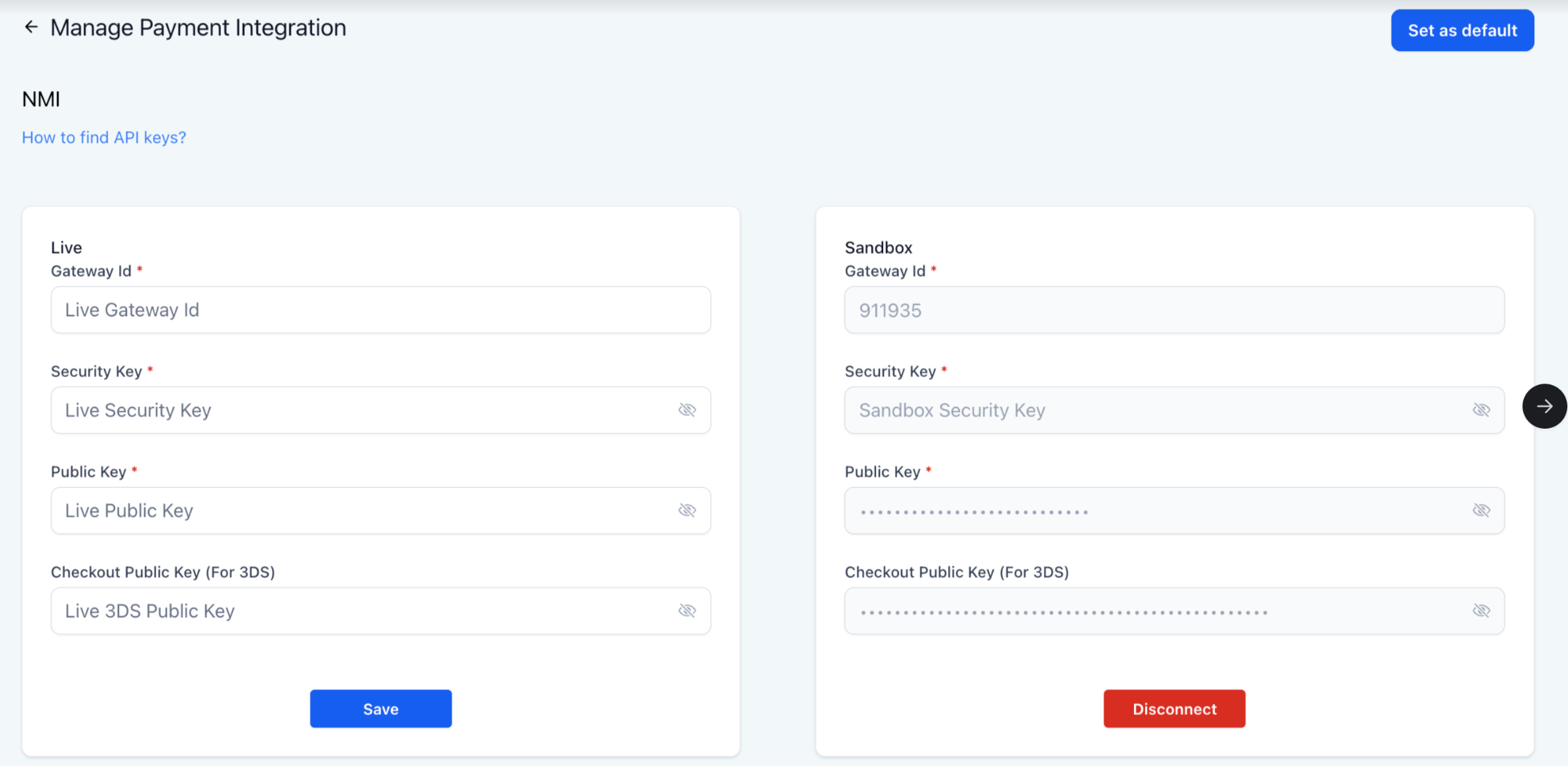
- Generate a Checkout Public Key for 3DS in your NMI Merchant Portal, and add it to your SourCherry integration.
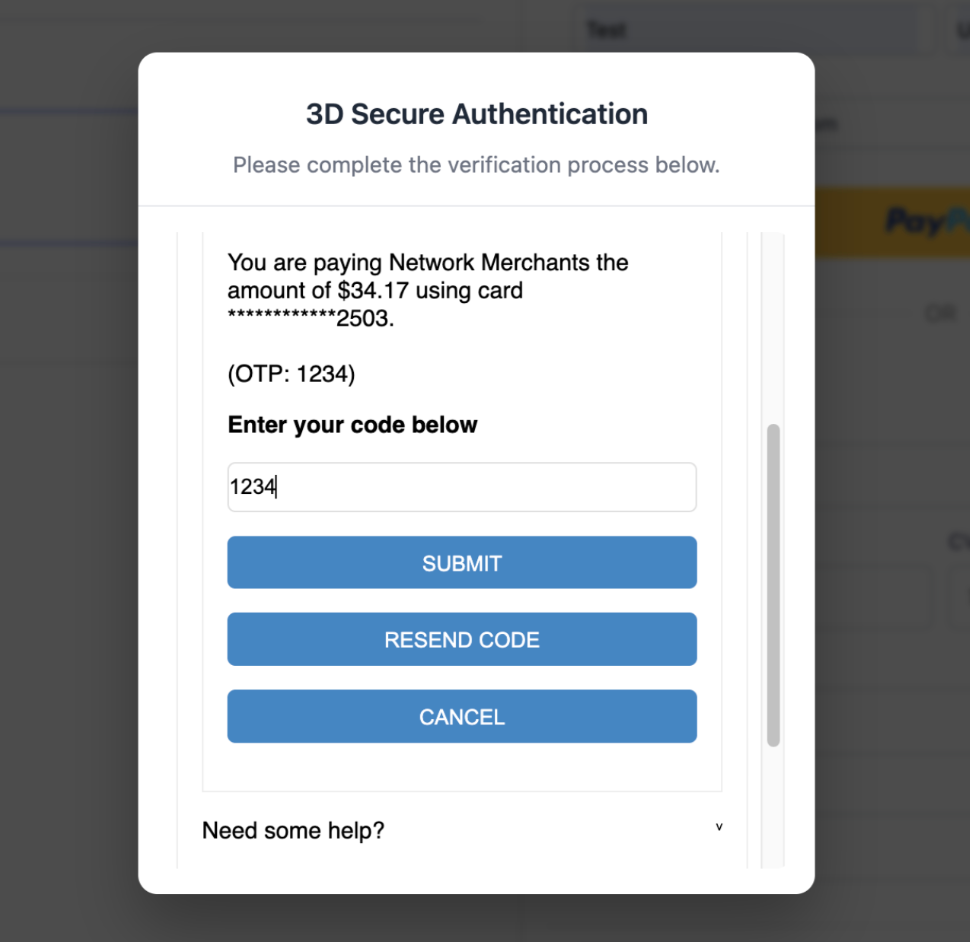
Once set up, whenever a card requires 3DS, your customers will automatically see a pop-up to verify and complete their payment. Refer to the Help article.
3DS flow on Square -
3DS flow on NMI -
Check out Public key addition on NMI -
Frequently Asked Questions
Q: Do I need to enable anything in the Square Dashboard?
No. Square’s default Risk Manager rules already apply 3DS to high-risk or SCA-mandated transactions.
Q: Does 3DS work for saved “Card on File” payments?
Square 3DS applies only to real-time cardholder-initiated payments. Card-on-file debits are exempt.
Q: Is there an extra fee for using 3DS?
Square does not charge additional 3DS fees; standard Square processing rates apply.
Q: Will 3DS appear on every transaction?
No. The card issuer and Square’s risk engine decide when to trigger 3DS. Many low-risk payments go straight through without the challenge.
Q: Can I disable 3DS?
You cannot disable 3DS from inside SourCherry; Square manages the rules. You may adjust risk rules in the Square Dashboard, but this is not recommended for SCA regions.
Q: Does 3DS slow down checkout?
The additional step adds only a few seconds and is embedded in-page, minimizing friction.
Q: Is 3DS supported on POS or Mobile Payments?
No. 3DS is solely for online (card-not-present) flows. In-person Square POS transactions use chip or tap for security instead.
Q: How do I troubleshoot repeated 3DS failures?
Check that the billing address matches the card issuer’s records, confirm the buyer’s device allows pop-ups, and ask them to retry with another card if problems persist.