
Document and Rich-Text Support helps you turn existing files and written notes into searchable Knowledge Base content for SourCherry AI tools. Upload DOC, DOCX, or PDF files, or write content directly in the rich-text editor. SourCherry extracts text, detects headings, structures content into searchable sections, and indexes it so connected AI experiences can retrieve relevant answers.
TABLE OF CONTENTS
- What is Document Support for Knowledge Base?
- Key Benefits of Document Support for Knowledge Base
- Supported File Types & Ingestion Behavior
- Automatic Parsing & Structuring
- How To Upload & Use Documents in Knowledge Base
- Troubleshooting Document and Rich-Text Sources
- Frequently Asked Questions
- Related Articles
What is Document Support for Knowledge Base?
Document and Rich-Text Support adds two ways to populate a SourCherry Knowledge Base: file uploads and rich-text entries. File uploads let you reuse existing Word documents and PDFs, while rich-text entries let you write or edit Knowledge Base content directly inside SourCherry.
During ingestion, SourCherry extracts text from supported documents, detects headings, and organizes content into searchable sections. This helps connected AI tools find relevant passages when answering customer or internal questions.
Key Benefits of Document Support for Knowledge Base
Understanding the advantages helps you decide when to upload a file versus writing in the editor. These benefits focus on speed, accuracy, and maintainability so teams can ship updates with confidence.
- Broader formats: Accept industry‑standard file types (DOC, DOCX, PDF) so you can reuse content you already maintain.
- Time savings: Ingest entire documents in one step instead of copying and pasting sections.
- Inline editing: Use the rich‑text editor to make quick content updates or create net‑new entries without leaving SourCherry.
- Higher answer quality: Automatic parsing structures content into searchable chunks aligned with headings and sections.
- Works with existing sources: Combine documents and rich text with URLs and FAQs to strengthen your training data.
Supported File Types & Ingestion Behavior
Know what content is extracted and how it is handled so you can prepare documents that ingest cleanly and provide high‑quality answers.
Note: Before uploading, remove sensitive content and ensure headings accurately reflect your structure. Clear headings produce better chunks and better answers.- Supported types: DOC, DOCX, PDF.
- Text‑only ingestion: Text is ingested. Embedded images are skipped to keep knowledge lightweight and focused on searchable content.
- Heading awareness: Detected heading hierarchy (for example, H1–H4) improves chunking and retrieval relevance.
- Instant indexing: New content becomes available immediately or within about a minute, depending on file size and indexing.
Automatic Parsing & Structuring
Parsing converts long documents into manageable chunks that align with sections and headings, enabling precise retrieval and citations in agent responses.
- Extracts text and detects headings to form a logical hierarchy.
- Splits large files into optimized chunks for faster, more relevant search.
- Indexes the content upon completion so bots can use the latest information.
- Preserves document‑level context so related sections remain connected during retrieval.
How To Upload & Use Documents in Knowledge Base
Proper setup ensures documents entries ingest cleanly and become searchable quickly for your AI agents.
- Go to AI Agents from your sub-account.
- Click on the Knowledge Base tab.
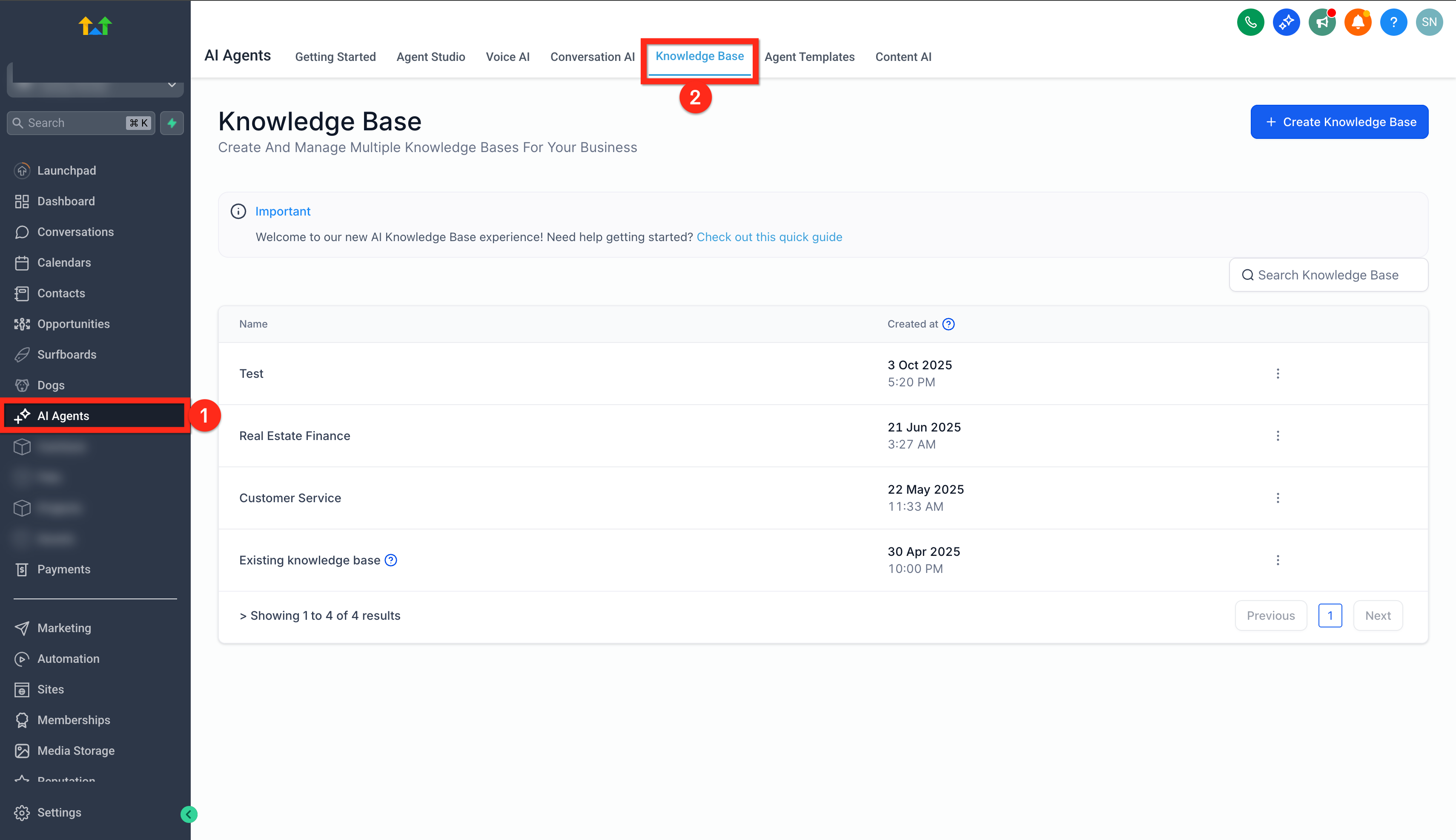
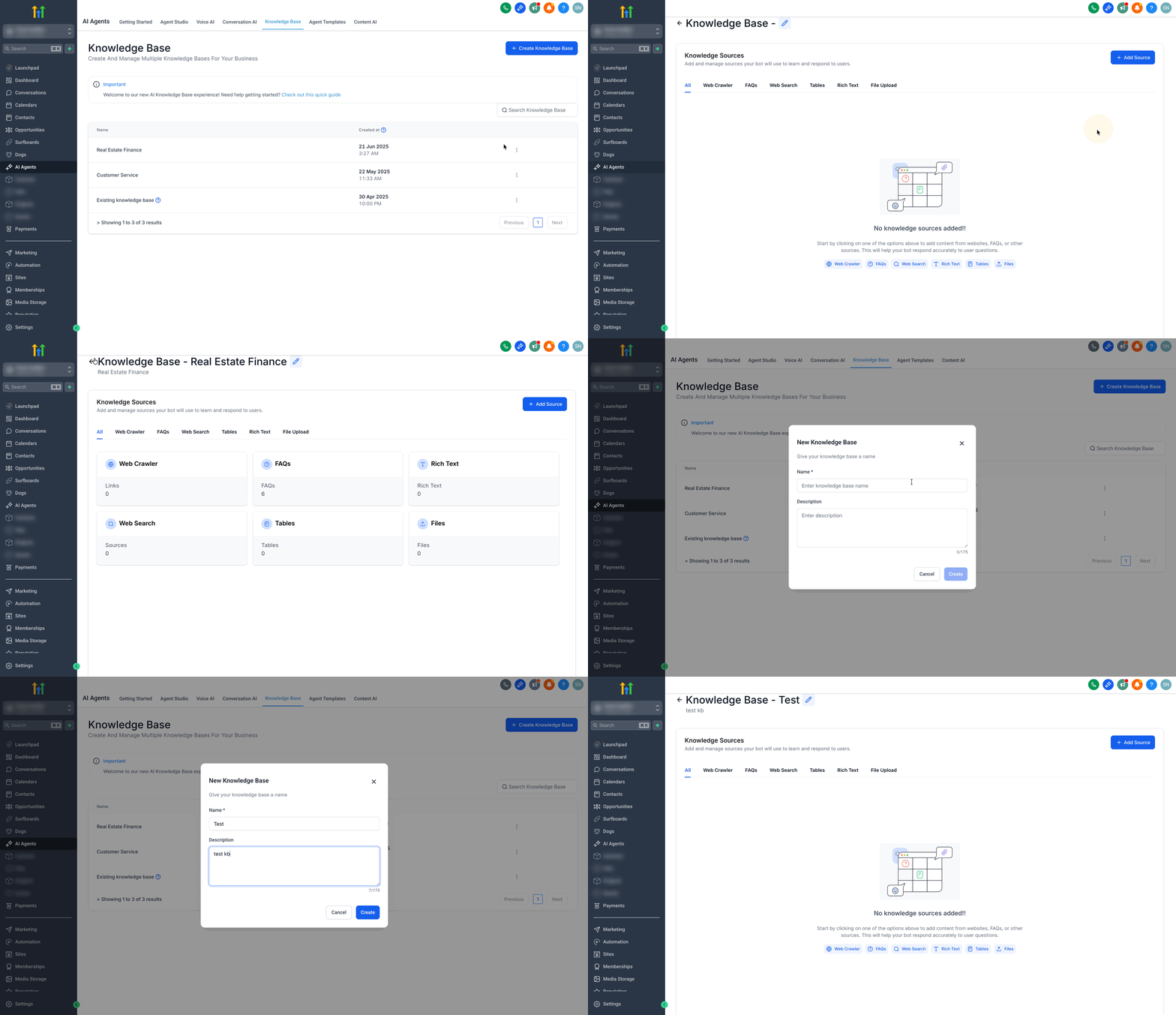
- Edit an existing Knowledge Base.
- or click Create New and give it a name and description.
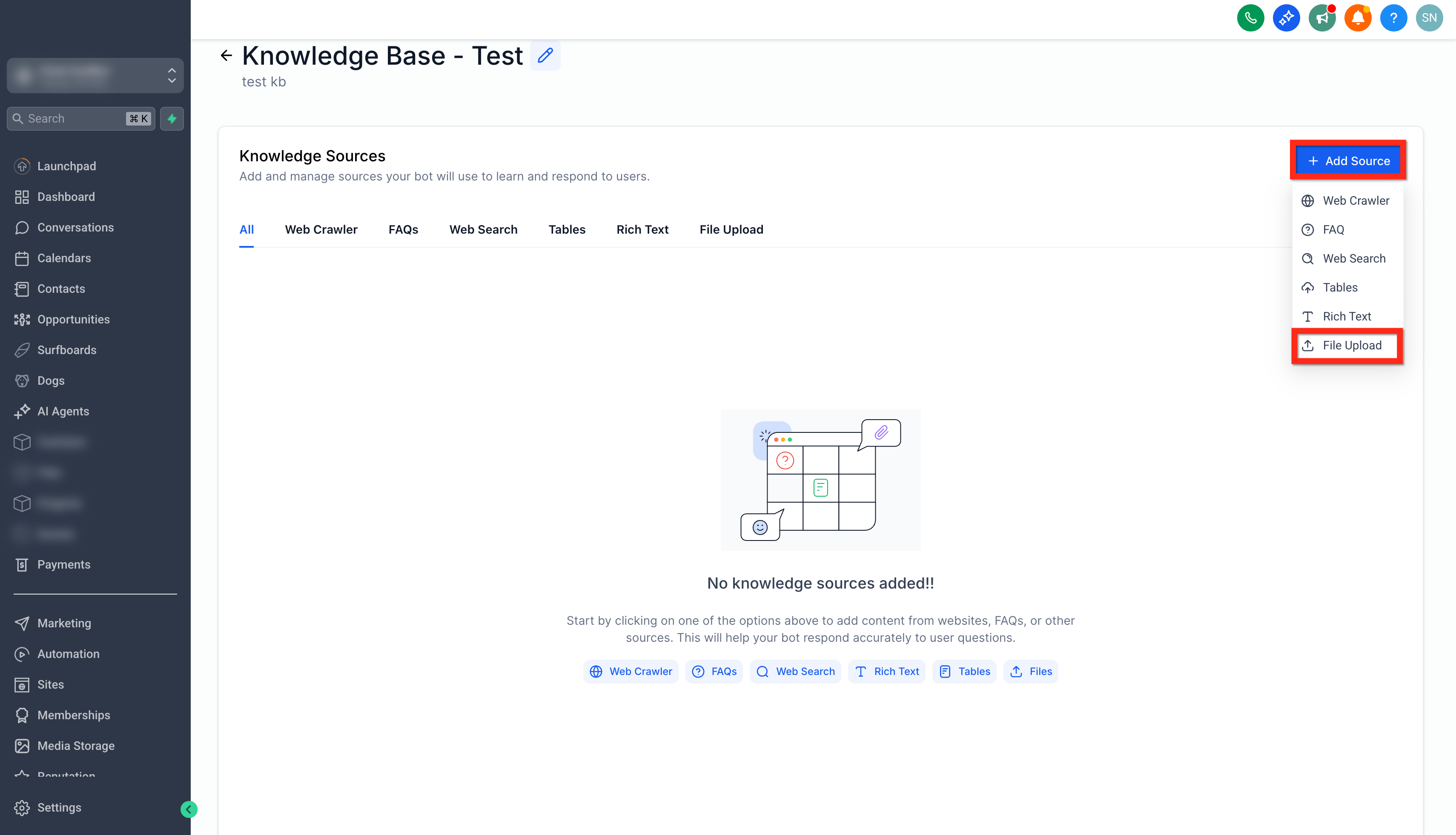
- Click Add Source → File Upload.
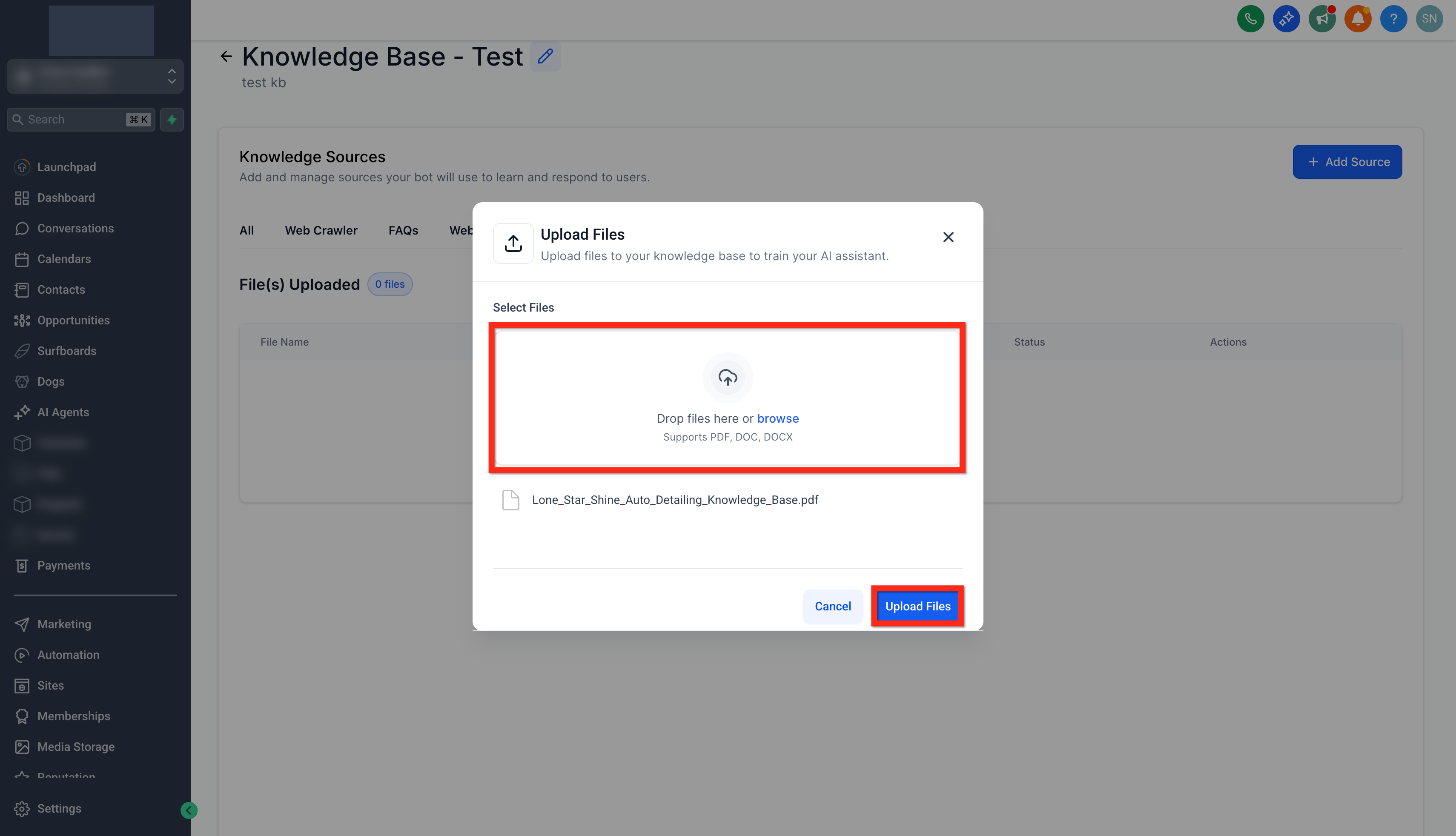
- Drag‑and‑drop or browse for your DOC, DOCX, or PDF files.
- Click Upload Files.
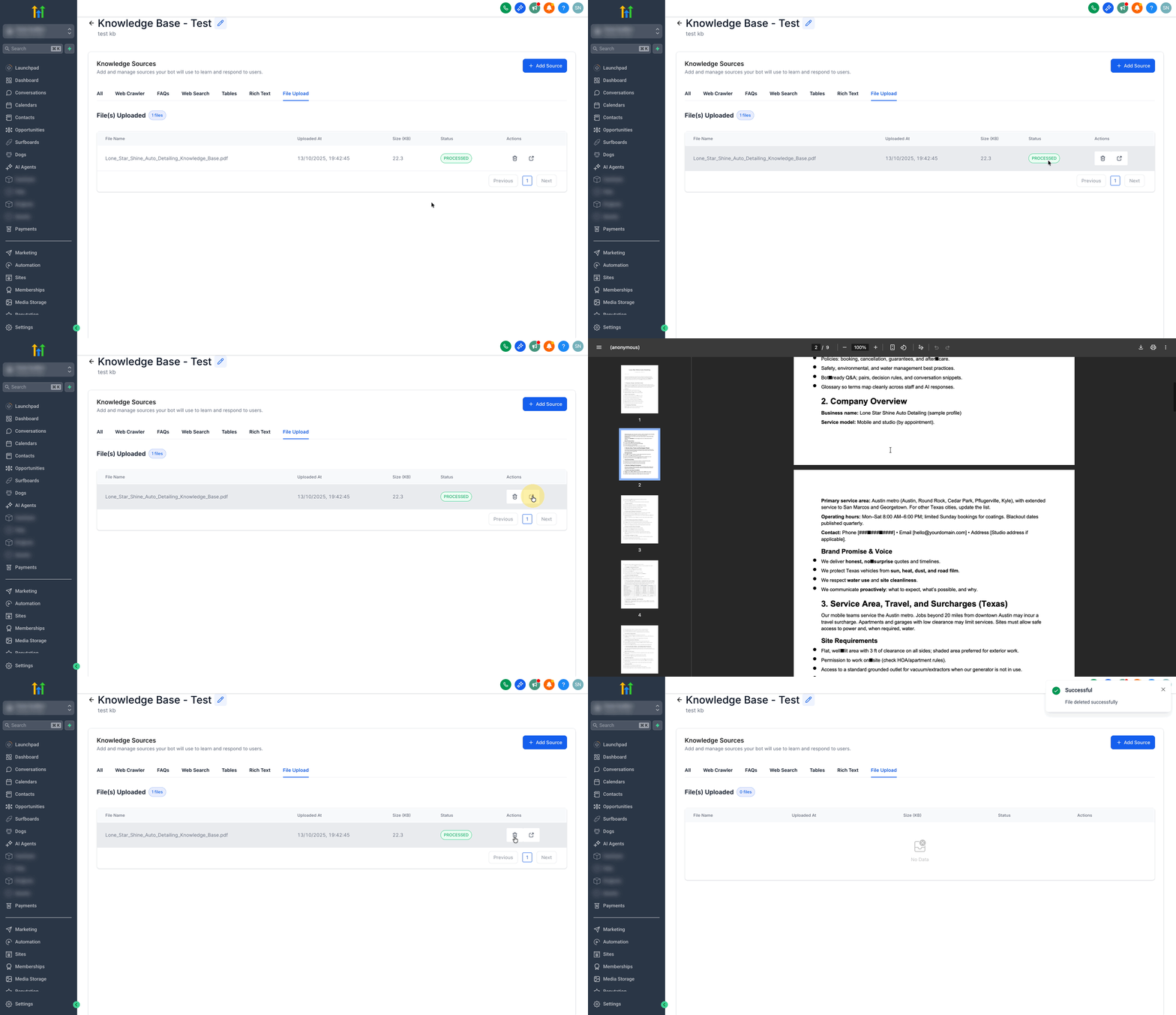
- Once the parsing is complete, the status will turn to Processed.
- You can use the arrow icon to open the uploaded file in a new tab or click on the bin icon to delete it as well.
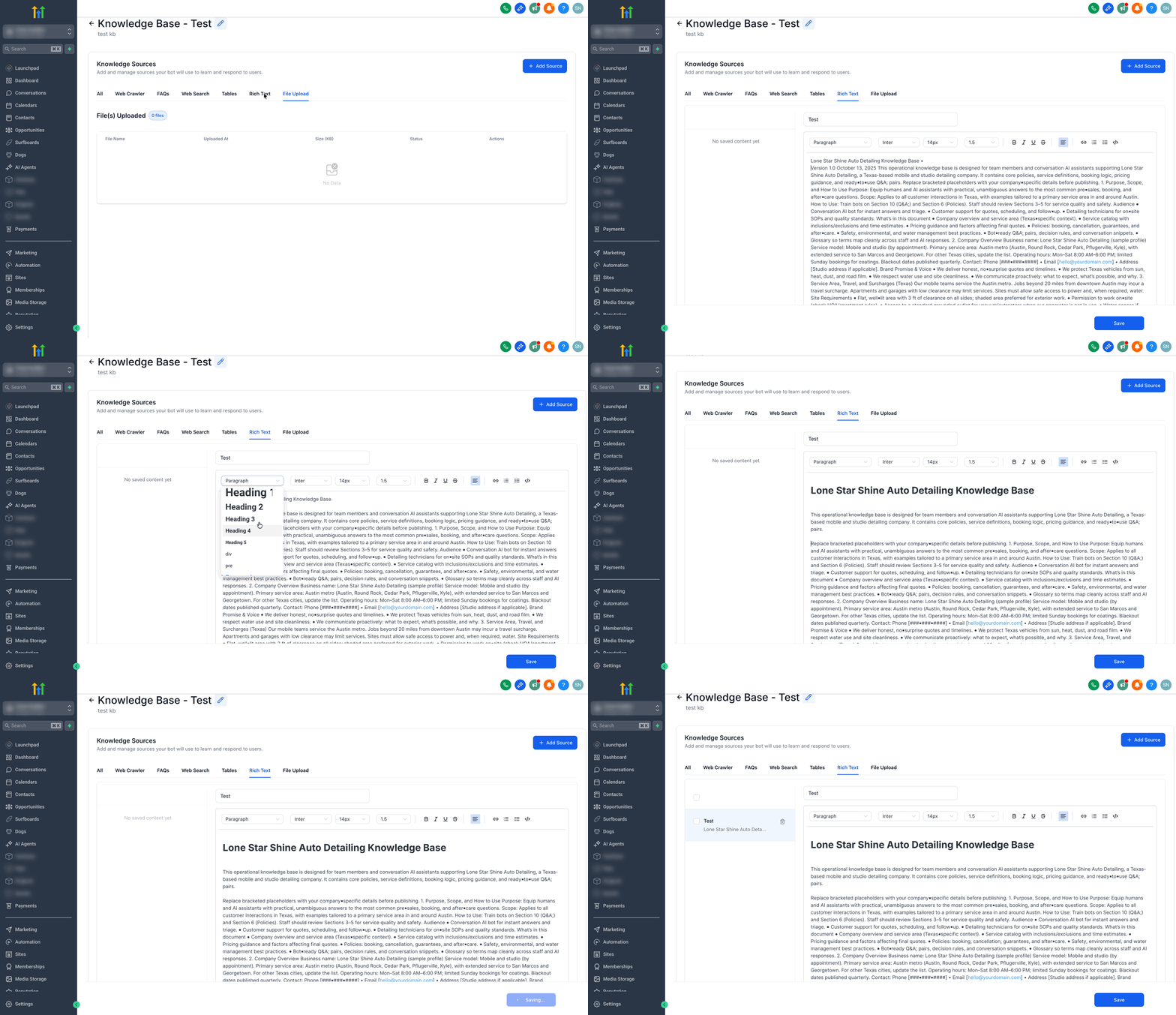
- You can also add Rich‑Text to write or edit content directly in the editor.
- Click Save to add the Rich-text to the knowledge base.
Troubleshooting Document and Rich-Text Sources
Most document and rich-text issues are caused by unsupported file types, unclear formatting, incomplete processing, image-only content, or duplicate sources. Reviewing the source status and testing retrieval usually helps identify the cause.
File upload fails
- Confirm the file type is DOC, DOCX, or PDF.
- Try uploading the file again.
- Check whether the file is corrupted or password-protected.
- Export the document to a supported format and re-upload.
Uploaded file is stuck processing
- Wait for processing and indexing to complete.
- Refresh the Knowledge Base source tab.
- Try a smaller or cleaner version of the file if processing does not complete.
- Re-upload the document if needed.
Document content is missing
- Confirm the document contains selectable text.
- Check whether the PDF is scanned or image-only.
- Review the document headings and structure.
- Re-upload a cleaner version with searchable text.
Images inside the document are not available
- This is expected. Embedded images are skipped during ingestion.
- Add important image-based information as written text in the document or as a rich-text entry.
Rich-text edits do not update uploaded files
- This is expected. File uploads and rich-text entries are stored separately.
- Update the rich-text entry directly, or upload a revised document if the source file changed.
AI retrieves the wrong source
- Check for duplicate or conflicting content.
- Remove outdated sources.
- Add clearer headings and direct answers.
- Use the Retrieval Tester to confirm which source is being returned.
AI cannot find expected document content
- Confirm the source status is Processed.
- Check whether the document includes the terms users are asking about.
- Add customer-friendly wording or synonyms.
- Break large, unclear documents into smaller focused files.
- Retest after updating the content.
Uploaded document contains outdated information
- Delete the outdated file source.
- Upload the revised version.
- Retest important questions to confirm the new source is retrieved.
Frequently Asked Questions
Q: Which document file types are supported?
DOC, DOCX, and PDF files are supported.
Q: Do images inside Word documents or PDFs import?
No. Only text is ingested. Embedded images are skipped so the Knowledge Base remains focused on searchable content.
Q: What should I do if my PDF is scanned or image-only?
Convert the PDF into selectable text before uploading, or add the important information as a rich-text entry.
Q: How fast do new uploads become available to AI tools?
Content is usually available immediately or within about a minute, depending on file size and indexing.
Q: Can I upload Google Docs directly?
Export the Google Doc as a DOCX or PDF file, then upload the exported file.
Q: Can I edit an uploaded document inside SourCherry?
Uploaded file sources are managed as files. To change document content, update the original file and upload the revised version. Use rich text when you want to write and edit content directly in SourCherry.
Q: Will rich-text edits overwrite uploaded files?
No. File-based sources and rich-text entries are stored separately.
Q: Will document uploads overwrite existing Knowledge Base entries?
No. Each upload is added as a new source. You can keep file-based sources, rich-text entries, URLs, FAQs, tables, and other supported sources together.
Q: Does Document Support replace URL, FAQ, or table sources?
No. Documents and rich text complement other Knowledge Base sources and can be used alongside them.
Q: How do I test whether uploaded content is retrievable?
Use the Knowledge Base Retrieval Tester to ask customer-style questions and review which sources are returned.
Q: Why is the wrong source being retrieved?
Duplicate, outdated, or overlapping content may be competing with the correct source. Review retrieved sources, update headings, remove old content, and retest.