
Turn your most passionate members into a growth engine with Community Affiliates in GoKollab. This article explains how the program works, who’s eligible, and how both owners and members access their affiliate tools. You’ll learn where to set the commission %, how tracking appears in dashboards, and how owners manage payouts directly (not by Kollab).
TABLE OF CONTENTS
- What is Community Affiliates?
- Key Benefits of Community Affiliates
- Member Referral Commissions
- Auto‑Generated Referral Links
- Commission Settings & Payout Ownership
- Access for Community Owners
- Access for Referrers (Community Members)
- Frequently Asked Questions
- Related Articles
What is Community Affiliates?
Community Affiliates enables an internal referral program for GoKollab communities. When activated, paid members receive personal invite links. When an invitee joins and pays for membership, the referrer earns a commission based on the percentage set by the community owner. This aligns incentives so growth comes from authentic member advocacy.
Community Affiliates is available exclusively on GoKollab and is designed to keep setup simple while giving owners clear control over commissions and payouts.
Key Benefits of Community Affiliates
Knowing the core advantages helps you position the program to your team and members, ensuring everyone understands how referrals convert into revenue and rewards.
Word‑of‑mouth growth: Recommendations from trusted members lead to higher‑quality sign‑ups.
Lower acquisition costs: Shift spend from ads to performance‑based commissions you control.
Member loyalty: Reward engaged advocates for contributing to community growth.
Owner control: Set the commission %, monitor results, and manage payouts yourself.
Clear attribution: Personal invite links attribute paid joins to the correct referrer.
Member Referral Commissions
Clear rules around when commissions are created reduce disputes and make the program easier to administer.
Commissions are credited when a new member uses a referrer’s invite link and completes a paid membership.
The commission % is defined by the community owner and applies to eligible referrals.
Earnings accumulate and are paid when the owner processes payouts.
Auto‑Generated Referral Links
Easy‑to‑use invite links encourage participation. Make sure members know where to find their link and how referrals are tracked.
Each paid member can access a unique invite link for your community.
Members can copy and share their link across social channels, email, or direct messages.
Announce the program with a pinned post and onboarding email to drive early momentum.
Commission Settings & Payout Ownership
Owners define the incentive structure and retain full control of payout timing and method, ensuring flexibility for different business processes.
Commission %: Owners set the global commission percentage for referrals that convert to paid memberships.
Payouts owned by you: Payouts are managed directly by community owners, not by Kollab. Choose how and when to pay (e.g., bank transfer) based on your internal processes.
Status updates: Owners manually mark payouts as Completed or Failed so referrers see accurate status in their dashboards.
Access for Community Owners
Use these steps to locate affiliate controls, set your commission %, and monitor referral performance so you can process payouts confidently.
How to Set Commission %
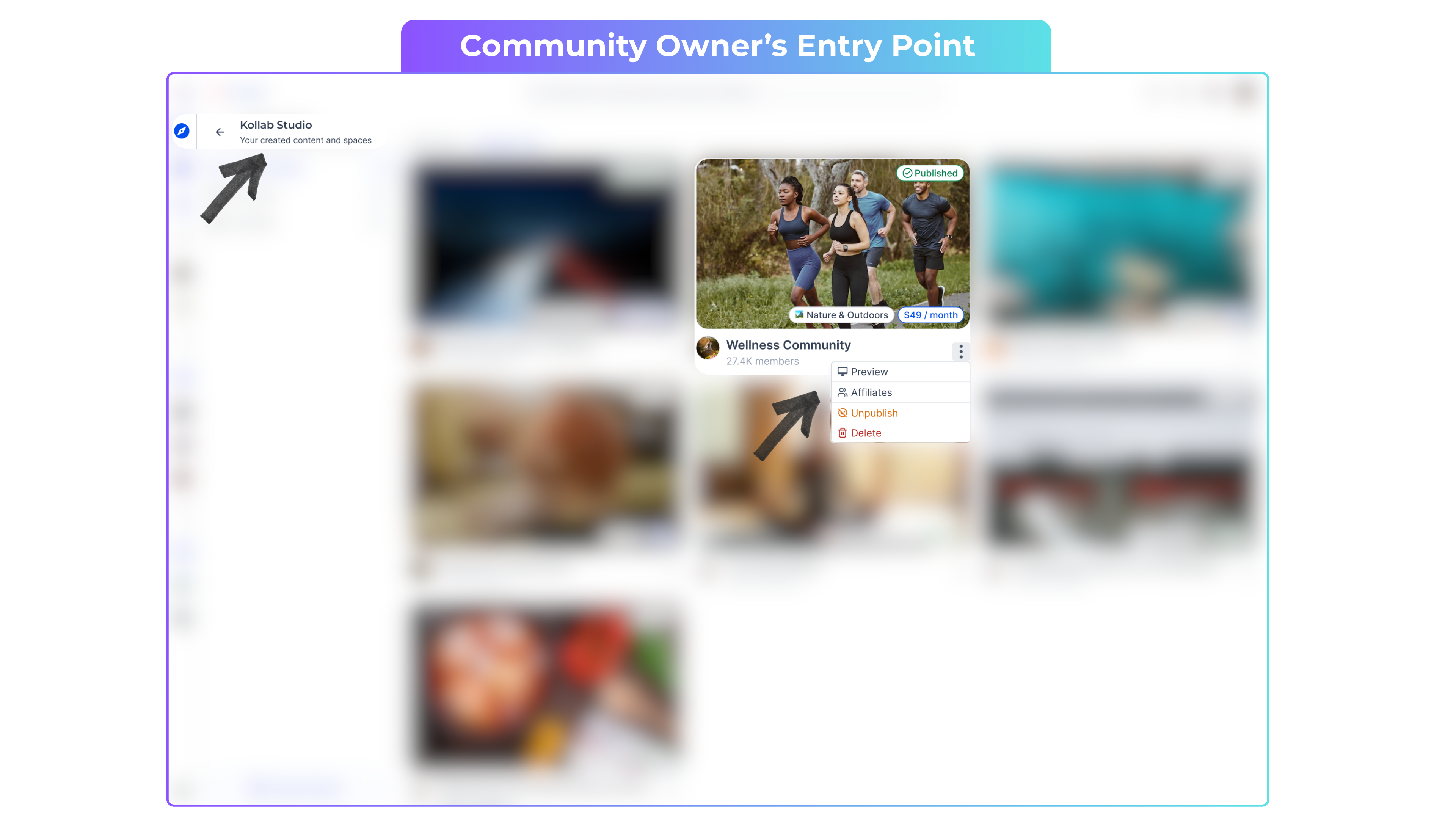
Go to Kollab Studio.
Click the kebab menu (three dots) next to your community.
Select Affiliates.
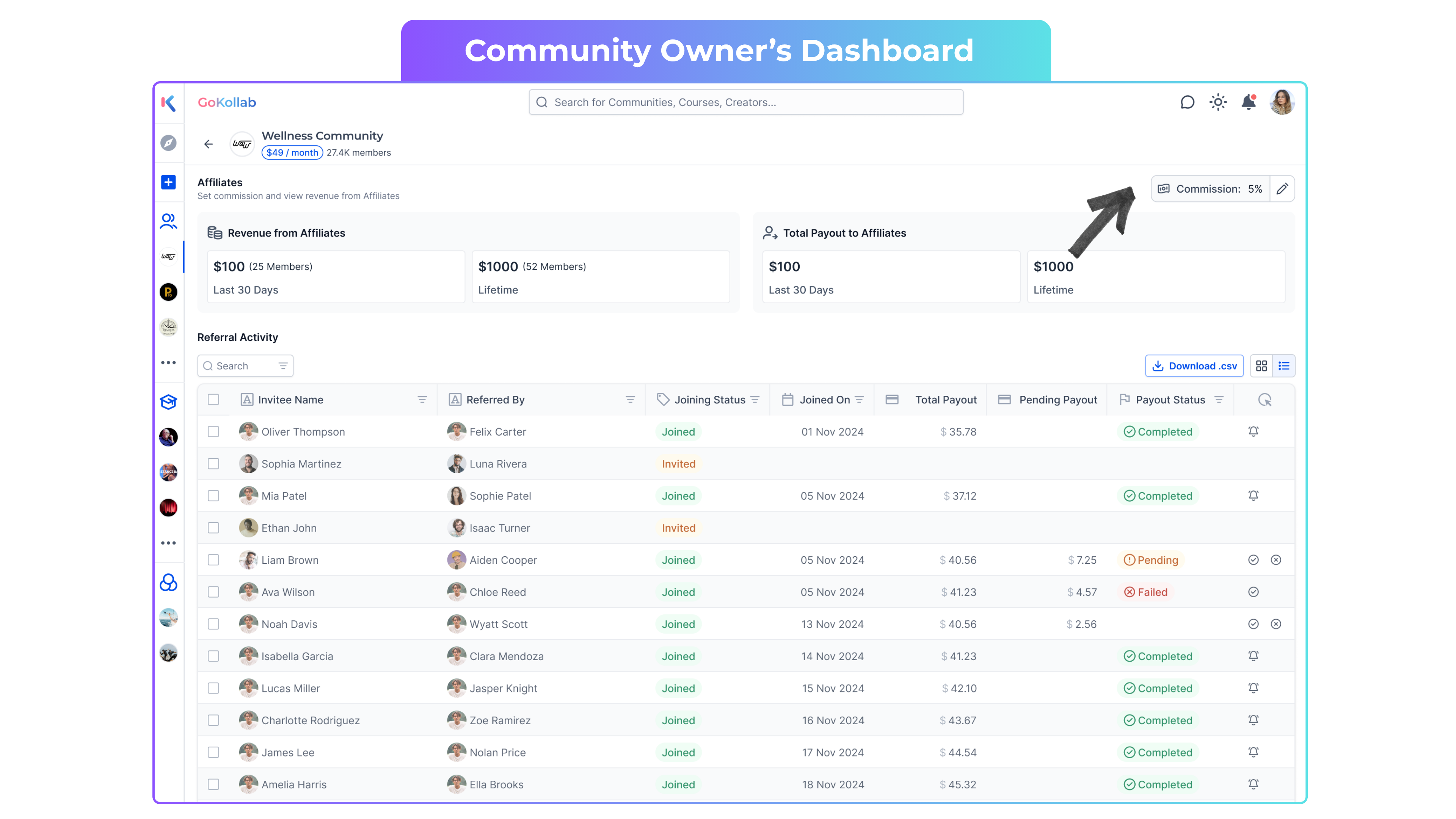
In the top right, set your Commission % (the reward given per referral) and save.
Understanding the Dashboard (Owners)
Revenue from affiliates: Additional membership revenue generated from referrals.
Total payouts: Total commissions you’ve already paid to affiliates.
Referral Table Fields
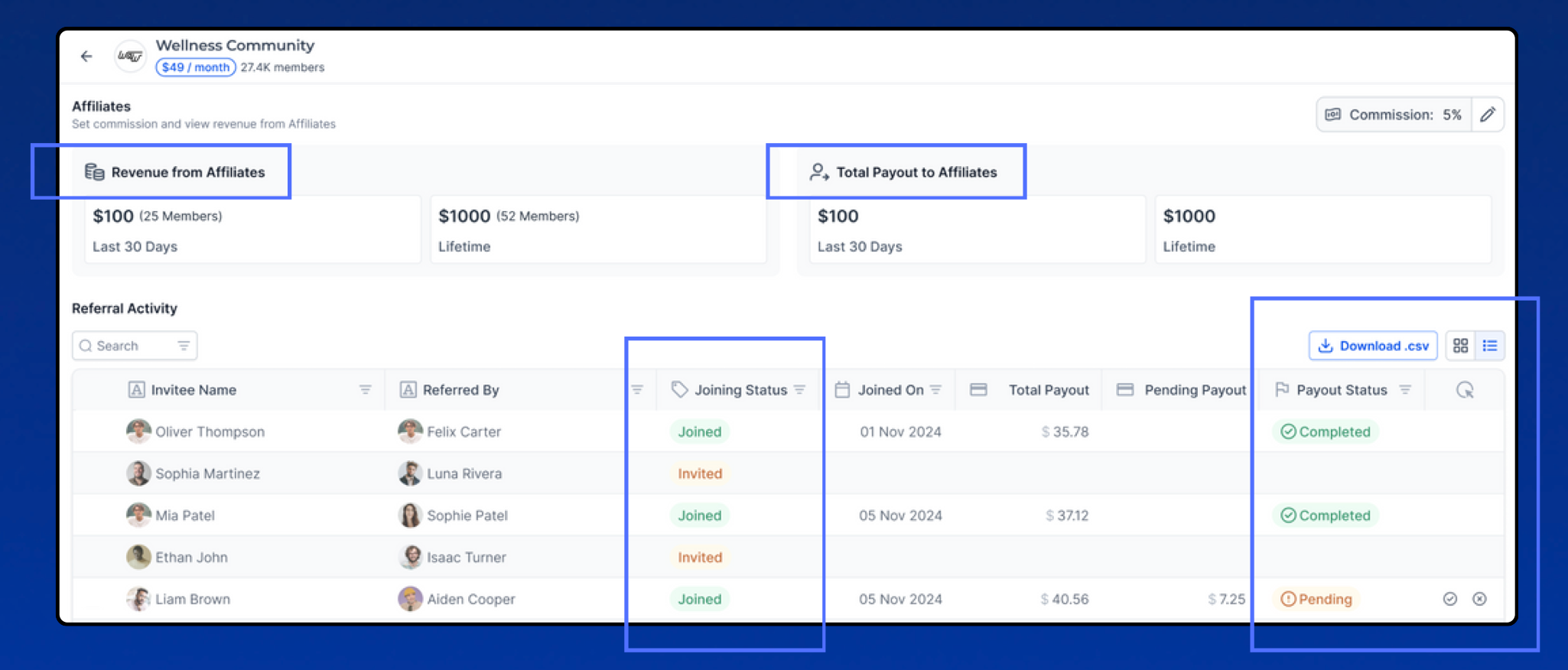
Invitee name: The new member invited.
Referred by: The existing community member who sent the invite.
Joining status: Shows Invited until the invitee pays; updates to Joined after payment.
Total Payouts: Amount you’ve paid so far for that referral.
Pending Payouts: Amount left to be paid for that referral.
Payout Status:
Completed → You’ve marked the payout as paid.
Pending → Not yet paid / Payment is processing.
Failed → Transfer didn’t go through (e.g., incorrect bank details).
Actions
Manually update payout statuses by clicking tick (Completed) or cross (Failed). The referrer’s dashboard updates accordingly.
Getting Bank Details of Members
At the top right of the referrals table, click Download CSV to retrieve the bank details needed to process payouts.
Access for Referrers (Community Members)
Members can view their referral performance and payout status so they always know what they’ve earned and what’s pending.
Accessing Your Affiliate Dashboard
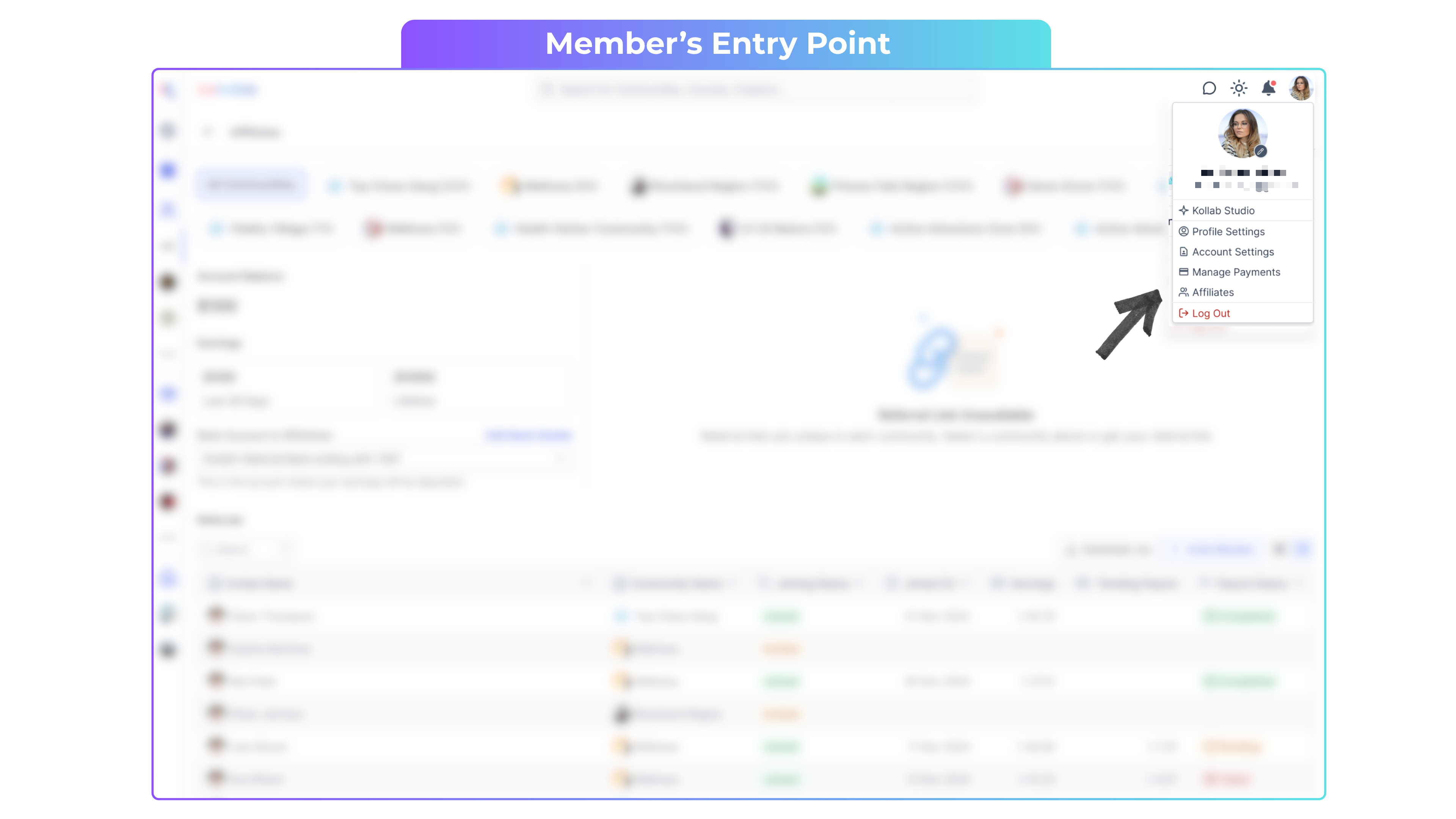
Click your Profile Icon in the top‑right corner to open the account menu.
Click Affiliates.
You’ll only see communities that offer affiliate commissions.
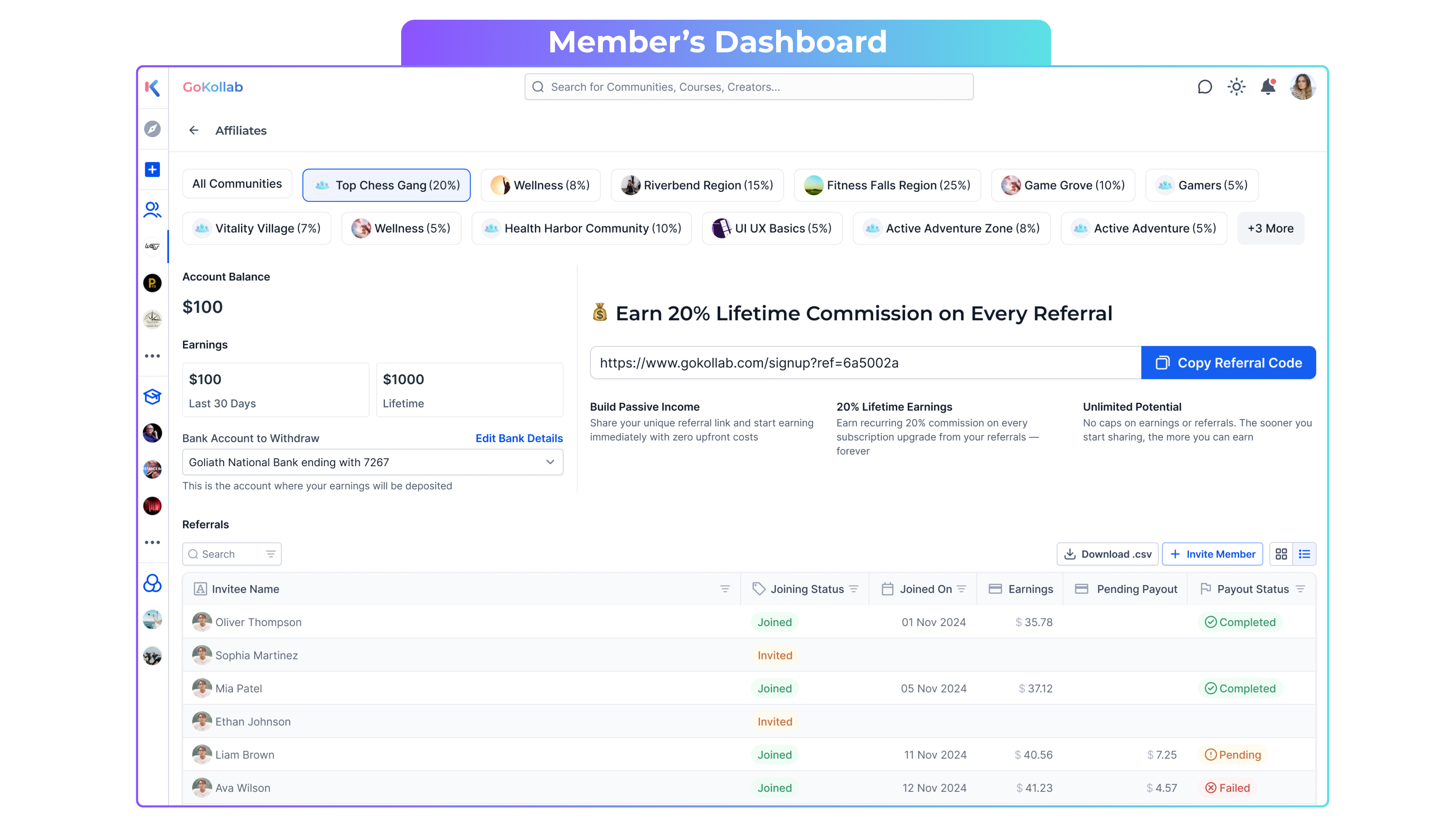
Your Dashboard Shows
Account Balance: Money you are yet to receive.
Earnings: Total money already received.
Important: Enter your bank details before you start referring so you can get paid.
Referral Table Fields (Members)
Invitee name: The member you invited.
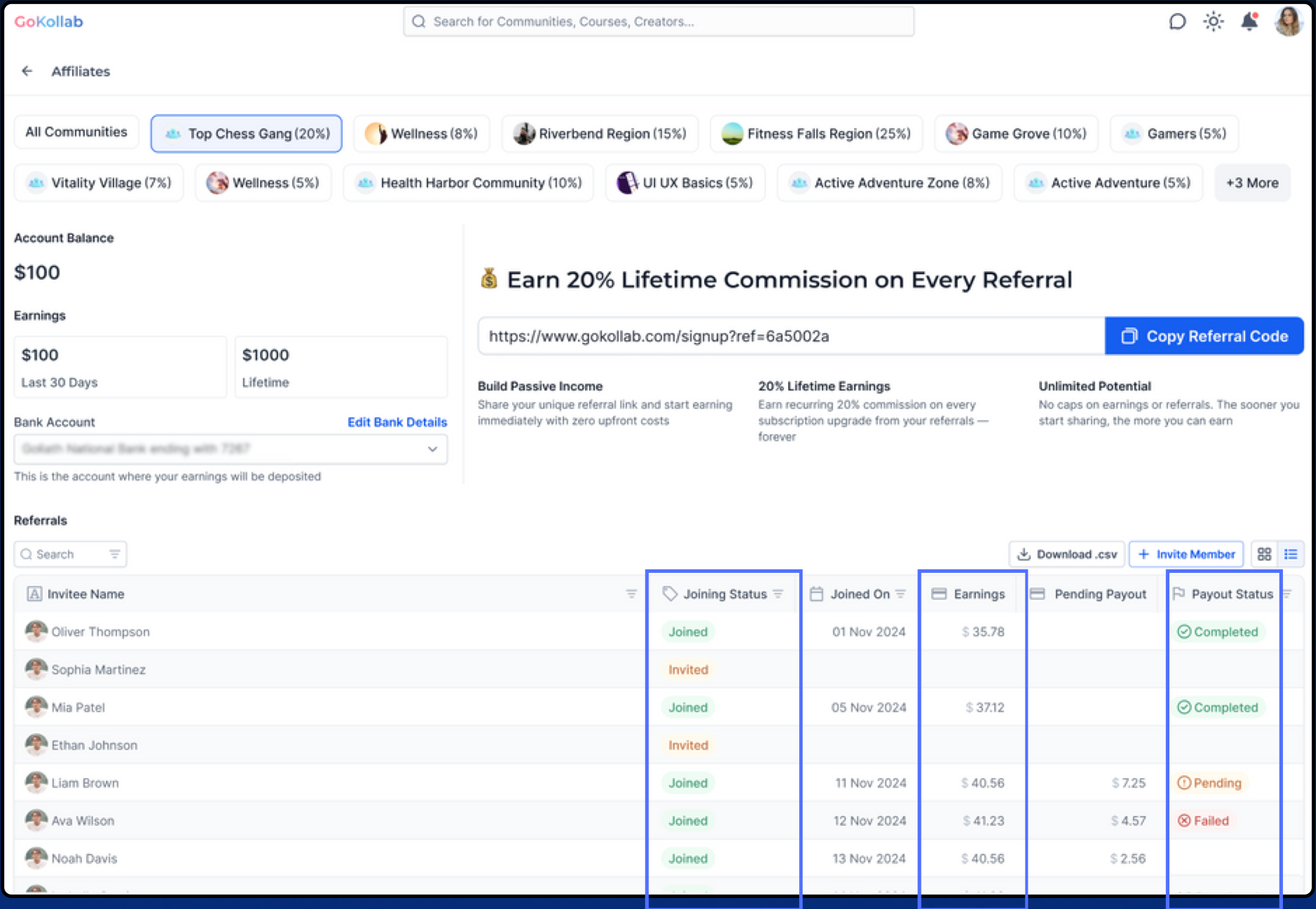
Joined Status: Invited if not purchased; Joined if paid.
Earnings: Total commission earned from that referral.
Pending Payouts: Commission not yet paid by the community owner.
Payout Status:
Completed → You’ve been paid.
Pending → Payment not yet processed.
Failed → Payment didn’t go through (contact your community owner for clarity).
Frequently Asked Questions
Q. Who can get an invite link?
Paid members in the community receive personal invite links.
Q. When is a commission created?
When an invitee joins via a member’s link and completes a paid membership.
Q. Where do I set or change the commission %?
Owners: Kollab Studio → kebab menu (three dots) → Affiliates → Commission % (top right).
Q. Who handles payouts?
Payouts are handled directly by community owners, not by Kollab.
Q. How do owners update payout status?
In the referrals table, click the tick to mark Completed or the cross to mark Failed.
Q. Can referrers see payout status updates?
Yes. Referrers see Completed, Pending, or Failed in their Affiliate dashboard.
Q. How do owners get member bank details for payouts?
Click Download CSV at the top right of the referrals table.