
Overview
Rich Communication Services (RCS) is a modern messaging standard that allows businesses to send richer, more interactive messages than traditional SMS.
With RCS, you can send:
Branded messages (business name displayed in supported inboxes)
Images and rich layouts
Tappable buttons (Call, Open URL, Suggested replies)
Interactive cards and carousels (if enabled)
When a recipient cannot receive RCS, SourCherry automatically falls back to SMS (if enabled).
Why Use RCS Instead of SMS?
RCS helps you:
Present a more branded experience
Increase engagement with tappable actions
Share richer content (images, structured cards)
Improve clarity with interactive message flows
Track delivery and read signals (when supported)
RCS vs SMS/MMS
| Feature | RCS | SMS | MMS |
|---|---|---|---|
| Reach | Compatible devices only | Nearly universal | Nearly universal |
| Branding | Business identity visible | Phone number | Phone number |
| Media | Native rich media & cards | Text only | Media (less consistent) |
| Buttons | Yes | No | No |
| Read receipts | Often available | No | No |
| Fallback | Falls back to SMS | N/A | N/A |
Best Practice: Always design messages so they still work as SMS.
What you can do with RCS in SourCherry
Depending on your plan and launch scope, you can typically:
Send 1:1 RCS messages from Conversations
Send RCS campaigns using Bulk Actions
Use media (images) and actions/buttons (where enabled)
Track delivery signals (and “read” where available)
Use SMS fallback when a recipient can’t receive RCS
RCS Availability & Requirements (US Launch)
Who Can Receive RCS?
RCS can be delivered to recipients who:
Have an RCS-supported device
Use an RCS-capable messaging app
Have RCS enabled
Are on a supported carrier/network
Some recipients will receive RCS, others will receive SMS fallback.
1. Device & App Support
RCS is commonly supported on:
Many Android devices using an RCS-capable messaging app (often Google Messages or carrier-supported apps)
Recipient-side settings must allow RCS features (users can disable RCS)
2. IPhone Support
RCS support on iPhone depends on OS/app ecosystem and carrier enablement. For many audiences, iPhone recipients may receive SMS fallback instead of RCS.
Note- 1. Always design your messaging so it still works when delivered as SMS.
3. Carrier/network factors (why results vary)
Even within the U.S.,
Results may vary based on carrier and network conditions.
Some carriers or device configurations may limit RCS support, affecting available features.
Temporary network issues can trigger fallback from RCS to SMS/MMS.
App-level settings, such as “Chat features” or read receipts, can also change the messaging experience.
4. Media & Feature Variability
RCS features can vary across recipient apps. When building rich messages:
1. Keep copy clear even without rich components
2. Avoid relying on a single button or image for critical info
3. Always include a plain-text fallback message
RCS Compliance & Consent (US)
1. Opt-In Requirements
You should send RCS only to recipients who have explicitly opted in.
Your opt-in must clearly state:
Message type (promotions, reminders, updates, etc.)
Expected frequency (“up to X per week/month”)
How to opt out
How to get support
2. Opt-Out Handling
Recipients must be able to opt out easily.
Treat common keywords like STOP, UNSUBSCRIBE, CANCEL, END, QUIT as opt-out signals.
Once a contact opts out, they should not receive further messages unless they opt back in.
3. Content guidelines (restricted/prohibited content)
To protect deliverability and compliance, avoid sending:
Deceptive or misleading content
Spammy/repetitive content without consent
Content that violates Twilio policies or applicable laws/regulations
For regulated industries, ensure your content aligns with your legal obligations.
4. Brand identification & user trust
RCS is a more branded channel; keep your sender identity consistent:
Use a sender name that matches your business or website
Ensure your website and sender profile describe the same business
Provide valid contact/support information
5. Quiet hours and frequency best practices
Send during reasonable local hours to respect recipients’ time and avoid disruptions.
Keep frequency aligned with what was promised at opt-in to maintain trust and prevent message fatigue.
Provide value first reminders, confirmations, and helpful updates typically perform best and drive stronger engagement.
Set Up RCS in SourCherry
Before You Start
Make sure you have the following:
RCS enabled on your SourCherry account
A connected Twilio account
Your business identity details:
Brand name
Website (recommended)
Support email and/or phone number
Business address (recommended)
Logo (if supported)
A clear opt-in process for messaging
Step 1: Enable RCS
Please contact SourCherry Support to enable RCS for your account.
Step 2: Create Your RCS Sender Profile
ISV locations: Reach out to SourCherry Support to create your sender profile.
Non-ISV locations: Share your sender details with Support for setup.
For guidance, refer to this article: How to Onboard an RCS Sender ID in SourCherry (Non-ISV)
Sender details typically include your brand information and business identity listed above.
Step 3: Submit for Approval
SourCherry Support will submit your RCS sender profile for approval on your behalf.
Approval is required before you can begin sending RCS messages.
Step 4: Configure SMS Fallback
To ensure message delivery when RCS is unavailable:
Go to Settings → Messaging → RCS → Fallback
Enable:
Fallback to SMS
This ensures:
RCS messages are sent to compatible recipients
SMS is automatically used when RCS is not available
Step 5: Send a Test Message
Go to Conversations
Select a test contact (a US Android device is recommended)
Send a text-only message first
Then test rich content (if enabled)
Note: Some recipients may receive an SMS fallback instead of RCS , this is expected behavior.
RCS UI Interface Walkthrough
1. Sending RCS Messages
1:1 RCS (Conversation UI)
You can send RCS directly from Conversations.
Steps:
Open a contact thread
Compose your message
Select the approved RCS Sender ID
Send
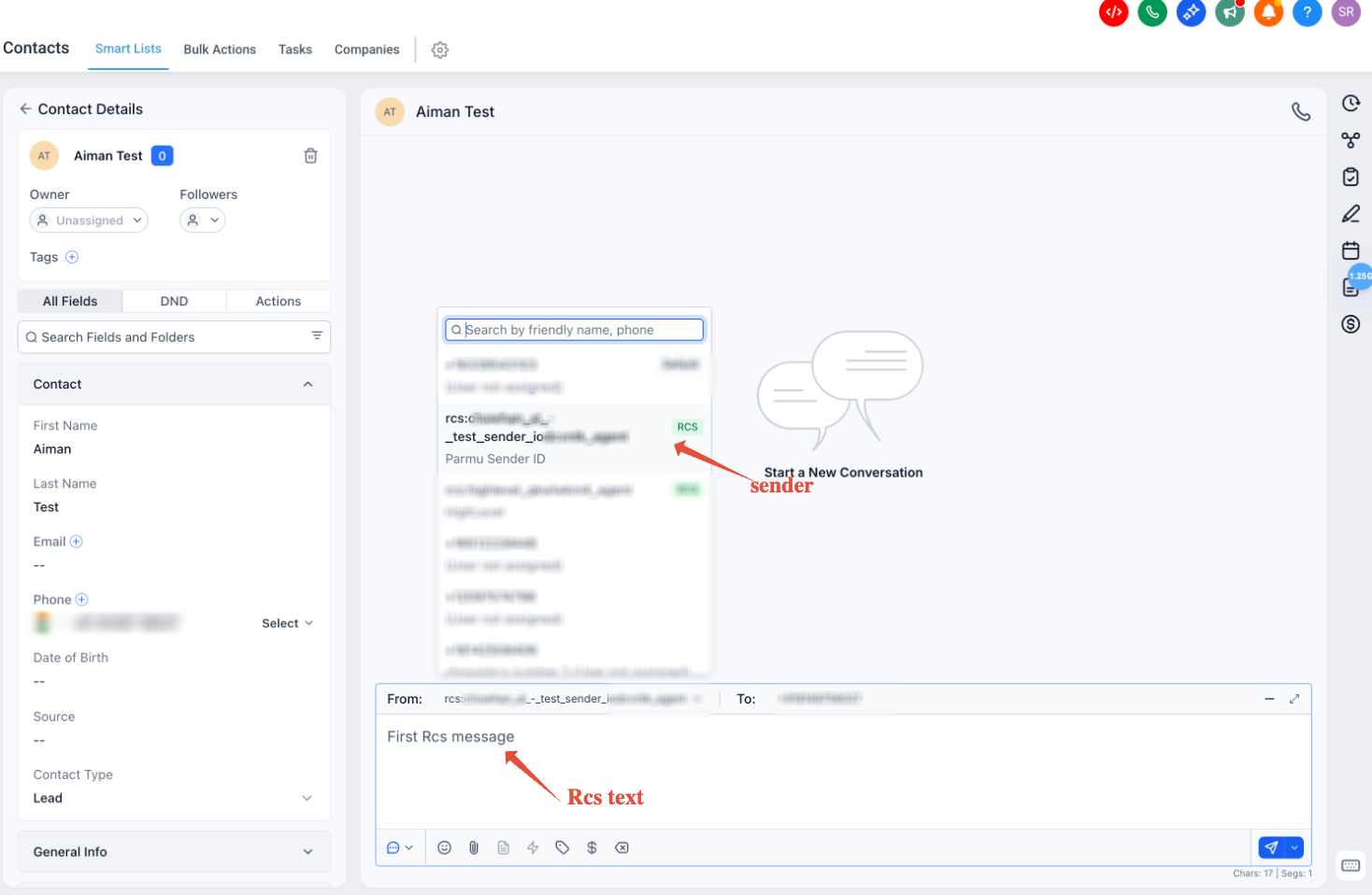
Important Notes
RCS messages send only to RCS-capable recipients
Snippets cannot be sent directly from Conversation UI
Fallback occurs automatically if enabled
2. Sending RCS via Bulk Actions (Snippets)
Bulk Actions is currently the only way to send RCS Snippets.
Steps
Go to Contacts
Open Smart Lists
Select contacts
Click More
Choose Send SMS & RCS
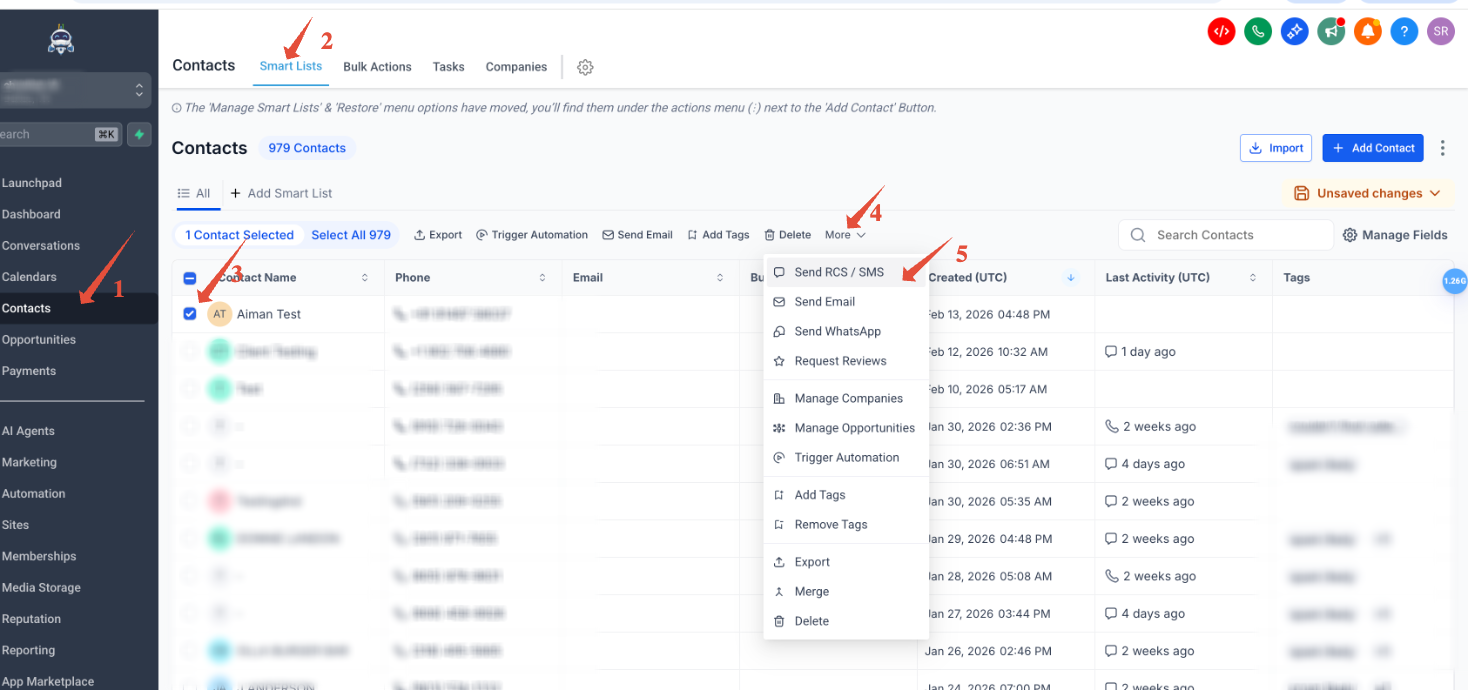
After selecting Send SMS & RCS, the following configuration screen appears:
Bulk RCS / SMS Configuration Screen
The configuration window includes the following fields:
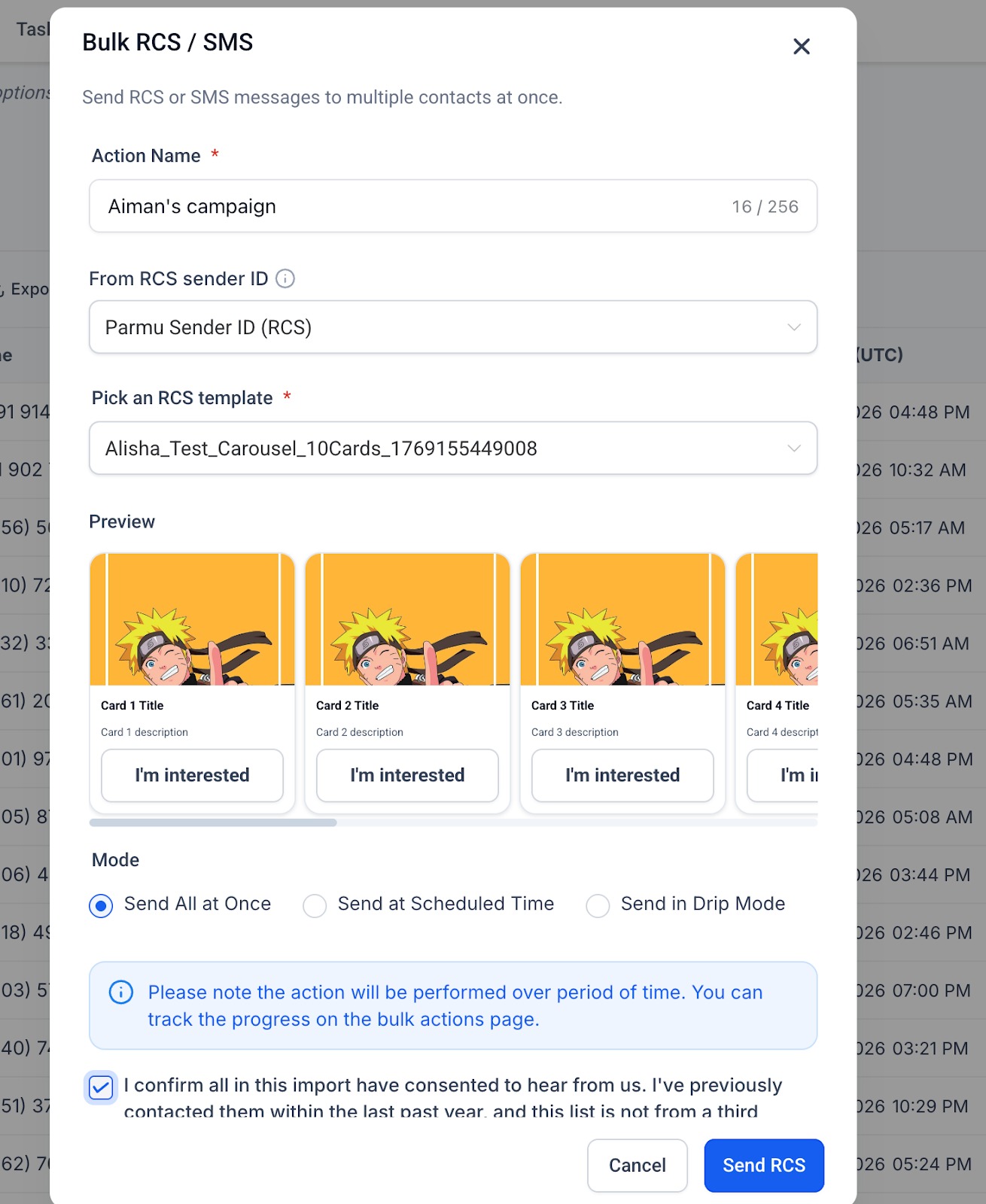
A) Action Name (Required)
- Name your campaign.
- This field is mandatory.
B) From RCS Sender ID
- Select an approved Sender ID from the drop down
- Only registered and approved Sender IDs will appear here.
C) Pick an RCS Template (Required)
- Choose a previously created RCS snippet.
- Only previously created RCS snippets will appear in this dropdown.
D) Mode Selection
Choose how the RCS message will be delivered:
Send All at Once - Sends the message immediately to all selected contacts.
Send at Scheduled Time - Sends the message at a specified future date and time.
Send in Drip Mode - Sends messages gradually over a defined time period.
A note appears indicating: The action will be performed over a period of time, and progress can be tracked on the Bulk Actions page.
Consent Confirmation Checkbox- This checkbox must be selected before proceeding.
E) Final Action
- Click Send RCS to execute the campaign.
- If Check Progress is selected. You are taken to the Bulk Actions page

Note- Bulk Actions is currently the only method for sending RCS snippets.
3. Creating RCS Snippets
RCS Snippets are pre-designed RCS message templates that allow you to send structured, rich messages instead of typing messages manually each time.
They are reusable message formats created inside the platform and can include interactive and visual elements supported by RCS.
RCS snippets can be created under:
Conversations → Snippets
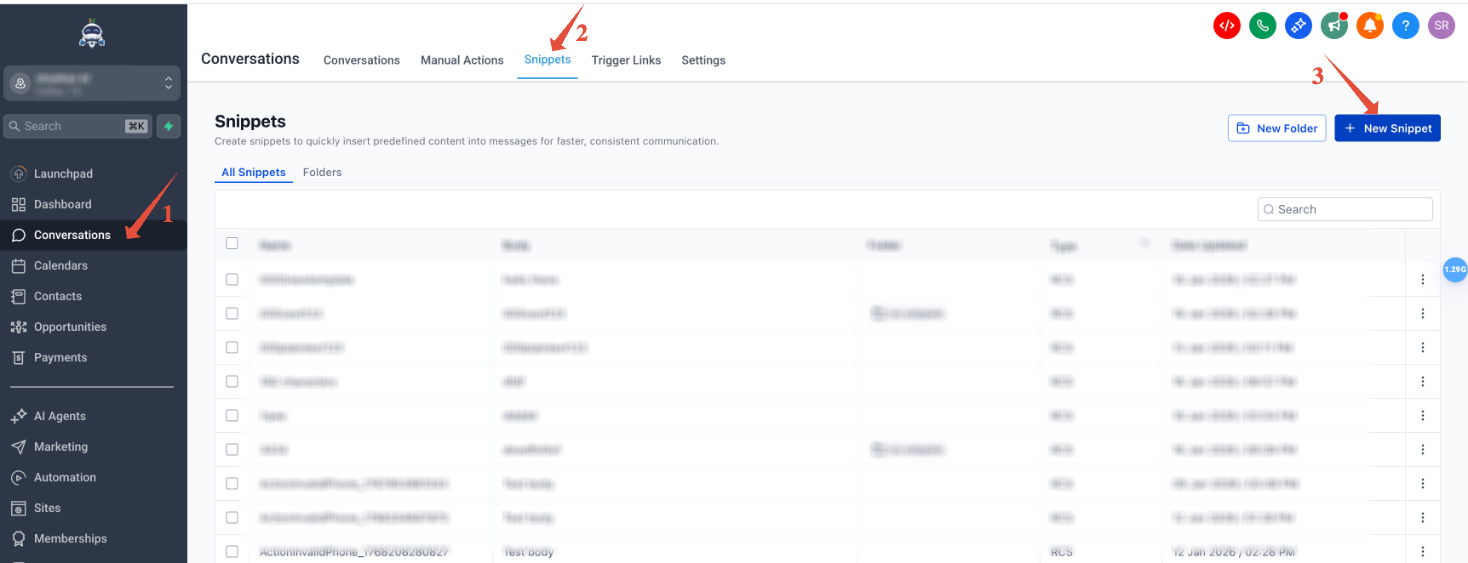
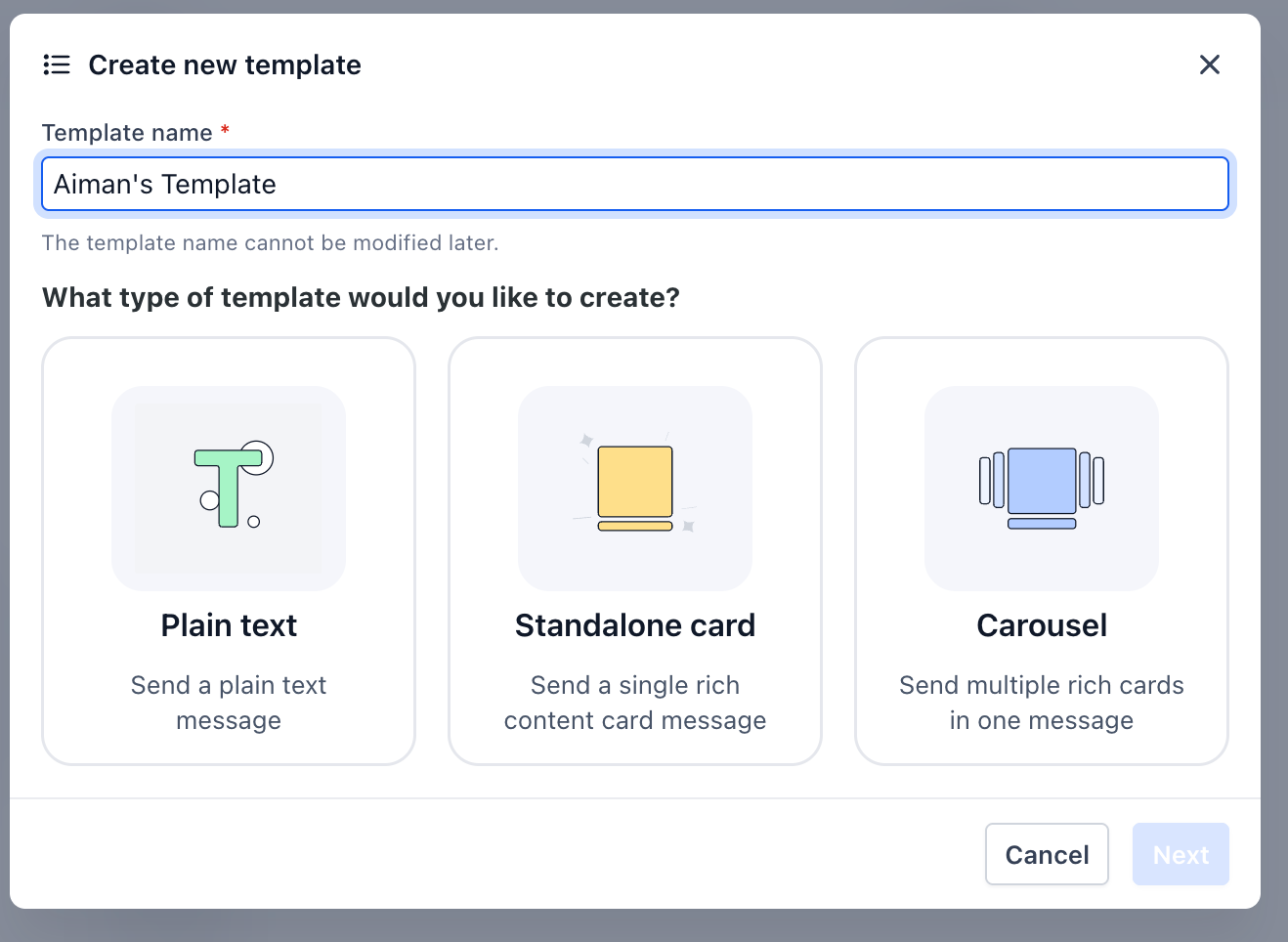
Available formats:
Plain Text
Standalone Card
Carousel
Explanation-
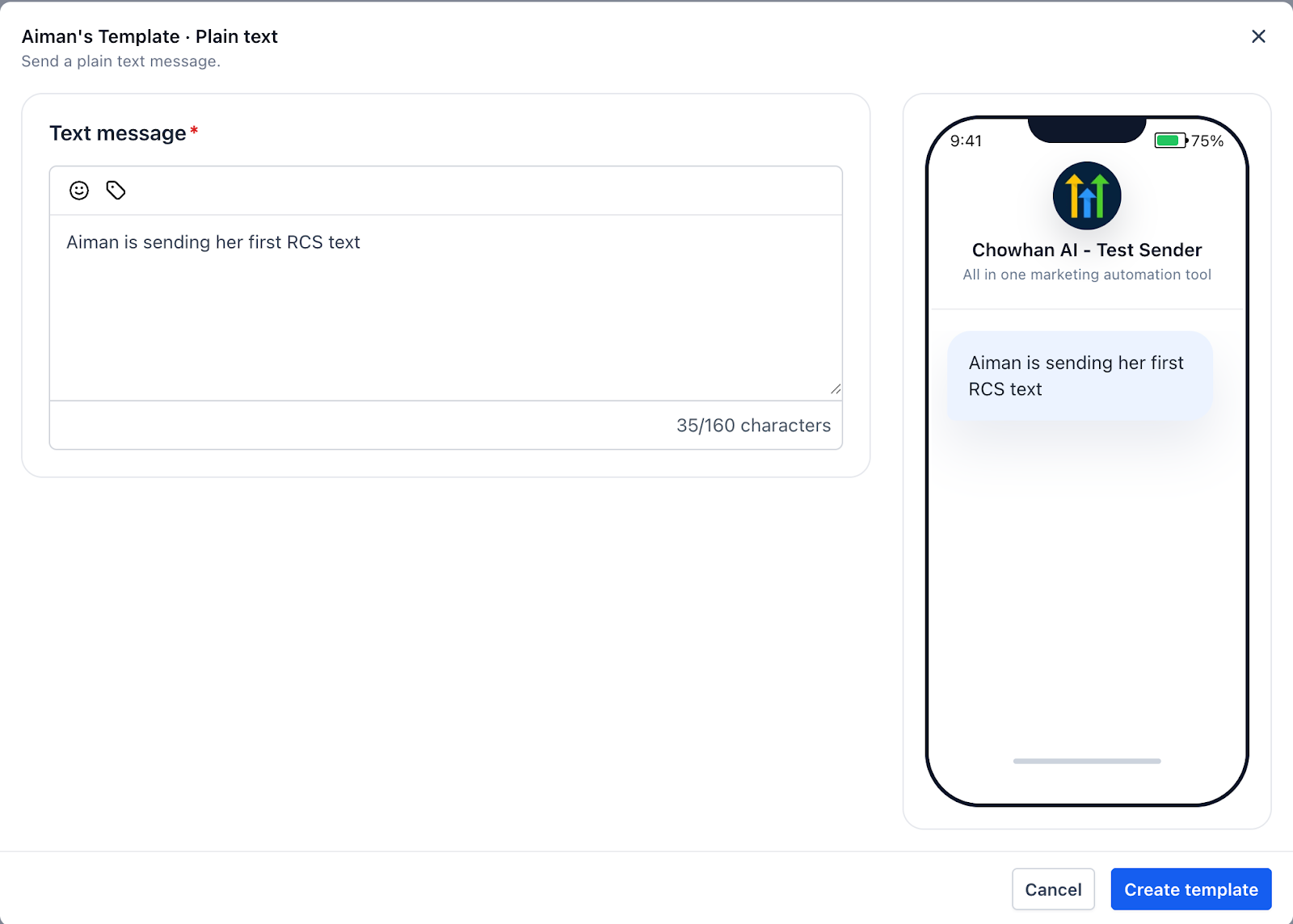
1. Plain Texts is used to send a simple text message. You enter the message content, and a live preview shows how it will appear on the recipient’s device. This format does not include media or buttons.
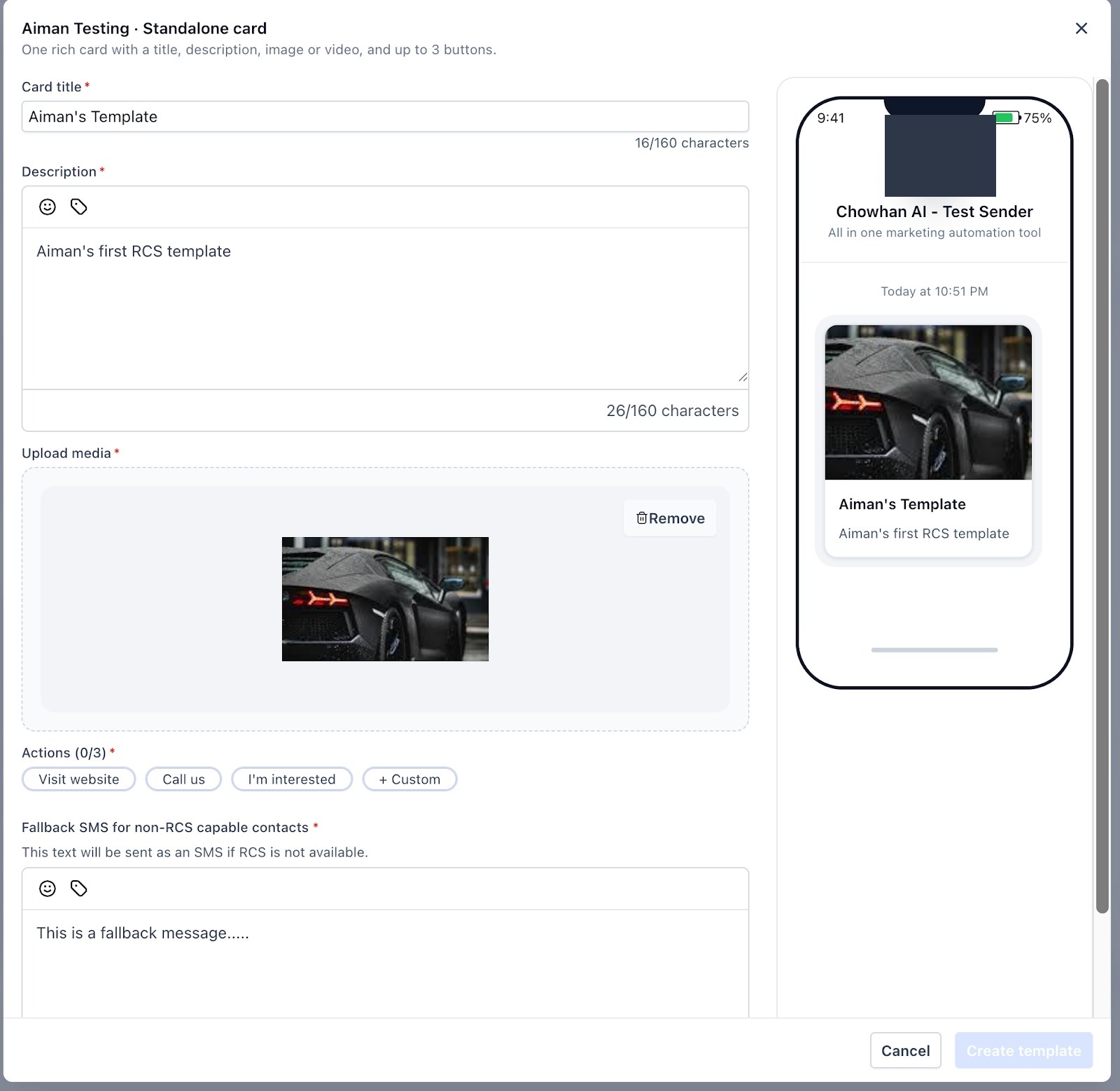
2. Standalone card allows you to create one rich card with a title, description, and uploaded media. You can add up to three action buttons. A fallback SMS message is required in case the contact is not RCS-capable.
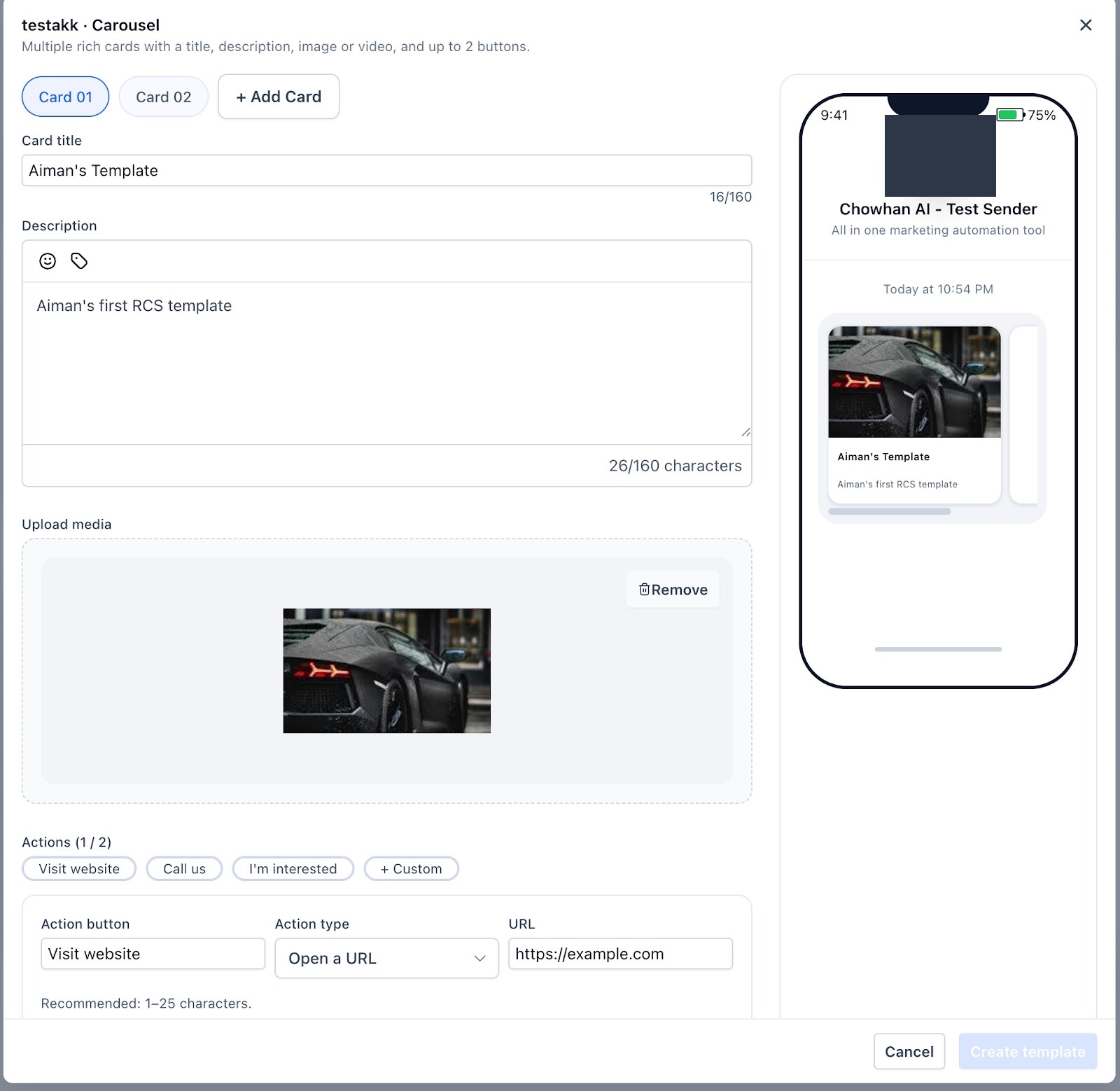
3. Carousel allows you to create multiple rich cards in a swipeable format. Each card includes a title, description, media, and up to two action buttons. A fallback SMS message is required for non-RCS-capable contacts
RCS Message Statuses
RCS messages display status indicators reflecting message progress, such as:
Sent
Delivered
Opened
These statuses are visible within the conversation interface.
Fallback to SMS: How It Works
Fallback occurs when:
Recipient cannot receive RCS
Network limitations exist
Rich components aren't supported
If fallback occurs:
The recipient receives SMS
Billing may reflect SMS pricing
Opt-outs apply across both RCS and SMS.
Opt-Out Behavior
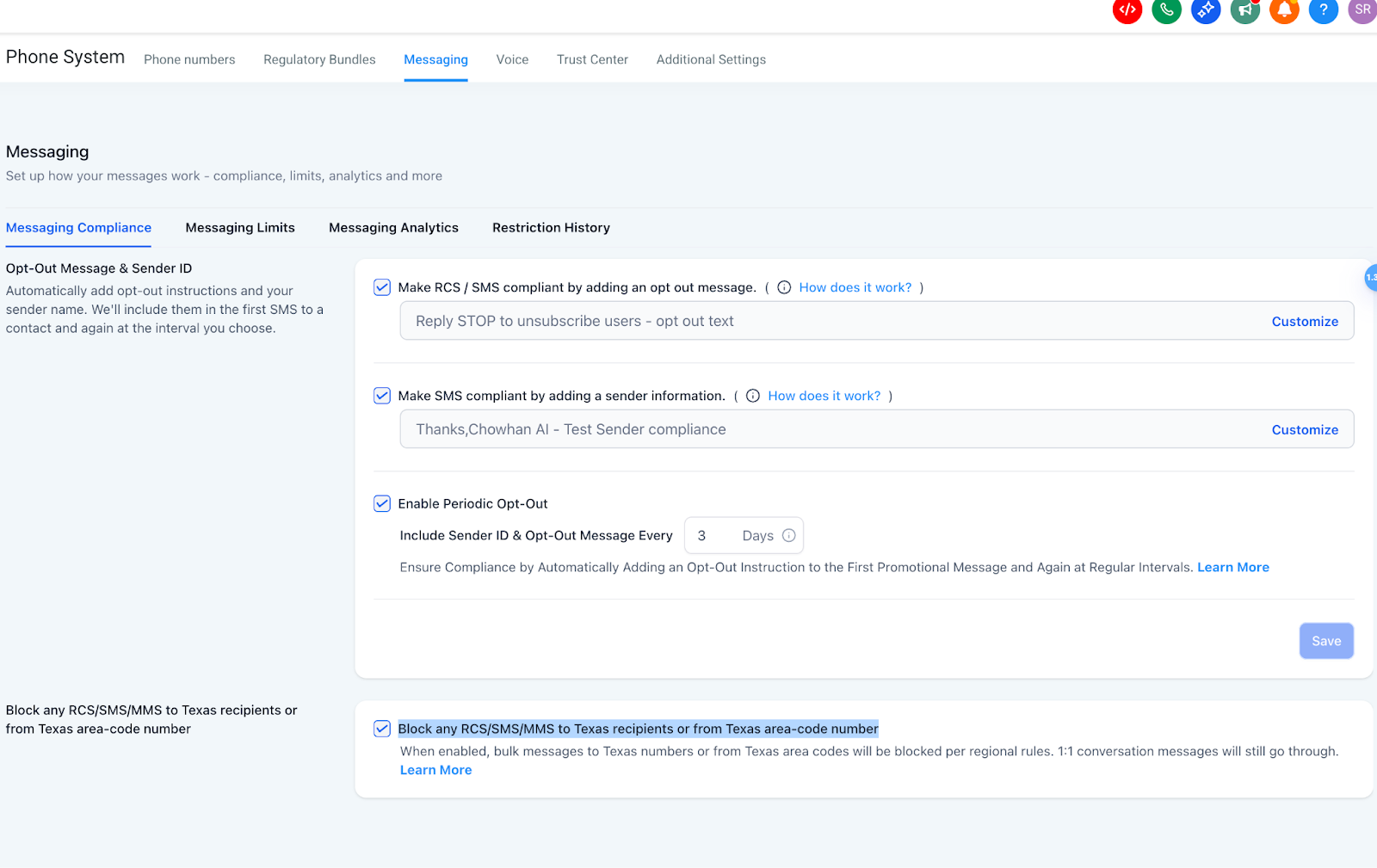
Opt-out text is appended to the first 1:1 RCS message
It does not repeat periodically like SMS
Texas blocking rules apply the same as SMS/MMS
STOP and equivalent keywords suppress across channels
RCS Pricing & Billing
RCS billing depends on the message type and destination.
A) Message Type
Basic RCS messages (plain text) and Single RCS messages (rich content with media or attachments) are both billed for inbound and outbound traffic.
B) Billing Structure by Region
1. United States (US)
Basic Outbound/Inbound → Charged per segment
Single Outbound/Inbound → Charged per message (static rate)
Region Message Type Direction Billing Unit Price (USD $) US Basic RCS Text Outbound Per segment 0.0083 US Basic RCS Text Inbound Per message 0.0083 US Rich RCS Inbound Per message 0.0165 US Rich RCS Outbound Per message 0.0220
2. Non-US
Basic/Inbound → Charged per message (static rate)
Single Outbound/Inbound → Charged per message (static rate)
C) Carrier Fees
RCS carrier fees are billed as follows:
Usage Category → Billed directly by Twilio
Agency Accounts → Same pricing as Twilio
Location Accounts → Twilio pricing + 5% markup
D) Failed Message Billing Logic
Scenario 1
RCS fails → SMS fallback delivers successfully → No RCS charge
Scenario 2
RCS fails → SMS fallback fails → Static charge applies: $0.001
Note- If the failure error falls under below errors no processing fee is incurred in scenario 2
Twilio internal errors:
12400, 20500, 20504, 30103, 30500, 63010, 63012Validity Period Expiration:
30036Twilio account suspension or Twilio imposed trial and fraud detection limits:
30002, 30454, 63038, 90010, 30044SMS Pumping Protection:
30450Geo-Permissions failures:
21408Meta-imposed WhatsApp restrictions beyond customer control:
63013, 63018, 63021, 63024, 63032Error
30008
(Note: Some 30008 errors may show as "Undelivered." These already incur termination costs and are not subject to additional processing fees.)First attempts where there is a “Fallback” feature in use, eg. RCS fallback to SMS, the first failure will not be charged, only if the final SMS failed then a single charge would be applied
Frequently Asked Questions
Will every message be RCS?
No. Some recipients will receive SMS fallback.
Can I use my existing phone number?
RCS often displays brand identity instead of a phone number in supported inboxes.
How long does approval take?
Timelines vary depending on submission quality and review volume.
Can I send images and buttons to everyone?
No. Not all recipients support rich components. Always include text fallback.