
This article explains how ratings and reviews work in the SourCherry Marketplace, including who can leave reviews, when reviews can be submitted, and how review limits are applied.
TABLE OF CONTENTS
- Overview
- Who Can Leave Reviews
- Rating vs Review Requirements
- Review Timing Rules
- Review Limits
- Sandbox Account Restrictions
- How to Leave a Review
- Important Notes
- Frequently Asked Questions
- Related Articles
Overview
The Marketplace App Ratings & Reviews system allows users to provide feedback on apps based on their experience. The system is designed to ensure that reviews are accessible, flexible, and reflect real usage.
These rules apply automatically and do not require any setup or configuration.
Who Can Leave Reviews
Agency admins can leave reviews without needing to be part of a specific sub-account
Users with access to an installed app can submit ratings and reviews
Rating vs Review Requirements
Users can submit a star rating without writing a review
Written feedback is optional
Review Timing Rules
Ratings can be submitted at any time after installation
Reviews after uninstalling an app must be submitted within 15 days
Review Limits
Reviews are tied to installations, not individual users.
Each installation allows one review
Agency-level apps → one review per agency
Sub-account apps → one review per sub-account
Sandbox Account Restrictions
Sandbox accounts cannot submit reviews
This ensures feedback reflects real user experiences
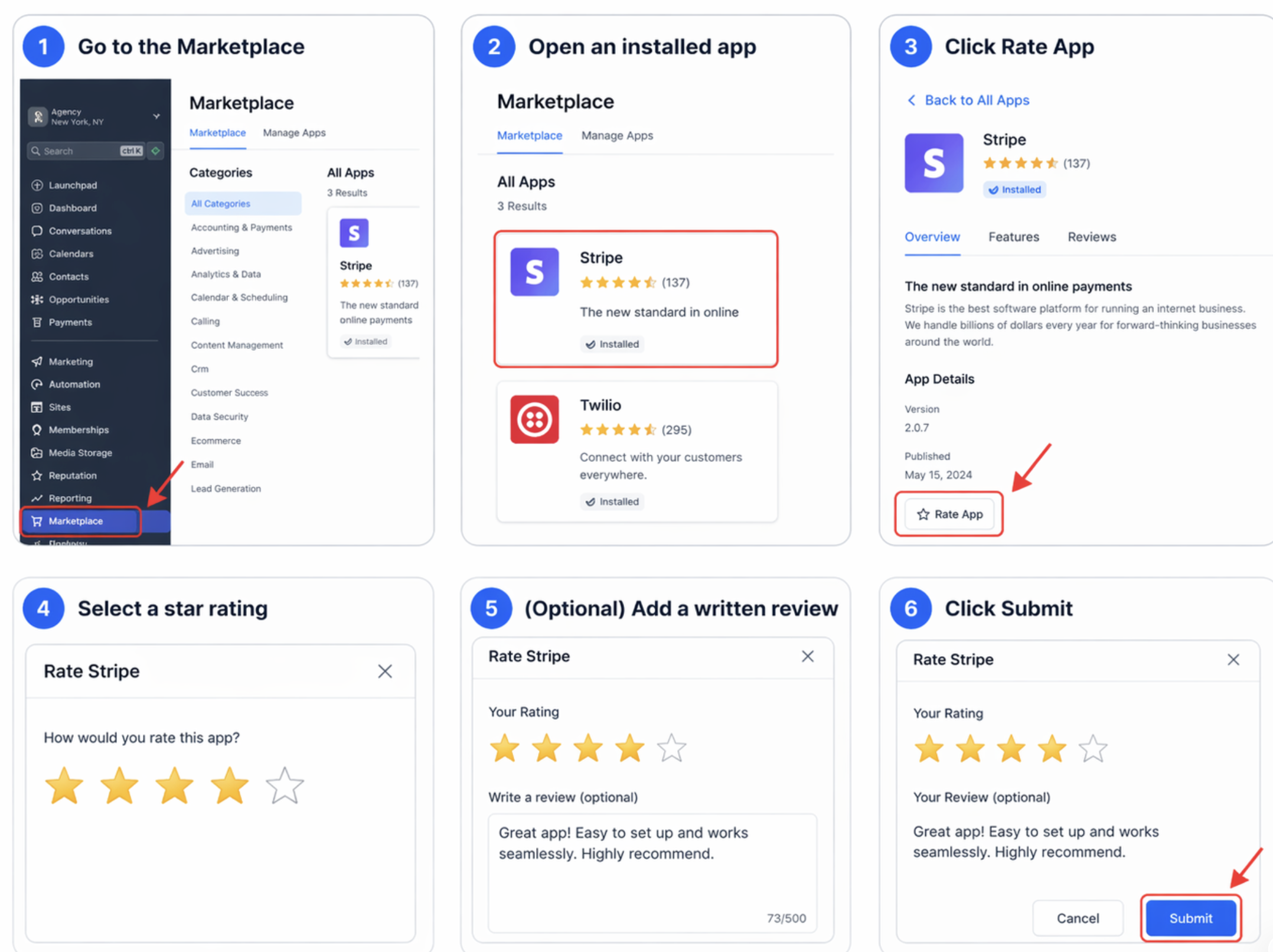
How to Leave a Review
Go to the Marketplace
Open an installed app
Click Rate App
Select a star rating
(Optional) Add a written review
Click Submit
Important Notes
Review availability depends on app installation status
Review limits cannot be bypassed
Ratings and reviews may vary based on account type (agency vs sub-account)
Frequently Asked Questions
Q: Can I leave multiple reviews for the same app?
No. Each installation allows only one review.
Q: Do I need to write a review to submit a rating?
No. Star ratings can be submitted without written feedback.
Q: Can sandbox accounts leave reviews?
No. Sandbox accounts are not allowed to submit reviews.
Q: Can I leave a review after uninstalling an app?
Yes, but only within 15 days of uninstalling the app.