
Ask AI now delivers richer, execution-ready responses that help you move from prompt to action faster. Instead of returning only plain text, Ask AI can intelligently organize information into structured formats such as tables, charts, todo lists, guided questions, code blocks, web search cards, media, approval requests, and Mermaid diagrams. These artifacts make it easier to analyze data, visualize workflows, create content, and collaborate with your team—all without leaving Ask AI.
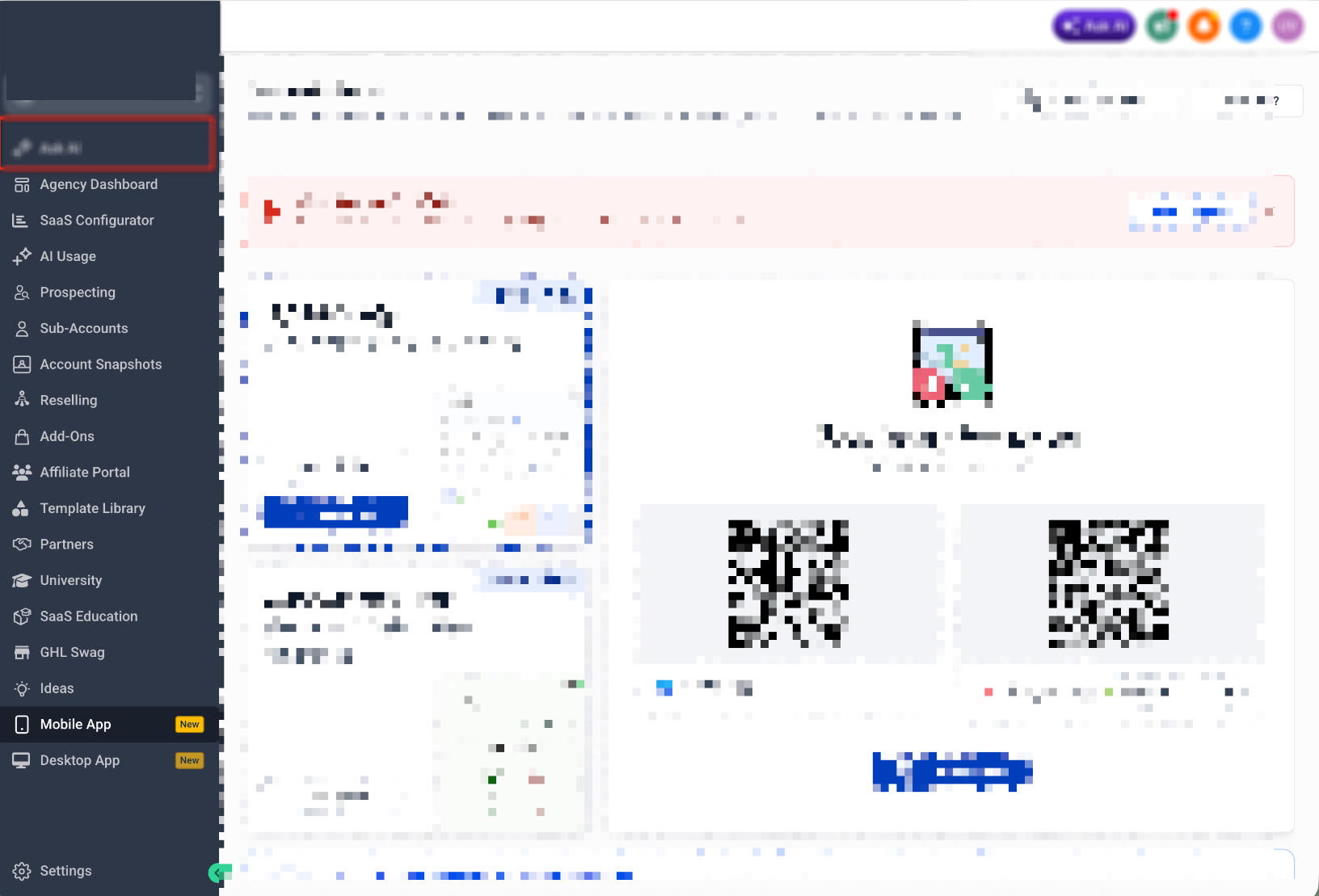
TABLE OF CONTENTS
- What are Ask AI Artifacts?
- Key Benefits of Ask AI Artifacts
- Supported Artifact Types
- Tables
- Charts
- Guided Questions
- Todo Lists
- Code Blocks
- Mermaid Diagrams
- Media Artifacts
- Web Search Cards
- Approval Requests
- Error Blocks
- How to Use Ask AI Artifacts
- Best Practices
- Frequently Asked Questions
- Related Articles
What are Ask AI Artifacts?
Ask AI Artifacts organize AI-generated responses into structured, interactive formats that are easier to read, understand, and act upon. Rather than presenting information only as plain text, Ask AI automatically selects the most appropriate layout—or lets you request one explicitly—to help visualize data, organize tasks, explain workflows, and support better decision-making.
Depending on your request, Ask AI can generate responses as:
- Tables
- Charts
- Todo Lists
- Guided Questions
- Approval Requests
- Code Blocks
- Mermaid Diagrams
- Media Artifacts
- Web Search Cards
- Error Blocks
Artifacts improve readability while helping you move more efficiently from ideas to execution. Although many artifacts organize information for you, some workflows may still require confirmation or supported Ask AI capabilities before actions are completed.
Key Benefits of Ask AI Artifacts
Structured AI responses help transform ideas into organized, actionable outputs. Whether you’re planning campaigns, analyzing marketing performance, documenting workflows, or brainstorming new ideas, artifacts improve clarity and collaboration.
- Improved readability: Organizes complex information into structured layouts that are easier to review.
- Faster decision-making: Visualizes important data using tables and charts.
- Workflow visualization: Displays automations and processes using Mermaid diagrams.
- Interactive conversations: Uses Guided Questions to collect missing information before generating results.
- Better collaboration: Creates organized checklists, diagrams, and reports that are easier to share with your team.
- Flexible output formats: Automatically selects—or allows you to specify—the format that best matches your request.
Supported Artifact Types
Each artifact type is designed to present information in the most useful format for your request. Ask AI automatically determines the best presentation when possible, but you can also request a specific format directly in your prompt.
Tables
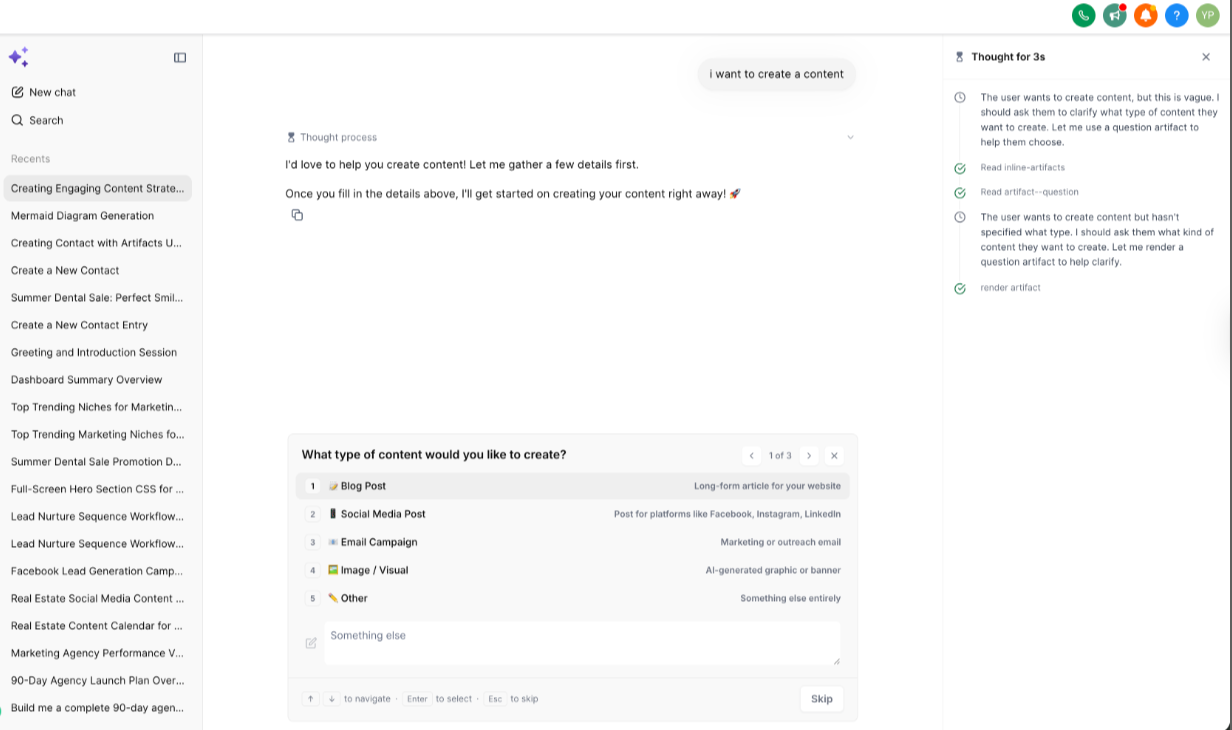
Tables organize structured information into rows and columns, making it easier to compare, prioritize, and review large amounts of data.
Common use cases include:
- Content calendars
- Campaign audits
- Lead reports
- Pipeline summaries
- Budget comparisons
- Performance tracking
Example Prompt
Create a 4-week content calendar for a real estate agent. Return it as a table with platform, publishing day, content format, and topic.
Charts
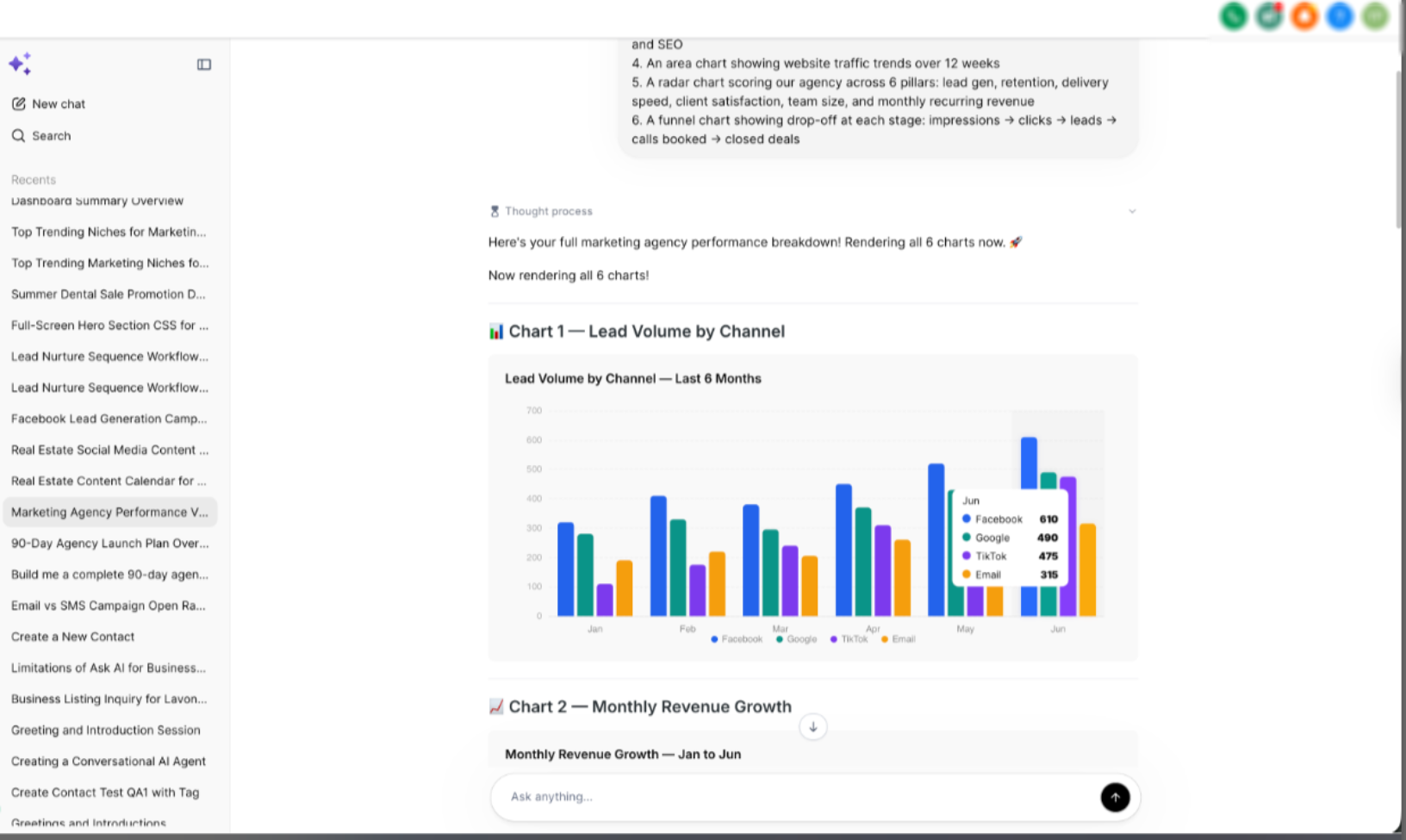
Charts transform numerical information into visual insights that are easier to understand. When your prompt includes metrics or performance data, Ask AI can generate charts to help identify trends, comparisons, and opportunities.
Supported chart types may include:
- Bar Charts
- Line Charts
- Pie Charts
- Funnel Charts
- Radar Charts
Example Prompt
Analyze my agency performance and generate charts for lead volume, revenue growth, traffic trends, and funnel conversion.
Guided Questions
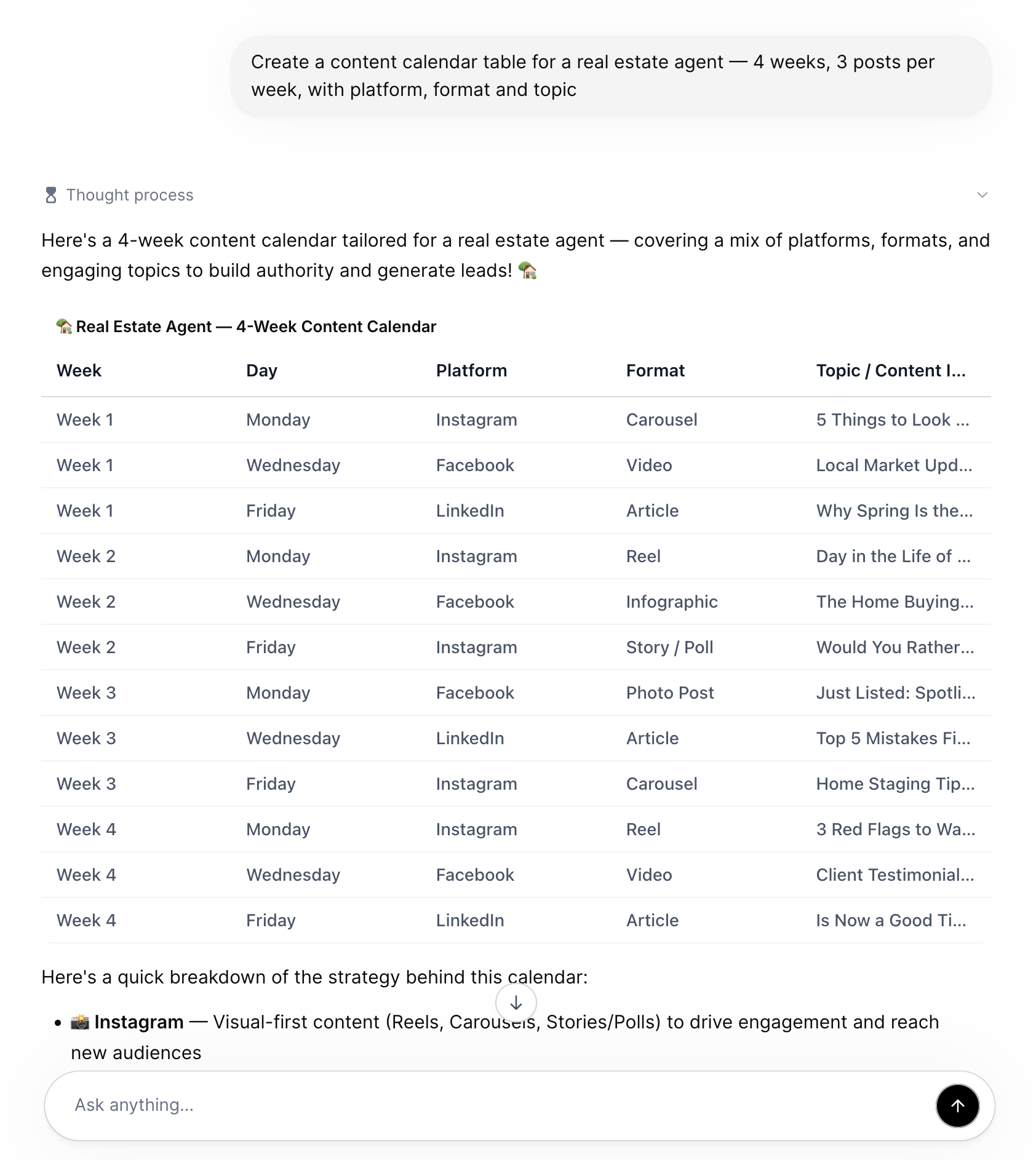
Guided Questions help Ask AI collect important information before generating a response. When your request is missing key details, Ask AI may ask follow-up questions to produce more accurate and personalized results.
For example, if you ask:
Create content
Ask AI may first ask:
- What type of content would you like to create?
- Which platform is it for?
- Who is your target audience?
- What industry or business are you in?
Providing these answers helps Ask AI generate more relevant recommendations.
Todo Lists
Todo Lists organize projects and processes into actionable checklists that are easy to follow and manage.
Common examples include:
- Client onboarding
- Campaign launches
- Standard Operating Procedures (SOPs)
- Internal team processes
- Marketing task planning
- Project management
Code Blocks
Code Blocks generate clean, syntax-highlighted code for a variety of programming and scripting languages. Formatting improves readability and makes it easier to copy, review, and implement generated code.
Supported languages include:
- HTML
- CSS
- JavaScript
- SQL
- JSON
- Python
For the best results, specify the programming language in your prompt.
Example Prompt
Generate a JavaScript function that validates email addresses.
Mermaid Diagrams
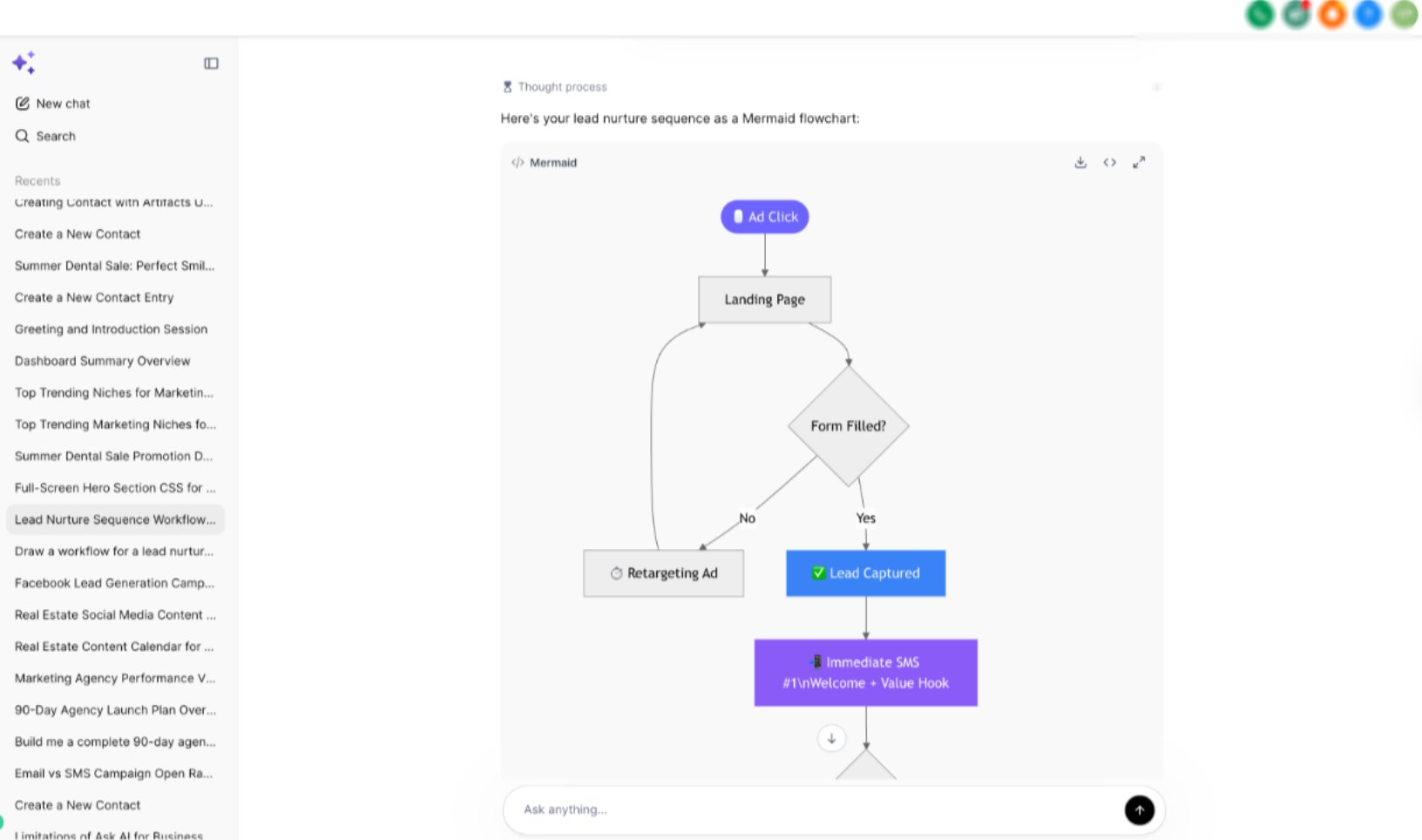
Mermaid diagrams convert text-based workflow descriptions into interactive visual diagrams. They are ideal for documenting automations, customer journeys, business processes, and decision trees.
Common use cases include:
- Automation workflows
- Lead journeys
- Campaign flows
- Decision trees
- Client onboarding
- Standard Operating Procedures (SOPs)
Large diagrams support:
- Full-screen viewing
- Pan
- Zoom
- Toolbar controls
Example Prompts
- Create a Mermaid flowchart for my missed-call text-back automation.
- Map my lead lifecycle from new lead to closed deal.
- Generate a Mermaid diagram for a 7-day reactivation campaign.
Media Artifacts
Media Artifacts display supported AI-generated media directly within the conversation, allowing you to review visual content without leaving Ask AI.
Depending on the supported workflow, media may include generated images or other supported visual outputs.
Web Search Cards
Web Search Cards present supported web search results as structured preview cards directly within the conversation. This allows you to quickly review relevant information while continuing your workflow inside Ask AI.
Approval Requests
Some Ask AI workflows require confirmation before continuing. Approval Requests provide an organized review step so you can verify information before Ask AI proceeds with supported actions.
Error Blocks
If Ask AI cannot generate or render a requested artifact, it may display a structured Error Block explaining what went wrong and, when possible, what information is needed to continue successfully.
How to Use Ask AI Artifacts
Providing clear instructions helps Ask AI choose the most appropriate artifact and generate higher-quality responses.
- Open Ask AI from the left navigation menu.
- Start a new conversation.
- Describe the task you want to accomplish.
- Optionally specify your preferred output format, such as:
- Table
- Chart
- Todo List
- Mermaid Diagram
- Code Block
- Table
- Include relevant business context, campaign goals, workflows, or supporting data.
- Review the generated artifact.
- Continue the conversation to refine, expand, or modify the response as needed.
Example Prompts
Content Calendar
Create a 4-week content calendar for a real estate agent. Return it as a table with platform, publishing day, content format, and topic.
Campaign Analysis
Review this campaign data and generate charts for lead volume, revenue growth, and funnel conversion.
Automation Workflow
Create a Mermaid flowchart for a missed-call text-back automation with fallback branches.
Best Practices
Following a few prompt-writing best practices helps Ask AI generate more accurate and useful artifacts.
- Request the output format you want whenever possible.
- Clearly describe your business objective.
- Include relevant data, workflows, or campaign details.
- Ask for recommendations instead of summaries when appropriate.
- Specify ranking, comparison, or prioritization criteria when evaluating options
. - Allow Ask AI to ask Guided Questions if additional information is needed.
- Continue the conversation to refine or expand generated artifacts.
Frequently Asked Questions
Q: Do I need to request a specific artifact?
No. Ask AI automatically selects the format it believes best fits your request. However, specifying an output format usually produces more predictable results.
Q: What are Mermaid diagrams used for?
Mermaid diagrams visually represent workflows, automations, lead lifecycles, campaign flows, decision trees, and Standard Operating Procedures.
Q: Can I view Mermaid diagrams in full screen?
Yes. Large Mermaid diagrams support full-screen viewing, along with pan, zoom, and toolbar controls for easier navigation.
Q: What are Guided Questions?
Guided Questions are interactive prompts that Ask AI uses to collect missing information before generating a response, helping improve the accuracy of the final output.
Q: Can Ask AI generate charts and tables?
Yes. When your prompt includes structured data or performance metrics, Ask AI can organize information into tables and generate supported charts.
Q: Do artifacts automatically complete actions in SourCherry?
Not always. Artifacts organize and present information. Some actions still require confirmation, supported Ask AI capabilities, or the appropriate user permissions.
Q: Can I ask Ask AI to change the artifact format?
Yes. You can continue the conversation and request a different output format, such as converting a table into a chart or generating a Mermaid diagram from a written workflow.
Q: What types of prompts produce the best artifacts?
The best results come from prompts that clearly describe your objective, provide relevant context or data, and specify the desired output format whenever possible.