
This guide shows how to move phone numbers between sub‑accounts inside a single Agency using the built‑in Move Numbers tool in Settings → Phone Integration. It covers LC Phone → LC Phone and Twilio → Twilio (same master account) moves, plus common errors and what to do if the in‑app move isn’t available (see Moving Phone Numbers: Migration Guide).
TABLE OF CONTENTS
- What is Move Numbers?
- Before You Begin
- Move Numbers Between Sub‑Accounts
- Troubleshooting & Known Limitations
- Frequently Asked Questions
What is Move Numbers?
Move Numbers is an in‑app workflow in Settings → Phone Integration that reassigns existing phone numbers from a source sub‑account to a destination sub‑account within the same Agency. Eligibility at a glance:
LC Phone ↔ LC Phone (same Agency): Supported in-app.
Twilio ↔ Twilio (same Master Twilio account): Supported in-app.
Different Master Twilio accounts: Not supported in-app—contact Twilio Support.
Geography: The in-app tool currently supports US & Canada numbers. For other countries, please open a SourCherry Support ticket.
A2P: A2P status is at the sub‑account level and does not move with the phone number; reattach the correct brand/campaign after moving.
Before You Begin
Make sure you have admin access to the source and destination sub‑accounts.
Identify the destination Location ID (a.k.a. Sub‑account ID): Settings → Business Profile.
Confirm which phone system the number uses today:
LC Phone (SourCherry)
Twilio connected at the Agency level
Move Numbers Between Sub‑Accounts
Step 1: Move Numbers
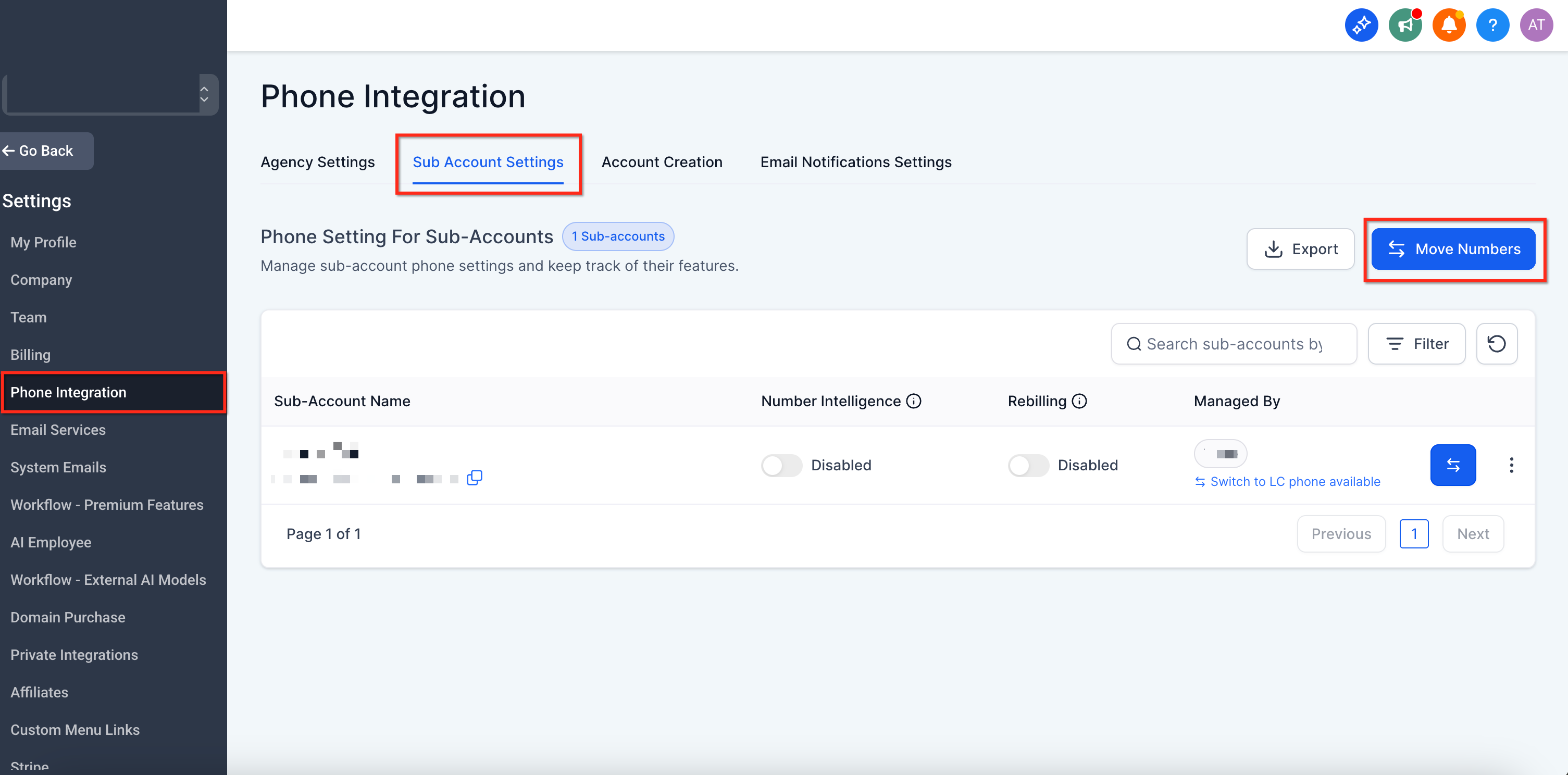
Navigate to the Agency Settings → Phone Integration. Under Sub-account Settings, click on Move Numbers.
Step 2: Select Source and Destination Sub-account and Phone Numbers to Move
Choose the destination sub‑account (search by name or paste the Location ID). Select the phone number(s) you want to move.
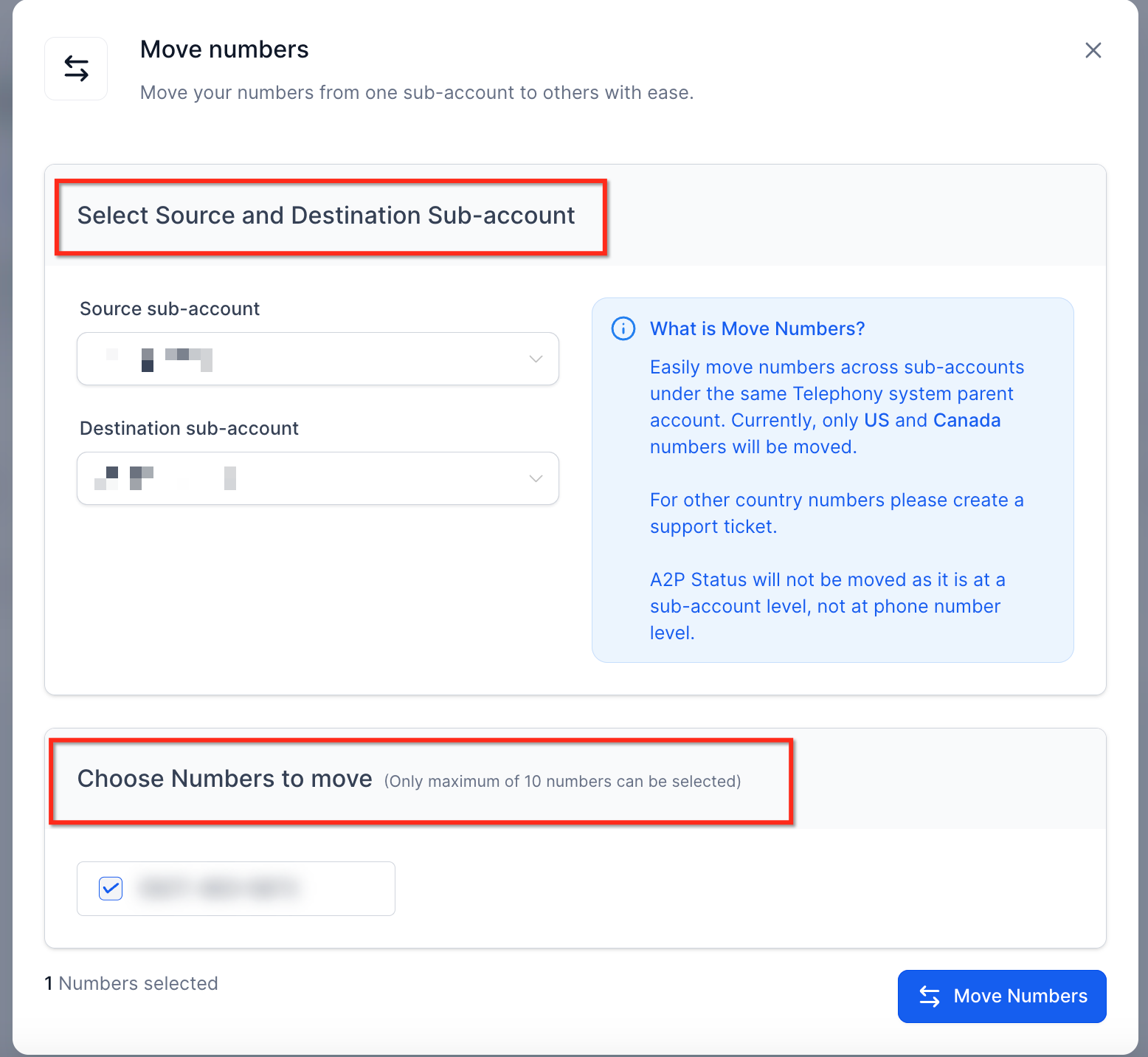
Please Note: Review the summary and click Move Numbers to start the transfer. Numbers will appear in the destination sub‑account once complete. After the move, re‑check number‑level settings (forwarding, recordings, whispers, etc.). Verify call/SMS flows, automations, and user assignments as needed.
Troubleshooting & Known Limitations
If the Move Numbers action is unavailable or fails, common causes include:
- Different Twilio master accounts: Numbers under a different Twilio master can’t be moved in‑app. Contact Twilio Support in this case.
Missing regulatory configuration (international): Some countries (e.g., AU +61) require approved Regulatory Bundles and an Address SID in the destination. Configure those first, then follow the relevant migration guide.
Provider mismatch: If you’re converting Twilio ↔ LC Phone, follow the dedicated conversion articles rather than the in‑app move.
Country support (US & Canada in-app): The in-app tool currently moves US & Canada numbers. For other countries, please create a SourCherry Support ticket.
Frequently Asked Questions
Q. Can I move multiple numbers at once?
Yes—select multiple numbers in Move Numbers.
Q. Do I need to contact Twilio?
Not for in‑app sub‑account moves. For inter‑Agency moves or provider conversions, follow the linked guides and contact SourCherry Support.
Q. Do A2P/Toll‑Free approvals transfer automatically?
After the move, verify the number is attached to the correct brand/campaign or Toll‑Free verification in the destination.