
This article explains how pricing works in Rentals, covering everything from base rates to advanced pricing rules like seasonal, day-based, and duration discounts. It also details the stacking order and exceptions based on booking unit type.
TABLE OF CONTENTS
What is Pricing in Rentals?
Pricing in Rentals is dynamic — it adapts based on conditions like date ranges, booking durations, or rental quantity. Each listing or variant has its own price configuration, allowing flexibility for different rental scenarios.
Your pricing setup consists of:
Base Price — The foundational rate for each listing or variant.
Security Deposit (optional) — Refundable or card-on-file charge to cover damages or losses.
Advanced Pricing Rules — Conditional rules that adjust the price based on time, duration, or demand.
By configuring theses pricing options, you are able to build a pricing structure perfect for your rentals!
Key Benefits of Configuring Pricing for Rentals
Granular Control: Build precise pricing with layered rules that reflect seasonality and demand.
Consistency: The same logic applies at checkout and in admin‑created bookings, reducing surprises.
Strategic Incentives & Duration discounts: reward longer rentals without manual promo management.
Hour‑of‑Day: Charge premiums for peak hours.
Deposits: separate from price, visible on checkout/invoices for easier reconciliation.
How to Configure Pricing
You can configure pricing under the Inventory & Pricing tab when editing a listing. To get to the Inventory & Pricing tab, follow these steps:
- Navigate to Calendar Settings > Rentals
- Click the Edit (Pencil) icon next to the listing you would like to edit
- Select the Inventory & Pricing tab
There are 3 main areas of pricing that can be configured within this tab.
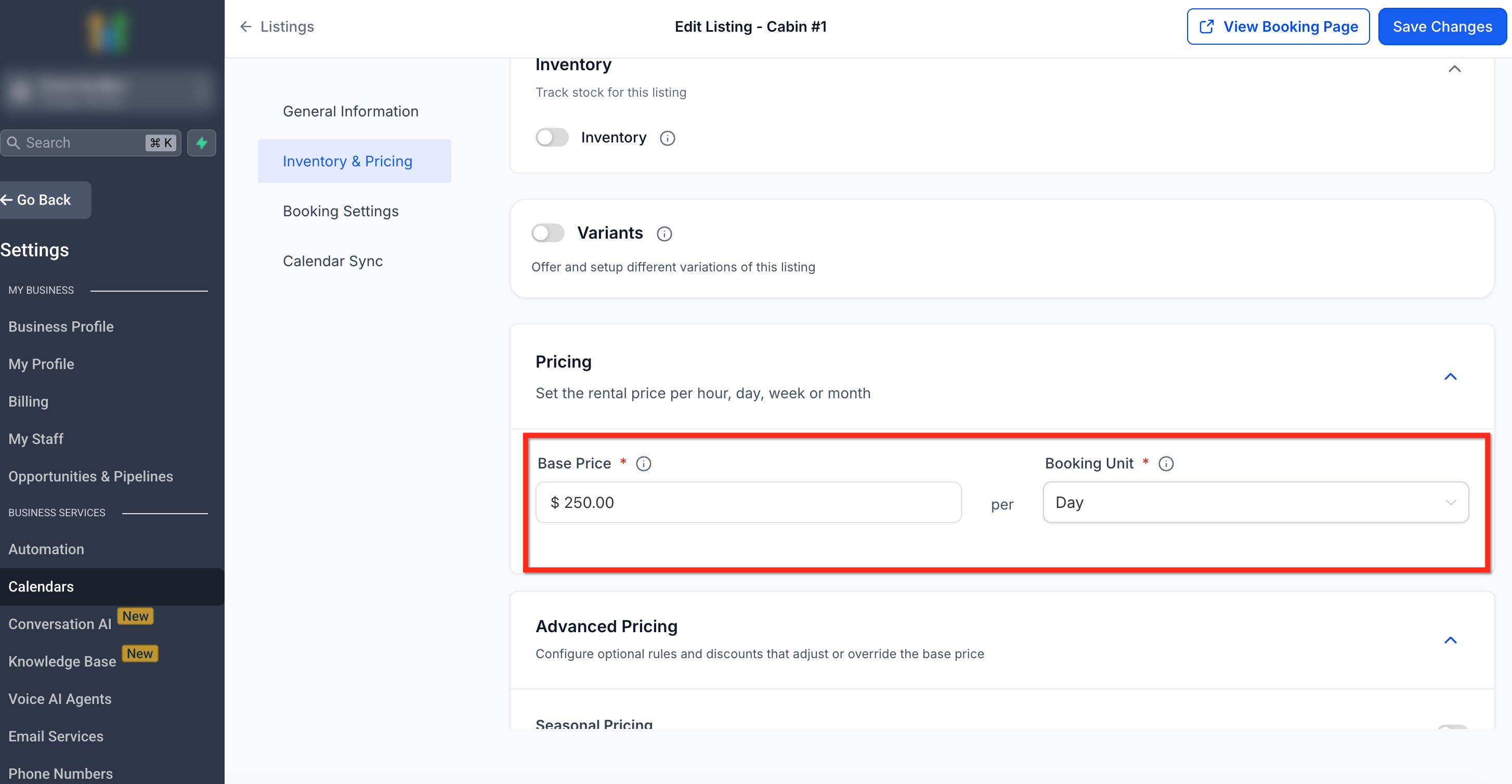
1. Base Price
Defines the default amount charged for the rental period.
Based on the selected Booking Unit: Hour, Day, Week, or Month.
Example: If you charge $50/hour, and the customer books for 4 hours, the total due before adjustments will be $200.
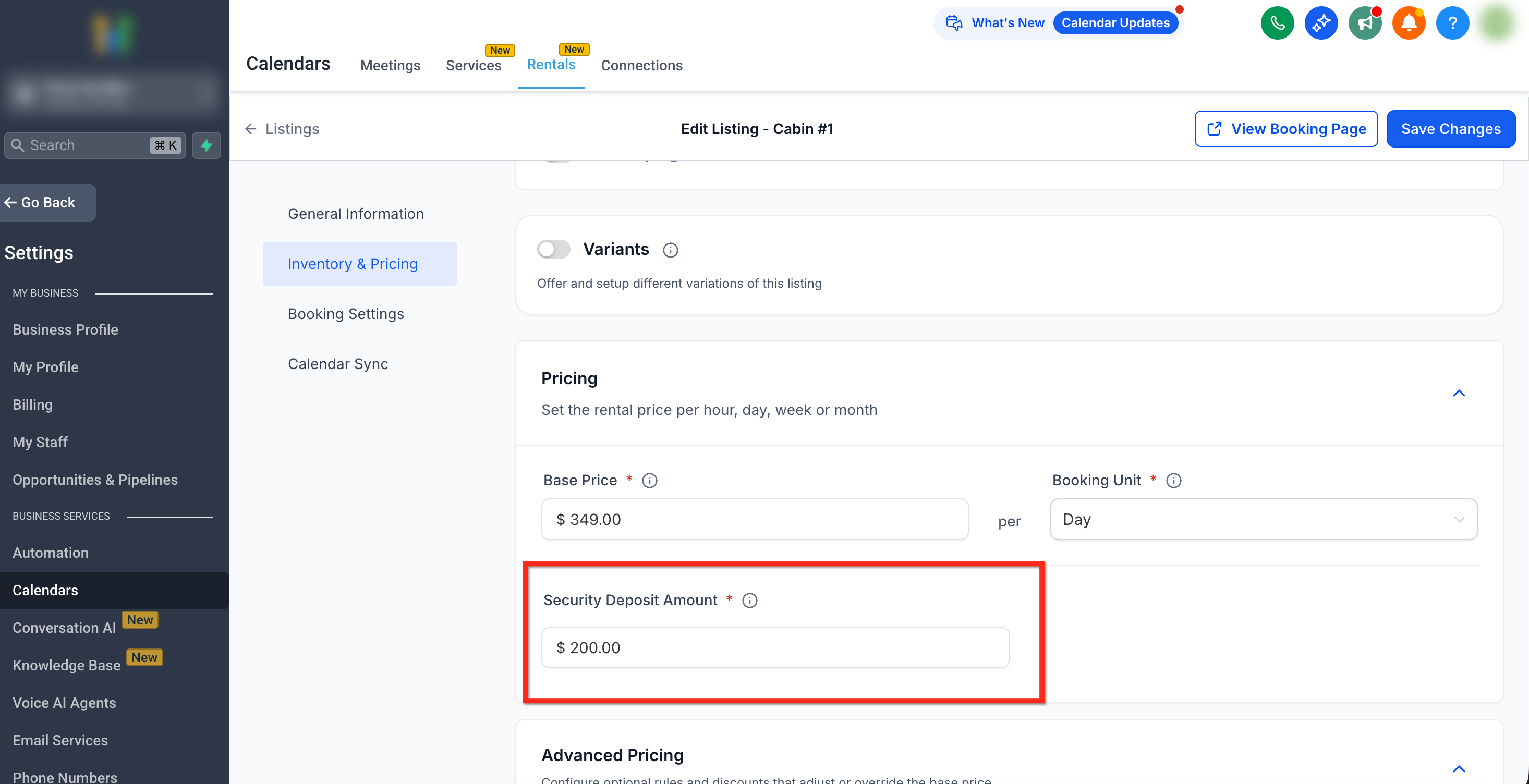
2. Security Deposit (Optional)
The security deposit option is only available if enabled in Global Settings. Click here to learn more about Global Settings.
To enable security deposit from global settings go to Calendar Settings > Rentals > Global Settings > Payment Settings then toggle on Enable Security Deposits.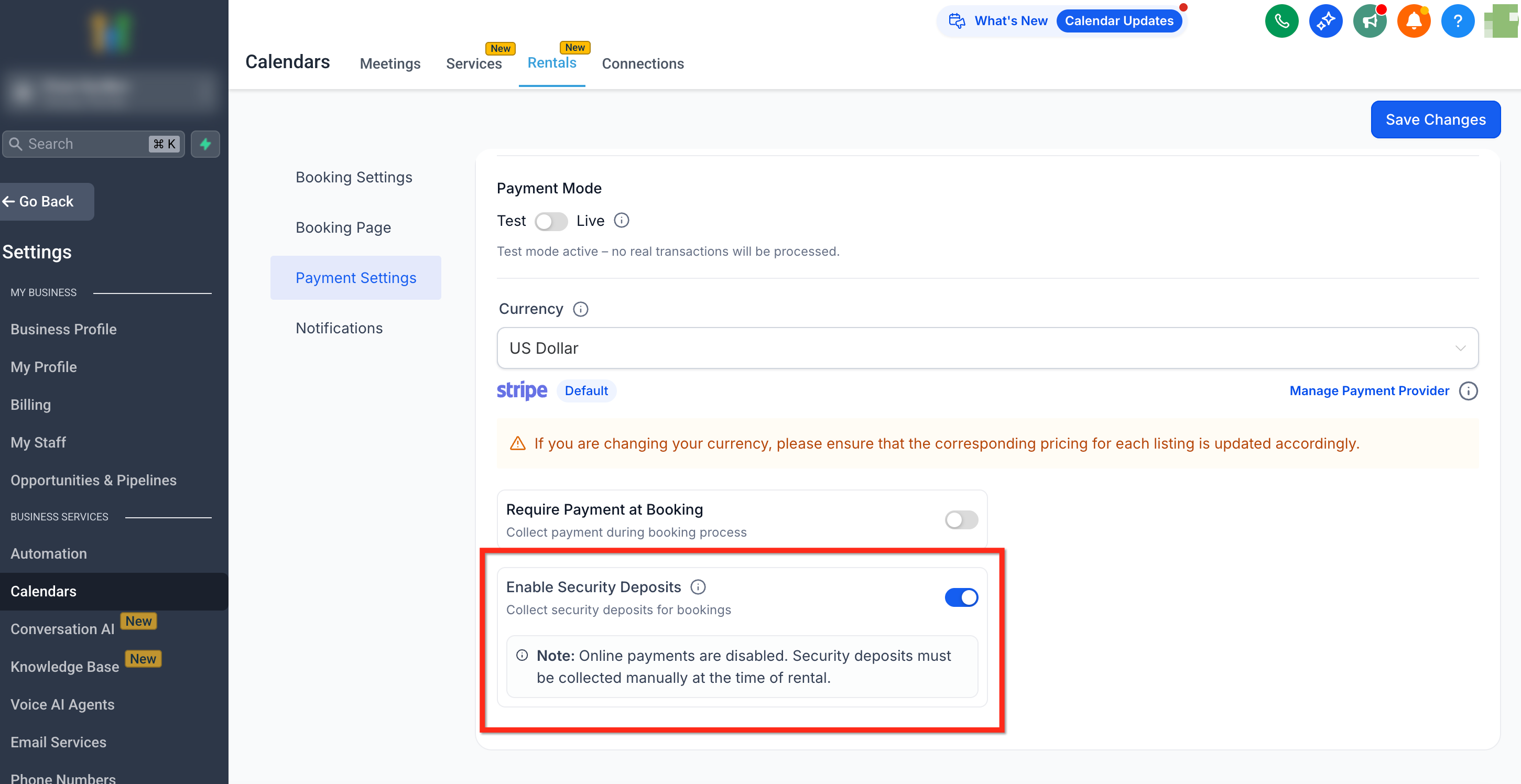
If the security deposit is set to $0, it is hidden from the booking website and isn't charged.
Note: The deposit amount does not affect the base price; it displays separately on invoices and checkout summaries.
3. Advanced Pricing Rules
Click Advanced Pricing to set up rule-based pricing adjustments. You can create multiple pricing conditions such as seasonal surcharges or long-duration discounts.
If variants are enabled, pricing is configured separately per variant. Each variant will have its own pricing tab and independent rules.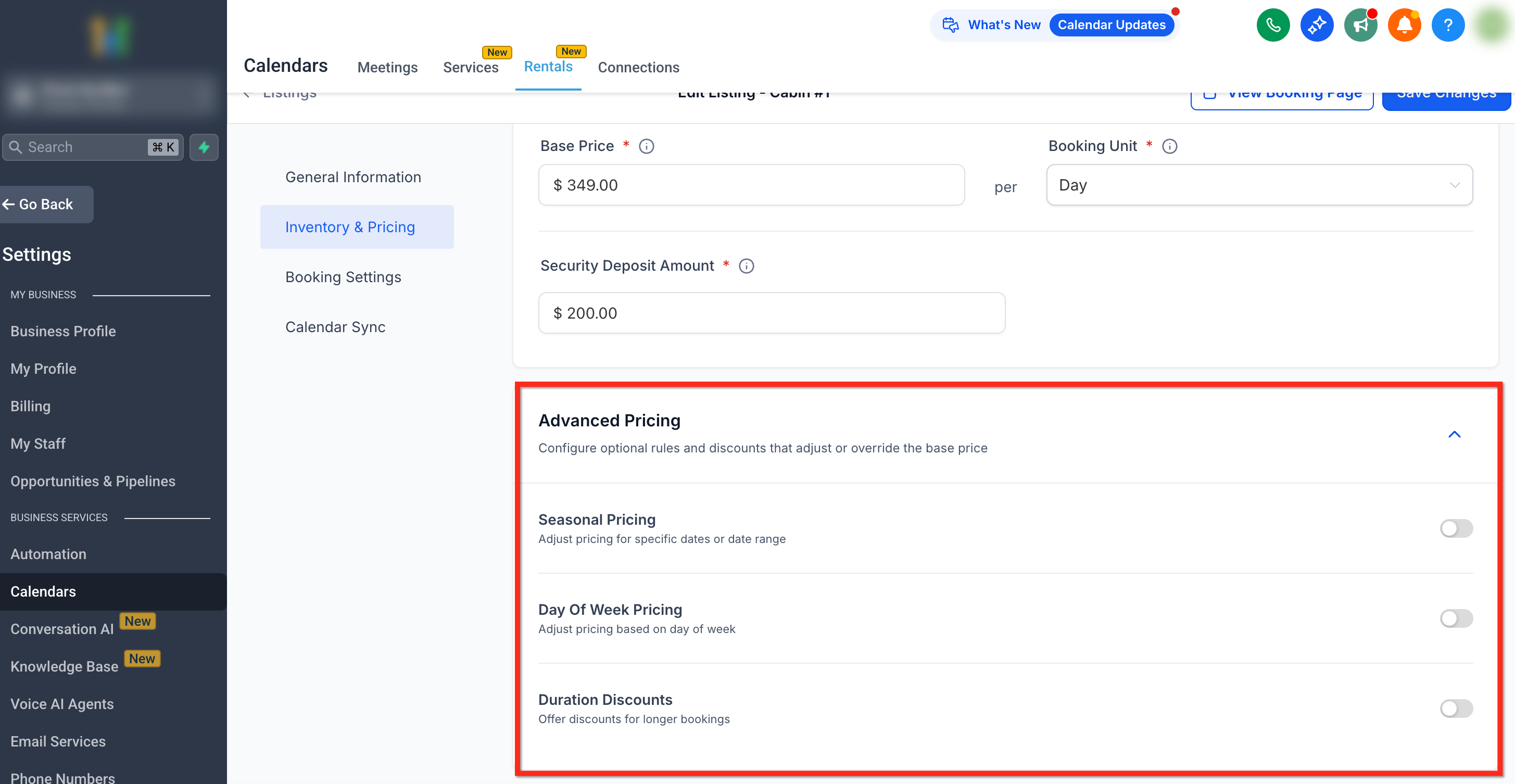
Advanced Pricing Rule Types
To use advanced pricing rules, first toggle on the pricing you would like to set up.
1. Seasonal Pricing
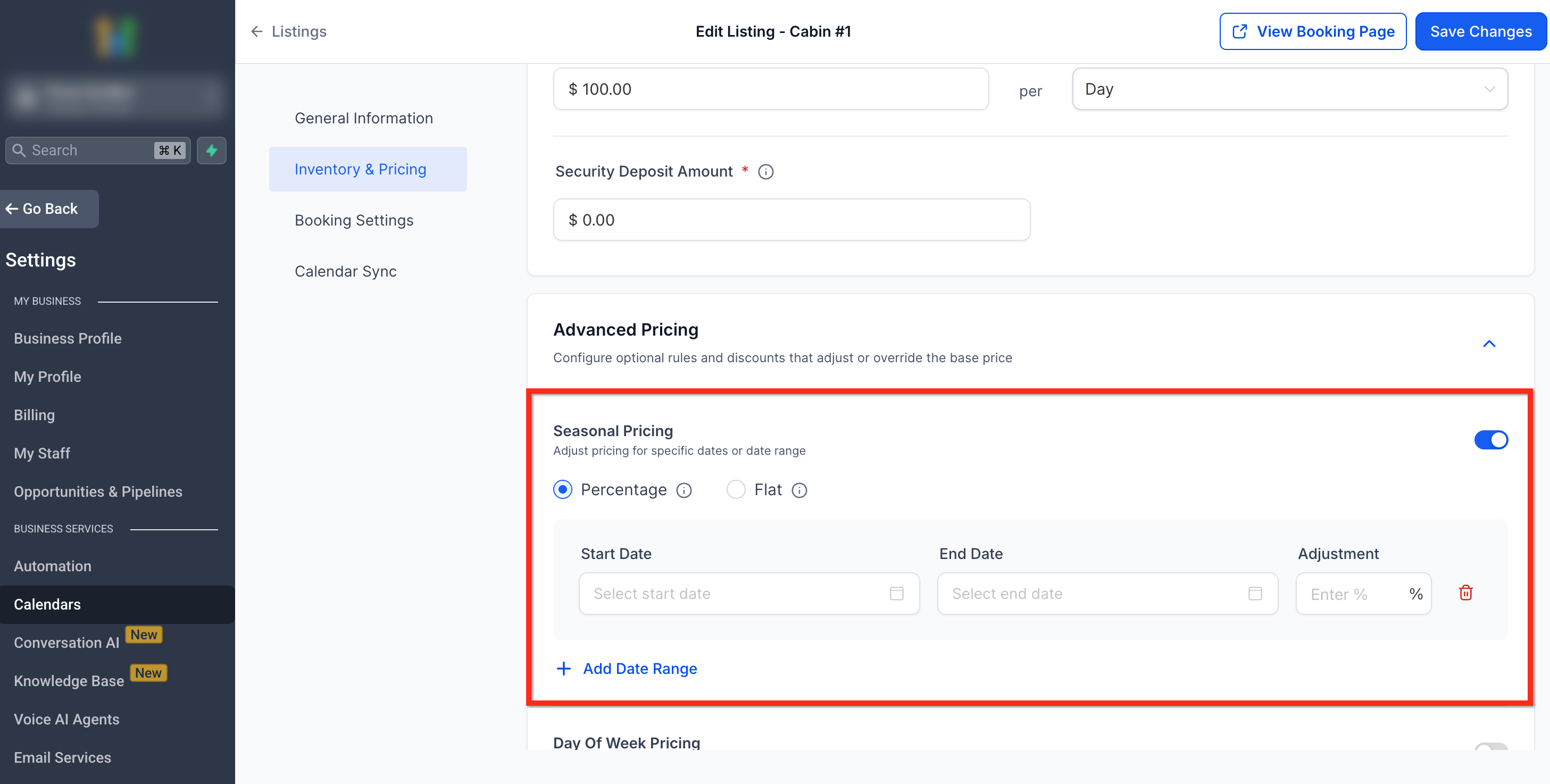
Seasonal pricing allows you to modify the base rate for specific date ranges—such as holidays, busy seasons, or low-demand periods.
When configuring this rule, you can choose between two modes:
Percentage (+/− %) – Adjusts the existing base price by a percentage. For example, if your base rate is $100 and you apply a -20% seasonal adjustment, the total becomes $80 for that range.
Flat – Replaces the base price entirely for the specified date range. This means the entered flat rate becomes the new price, not an incremental change. For example, if the base rate is $100 and you set a flat rate of $150, the system will charge $150 per unit—not $250.
Use flat rate when you want to completely override the base pricing for a season (e.g., fixed holiday pricing) and percentage when you want relative adjustments that build on your existing rate. To add an additional date range, click + Add Date Range.
2. Day of Week Pricing
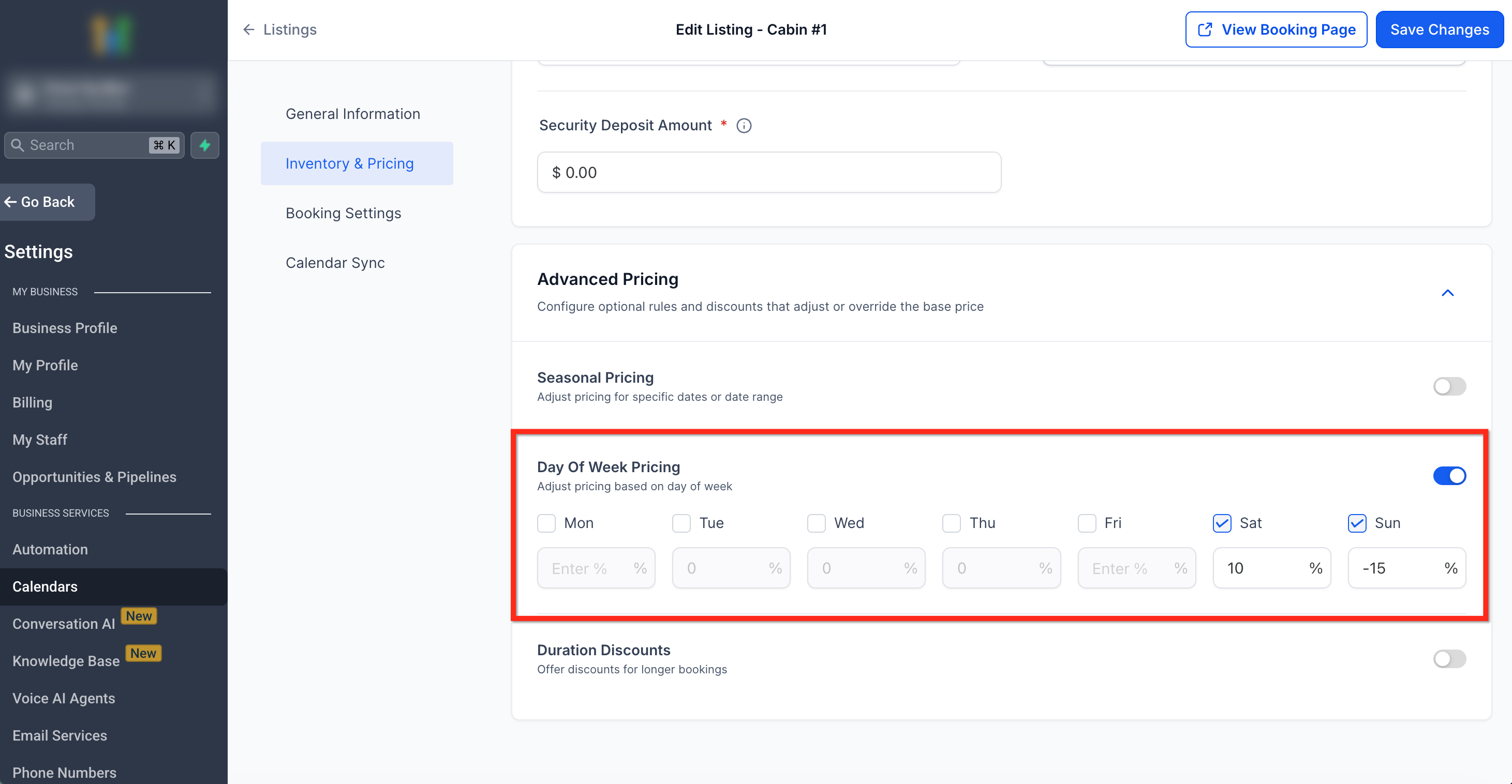
Adjust pricing based on the day of the week.
Useful for rentals with higher demand on weekends.
Each day can have a unique percentage adjustment.
Use a minus (-) sign for discounts and just a number for rate increases.
Example: Saturday +10%, Sunday -15%.
3. Hour of Day Pricing
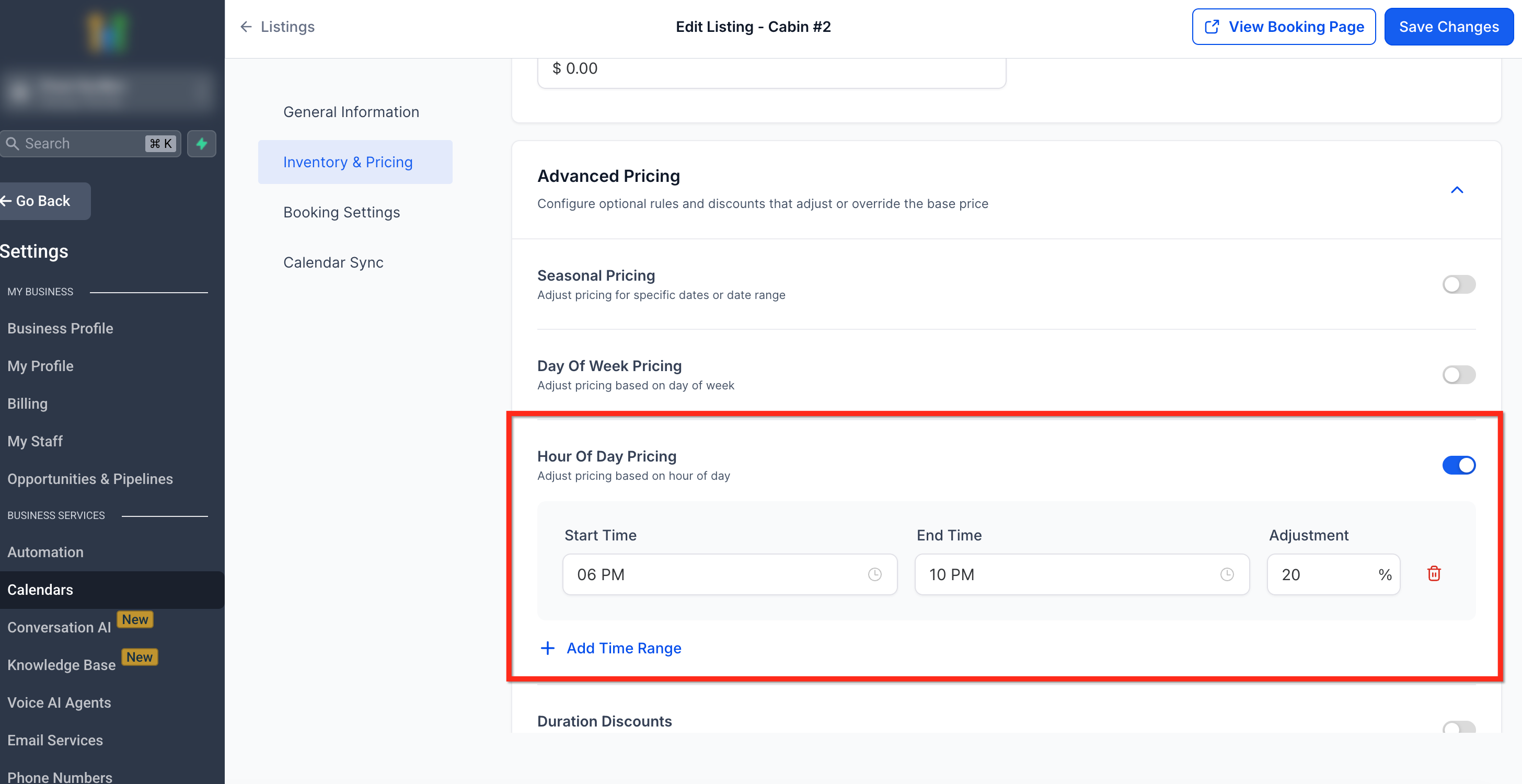
Modify prices based on the time of day.
Enables surge pricing for peak hours.
Example: 6 PM–10 PM → +20% for evening demand.
Important: Hour-of-day pricing applies only when your listing’s Booking Unit is set to Hourly. For Day, Week, or Month units, this rule is ignored.
4. Duration Discounts
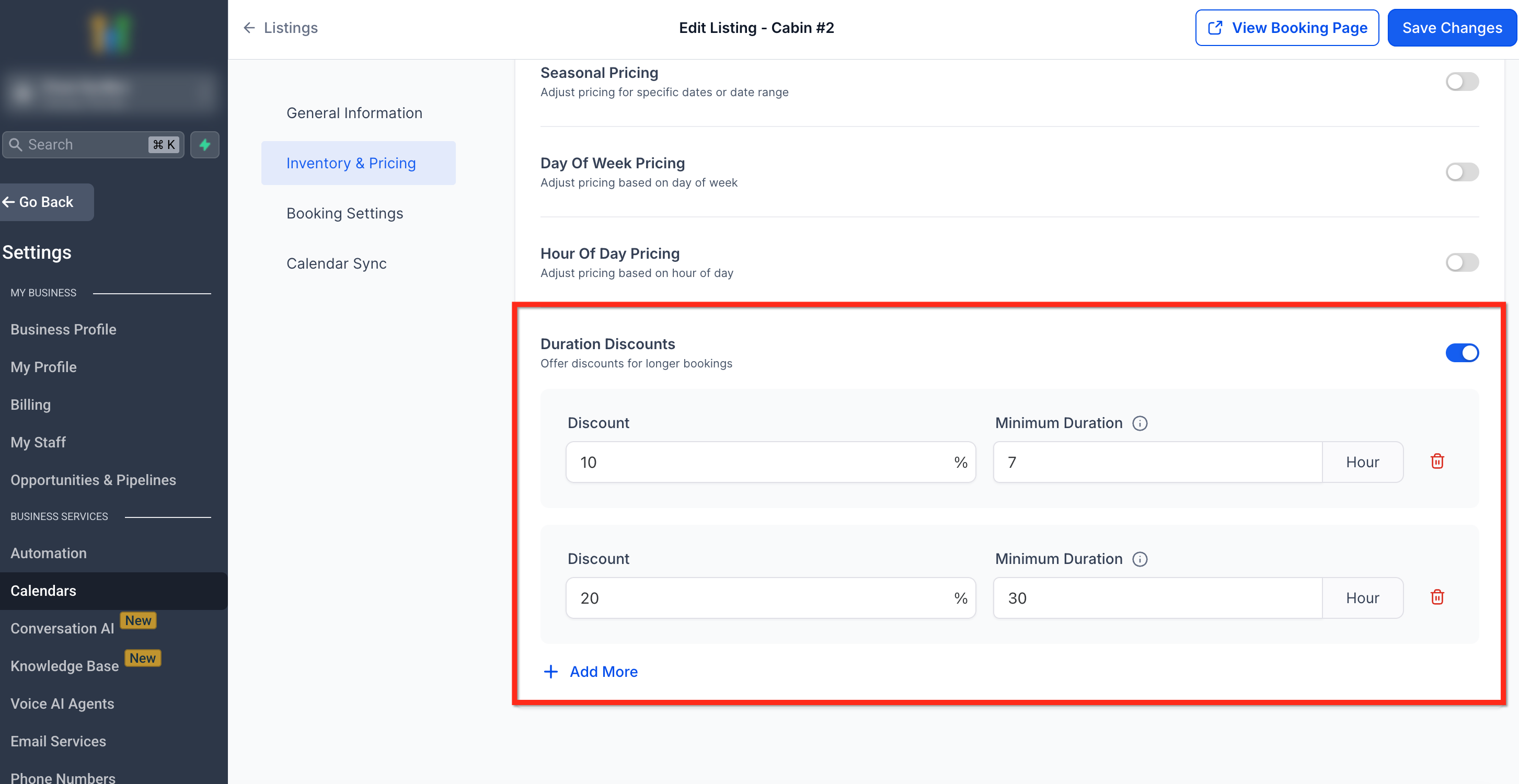
Duration discounts reward customers for booking longer rental periods. These discounts are entered as positive values, but their effect is to reduce the final price.
Define thresholds (for example: 3 days, 7 days, 30 days).
Each threshold represents a tier—once the booking duration meets or exceeds that value, the corresponding discount applies.
Discounts can be set as Flat ($) or Percentage (%) reductions.
Tiering logic: The highest tier reached determines the discount. If you set a 3-day discount of 5% and no higher tiers, any booking lasting 3 days or more (4, 5, 7, etc.) will also receive that same 5% discount.
Example: 10% off for 7+ day rentals and 20% off for 30+ day rentals. A 14-day booking gets 10% off, while a 40-day booking gets 20% off.
Important: Duration discounts are applied based on the rental duration used for pricing calculations. For example, if a booking is charged as 3 months, the 3-month discount will apply—even if the actual booking duration is less than 3 months (e.g., 2 months and 1 day). This ensures discount eligibility remains consistent with how rental pricing is calculated.
Note: Duration discounts apply after all other time-based rules (like Seasonal or Day-of-Week pricing) have been calculated.
5. Quantity Discounts
Quantity discounts reduce the per-unit cost when customers rent multiple units of the same listing. These are entered as positive values, but their effect is to lower the overall price.
Define quantity thresholds (for example: 3 units, 5 units, 10 units).
Each threshold acts as a tier. Once that quantity is met or exceeded, the corresponding discount applies to all booked units.
If you define only one tier (e.g., 5% off for 5+ units), that discount will apply for any booking of 5 or more units.
Example: 5% off for 5+ units, 10% off for 10+ units. A 7-unit booking receives 5% off, while a 12-unit booking receives 10% off.
Important: Quantity Discounts are only available when the inventory is enabled for the listing.Quantity discounts follow the same tier carry-forward logic as duration discounts and are also applied after time-based pricing rules to ensure consistency.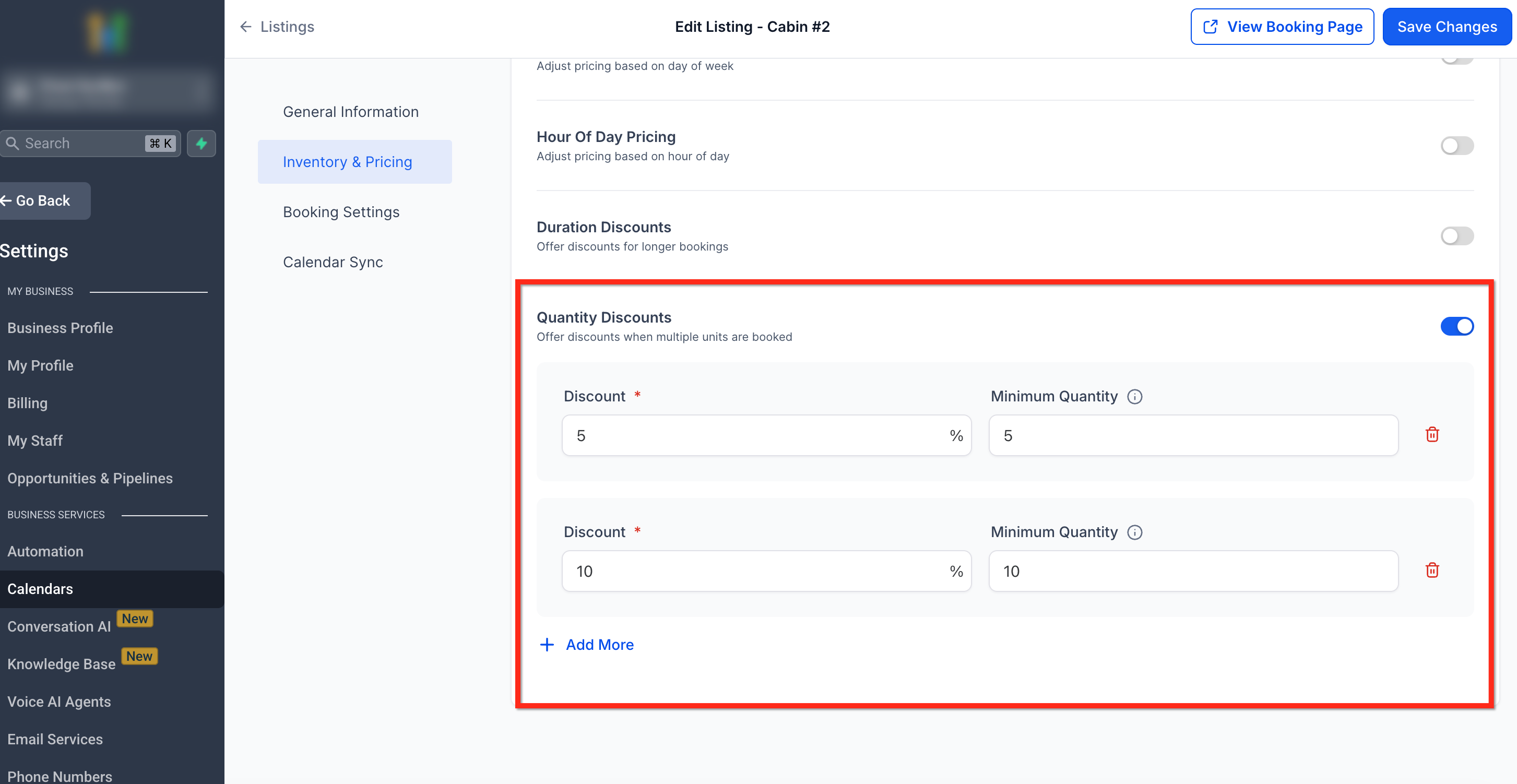
Stacking Order (Rule Application Priority)
Pricing rules are evaluated in the following sequence:
Base Price → Seasonal → Day of Week → Hour of Day → Duration Discount → Quantity Discount.
| Order | Rule Type | Applies When | Notes |
|---|---|---|---|
| 1 | Base Price | Always | Fundamental rate for the listing. |
| 2 | Seasonal Pricing | If current date is within a defined range. | Overrides base price temporarily. |
| 3 | Day of Week Pricing | If booking overlaps a configured day. | Adjusts the running total after seasonal. |
| 4 | Hour of Day Pricing | Only if booking unit = Hourly. | Applies additional fine-grained adjustments. |
| 5 | Duration Discounts | If total duration meets/exceeds threshold. | Reduces total price after time-based adjustments. |
| 6 | Quantity Discounts | If multiple units booked. | Reduces per-unit rate at checkout. |
For non-hourly listings, Hour-of-Day pricing isn't applicable.
Additional Pricing Nuances
Pricing in Rentals follows consistent rules across all booking sources — whether a booking is made by a customer on the Booking Website or created internally through the in-app flow. The same logic applies everywhere to ensure predictable billing for every duration, time frame, or adjustment.
How Pricing Rules Apply
When determining which pricing adjustments (like Seasonal, Day of Week, or Hour of Day) apply, the system checks the start time of each billed unit — such as an hour, day, week, or month — and applies the relevant rule for that entire unit.
This means Rentals does not split pricing mid-way through overlapping time windows. Instead, once a rule applies at the start of a billed block, it stays in effect for that full block.
Example: Day of Week Pricing
Let’s say your listing charges per day and has a +10% rule for Tuesdays.
A booking starts at 11:30 PM on Tuesday and ends at 11:30 PM on Thursday.
Since the booking starts on Tuesday, the system applies the Tuesday uplift for the entire first day.
The base rate will apply from the next billing day onward i.e for Wednesday.
This helps ensure each billed unit (in this case, one day) is priced consistently instead of being divided into partial-day charges.
How Time-Based Billing Works for Daily, Weekly, and Monthly Units
When a listing’s pricing unit is set to per day, week, or month, Rentals uses precise time-based calculation instead of simple date differences. This means that the system measures exact time elapsed — not just the number of calendar days.
Example: Time-Based Pricing
If a daily rental starts on October 18th at 2:00 PM and ends on October 19th at 2:05 PM, the system charges for two full days, because it exceeds a 24-hour period.
Similarly, for weekly and monthly bookings, any minute beyond the defined length (7 days for a week, 30 days for a month) begins a new billing cycle.
This approach applies to all bookings, whether created on the Booking Website or inside the app. Each rental is measured from the exact start date and time to ensure accurate, fair billing.Calculation Examples
Example 1 — Daily Listing with Seasonal and Duration Rules
Base Price: $100/day
Seasonal Pricing: +20% (June 1–Aug 31)
Duration Discount: 10% off for 6 days
Booking: 7 days in July
Calculation:
Base: $100 × 7 days = $700
Seasonal +20% → $700 × 1.2 = $840
Duration Discount 10% → $840 × 0.9 = $756 total
Example 2 — Hourly Listing with Time-Based Adjustments
Base Price: $25/hour
Day of Week: +10% on Saturday
Hour of Day: +15% between 6 PM–9 PM
Booking: 3-hour rental on Saturday (6–9 PM)
Calculation:
Base: $25 × 3 hours = $75
Day Adjustment +10% → $75 × 1.10 = $82.50
Hour Adjustment +15% → $82.50 × 1.15 = $94.88 total
Example 3 — Equipment Rental with Quantity Discount
Base Price: $50/day
Quantity Discount: 5% off for 5 units
Booking: 5 units for 1 day
Calculation:
Base: $50 × 5 units = $250
Quantity Discount 5% → $250 × 0.95 = $237.50 total
Frequently Asked Questions
Q: Can I set multiple discounts for the same duration?
No, only the highest applicable discount applies per rule type.
Q: What happens if multiple rules overlap?
The stacking order ensures that the system applies rules sequentially, adjusting the running total accordingly.
Q: Do rules apply to variants individually?
Yes, each variant follows its own pricing structure.
Q: Can I set Hour-of-Day pricing for daily or weekly bookings?
No, it only applies to listings with the booking unit set to Hour.