
Spam calls can overwhelm your team, inflate call volume, and waste time. This guide walks through practical steps you can take to reduce inbound spam calls using built in tools and call routing strategies.
TABLE OF CONTENTS
- What is Inbound Spam Call Reduction in SourCherry?
- Key Benefits of Inbound Spam Call Reduction
- Number Intelligence (Spam Detection, Caller ID & Validation)
- Custom Dispositions for Voice Calls (Create “Spam call”)
- Workflow — Contact DND (Quarantine Marked Spam)
- Interactive Voice Response (IVR) — Light Front-Door Filter (Optional)
- VIP/Safe List & Auto-Clear DND (Rollback Patterns)
- Mobile Visibility (Spam Labels on App)
- How To Set Up Inbound Spam Call Reduction (Step-by-Step)
- Frequently Asked Questions
What is Inbound Spam Call Reduction in SourCherry?
Inbound spam call reduction is a layered configuration that identifies likely spam before agents engage, quarantines repeat offenders automatically, and adds a light IVR “front door” to deter bots. Combining detection (Number Intelligence), agent input (Custom Dispositions), and automation (DND + IVR) delivers strong protection without blocking real customers.
Key Benefits of Inbound Spam Call Reduction
Understanding the outcomes helps you deploy the right balance of protection and accessibility. These benefits focus on reducing interruptions, preserving lead flow, and keeping rollback options simple.
- Fewer agent interruptions: reduce spam that rings through to users.
- Faster handling: agents can mark a call as Spam call with one tap/click.
- Automatic quarantine: a workflow places marked numbers in DND to prevent future inbound rings.
- Front-door screening (IVR): simple keypress prompts repel robocalls while routing real people quickly.
- Safe-list & rollback: VIPs can bypass filters; DND can auto-clear after review or X days.
- Measurable impact: track “Spam Likely” rates, IVR completion, and fewer agent-handled spam calls.
Number Intelligence (Spam Detection, Caller ID & Validation)
Number Intelligence adds network-level signals (e.g., Spam Likely) to your call logs and phone experience. Turning it on provides early detection so you can flag/route suspicious calls before agents engage.
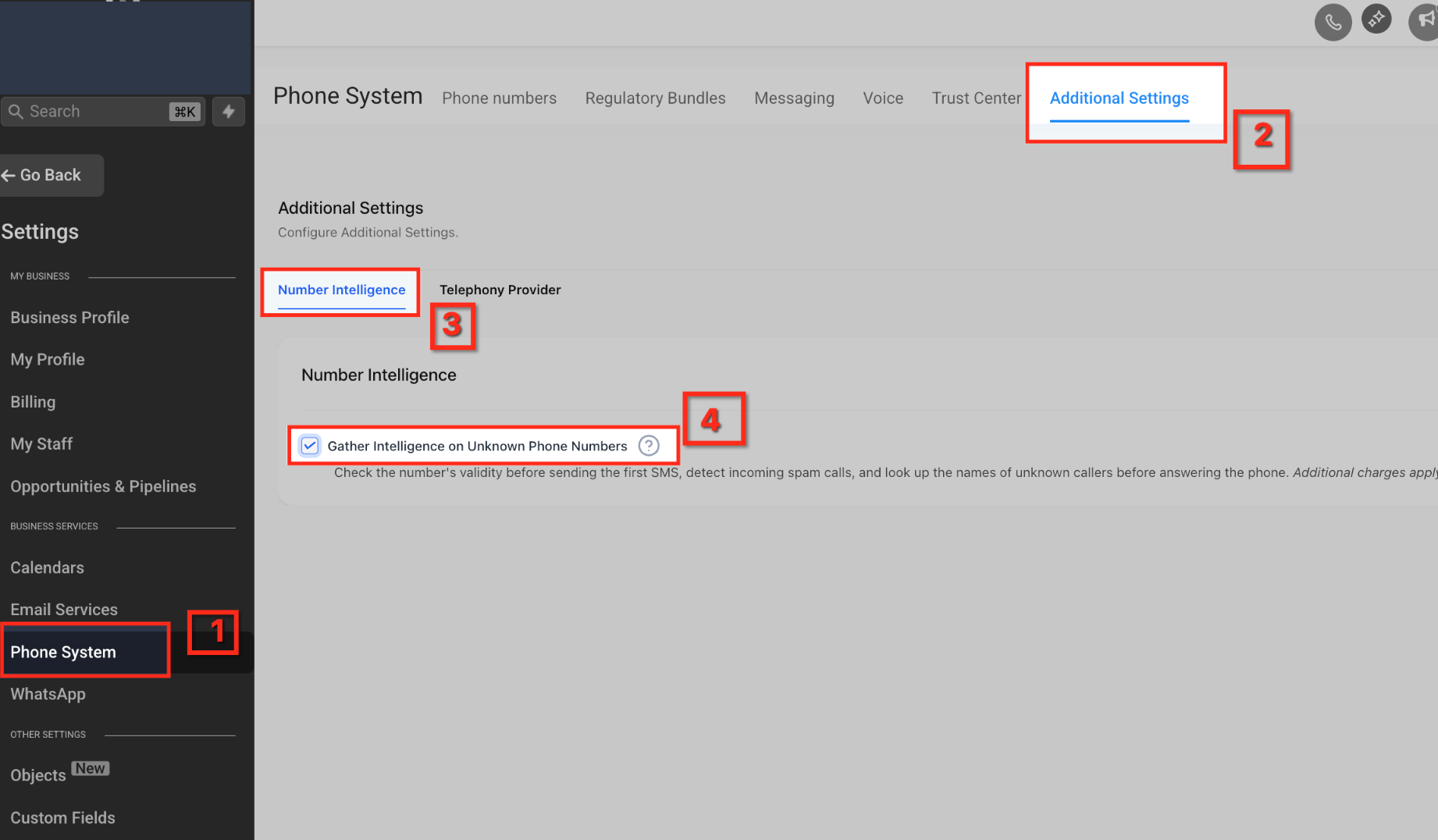
- Where to enable: Settings → Phone System → Additional Settings → Number Intelligence (sub-account).
- Scope & notes: Spam Detection/Caller Name Lookup availability and pricing are documented in the Number Intelligence article; charges are usage-based per lookup/event. Availability may vary by country; Spam Detection is most effective in the U.S. (for more information, refer to this article: Number Intelligence - Spam Detection, Caller ID & SMS Validation
- Verify it’s working: Look for Spam Likely indicators on inbound calls in call logs and supported dialer views.
Custom Dispositions for Voice Calls (Create “Spam call”)
Custom Dispositions standardize agent feedback. Adding a Spam call disposition lets agents consistently label unwanted calls, which your workflow can use to auto-quarantine future attempts.
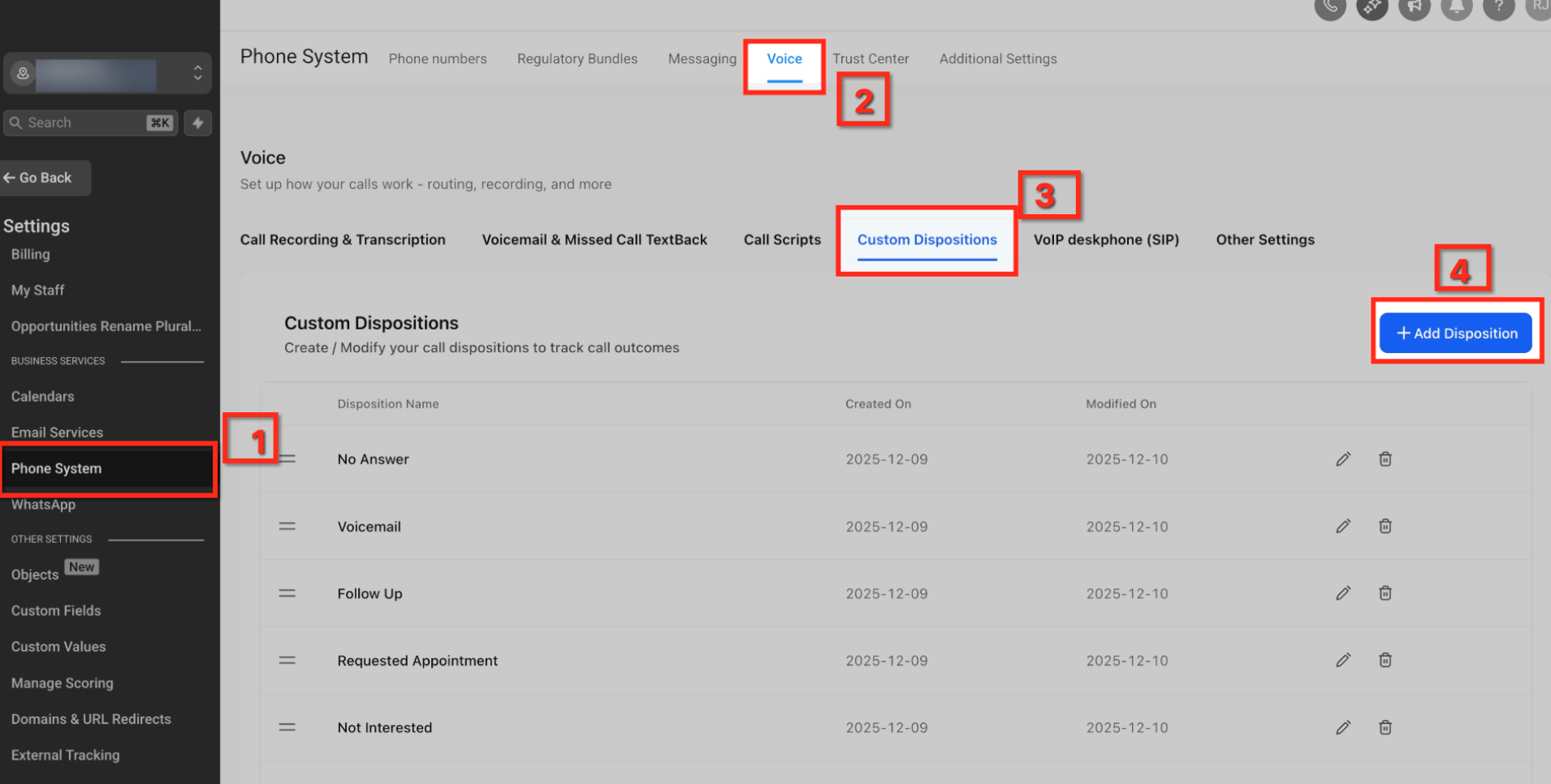
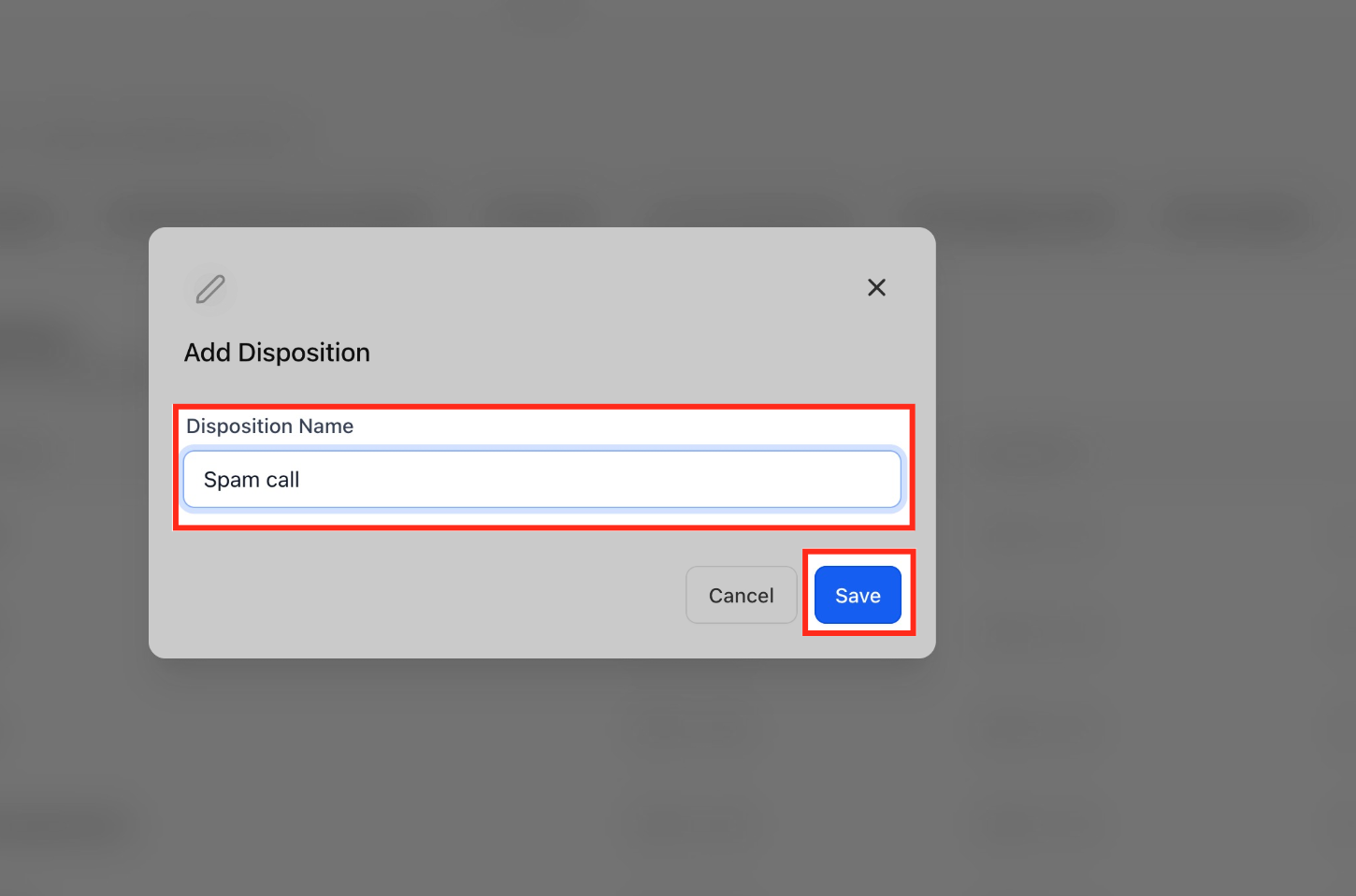
- Create the disposition: Settings → Phone System → Dispositions → Add Disposition → Name: “Spam call” → Save.
- Where agents use it: Call end screen (web and mobile).
- Guidelines: Keep the label short and unambiguous (e.g., Spam call).
Workflow — Contact DND (Quarantine Marked Spam)
Workflows operationalize your policy. When an agent marks Spam call, a workflow can enable DND for that contact—silencing future inbound rings from the same number while preserving your ability to reach out if needed.
Recommended safe preset (clarity on terms):
- Direction controls which way communication is blocked (e.g., Inbound).
- Channels control what is blocked (e.g., Voice vs All channels). Start conservatively with Inbound + Voice so legitimate SMS/email aren’t affected.
Recipe:
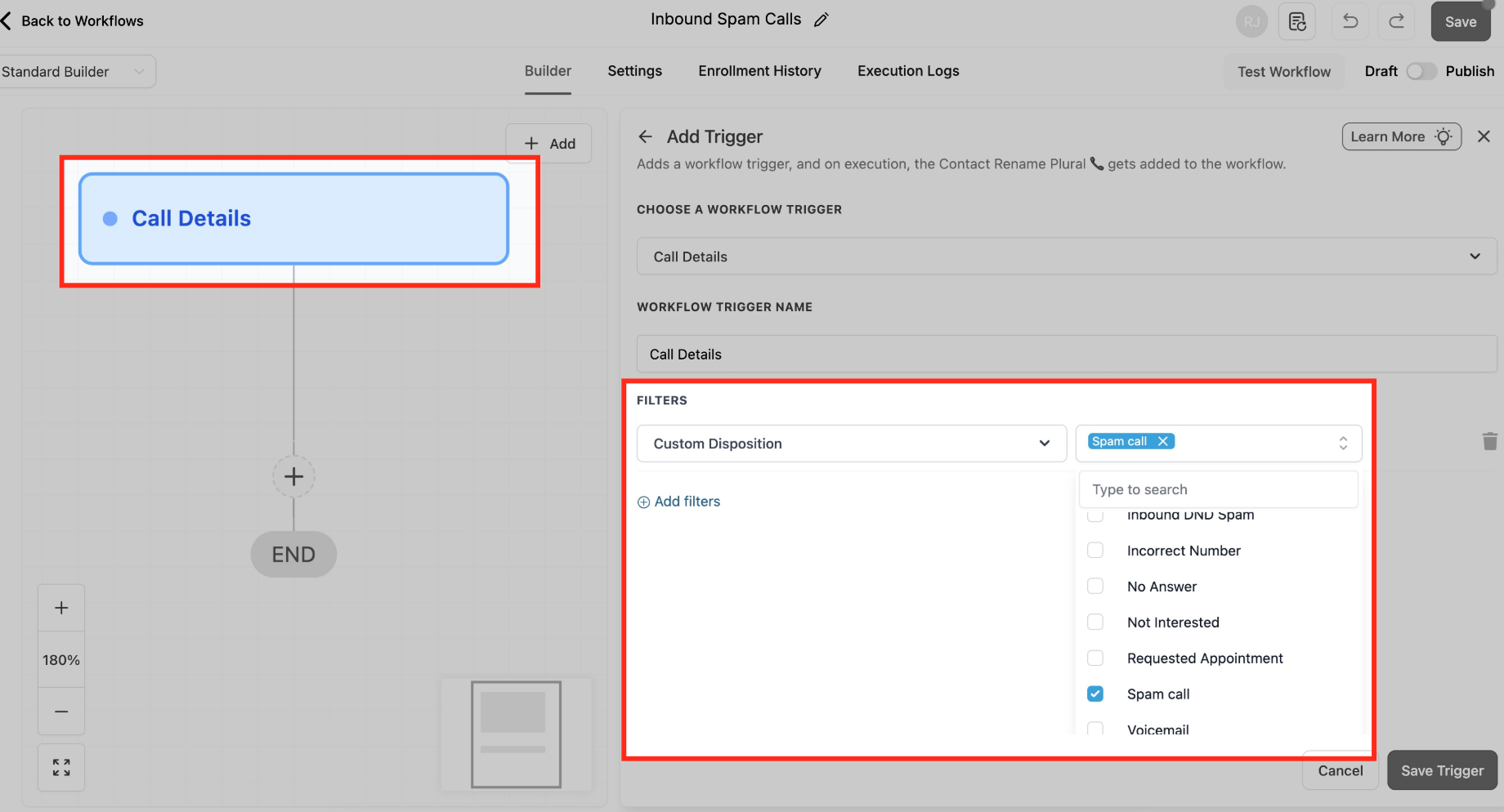
Trigger: Call Details.
Filter: Disposition = Spam call (and optionally Direction = Inbound).
Action: Enable/Disable DND → Direction = Inbound → Channels = Voice → Save & Publish.
Interactive Voice Response (IVR) — Light Front-Door Filter (Optional)
A minimal IVR (“Press 1/2”) deters robocalls and routes people quickly. Keep it short to avoid friction for urgent-use businesses.
Minimal 2-option IVR template:
Say/Play: “To reach support, press 1. For new inquiries, press 2.”
Gather Input (DTMF) → Map Input:
1 → Connect Call to Support Team or User/Group
2 → Connect Call to Sales
Timeout/Invalid: Repeat once, then Voicemail or Fallback agent
Constraint: One phone number can be mapped to one IVR workflow at a time.
Build path:
Trigger: Start IVR (map your inbound number to this workflow).
Actions: Say/Play → Gather Input → Map Input → Connect Call (+ Voicemail fallback).
VIP/Safe List & Auto-Clear DND (Rollback Patterns)
False positives happen. These two patterns preserve accessibility for key callers and automatically restore access after review or elapsed time.
VIP / Safe List Bypass:
Add tag VIP or SafeList on contact.
In the DND workflow, add an If/Else before DND: If contact has tag VIP/SafeList → Skip DND; else → apply DND.
Auto-Clear DND After X Days (e.g., 30):
Create a workflow with Trigger: Contact DND (or schedule-based logic), Wait: 30 days, Action: Disable DND (or notify a reviewer first).
Optionally remove a “Quarantined–Spam” tag upon review.
Mobile Visibility (Spam Labels on App)
Seeing “Spam Likely” on mobile reassures agents that filters are working when away from desktop.
Requirement: SourCherry Mobile App v3.97.3 or later.
Experience: “Spam Likely” appears on call lists and details where supported.
How To Set Up Inbound Spam Call Reduction (Step-by-Step)
Correct order reduces risk and speeds verification. Complete each step and test before moving on.
Step 1 — Enable Number Intelligence
Go to Settings → Phone System → Additional Settings → Number Intelligence.
Check Gather Intelligence on Unknown Phone Numbers.
Save.
Agency onboarding tip: In Agency View, you can set defaults so new sub-accounts start with Number Intelligence enabled by default. See Understanding Default Phone Preferences for New Sub-Accounts.
Step 2 — Create the “Spam call” disposition
Go to Settings → Phone System → Voice → Custom Dispositions.
Click + Add Disposition.
In Add Disposition, set Disposition Name → Save.
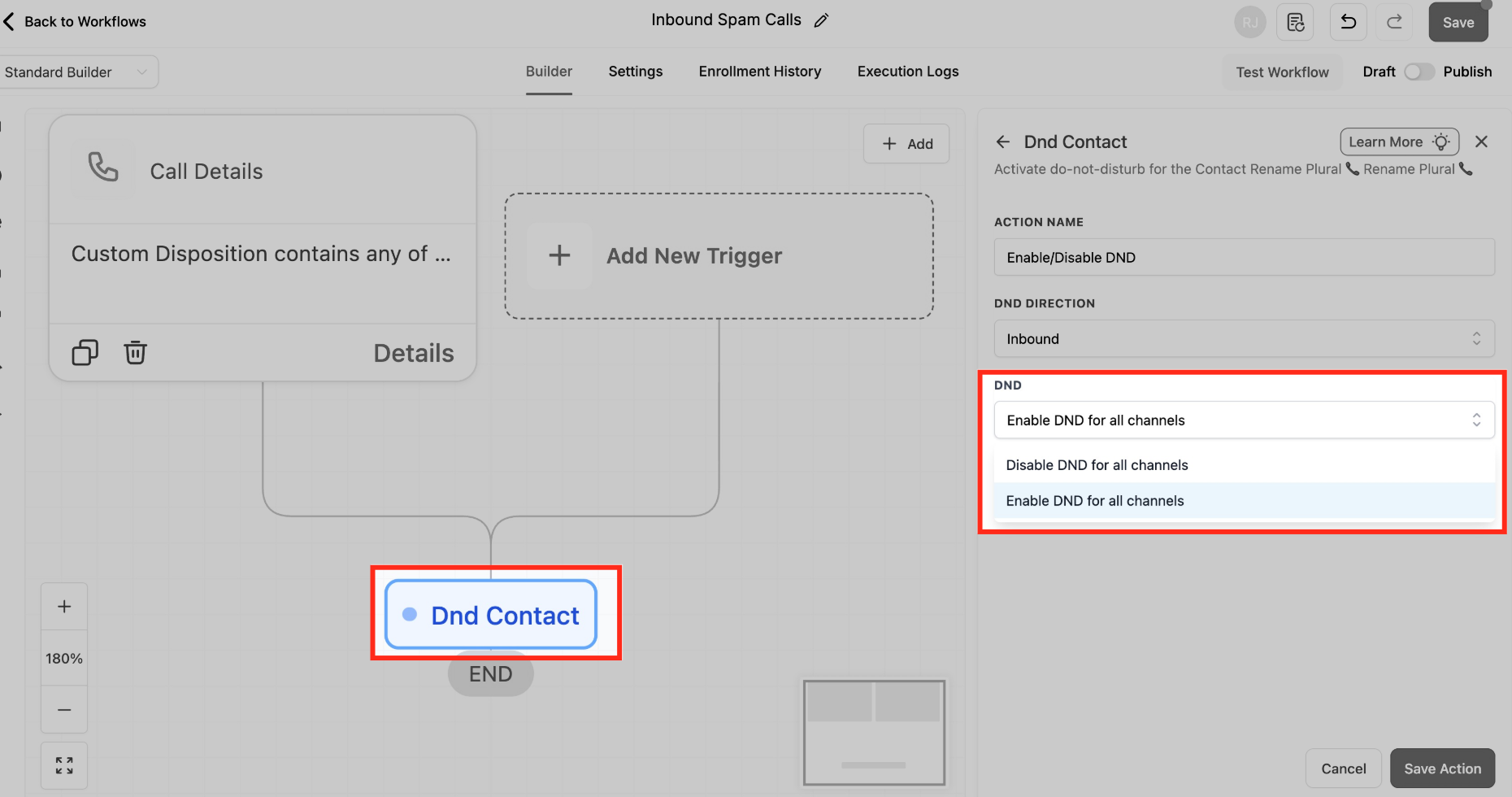
Step 3 — Auto-enable Inbound DND (Calls) for spam-labeled contacts
Create a Workflow.
Trigger: Call Details.
Add Filters: Direction = Inbound AND Disposition
Action: Enable/Disable DND (Contact) → Enable Inbound → Calls only.
Optional branches: VIP tag skip; Remove DND path if corrected.
Publish.
For more information, you can refer to these help articles
1. Call Details Workflow Trigger
2. Enable/Disable DND Workflow Action
Step 4 — Using IVR Workflow
This article provides some of the important steps only. For more details, refer to the below help article :
Interactive Voice Response (IVR) Guide - Triggers & Actions
- Start by creating a new Workflow and choose the Start IVR Trigger.
- In Filters, set In Phone Number and select the public line you want to screen (note: if a number doesn’t appear, it may already be in use by another workflow).
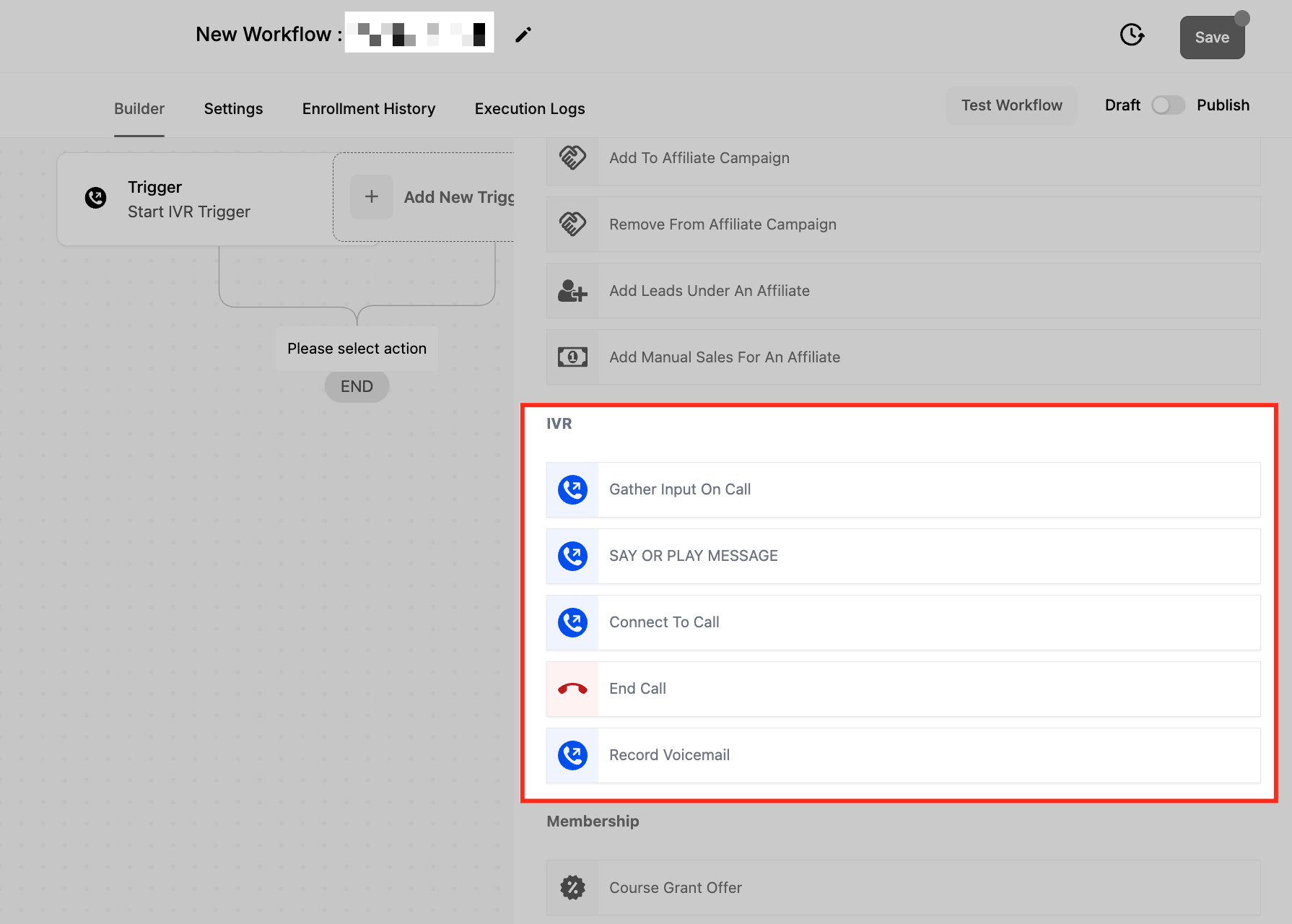
- Add Gather Input on call and use Say a message to deliver a short prompt such as “Thanks for calling [Business]. To connect, press 1.”
- Choose your Language, Message Voice, keep Number of loops at 1, and in Advanced Settings set a brief timeout (about 3–5 seconds) with one retry; accept only digit 1.
- For callers who press 1, add Connect Call (IVR) and select your Users or Add custom number; optionally enable Detect Voicemail, consider whether to Record Call, and set a reasonable Timeout (seconds).
- For callers who don’t respond or press the wrong key, add Say or play a message with a concise “We didn’t catch that” notice, then End Call (IVR) (or route to voicemail if preferred).
- Publish, then place test calls from a mobile and a landline to confirm the “press 1” path connects and the fallback path ends cleanly.
Create a new Workflow or update your existing number flow.
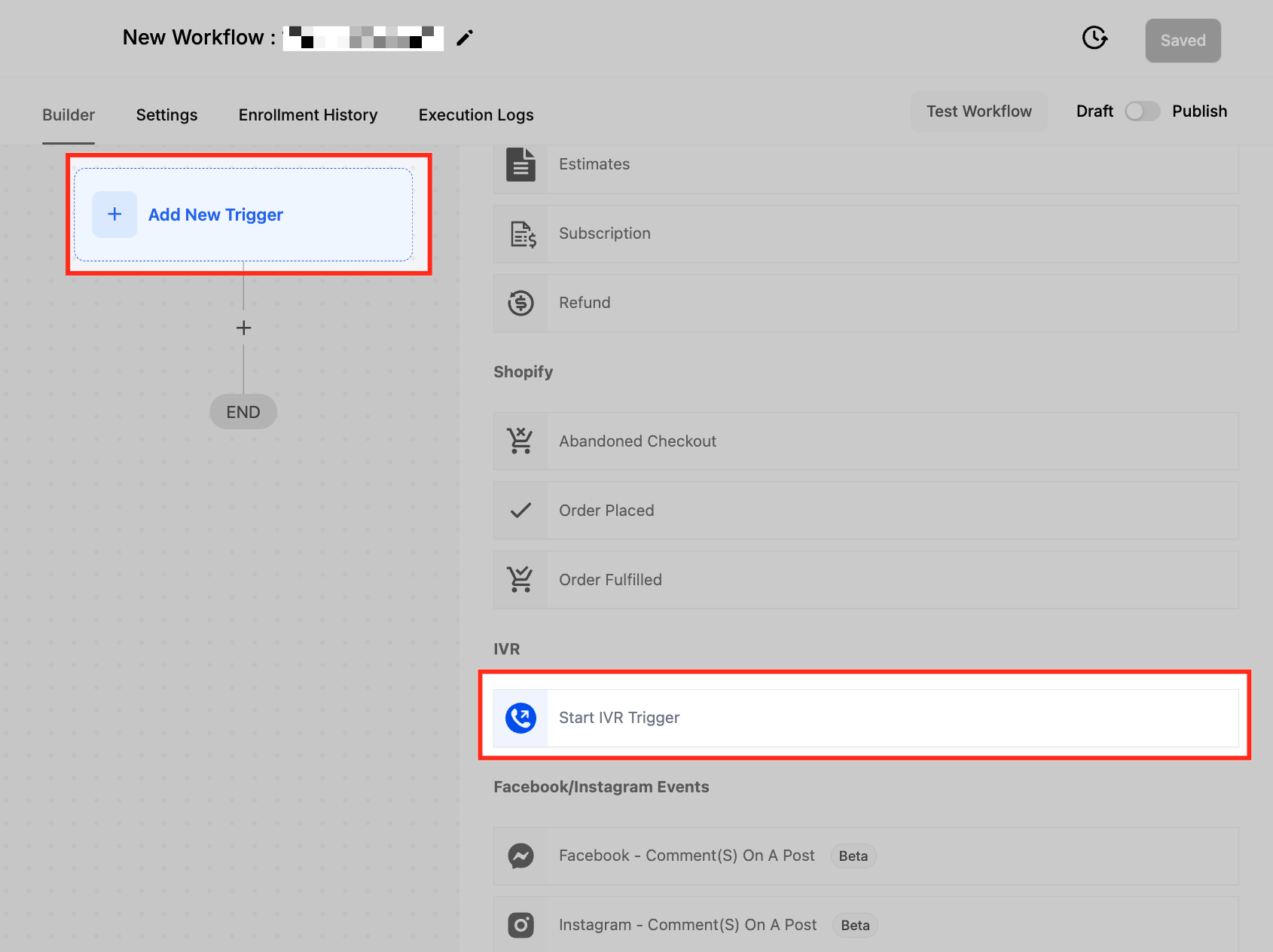
Trigger: Start IVR tied to your public inbound number.
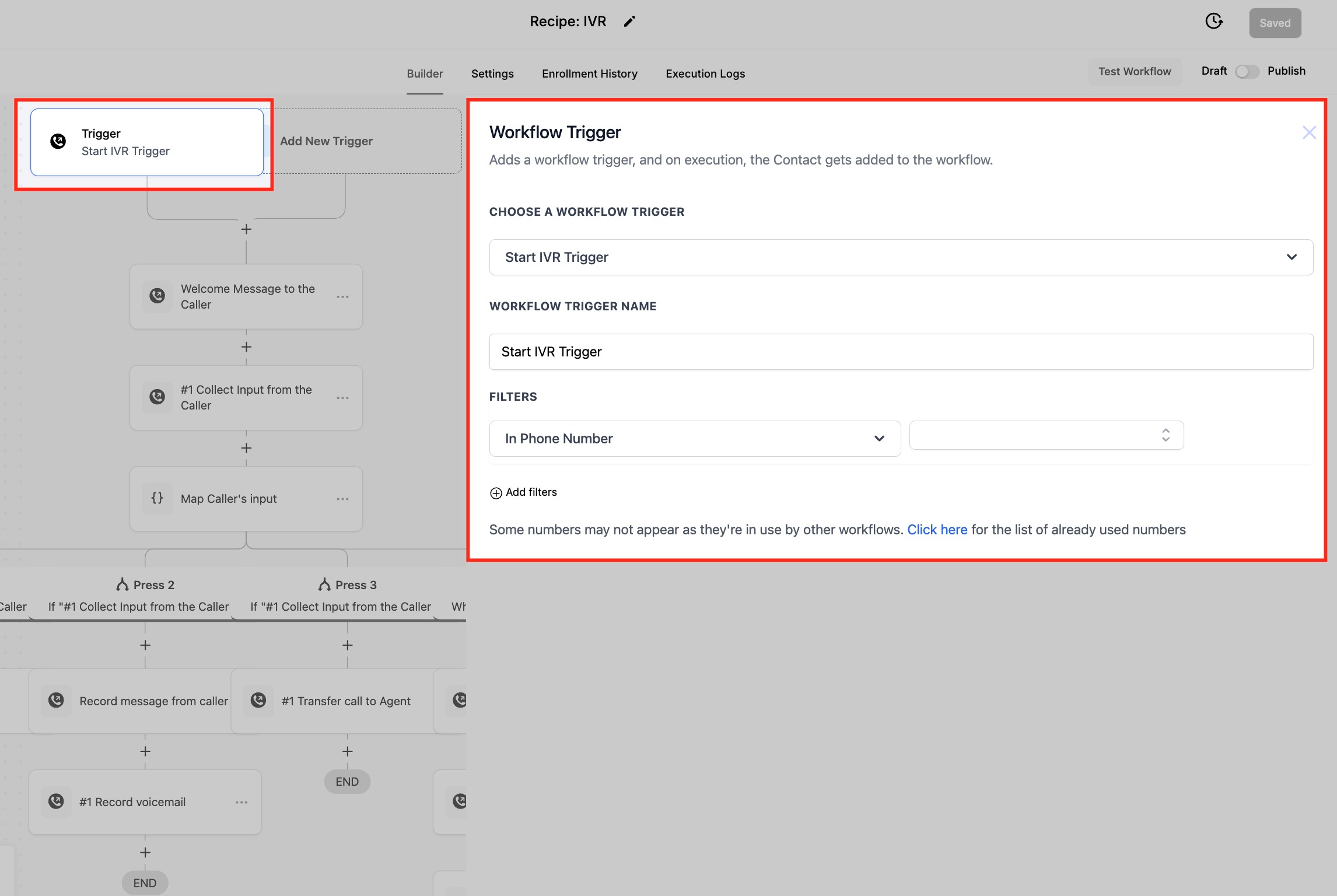
IVR Gather Input on Call: expect “1”; timeout ~3–5 seconds; 1 retry.
Say or Play Message example: “Thanks for calling [Business]. To connect, press 1.”
Step 5 — Validate call flow & timeouts
Open Phone Numbers → [Select Number] → Incoming Calls Settings.
Confirm the IVR/workflow association and set ring timeout (e.g., ~20 seconds).
Place 3–5 test calls (unknown number; marked-spam number; VIP number) and verify outcomes.
Step 6 — Monitor & tune
Weekly: review Call Logs, disposition usage, IVR no-input rates, and contacts with Inbound DND (Calls).
Adjust prompts/timeouts and retrain agents as needed.
Note: if your own numbers are being labeled “spam likely”: that’s a separate, outbound reputation issue. see related articles for remediation via caller reputation best practices and free caller registry steps.Frequently Asked Questions
Q: Will Number Intelligence automatically block calls?
No. It provides “Spam Likely” signals. Blocking behavior comes from your workflows (e.g., DND) and/or IVR design.
Q: Should I set DND to “All channels”?
Start with Inbound + Voice. Expanding to all channels risks suppressing legitimate SMS/email. Increase scope only if spam persists.
Q: How do I avoid blocking VIPs or important vendors?
Use a VIP/SafeList tag and add an If/Else condition to skip DND and bypass IVR for those contacts.
Q: What if an agent marks a real customer as “Spam call”?
Remove DND on the contact record (or let your auto-clear workflow lift DND after X days). You can also log a note and add the VIP tag.
Q: Can I send spam-labeled calls straight to voicemail?
Yes. Route via IVR timeout/invalid or add a workflow branch that sends Inbound, Voice to voicemail when disposition = Spam call.
Q: Does this impact outbound dialing?
DND settings configured for Inbound do not block your outbound calls to that contact. Choose Direction and Channels intentionally.
Q: Can I filter SMS spam, too?
You can apply DND to additional Channels (e.g., SMS). Evaluate impact first; consider separate logic for SMS vs Voice.
Q: Is IVR required?
No. IVR is optional. Many businesses rely on Number Intelligence + Disposition → DND only, especially in urgent-response use cases.