
Locale-Based Currency Formatting in SourCherry ensures that your store prices display in a format familiar to each visitor based on their region and language. This article explains how the feature works, how to enable it, and how it impacts price display across your store. By automatically adjusting separators, decimals, and currency symbol placement, your store delivers a more localized and intuitive shopping experience.
TABLE OF CONTENTS
- What is Locale-Based Currency Formatting?
- Key Benefits of Locale-Based Currency Formatting
- How Locale Detection Works
- Where Currency Formatting Applies
- How To Setup Locale-Based Currency Formatting
- Key Considerations
- Frequently Asked Questions
- Related Articles
What is Locale-Based Currency Formatting?
Locale-Based Currency Formatting automatically adjusts how prices are displayed across your SourCherry store based on the visitor’s location and the page language. Instead of showing plain numeric values, prices follow region-specific formatting standards such as thousand separators, decimal styles, and currency symbol placement. This ensures that visitors instantly understand pricing in a way that feels natural to them, reducing friction during browsing and checkout.
Key Benefits of Locale-Based Currency Formatting
Improved Readability: Prices are displayed in familiar formats, making them easier to understand at a glance.
Better User Trust: Regionally accurate formatting creates a more professional and localized experience.
Global Compatibility: Supports international audiences without needing multiple store versions.
Automatic Formatting: Handles separators, decimals, and symbol placement without manual input.
Consistent Experience: Applies across product pages, cart, and checkout for uniformity.
How Locale Detection Works
Locale detection determines how prices are formatted by combining multiple signals to deliver the most relevant display for each visitor.
Page Language Priority: The selected page language (from SEO & AI Search Optimization settings) influences the base formatting.
Visitor Location: The system refines formatting based on the visitor’s geographic location.
Fallback Behavior: If locale data is unavailable, formatting defaults to en-US.
Formatting Only: Currency values are not converted—only the display format changes.
Where Currency Formatting Applies
Locale-based formatting is applied consistently across all major store components to ensure a seamless experience.
Product List Page (PLP)
Product Detail Page (PDP)
Cart
Checkout
All store price elements
How To Setup Locale-Based Currency Formatting
Proper setup ensures that your store displays prices correctly for global visitors and aligns with your localization strategy.
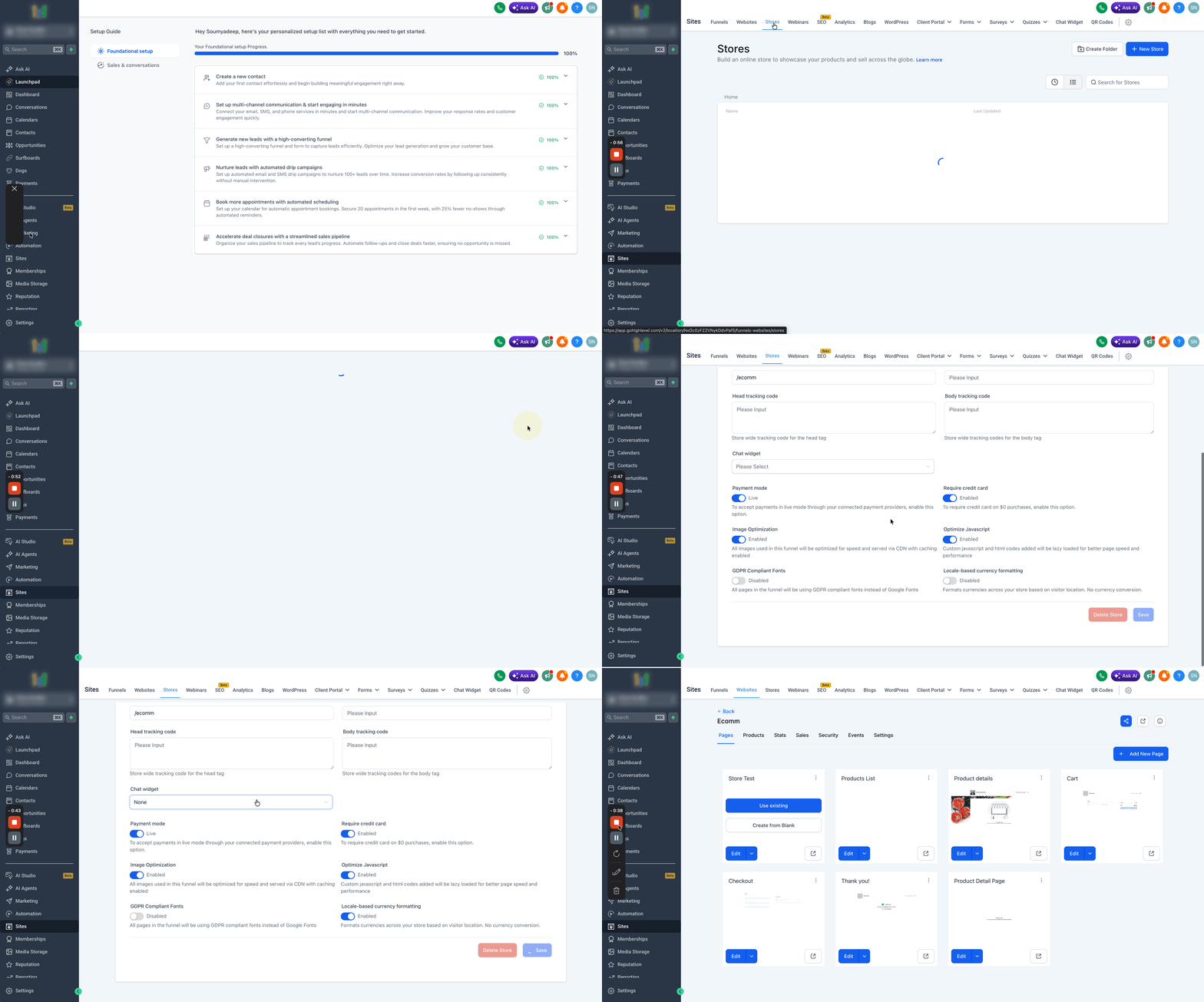
Navigate to Sites > Stores in your SourCherry account.
Open your store and go to Store Settings.
Locate the toggle Locale-Based Currency Formatting.
Enable the toggle.
Click Save.
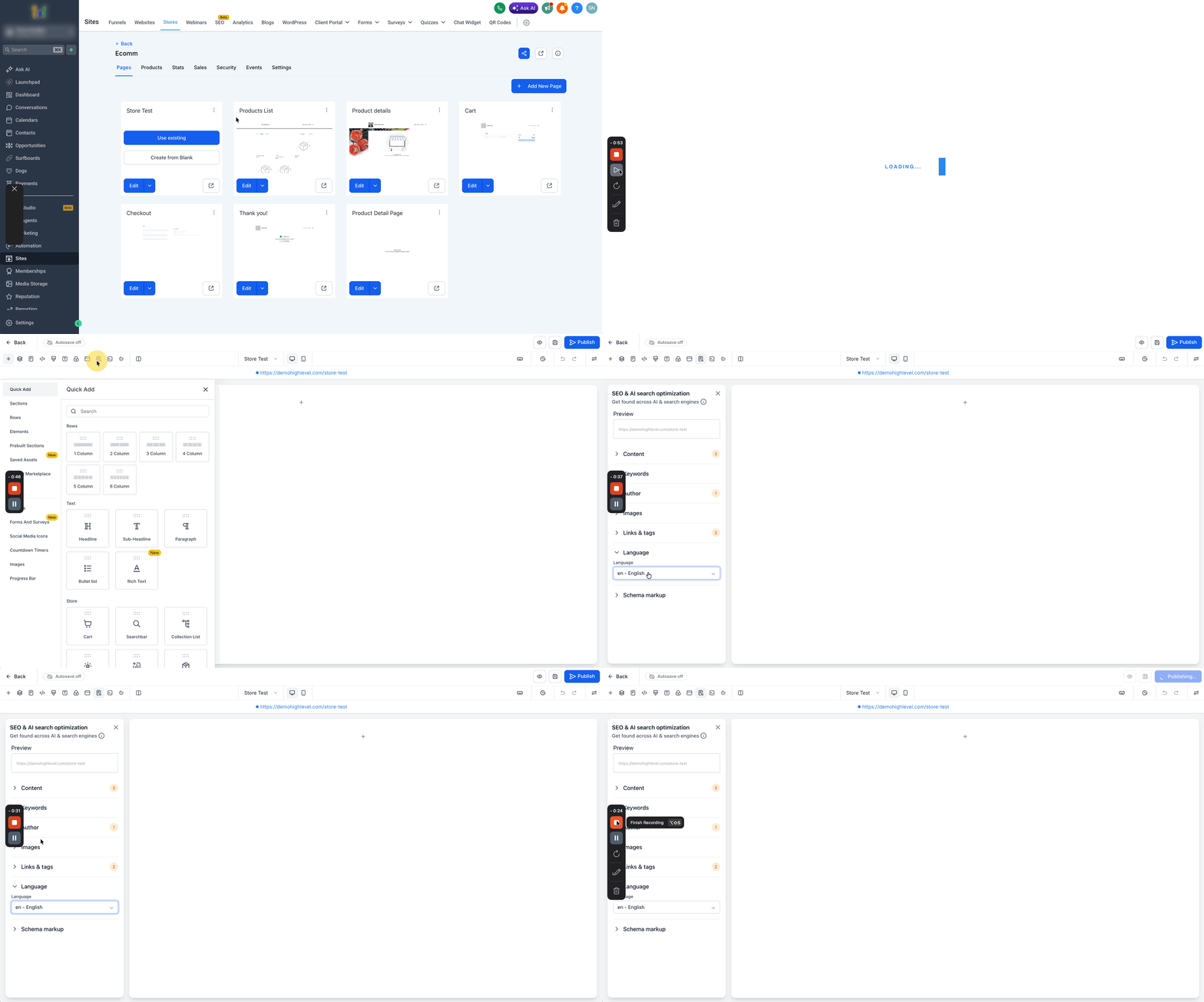
Open your store in the Builder.
Navigate to SEO & AI Search Optimization.
Set the appropriate Page Language.
Save and Publish your changes.
Key Considerations
Understanding how this feature behaves helps avoid confusion and ensures accurate expectations when managing international stores.
No Currency Conversion: Prices remain in the same currency; only formatting changes.
Visitor-Based Formatting: Formatting is based on the visitor’s location, not the store’s location.
Language Matters: Incorrect page language settings may lead to unexpected formatting.
Fallback to en-US: If locale data is unavailable, default formatting is applied.
Frequently Asked Questions
Q: Does this feature convert currencies automatically?
No, it only changes how the currency is displayed, not the value.
Q: Why do prices look different for different users?
Formatting adjusts based on visitor location and page language.
Q: What happens if no locale is detected?
The system defaults to en-US formatting.
Q: Do I need multiple stores for different regions?
No, this feature allows a single store to support multiple regions visually.
Q: Where do I control the language setting?
In the Builder under SEO & AI Search Optimization.