
Ask AI feedback helps SourCherry understand which responses are helpful and which ones need improvement. By rating individual Ask AI answers with thumbs up or thumbs down, users can share clear feedback while they work. When feedback is specific and constructive, it gives SourCherry better signals to improve Ask AI’s accuracy, instruction following, response quality, and overall usefulness.
This article explains how Ask AI feedback works, when to use thumbs up or thumbs down, how to add reasons and comments, and why thoughtful feedback matters.
TABLE OF CONTENTS
- What is Ask AI Feedback?
- Key Benefits of Ask AI Feedback
- When to Use Thumbs Up or Thumbs Down
- How Feedback Applies to Full Ask AI Responses
- Adding Reasons and Comments
- How To Provide Feedback on Ask AI Responses
- Best Practices for Constructive Feedback
- Frequently Asked QuestionsQ: Can I update or clear my feedback after submitting it?
- Related Articles
What is Ask AI Feedback?
Ask AI feedback is a rating system that lets users evaluate individual Ask AI responses inside a conversation. Users can select thumbs up when a response is helpful or thumbs down when a response does not meet expectations.
Feedback is tied to a single Ask AI answer. If that answer includes text plus structured content, such as a card, table, diagram, or artifact, the rating applies to the full response. This helps SourCherry understand the quality of the complete answer rather than only one part of it.
When users choose thumbs down, they may be asked to select one or more reasons and add an optional comment. These details help explain what went wrong and make the feedback more actionable.
Key Benefits of Ask AI Feedback
- Better Response Quality: Feedback helps identify answers that are useful, accurate, and aligned with user expectations.
- Clearer Improvement Signals: Reason selections and comments help explain why a response missed the mark.
- Support for Rich Responses: Ratings apply to the full Ask AI response, including related text, cards, diagrams, tables, or artifacts.
- More Accurate Product Improvements: Feedback gives SourCherry clearer insight into response issues such as accuracy, tone, instruction following, or unnecessary refusals.
- Easy Correction: Users can update or clear their feedback if they change their mind.
- Faster In-Workflow Feedback: Thumbs controls let users share feedback directly inside the Ask AI conversation without leaving the chat.
When to Use Thumbs Up or Thumbs Down
Choosing the right feedback option helps SourCherry understand whether an Ask AI response was successful or needs improvement. Use thumbs up when the response was helpful, and use thumbs down when the response missed the mark or needs correction.
Feedback Option | Use When the Response… | Example |
Thumbs Up | Answered your question clearly Followed your instructions Used the right tone or format Provided accurate and useful information Helped you complete the taskIncluded helpful structure, such as steps, lists, or tables Produced a useful artifact, card, or diagram | You ask Ask AI to create a follow-up email, and the response is accurate, well-written, and ready to use with minimal edits. |
Thumbs Down | Was inaccurate Did not follow your instructions Missed important context Was off-topic Used the wrong tone Was too vague or incomplete Refused when it should have helped Produced an artifact or structured output that did not match the request | You ask Ask AI for a professional email, but it creates a casual social media caption. Select thumbs down and choose a reason related to instruction following or relevance. |
When selecting thumbs down, choose the reason options that best match the issue. If the reason options do not fully explain the problem, add a short comment with more detail.
How Feedback Applies to Full Ask AI Responses
Ask AI responses may include more than plain text. A single answer can include written content, structured cards, tables, diagrams, artifacts, or follow-up text that belongs to the same response.
When you rate an Ask AI response, your feedback applies to the full answer. This means you are rating the complete response experience, not just one sentence, card, or visual element.
For example:
- If Ask AI provides an explanation and a table, the rating applies to both.
- If Ask AI generates a diagram with supporting text, the rating applies to the full answer.
- If Ask AI returns a card or artifact as part of the response, the rating applies to that complete response.
This helps keep feedback connected to the full context of what Ask AI provided.
Adding Reasons and Comments
Reasons and comments make negative feedback more useful. A thumbs down rating tells SourCherry that something was wrong, but reasons and comments help explain what should be improved.
When selecting thumbs down, users can choose one or more reasons. These options may vary based on the product experience and language settings.
Helpful comments should be short, specific, and focused on the issue.
Good feedback examples:
- “The answer ignored my request to keep the email under 100 words.”
- “The response used the wrong contact name.”
- “The steps were missing the setup step for permissions.”
- “The tone was too casual for a legal client.”
- “The table was helpful, but the dates were incorrect.”
Less helpful feedback examples:
- “Bad.”
- “Wrong.”
- “Did not like it.”
- “Fix this.”
Constructive comments help SourCherry better understand what happened and what a better response should have included.
How To Provide Feedback on Ask AI Responses
You can share feedback directly in Ask AI to help SourCherry improve future responses. Simply choose thumbs up or thumbs down, and add a short reason if you’d like to provide more details.
Your feedback can be changed anytime. If you selected the wrong rating, changed your mind, or no longer want to leave feedback, you can update or clear it. The most recent rating will be saved, and clearing feedback will return the response to an unrated state.
1. Open Ask AI in SourCherry and start a new conversation. After sending a prompt or question, review the response and use the thumbs up or thumbs down icons below it to rate whether the answer was helpful.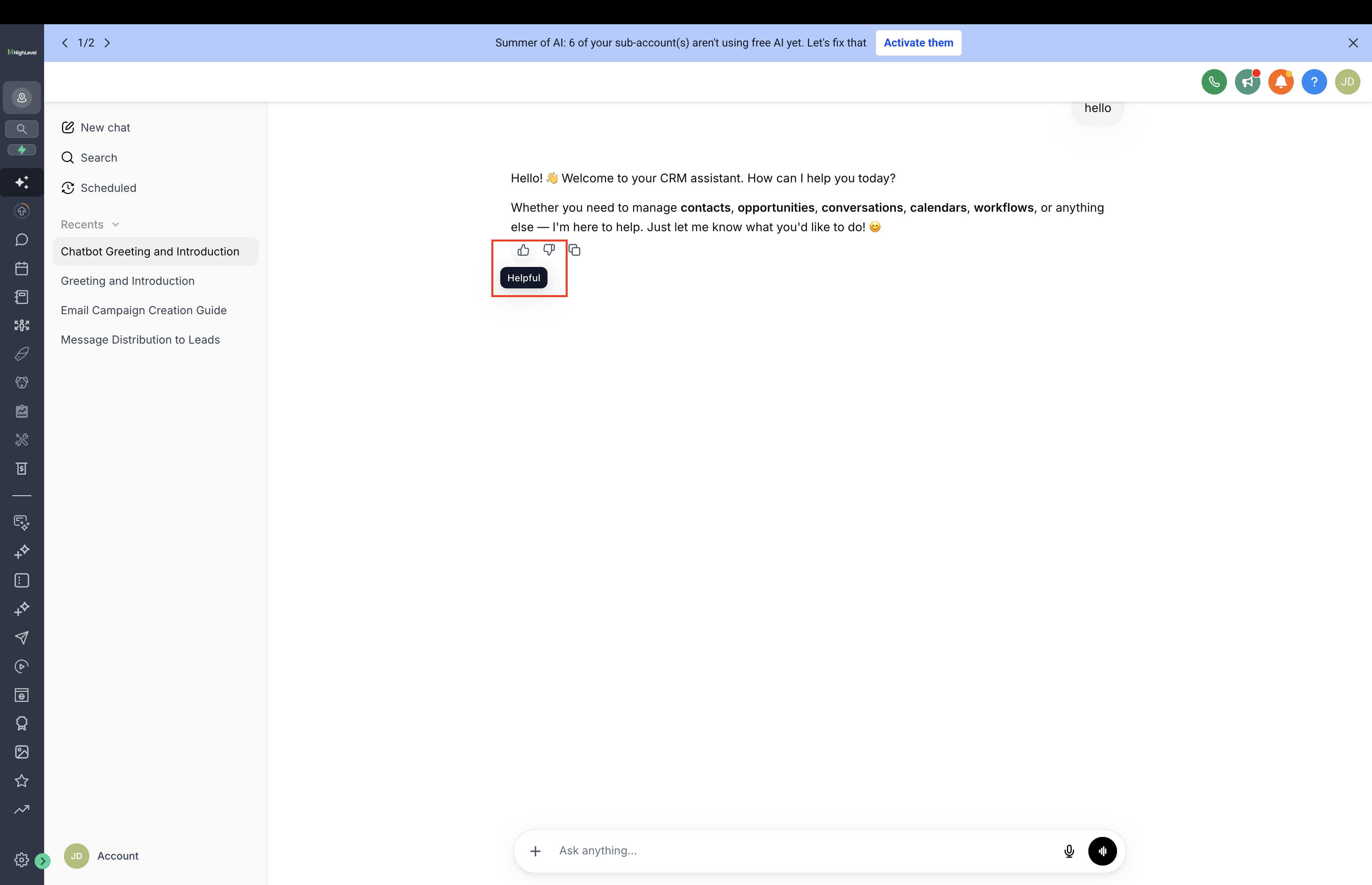
2. If you select thumbs down, choose a reason and add an optional comment to share more details. Submit your feedback when finished. You can update or clear your rating later if needed.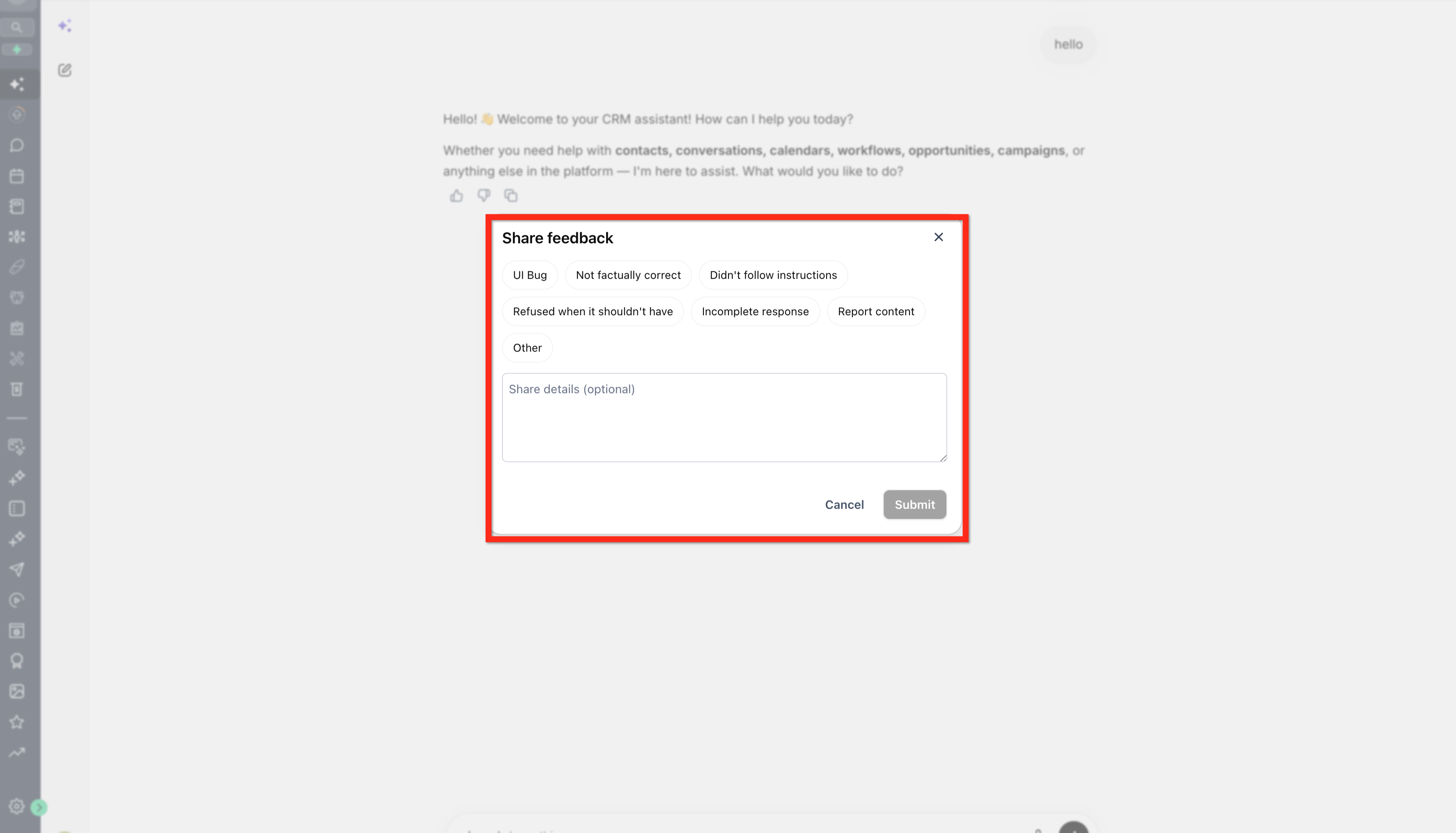
Best Practices for Constructive Feedback
Use these best practices when leaving feedback:
- Be specific about what was wrong.
- Mention whether the issue was accuracy, tone, format, relevance, or instruction following.
- Include the expected outcome when possible.
- Keep comments short and focused.
- Rate the full response, including any artifacts or structured content.
- Use thumbs up when Ask AI gets it right, not only thumbs down when something is wrong.
- Update or clear feedback if your opinion changes.
Example of constructive feedback:
“The response was helpful overall, but it did not follow my request to format the answer as a checklist.”
Frequently Asked Questions
Q: Why do some Ask AI conversations not show feedback controls?
Feedback is available in new Ask AI conversations created after the feature release. Older conversations may not show thumbs up or thumbs down controls.
Q: Can I change my rating after submitting it?
Yes. You can update your feedback by choosing a different rating.
Q: Does feedback immediately change the next Ask AI response?
No. Feedback helps SourCherry identify where Ask AI responses are helpful or need improvement, but ratings do not necessarily change the next response in the same conversation.
Q: Should I leave thumbs up feedback too?
Yes. Positive feedback helps identify responses that are accurate, helpful, and aligned with user expectations.
Q: Can I update or clear my feedback after submitting it?
Yes. You can change your rating or clear your feedback if you selected the wrong option, changed your mind, or no longer want to rate that response.