
Bad call quality can damage communication with leads and clients. This article outlines how to diagnose and fix poor VoIP call performance in SourCherry, including troubleshooting devices, internet connections, and software settings.
TABLE OF CONTENTS
- What is Bad Call Quality?
- Key Benefits of Fixing Bad Call Quality
- How to Fix Bad Call Quality
- Advanced Troubleshooting: Jitter, Latency & Packet Loss
- Interpreting Call Quality Error Codes
- Frequently Asked Questions
- Related Articles
What is Bad Call Quality?
Poor call quality in SourCherry can impact customer relationships, agent productivity, and overall communication efficiency. Understanding what causes call issues—like choppy audio, one-way audio, or dropped calls—is the first step in resolving them and ensuring reliable VoIP communication. These issues are often caused by internet instability, device interference, or network misconfiguration. Because SourCherry uses internet-based telephony, even minor problems in your local setup can drastically affect call quality.
Key Benefits of Fixing Bad Call Quality
Resolving poor call quality issues helps maintain professional communication, reduce frustration for both agents and clients, and protect your brand reputation. A stable calling environment improves team efficiency and enhances the customer experience.
Increased Call Reliability: Reduce dropped calls and ensure smooth conversations.
Better Customer Experience: Clients can hear you clearly, improving satisfaction and trust.
Improved Team Productivity: Agents spend less time troubleshooting and more time engaging leads.
Reduced Missed Opportunities: Stable calls prevent communication gaps that could cost sales.
Professional Brand Image: Crisp audio reflects well on your business and builds credibility.
How to Fix Bad Call Quality
Diagnosing and resolving call quality issues ensures smoother operations and more effective communication. By methodically troubleshooting your environment—devices, network, and software—you can eliminate the most common causes of poor VoIP performance in SourCherry.
- Use a Wired Internet Connection: Wi-Fi is more prone to packet loss and instability. Connect your device directly to your modem/router via Ethernet.
- Close Bandwidth-Heavy Applications: Streaming services, file downloads, and cloud backups can affect VoIP quality. Pause or close them during calls.
- Restart Your Router and Modem: Power cycling can fix minor internet stability issues. to do this, unplug the power cable from your router and modem, wait 30 seconds then plug them back in and wait for full reconnection
- Update Your Browser or App: Outdated browsers or SourCherry apps may cause compatibility issues. Ensure Chrome or the desktop app is updated to the latest version.
- Use the SourCherry Web App in Google Chrome: Google Chrome provides the most stable VoIP performance with SourCherry. Avoid other browsers or mobile web access for calling.
- Use Headphones with a Built-In Microphone: Headsets reduce echo and improve microphone quality. Avoid using laptop speakers/mics for professional calls.
- Third Party Apps: Some extensions or software can conflict with audio settings or eat up bandwidth. Disabling them helps identify the root cause of bad call quality.
- Check Device and Network Compatibility: Ensure your internet speed and hardware meet VoIP standards. the recommended minimum speed is 5 Mbps upload/download. Click here to test your connection with SpeedTest
- Check for Firewall or Port Blocking: Some firewalls block SIP traffic. Ask your IT team to ensure UDP Ports 10000–20000 are open
- Contact SourCherry Support: Still having issues? Open a support ticket with call logs and setup details. Click here to submit a support ticket.
Advanced Troubleshooting: Jitter, Latency & Packet Loss
Beyond basic internet issues, advanced VoIP problems often stem from network jitter, latency, and packet loss. Understanding these terms helps IT teams and power users identify deeper connectivity issues affecting SourCherry call performance.
Jitter: Irregular delays in packet delivery. Aim for less than 30ms.
Latency (RTT): Delay between when a sound is sent and heard. Target under 150ms.
Packet Loss: Lost voice data during transmission. Should always be 0%.
Interpreting Call Quality Error Codes
SourCherry automatically detects and displays network issues affecting call quality in real time. Understanding these error codes helps you quickly identify the root cause of audio issues—whether you're using the Web App or Mobile App—so you can apply the correct fix faster.
Web App Error Codes
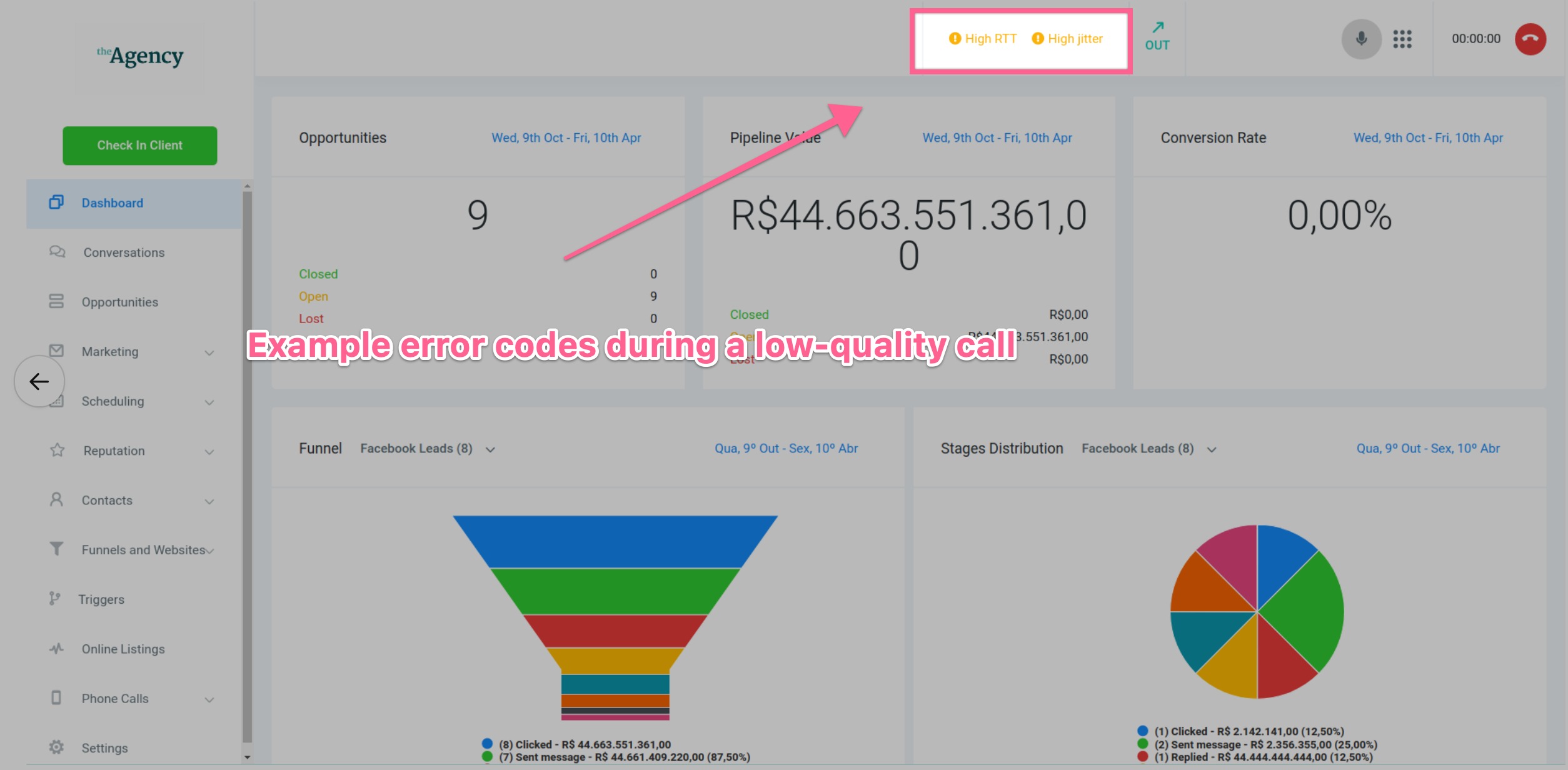
During a live call, you may see a call error indicator at the top of your SourCherry dashboard. Below are the most common error codes and what they mean:
high-rtt:High round-trip time indicates network latency. Calls may sound delayed or out of sync.high-jitter:Jitter refers to inconsistent packet delivery. This may cause audio crackling or robotic voices.high-packet-loss:When voice data is lost during transfer, calls can sound choppy or cut out completely.
Mobile App Error Notifications
The SourCherry mobile app (or SourCherry/Whitelabel versions) will show real-time warnings when call quality is compromised. These alerts help users take action—like switching networks or pausing bandwidth-heavy apps—before the issue worsens.
high-rtt:We detect high round-trip time on this network.high-jitter:You could experience choppy audio or crackling noises.high-packet-loss:Some audio may be missing or distorted.low-mos:Indicates a low Mean Opinion Score, signaling poor overall call quality.
Frequently Asked Questions
Q: Why do my calls sound robotic or distorted?
Usually caused by high jitter or packet loss. Try a wired connection and close unused apps.
Q: Can I make calls over Wi-Fi?
Yes, but a wired connection offers more stability and better quality.
Q: Which browser is best for SourCherry calling?
Use Google Chrome for optimal compatibility and performance.
Q: Why can’t the other person hear me?
Check your microphone input settings and Chrome’s mic permissions.
Q: How do I test my internet speed for calling?
Go to SpeedTest.net and aim for 5 Mbps or higher with no packet loss.
Q: What if call quality is still bad after troubleshooting?
Submit a support ticket with specific examples so our team can help.