
Enable Services to unlock SourCherry’s multi‑service booking with add‑ons, resources, and built‑in payments. This article shows you how to turn Services on for one (or multiple) sub-accounts!
TABLE OF CONTENTS
- Overview of Services
- Key Benefits of Services
- How to Enable Services for a Single Sub-Account?
- How to Enable Services for Multiple Sub-Accounts?
- Upcoming Features
- Frequently Asked Questions
- Related Articles
Overview of Services
Services is the enhanced booking and scheduling tool designed specifically for service-based businesses. Services provide you with many feature upgrades including:
Better Booking Experience
Quickly create and manage new services.
Cleaner, more intuitive booking pages.
Book multiple services at once directly from the in-app appointment modal.
More Payment Options
Accept payments via Stripe, Square, Razorpay, Authorize.net, and NMI.
Save cards on file for future bookings.
Collect payments directly in the appointment modal.
Flexible Services Management
Control public or private service visibility.
Create service variations (different durations, prices).
Add add-ons and processing times to bookings.
Manage resources like rooms and equipment.
Click here for more information on Services Management
Advanced Staff Configurations
Offer staff-specific pricing.
Configure granular staff availability.
Auto-assign appointments based on availability or price.
Click here for more information on Staff Configurations
Easy Customization
Share booking links for services, staff, or categories.
Brand your booking page with advanced customization options.
Use global settings for quick updates.
Keep customers informed with customizable notifications.
Click here for more information on Services Customization
Key Benefits of Services
Services help you speed through setup, reduce booking errors, and boost conversions while keeping you in control.
Boost Revenue: Encourage customers to book multiple services in a single checkout and add paid add‑ons
Enhance Customer Experience: Provide flexible booking options and optimized booking pages that reduce friction
Streamline Scheduling: Use advanced booking management tools tailored to your business exact needs
Save Time and Effort: Simplify setup and operations with unified booking flows, easy payment collection, and built‑in automations
How to Enable Services for a Single Sub-Account?
You can enable Services for sub-accounts directly from Agency Settings. Follow these steps to activate Services in a single sub-account!
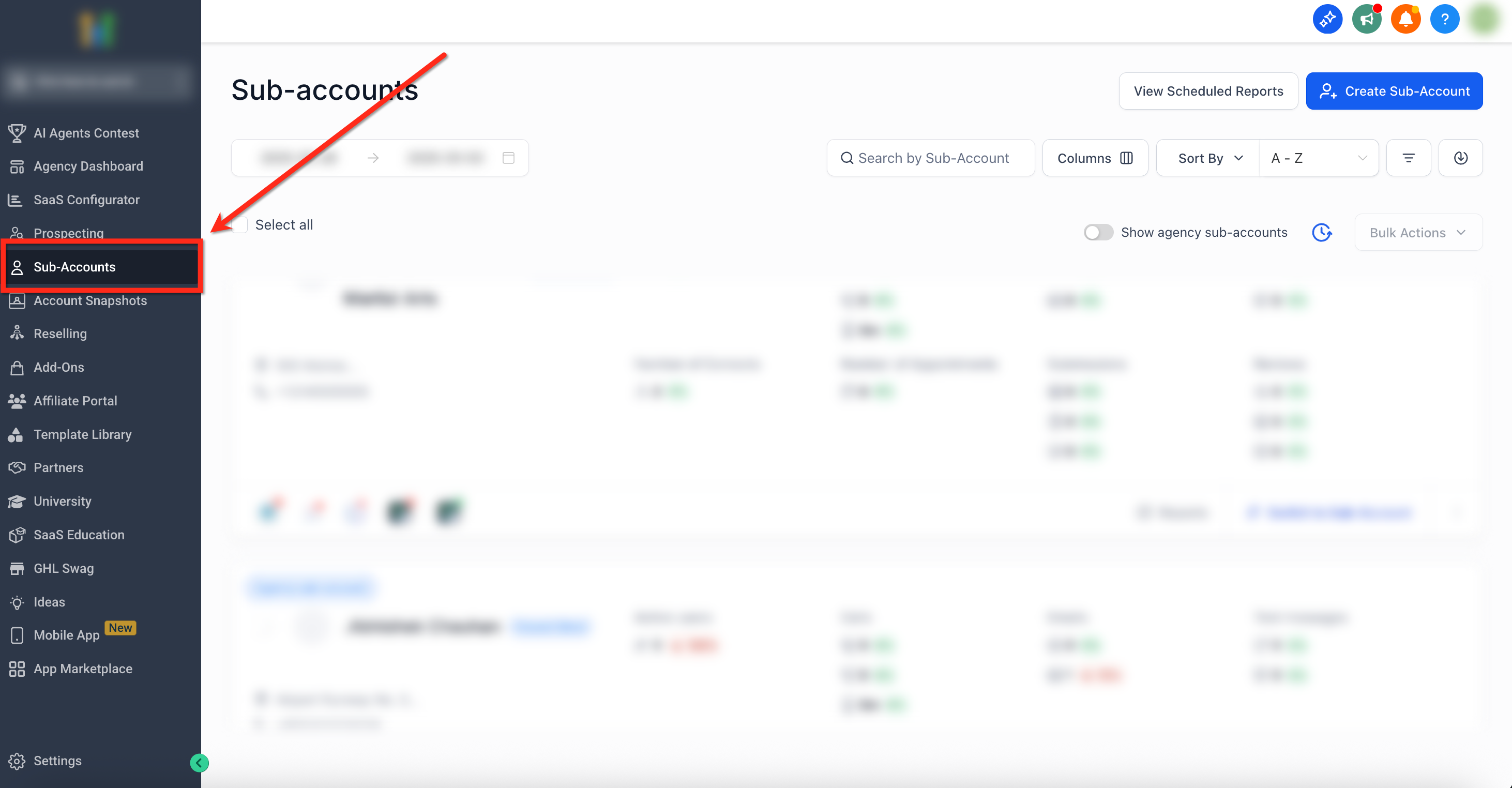
Step 1: Navigate to Sub-Accounts
- From the Agency dashboard, select the Sub-Accounts tab on the left-side navigation bar
Step 2: Go to Manage Client
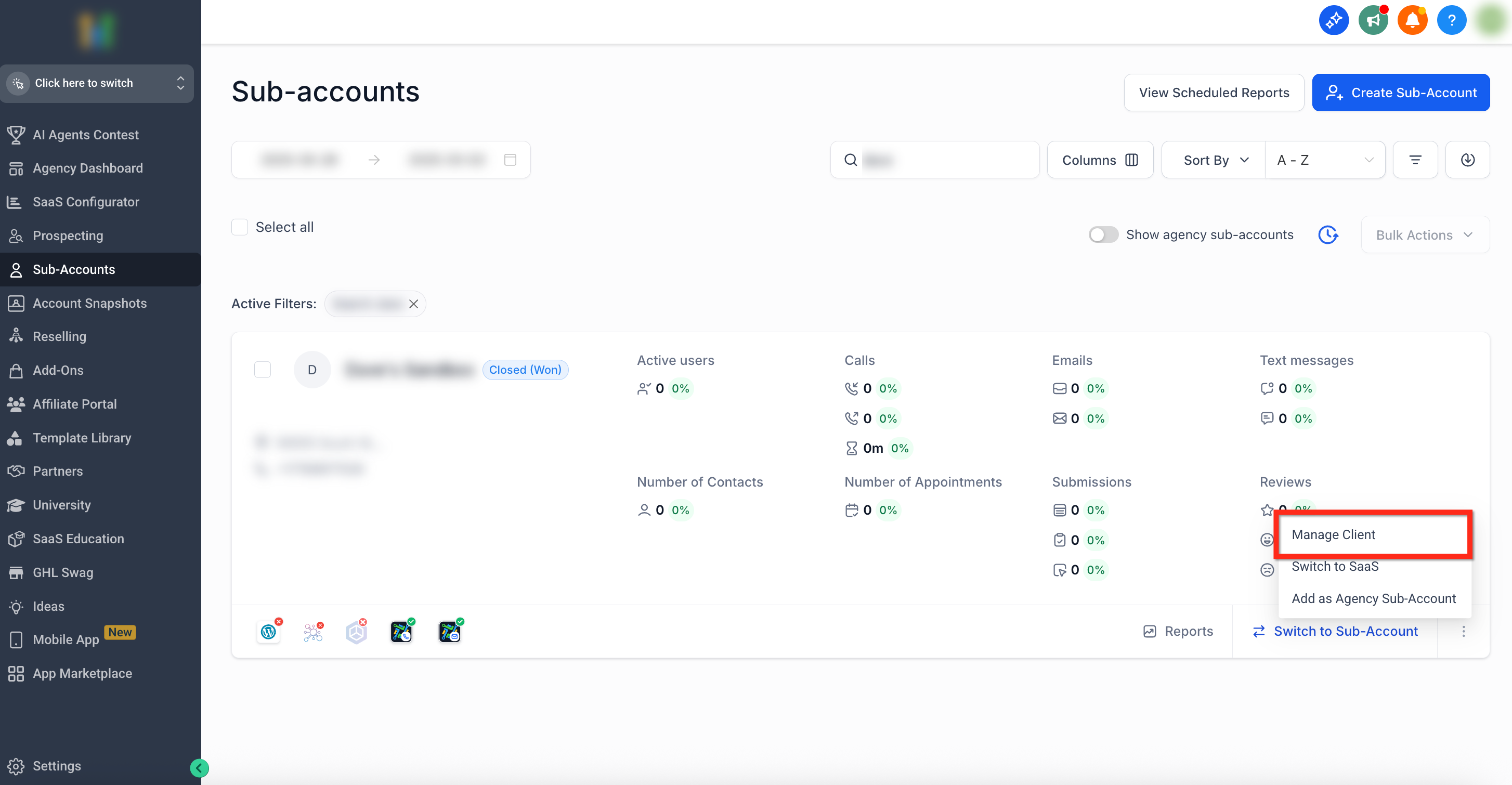
- Use the search bar or scroll to locate the sub-account where you would like to active Services
- Click the Three Dots (⋮) icon in the bottom right of the sub-account panel
- Select the Manage Client Option
Step 3: Turn on Services (Single Sub-Account)
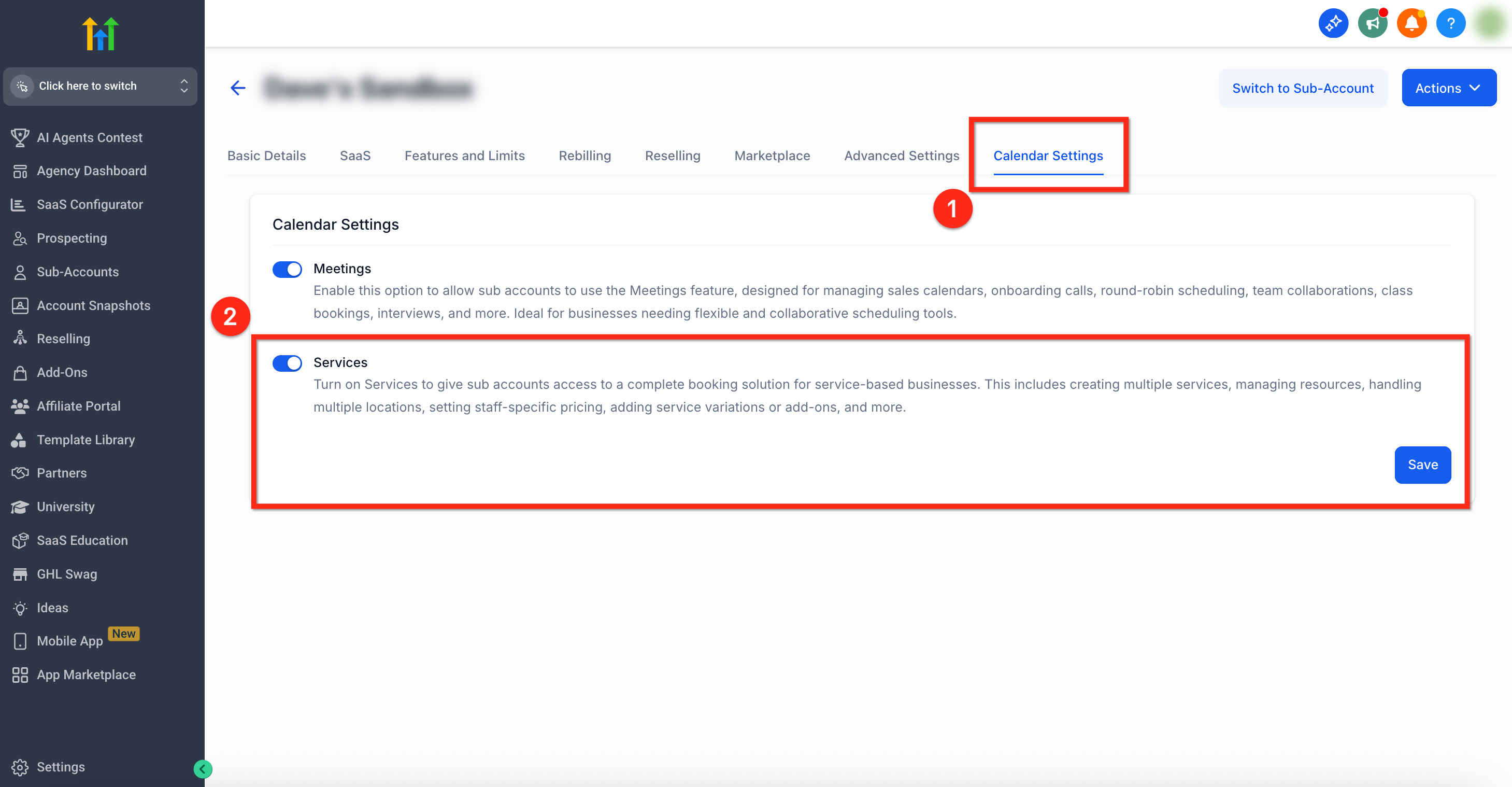
- Select Calendar Settings from the top navigation bar
- Use the toggle to Turn On Services
- Click the blue Save button to save your changes
How to Enable Services for Multiple Sub-Accounts?
You can enable Services for sub-accounts directly from Agency Settings. Follow these steps to activate Services for multiple sub-accounts at once!
Step 1: Navigate to Sub-Accounts
- From the Agency dashboard, select the Sub-Accounts tab on the left-side navigation bar
Step 2: Open Setup Calendars
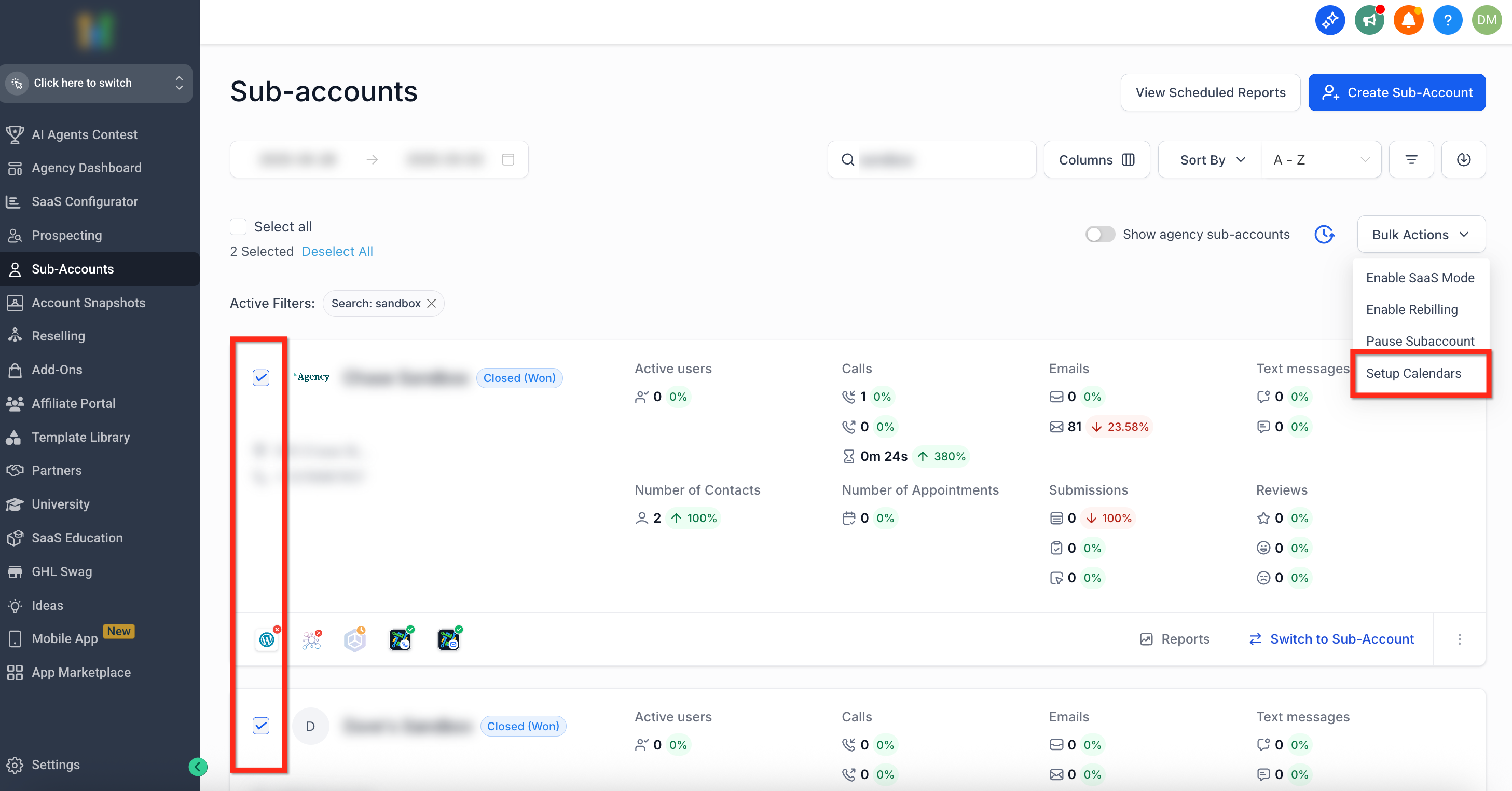
- Select the sub-accounts where you would like to active Services using the checkboxes
- Once sub-accounts are selected, click Bulk Actions in the upper-right corner
- From the drop down menu, pick Setup Calendars
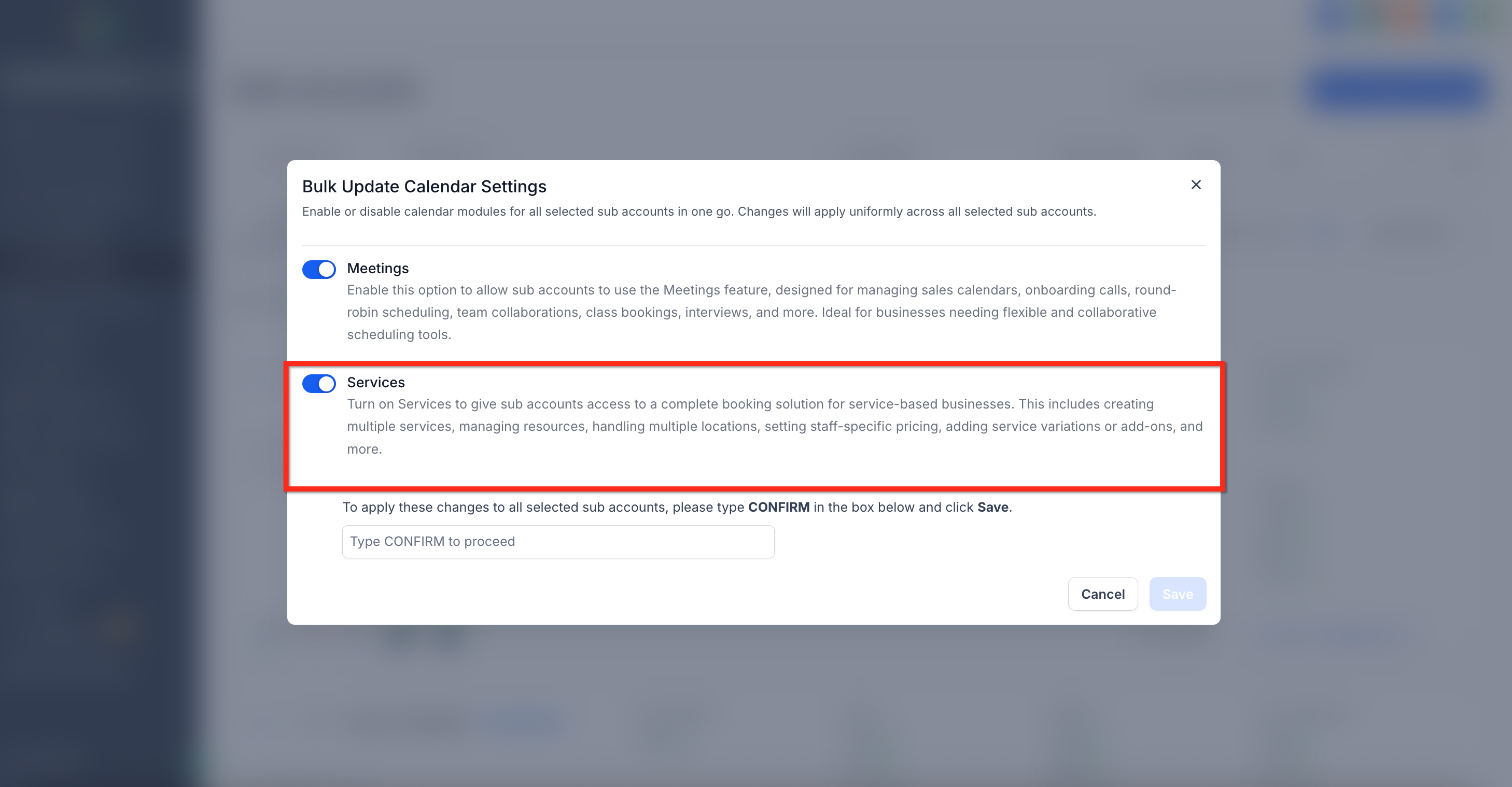
Step 3: Turn on Services (Multiple Sub-Accounts)
- Use the toggle to Turn On Services
- Type CONFIRM then click the blue Save button to save your changes
Upcoming Features for Services
We’re always working to make Services better for you. Here’s an early look at what’s coming soon:
Group Bookings – Book multiple appointments for the same time slot.
Reporting & Insights – Get detailed reports on bookings, services, and revenue.
- Opportunities Integration – Book and manage service appointments via the Opportunities tab.
- Conversation AI & Voice AI – Allow AI bots to book appointments on your behalf.
- Custom Values in Email Builder – Use service-based custom values in your email templates.
[Now Live] Snapshots – Create snapshots and import your setup into different sub-accounts.
[Now Live] Mobile App Support – Create and view service bookings directly from the mobile app.
[Now Live] Custom Forms at Service Level – Add custom forms to individual services for more flexibility.
[Now Live] Edit Unpaid Appointments – Make edits to unpaid appointments (paid appointments editing will be added in a future update).
[Now Live] Processing Fees – Apply processing fees to each transaction.
[Now Live] Gift Cards for Services – Enable customers to purchase and redeem gift cards.
[Now Live] Taxes for Services – Configure and apply tax settings for services.
Frequently Asked Questions
Q: Will enabling Services disrupt my existing calendars or workflows?
No. When you enable Services, SourCherry automatically copies your existing service calendars and creates equivalent Services. Your current calendars and any workflows tied to them continue to work exactly as they do today. You can run Meetings (Existing Calendars) and Services side by side or enable only the one that fits best. This ensures that the transition is smooth and without disruptions.
Q: Do I have to connect payments before enabling Services?
No, but you must connect a provider before collecting payments on the booking page.
Q: Can I enable Services for only some sub-accounts?
Yes. Since the activation of services is done on a per sub-account basis, you can roll it out selectively. Enabling Services in specific sub-accounts will not affect the other (non-selected) sub-accounts.
Q: Are Services supported in snapshots?
Yes! You can include the following assets when creating or loading a Snapshot: Calendar Services, Calendar Service Add-Ons, Calendar Service Categories and Calendar Service Resources. These assets are selectable independently while creating or restoring Snapshots, giving agencies full flexibility.
Q: Can I edit a Service Appointment after it is booked?
Yes but what you can edit depends on whether the appointment is unpaid or paid.
- Unpaid Service Appointments: You can edit most details directly from the appointment edit screen, including adding/removing services and add-ons, changing duration, service variants, staff, location, appointment title, date/time, timezone, and coupon codes.
- Paid Service Appointments: Structural changes (for example, changing the service or staff) remain restricted after payment is collected. The edit screen shows a message explaining what is editable. To make broader changes, click Duplicate Appointment to clone the appointment, update the duplicated appointment, and rebook.