
Ask AI Voice Mode lets you speak to Ask AI instead of typing, making it easier to ask questions, trigger supported actions, receive spoken updates, and stay productive while multitasking. Voice Mode provides a hands-free way to interact with Ask AI directly within SourCherry.
Voice Mode is continually enhanced with performance improvements, bug fixes, and new capabilities to deliver an even better conversational experience over time.
TABLE OF CONTENTS
- What is Ask AI Voice Mode?
- Key Benefits of Ask AI Voice Mode
- Using Ask AI Voice Mode
- How To Setup Ask AI Voice Mode
- Safe Execution for Critical Actions
- Frequently Asked Questions
- Related Articles
What is Ask AI Voice Mode?
Ask AI Voice Mode is a voice-first way to interact with Ask AI in SourCherry. Instead of typing every prompt, users can speak naturally, listen to responses, interrupt or redirect the conversation, and switch back to text when needed.
Voice Mode builds on the existing Ask AI experience by adding spoken input and spoken responses. It can help users ask questions, retrieve information, trigger supported actions, manage workflows, and continue multi-step conversations using voice.
Key Benefits of Ask AI Voice Mode
- Hands-Free Use: Speak to Ask AI instead of typing every prompt.
- Faster Conversations: Continue requests using natural voice prompts.
- Easy Corrections: Interrupt or redirect Ask AI during a conversation.c
- Flexible Input: Switch between voice and text in the same conversation.
- Safer Actions: Confirm sensitive supported actions before they are completed.
Using Ask AI Voice Mode
Voice Mode lets you speak naturally to Ask AI and continue the conversation without restarting each prompt.
You can use Voice Mode to:
- Ask questions
- Continue a previous request
- Clarify or correct instructions
- Pause voice input
- Switch to text
- Confirm or cancel supported actions
How To Use Ask AI Voice Mode
Ask AI Voice Mode is available directly from the Ask AI workspace. Make sure your browser has permission to use your microphone before starting.
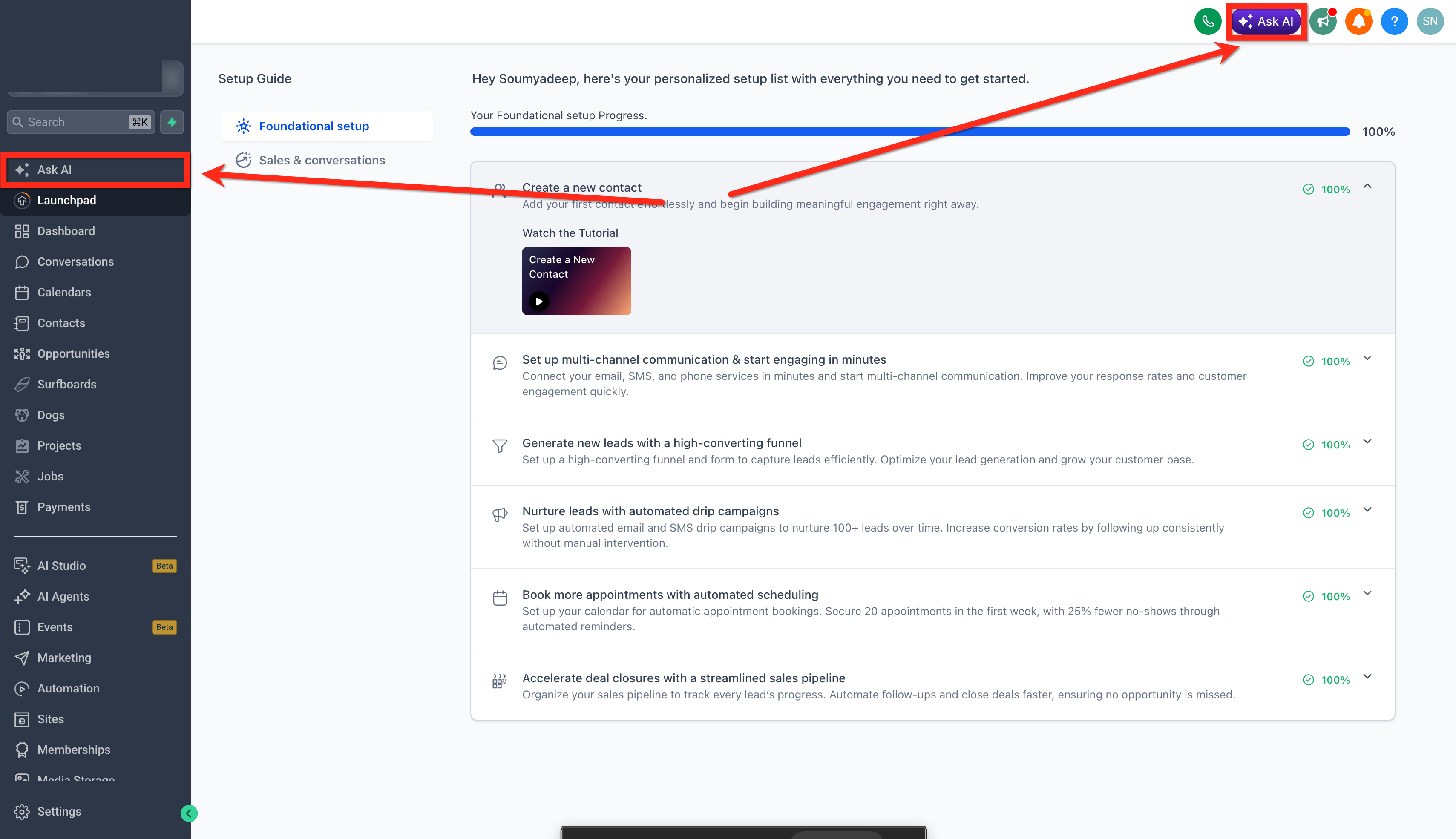
1. Log in to SourCherry and click Ask AI from the left or top navigation menu.
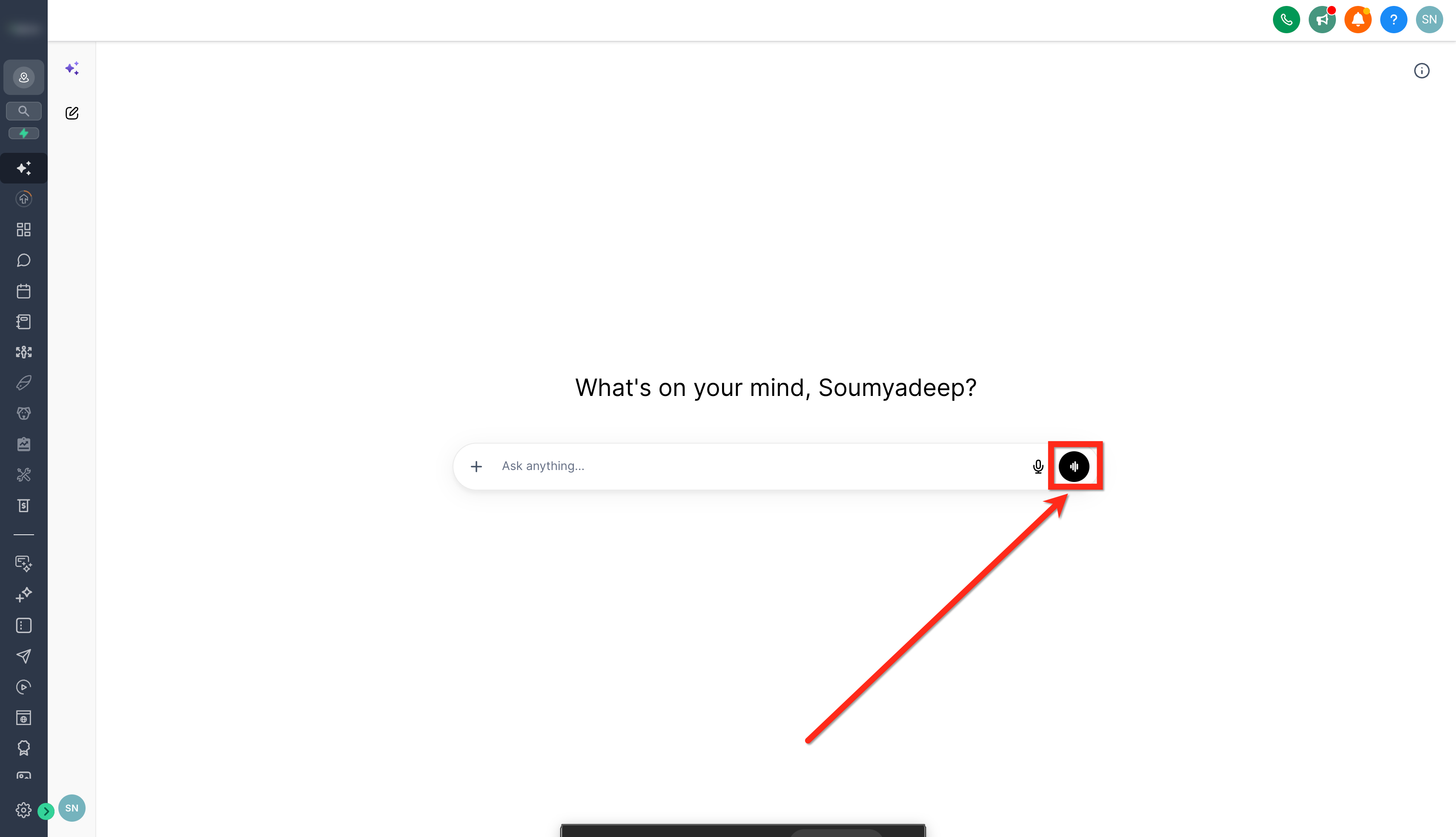
2. Click the Voice Mode button in the Ask AI message bar.
3. Allow microphone access and speak: Allow microphone access when prompted, then speak your request to Ask AI.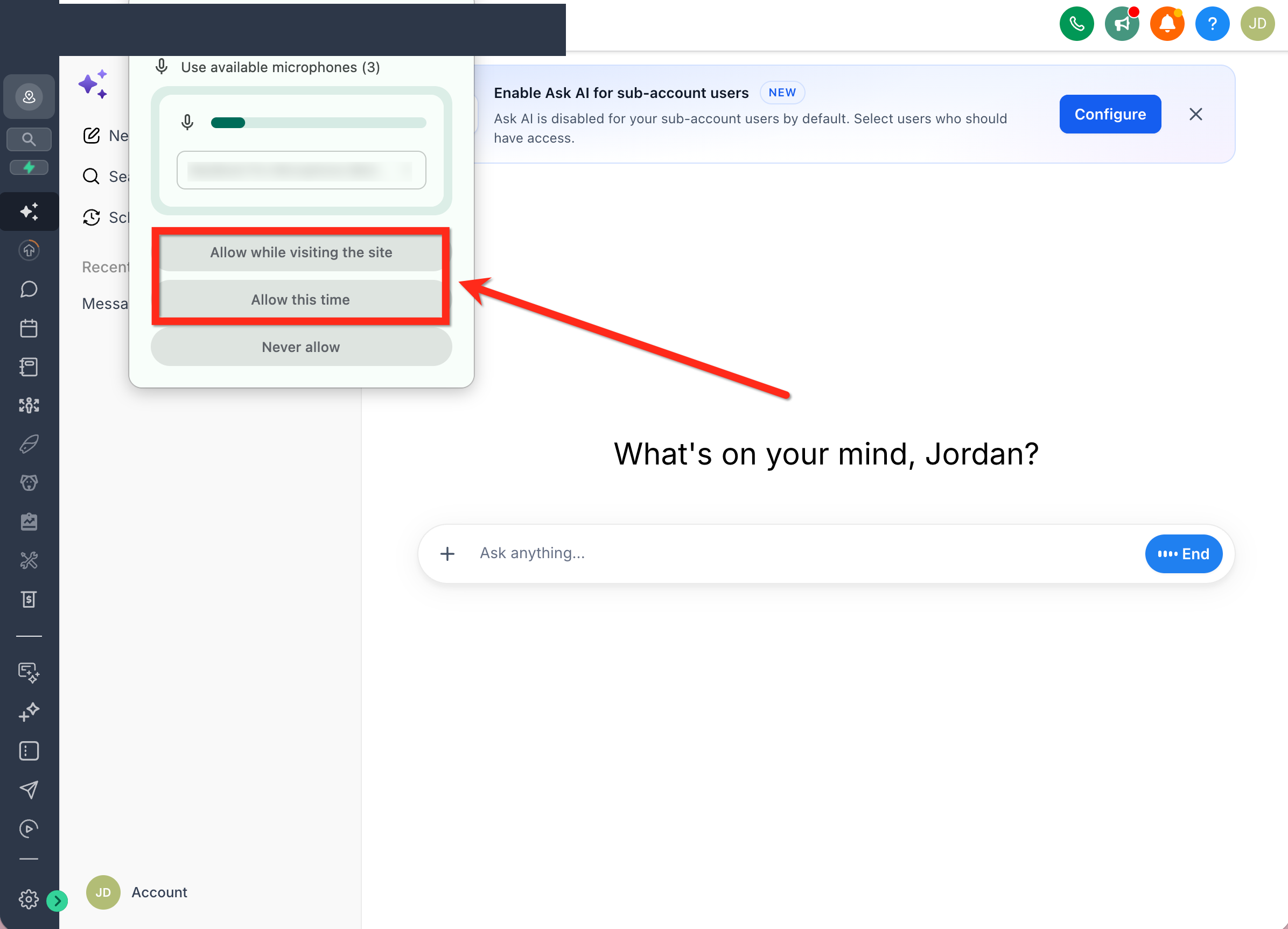
Safe Execution for Critical Actions
Safe execution helps protect users from accidental changes when Voice Mode is used for important actions. When a request involves sensitive or higher-impact changes, Ask AI asks for confirmation and any required details before continuing.
This helps ensure the user stays in control before Ask AI performs an action that may affect contacts, workflows, pipelines, records, or other business data.
Ask AI may ask for confirmation when:
- The request is missing required information
- The action could affect important data
- The request involves changing records or statuses
- The scope of the action needs clarification
- The action requires user approval before execution
Users can approve, cancel, or revise the request before Ask AI continues.
Frequently Asked Questions
Q: How do I access Ask AI Voice Mode?
Open Ask AI in SourCherry and click the Voice Mode or microphone control.
Q: Why is my browser asking for microphone permission?
Your browser needs permission before SourCherry can use your microphone.
Q: What should I do if Voice Mode cannot hear me?
Check your microphone connection, browser permissions, and selected input device.
Q: Can I switch from voice to text?
Yes. You can pause Voice Mode and continue typing in the same Ask AI conversation.
Q: Can I interrupt Ask AI while it is responding?
Yes. You can interrupt or redirect Ask AI during a Voice Mode conversation.
Q: Will Ask AI confirm important actions first?
Ask AI may ask for confirmation before completing sensitive supported actions.